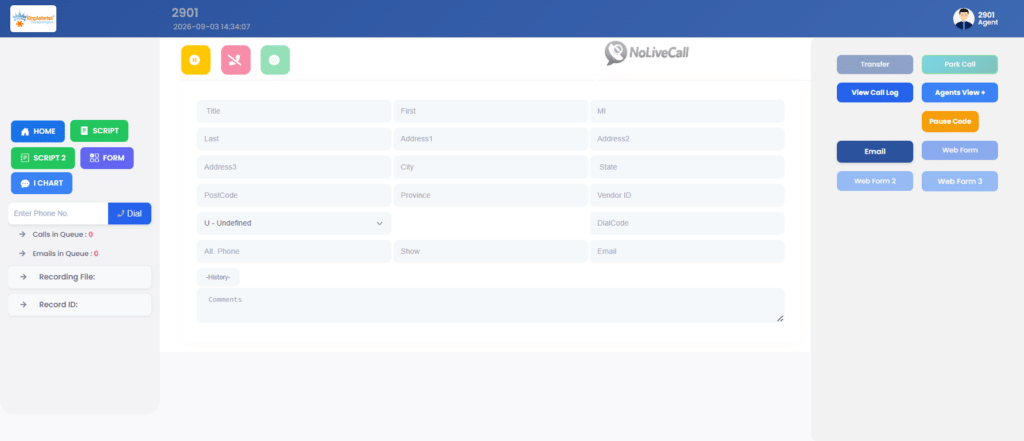
Every agent on a VICIdial system works from a single screen. That screen is the VICIdial Web Client, and it opens in a normal browser tab. There is no program to install and no softphone license to buy. This guide explains what the client does, how agents sign in, how browser calling is set up, how scripts work, and how to fix the errors we see most often.
What is the VICIdial Web Client?
The VICIdial Web Client is the agent side of VICIdial. It is a set of PHP pages that Apache serves from the /agc/ folder on your web server. The main page is vicidial.php, so the address on a typical system looks like:
https://dialer.example.com/agc/vicidial.php.MariaDB stores the leads, users and campaigns. Asterisk places and receives the calls. The page checks in with the server about once a second, which is why lead details show up the moment a call connects.
Some people search for it as the agent web client. The name changes, but the page is the same: the place where an agent logs in, takes calls, reads a script and picks a disposition.
Is VICIdial a dialer?
Yes. VICIdial is a dialer first and also handles inbound calls. Each campaign has a dial method that decides how numbers are called.
| Dial Method | What It Does |
|---|---|
| MANUAL | The agent manually clicks or enters each phone number to place a call. |
| RATIO | Dials a set number of lines per available agent based on the Auto Dial Level setting. |
| ADAPT_HARD_LIMIT | Adjusts the predictive dialing level while enforcing a strict drop-rate limit. |
| ADAPT_TAPERED | Gradually adjusts the dialing level to help manage the call drop rate. |
| ADAPT_AVERAGE | Adjusts predictive dialing based on the average drop rate. |
| INBOUND_MAN | Handles inbound calls while allowing agents to make manual outbound calls when idle. |
Whatever the dial method, the VICIdial Web Client is where the agent sees the result: a live call and a lead on screen.
What is VICIdial used for?
Teams use VICIdial for outbound sales and lead follow-up, collections, appointment reminders, surveys and political polling, and inbound queues with IVR menus. Many run a blended setup where agents take inbound calls and drop back to outbound dialing when the queue is empty. Call recording, reports and DNC list handling come with the system, so a small team can start on one server and move to a cluster later.
Can I use VICIdial for free?
Yes. VICIdial is open source under the AGPLv2 license and has no per-agent fee. You can install it and run it for as many agents as your hardware supports.
Free covers the software only. Someone still has to install it, tune it, keep Asterisk and MariaDB updated and fix problems on a busy day.
How much does VICIdial cost?
There is no license price, so the cost is everything around the software.
- One all-in-one server is enough for a small team. Larger teams split the database, web and telephony roles across separate machines.
- SIP trunks and phone numbers are usually the biggest running cost, because carrier minutes grow with call volume.
- Paid support, custom features and training are optional but common.
- Admin time goes into reports, list loading and updates.
Agent count, call volume and dialing countries differ for every team, so any single price you read online is a guess. A fair estimate needs those three numbers.
VICIdial download and VICIdial Web Client download
People often search for a VICIdial web client download, but agents have nothing to download. The client lives on the server, and agents just open its address.
What you do download is the server software. The usual route is the ViciBox ISO from the official VICIdial website. ViciBox is built on openSUSE and installs Asterisk, Apache, MariaDB and VICIdial together. The installer lets you choose a single all-in-one machine or separate roles for a cluster. When the install finishes, the client is live at /agc/vicidial.php.
Take the VICIdial download from the official site only. Copies from forums or file-sharing pages can be outdated or modified.
VICIdial agent login, step by step
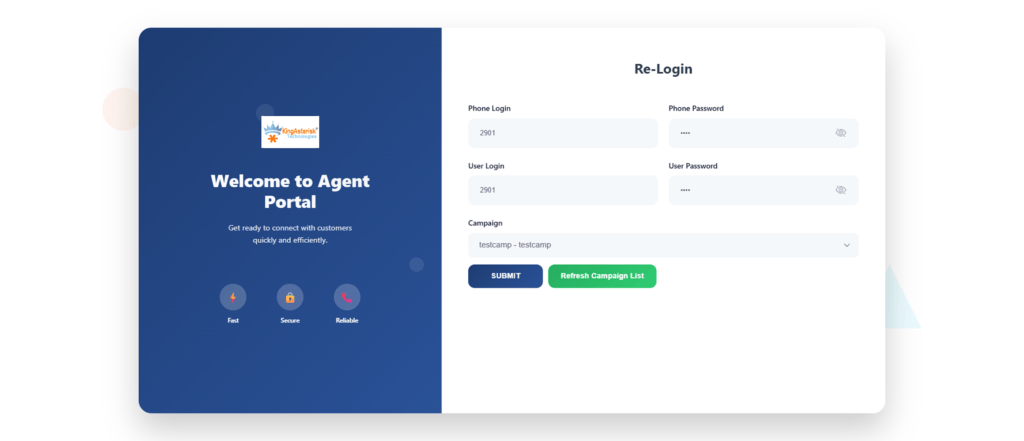
The VICIdial agent login has two screens.
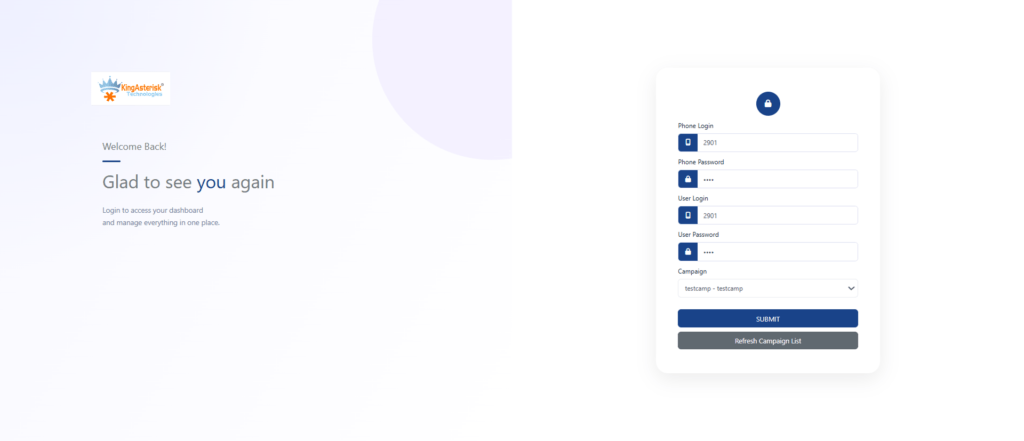
- Open the KingAsterisk Free Live Demo in Chrome or Firefox.
- Use the demo login credentials provided on the demo page to access the VICIdial Agent Login screen.
- Enter the required agent login details in the demo interface.
- Select an available campaign from the dropdown, if prompted.
- Click Submit and follow any browser microphone permission prompts if browser calling is enabled.
After login you land on the main screen in a paused state. Click Resume to start taking calls.
Agent web client: campaign login
The campaign dropdown only lists campaigns your user group is allowed to use. If yours is missing, ask your admin to check Allowed Campaigns on your user group under Admin > User Groups. Picking the wrong campaign is a common reason agents get no calls, so read the name before you click Submit.
You may also see this page called the agent web client 2.0 login. Layouts differ between builds and custom themes, so confirm the exact address with your administrator. The standard flow is the same: phone login, then user login and campaign.
VICIdial Web Client example: one call from start to finish
Here is a normal session in the VICIdial Web Client on an outbound campaign that uses ADAPT_TAPERED.
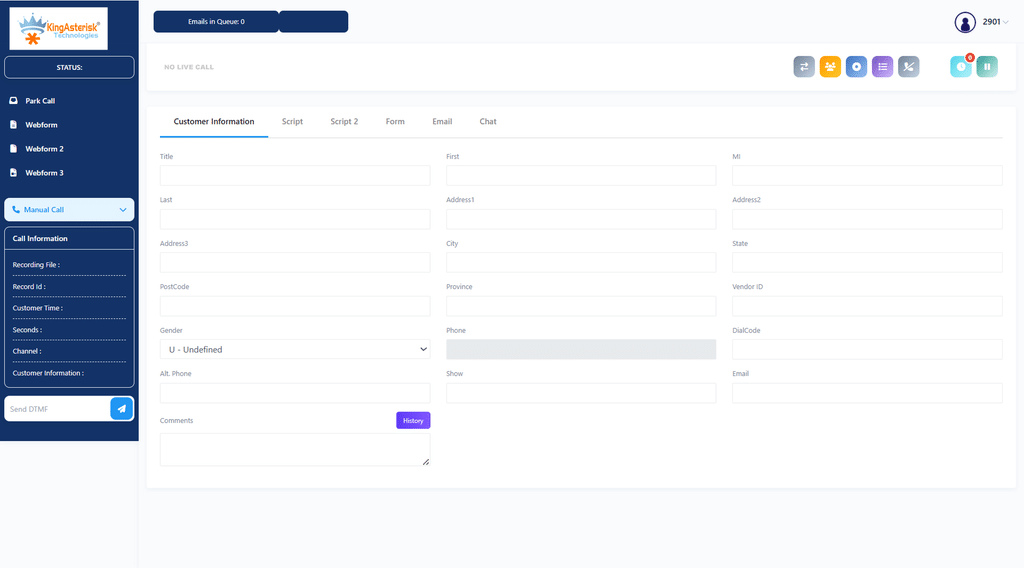
- The agent logs in and clicks Resume.
- The system dials leads in the background. When a person answers, the call drops into the agent’s browser phone and the lead’s name, phone number and city fill the screen.
- The Script tab shows what to say, with the lead’s first name already in place.
- The call ends. The agent clicks Hangup Customer, picks a status such as SALE, NI, NA, CALLBK or DNC, and submits it.
- The system moves on to the next lead.
Warm transfers use the Transfer – Conf button. Every status is saved with the lead, so supervisors can pull reports by agent, talk time and disposition, and reload leads by status later.
How to set up a VICIdial script
A VICIdial script is a block of HTML that shows up in the Script tab of the agent screen. You create it under Admin > Scripts and pick it in the campaign’s Script setting. Variables wrapped in –A– and –B– pull lead data into the text.
<p>Hello, may I speak with --A--first_name--B-- --A--last_name--B--?</p>
<p>This is --A--fullname--B-- from Your Company. Is --A--phone_number--B-- the best number to reach you?</p>Keep scripts short. Agents glance at them during a call, so one clear opening line and a few branching notes work better than a full page of text.
Browser calling in the VICIdial Web Client
The browser phone uses WebRTC through ViciPhone, a JavaScript SIP client that runs inside the page. Four things have to be in place.
First, HTTPS with a certificate the browser trusts. Browsers block microphone access on plain HTTP pages, and a self-signed certificate usually makes the secure WebSocket connection fail. Let’s Encrypt works fine.
Second, the Asterisk WebSocket server turned on in /etc/asterisk/http.conf:
[general]
enabled=yes
bindaddr=0.0.0.0
bindport=8088
tlsenable=yes
tlsbindaddr=0.0.0.0:8089
tlscertfile=/etc/letsencrypt/live/dialer.example.com/fullchain.pem
tlsprivatekey=/etc/letsencrypt/live/dialer.example.com/privkey.pemThird, the phone entry is marked as a webphone. Under Admin > Phones, set Set As Webphone to Y for that extension.
Fourth, open firewall ports: TCP 443 for the client, TCP 8089 for secure WebSocket, and UDP 10000 to 20000 for audio, which is the default RTP range in rtp.conf. If the server sits behind NAT, also set externip and localnet in sip.conf and check the ICE settings.
Common problems and fixes
Most trouble with the VICIdial Web Client comes from a short list of causes.
| What the Agent Sees | Likely Cause | Fix |
|---|---|---|
| No Audio Either Way | Microphone blocked or RTP ports closed | Allow microphone access in browser settings and verify the required UDP RTP port range is open. |
| Phone Stays Unregistered | Port 8089 closed or certificate not trusted | Verify TCP port 8089 is reachable and install a trusted TLS certificate. |
| Campaign Missing at Login | Campaign not listed in the user’s Allowed Campaigns | Open Admin > User Groups and verify the user’s campaign permissions. |
| Login Rejected | Incorrect phone or user credentials, or inactive user | Verify the agent’s login details, phone settings, and active status in the admin panel. |
| One-Way Audio | NAT or media configuration issue | Check externip, localnet, firewall rules, and ICE settings where applicable. |
| Blank Script Tab | No script assigned to the campaign | Select and save the appropriate script in the campaign settings. |
Use a current Chrome or Firefox, keep extra extensions off agent machines, and avoid logging the same user in from two browsers at once. That alone prevents a lot of support tickets.
FAQs
No. The client runs from your server. Agents open /agc/vicidial.php in a browser. Only the server needs the VICIdial software installed.
Current versions of Chrome and Firefox are the safest choice, and Edge on Chromium works well too. Safari supports WebRTC, but test it with your own setup before rolling it out to a full team.
It is a full dialer with an agent screen. The server places the calls using the dial method you pick, and the web client is where agents handle them.
The software is free under the AGPLv2 license. Your costs are servers, SIP trunks, support and admin time, and they depend on agent count and call volume.
Yes. Screen colors can be changed from the admin panel, and deeper changes such as your logo, layout and CSS are made in the files under /agc/. Keep a copy of your edits, because a VICIdial update can overwrite them.
Usually the page is loaded over HTTP instead of HTTPS, so the browser refuses microphone access. Switch to HTTPS, allow the microphone in the site settings and reload the page.
Get help with your VICIdial setup
KingAsterisk Technology installs, tunes and supports VICIdial for contact center teams. If you want the VICIdial Web Client branded with your logo, connected to your CRM or fixed after an upgrade, send us your agent count, daily call volume and dialing countries. We will reply with a clear plan and estimate.