
A debt collection dialer is the Contact Center Software System, collection teams rely on to manage outbound payment calls without burning agent hours on manual number entry. When a team is juggling hundreds of overdue accounts, follow-up reminders, and callback requests, dialing one number at a time simply doesn’t scale.
This article explains what a debt collection dialer does, how it works day to day, and what to look for before choosing one for your agency.
What Is a Debt Collection Dialer?
So what is a debt collection call, exactly? It’s an outbound call placed to a customer with a pending balance, usually to confirm the amount owed, remind them of a due date, or arrange a payment plan. A debt collection dialer is the software layer that organizes thousands of these calls into manageable campaigns, pulling customer records, assigning them to agents, and logging the outcome of every conversation.
Instead of agents scrolling through spreadsheets, the dialer presents account details, dials the next number, and routes the connected call straight to an available agent.
What a Dialer Actually Handles
A properly configured debt collection dialer typically manages:
- Large calling lists sorted by priority or due date
- Automated outbound dialing across campaigns
- Call outcome tracking (dispositions)
- Callback and follow-up scheduling
- Agent activity monitoring
- Account data synced from connected systems
How a Debt Collection Dialer Works
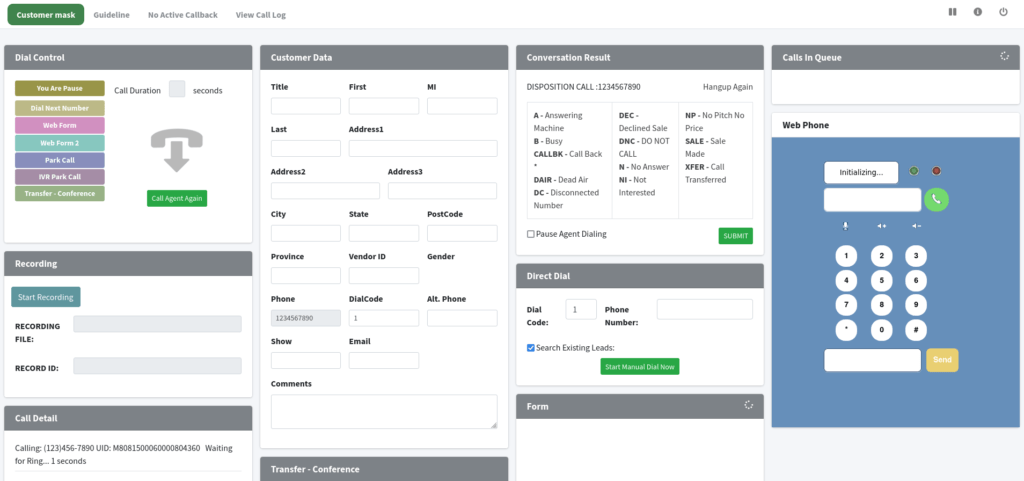
People new to this space often ask what a dialer is in BPO terms. In a business process outsourcing setup, the dialer is the engine that decides who gets called, when, and how the call is routed once it connects. Here’s the general flow:
Step 1: Importing Account Data
Customer records with balances, phone numbers, and payment history are loaded into the system, often through a connected database or file import.
Step 2: Building the Campaign
Accounts get grouped by criteria like days past due, balance size, or region, so agents aren’t working one giant undifferentiated list.
Step 3: Setting the Dialing Mode
A supervisor picks how aggressively the system should dial based on agent headcount and campaign urgency.
Step 4: Placing the Calls
The dialer starts working through the list, connecting live calls to agents as they come in.
Step 5: Logging the Outcome
After each call, the agent records a disposition – payment confirmed, callback requested, no answer, wrong number – which feeds directly into follow-up scheduling.
Step 6: Reviewing Results
Supervisors pull reports to see talk time, contact rates, and payment commitments across the campaign.
Common Collection Calling Problems It Solves
Too Much Manual Dialing
Punching in numbers by hand eats into the hours agents could spend actually speaking with customers.
Campaigns That Get Too Big to Track
Once a list grows past a few hundred accounts, manual tracking in spreadsheets starts breaking down fast.
Follow-Ups That Fall Through the Cracks
A customer who asks for three more days to pay needs that callback logged somewhere reliable, not scribbled on a sticky note.
Supervisors Flying Blind
Without campaign-level reporting, it’s hard to know which agents are closing payment commitments and which lists need re-prioritizing.
Dialing Modes Explained
Different collection goals call for different dialing behavior.
Predictive Dialing
Dials ahead of agent availability using call-pacing calculations, suited to high-volume first-notice campaigns.
Progressive Dialing
Place the next call only once an agent is free, which keeps pacing steadier for sensitive collection conversations.
Preview Dialing
Shows the agent the account file before the call goes out, useful for complex balances or repeat accounts that need context first.
Managing Large Collection Campaigns
A few practices keep big campaigns from spiraling:
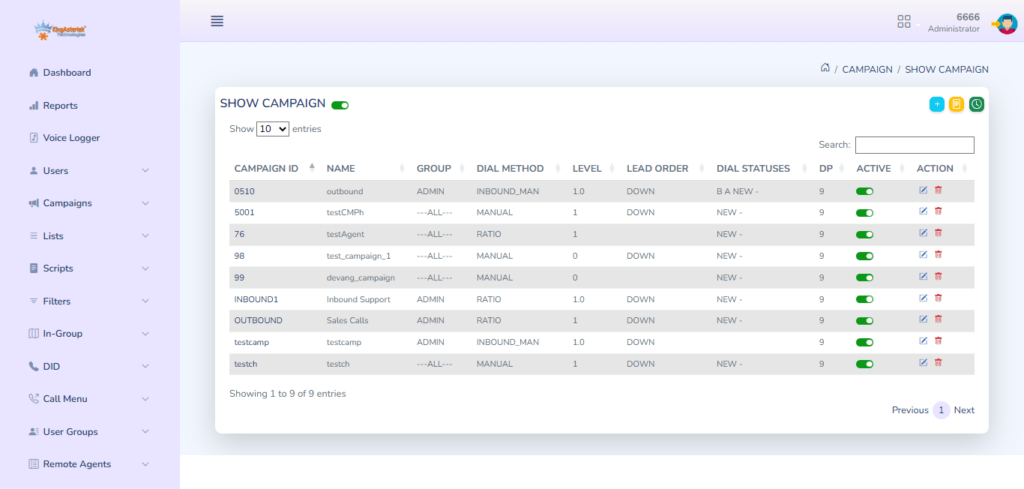
- Break lists into segments by due-date age or balance tier
- Set calling-hour rules per campaign to stay within regulatory windows
- Track every callback request through a disposition, not memory
- Check agent-level contact and payment-commitment rates weekly
- Keep account data current so agents aren’t working stale balances
Must-Have Features
When comparing a debt collection dialer phone number setup against a fuller platform, look past the basics and check for:
- Automated dialing that removes repetitive number entry
- Campaign management for running several lists at once
- Disposition tracking tied to follow-up workflows
- Callback scheduling that doesn’t rely on manual notes
- Reporting dashboards for agent and campaign-level visibility
- Account data linking so agent screens show live balance details
Connecting the Dialer With Your CRM
Most agencies already run a separate system for customer records, so the dialer needs to talk to it. A connected setup can:
- Pull fresh contact and balance data into each campaign
- Show account history on the agent’s screen mid-call
- Push disposition results back into the account record
- Keep callback dates synced across both systems
This kind of two-way link is what most people mean when they search for a debt collection dialer app that “just works” with their existing tools – the dialer and the records system stop operating as two disconnected pieces of software.
A Real-World Example
A mid-sized collection agency running three regional campaigns was logging callback requests in a shared spreadsheet. Agents often lost track of which customers had asked for extra time, and some accounts got called twice in the same week by different agents.
After moving to a dialer with built-in disposition and callback tracking, the agency tied every “requested callback” outcome to an automatic follow-up slot. Within weeks, duplicate calls to the same customer dropped sharply, and supervisors could finally see which campaign was converting promises into actual payments.
Choosing the Right Dialer for Your Team
Before signing on with a provider, weigh these factors:
- Dialing modes available – does it support predictive, progressive, and preview?
- Campaign flexibility – can you run multiple lists with different rules at once?
- Data connections – does it integrate with the systems you already use?
- Reporting depth – can supervisors actually see what they need to see?
- Regulatory fit – does it support consent tracking and contact-hour limits in your region?
- Growth room – will it hold up as your account volume increases?
People also frequently ask how I can check my debt collection status internally – the honest answer is that it depends entirely on whether your dialer’s reporting and disposition history are set up properly in the first place. A system with clean campaign reporting makes that check straightforward; one without it means digging through call logs by hand.
KingAsterisk’s Debt Collection Dialer Solutions
KingAsterisk Technology builds Asterisk-based dialer systems and VICIdial customizations for collection agencies that need calling workflows shaped around their specific campaigns. Our work covers predictive and progressive dialing configuration, multi-campaign setup, custom data integrations, and agent interface customization – built from direct deployment experience across 150+ global projects.
Frequently Asked Questions
It’s an outbound call made to a customer with an outstanding balance, usually to remind them of a payment due date or discuss settlement options. Agencies use dialers to manage these calls at scale across large customer lists.
In outsourced collection operations, a dialer is the system that automates outbound calling, decides pacing between calls, and routes connected customers to available agents. It removes the need for agents to dial manually.
Most agencies use a dedicated debt collection dialer paired with account management software. The dialer handles outbound calling and disposition tracking, while the connected system holds balance and payment history.
That depends on your internal setup – a dialer with proper campaign reporting lets supervisors pull contact rates, disposition outcomes, and payment commitments by account or agent directly from the system.
Not exactly. A debt collection dialer number typically runs through the dialing platform itself, allowing outbound calls to be tracked, recorded where permitted, and tied to specific campaigns rather than a single static line.
Conclusion
Recovering payments faster comes down to reducing wasted agent time and keeping every follow-up accounted for. A debt collection dialer brings structure to that process – organizing campaigns, automating outbound calls, and giving supervisors a clear view of what’s actually working. Agencies that choose a setup matched to their actual call volume and regulatory needs typically see steadier contact rates and fewer missed follow-ups over time.
Looking to set up a debt collection dialer built around your agency’s workflow? Contact KingAsterisk to discuss a configuration suited to your campaigns.