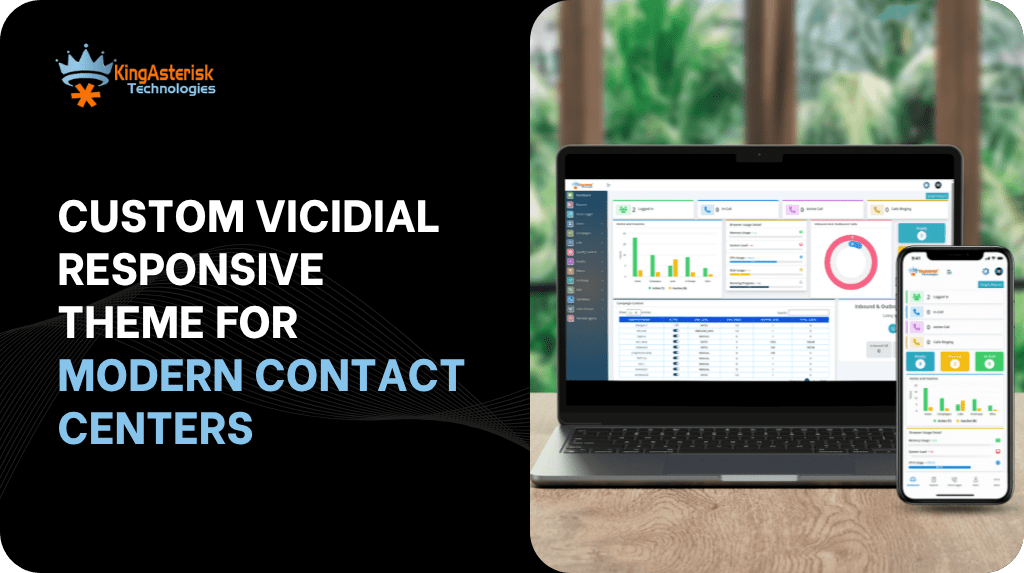
A VICIdial Responsive Theme platform is only as effective as the screen an agent looks at for eight or more hours a day. When that VICIdial screen fails to adapt to different monitors, laptops, or window sizes, it slows agents down, hides critical panels, and adds friction to every call. This is exactly the problem a custom theme is built to solve – a layout that adjusts intelligently to any resolution while keeping every dialing, scripting, and disposition tool exactly where an agent expects it.
In this guide, we break down what a VICIdial responsive theme actually is, why flexible agent interfaces matter more than ever for distributed teams, what to check before using a VICIdial responsive theme download or a VICIdial responsive theme GitHub repository, and how KingAsterisk Technologies approaches custom theme development for VICIdial deployments.
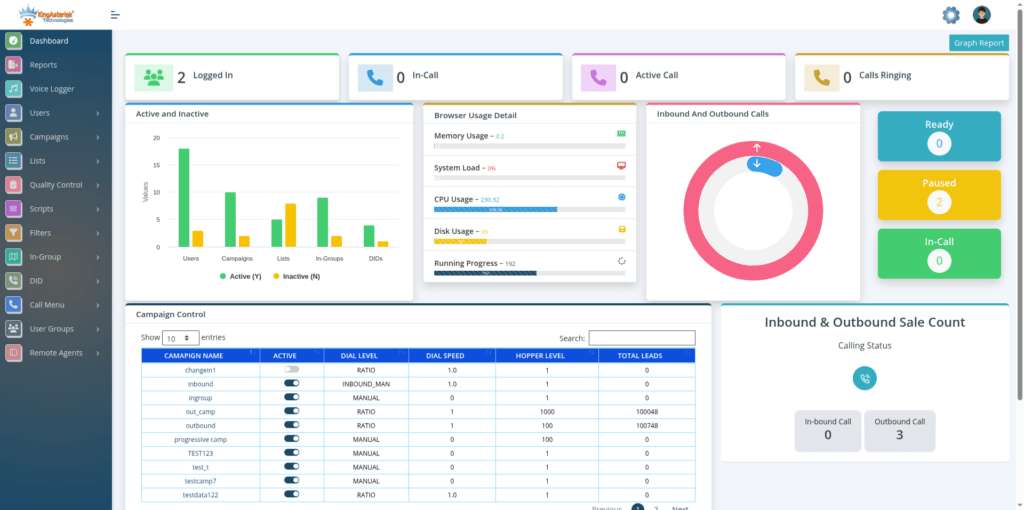
What Is a VICIdial Responsive Theme?
At its core, VICIdial ships with an agent screen and administration panel built on a traditional, fixed-layout structure. That structure works well on a standard desktop monitor, but it doesn’t automatically reflow when an agent switches to a smaller laptop, an ultrawide display, or a different browser zoom level.
A responsive theme replaces that rigid structure with a flexible grid system. Instead of hard-coded pixel widths, panels, buttons, and script windows are built using relative units and breakpoints, so the interface reorganizes itself based on the available screen space. The dial pad, call control buttons, lead information panel, disposition list, and script area all remain visible and usable, regardless of the device an agent is working from.
This is different from simply changing colors or fonts. A true responsive theme touches the underlying HTML and CSS structure of the agent screen, the layout grid, and often the JavaScript that governs how panels expand, collapse, or stack.
Why Agent Interfaces Need to Be Flexible
Dialer teams today rarely work from a single, uniform hardware setup. Agents log in from different monitor sizes, different operating systems, and increasingly from home-based workstations that were never standardized by an IT department. A fixed-width interface assumes a single ideal screen size – and breaks the moment reality doesn’t match that assumption.
Common problems with non-responsive dialer screens
- Script or CRM panels get cut off on smaller displays, forcing agents to scroll mid-call.
- Buttons for hold, transfer, or disposition shift position depending on browser zoom, causing mis-clicks.
- New agents need extra training time just to learn where controls ‘end up’ on their specific screen.
- Supervisors reviewing multiple agent screens side-by-side struggle when layouts don’t scale down cleanly.
- Remote or field-based agents on laptops experience a cramped, unusable version of the same interface a desktop agent sees comfortably.
A responsive theme removes these inconsistencies. The same underlying dialer logic runs identically for every agent – only the presentation adapts.
| Feature | Fixed-Width Theme | Responsive Theme |
|---|---|---|
| Screen adaptability | Breaks on smaller screens | Auto-adjusts to any resolution |
| Agent onboarding | Requires manual zoom/scroll fixes | Consistent layout, faster training |
| Remote agent support | Limited, prone to layout errors | Works reliably across devices |
| Panel visibility | Script/CRM panels can get cut off | Panels reflow using flexible grids |
| Long-term maintenance | Needs rework for every new display | One codebase, fewer patches |
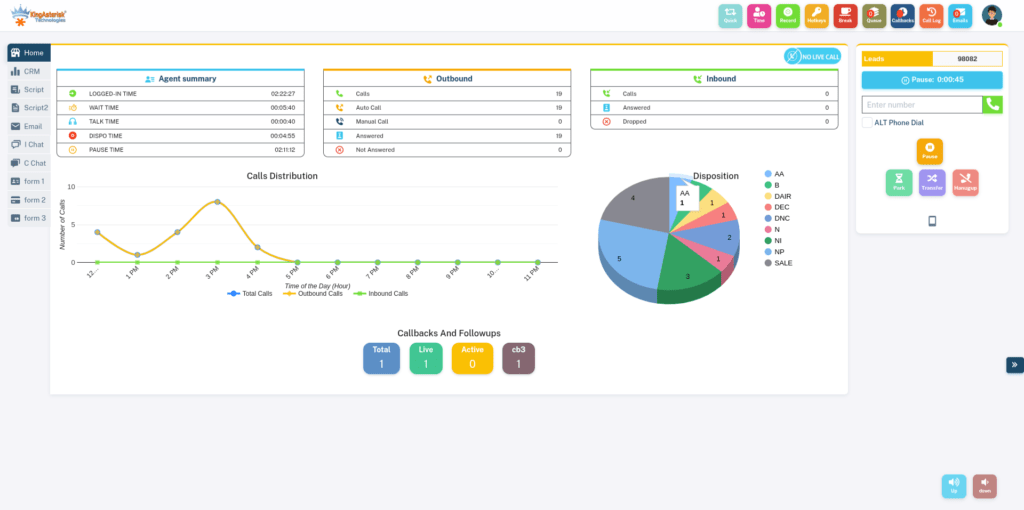
Core Building Blocks of a Responsive VICIdial Theme
1. A flexible grid layout
Rather than positioning elements at fixed pixel coordinates, a responsive theme organizes the agent screen into a grid of proportionally sized regions – call controls, lead data, script text, and disposition options. As screen width changes, these regions resize or stack in a predictable order instead of overlapping or disappearing.
2. Breakpoints for different screen classes
Breakpoints are the rules that tell the interface how to reorganize itself at specific screen widths – for example, a wide desktop monitor, a standard laptop, and a narrower browser window. A well-built theme defines breakpoints that keep every essential control reachable at each of these stages, without requiring horizontal scrolling.
3. Scalable typography and controls
Text sizing, button dimensions, and spacing are defined in relative units so they scale smoothly rather than becoming unreadably small or awkwardly oversized. This matters particularly for agents who work extended shifts and rely on quick visual scanning of lead details and script prompts.
4. Cross-device and cross-browser compatibility
A properly engineered theme is tested across the major browsers agents actually use, along with common operating system combinations, to confirm that call controls, real-time timers, and popup windows behave consistently everywhere.
5. Preserved core dialer functionality
Visual flexibility should never come at the cost of dialer performance. The underlying agent screen logic – call state handling, disposition submission, script rendering, and real-time status updates – needs to remain untouched while only the presentation layer is restructured.
VICIdial Responsive Theme Download: What to Check First
Many teams start their search by looking for a ready-made VICIdial responsive theme download or browsing a VICIdial responsive theme GitHub repository for community-built templates. Pre-built themes can be a reasonable starting point, but a few checks matter before installing one on a live system.
1. Version compatibility: Confirm the theme was built for your installed VICIdial and VICIBox version. Themes built for older releases can break newer agent screen scripts.
2. Codebase transparency: Review the source files before deployment. A theme pulled from a public GitHub repository should be readable, documented, and free of unnecessary external calls.
3. Update history: Check whether the repository is actively maintained. An abandoned project can leave security gaps as VICIdial itself continues to evolve.
4. Licensing terms: Confirm the theme’s license allows the kind of customization and redistribution your organization plans to do.
5. Testing on a staging environment: Never apply a downloaded theme directly to a production dialer. Test agent login, call handling, and disposition flows on a staging instance first.
For organizations that need guaranteed compatibility, dedicated support, and a theme built specifically around their campaign structure, a custom-built responsive theme is generally the safer long-term path compared with adapting a generic download.
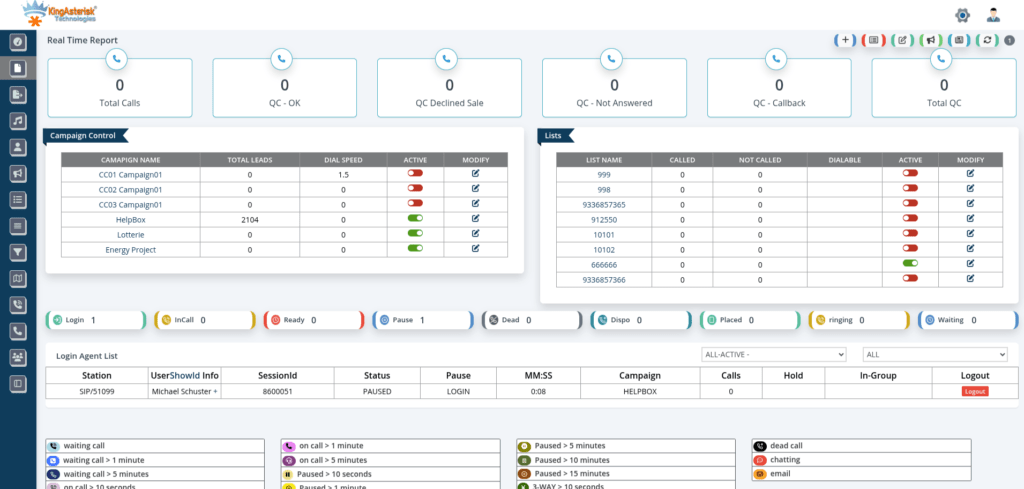
How KingAsterisk Builds a Responsive Agent Theme
KingAsterisk Technologies develops custom VICIdial themes tailored to each client’s existing environment rather than applying a one-size-fits-all template. The process is structured around a few clear stages.
Step 1: Environment assessment
Development begins by confirming the client’s current ViciBox version and the underlying VICIdial codebase version. This ensures the responsive theme is engineered against the exact environment it will run on, rather than a generic baseline that may not match.
Step 2: Interface design and grid planning
The agent screen is mapped out region by region – call controls, script area, lead panel, disposition list – and rebuilt using a flexible grid with defined breakpoints. Where a client uses a modern front-end stack, this can include a React-based interface with a utility-first styling approach for faster iteration and consistent design tokens.
Step 3: Development and internal testing
The theme is built and tested across common screen sizes and browser combinations before being shared with the client, checking that every control agents rely on – hold, transfer, disposition, script navigation – remains accessible at each breakpoint.
Step 4: Delivery or managed installation
Depending on the client’s preference, KingAsterisk either delivers the completed source code and installation steps for the client’s own team to deploy, or completes the installation directly on client-provided server access.
Step 5: Post-launch support
Once a responsive theme is live, ongoing support options are available to handle future VICIdial updates, additional breakpoint tuning, or new panel requirements as a campaign structure evolves.
Need a Responsive VICIdial Theme Built for Your Environment?
KingAsterisk Technologies designs custom VICIdial agent interfaces tailored to your exact ViciBox deployment and codebase version — from responsive grid layouts and agent workflow optimization to testing, customization, and final production deployment. Contact us to discuss your current setup, feature requirements, and project timeline.
Server and Environment Requirements
Before any custom theme project begins, a few infrastructure basics need to be confirmed on the client side.
- Hardware recommendations are provided based on expected campaign volume, with support for both Intel and AMD server configurations.
- An AlmaLinux server is required from the client side, provisioned with a dedicated IP address.
- Server access is needed for installation and configuration once the theme has been finalized.
- Installation and configuration support is included as part of the deployment process.
Confirming these requirements early prevents delays once development work is complete and installation is ready to begin.
Agent and Administration Access Structure
On a standard VICIdial installation, agents typically log in through a dedicated agent screen path, separate from the administration dashboard used to manage campaigns, lists, and users. Custom theme deployments often use a distinct, client-specified path for both the agent interface and the administration panel, while the underlying authentication mechanism stays the same as a standard installation – only the file path and visual layout change.
Keeping this separation clear during theme development matters: the responsive treatment needs to be applied consistently to both the agent-facing screen and any administration view the theme touches, so supervisors and agents get the same reliable experience.
Common Pitfalls When Building or Installing a Responsive Theme
- Overriding core dialer scripts instead of layering theme changes on top, which makes future upgrades difficult.
- Skipping cross-browser testing and discovering layout issues only after agents are already live on the new theme.
- Using a downloaded theme without checking version compatibility against the current VICIdial and ViciBox release.
- Ignoring smaller breakpoints, so agents on laptops or narrower windows still end up scrolling.
- Not testing real call scenarios – hold, transfer, conference – after the visual layer has changed, since a theme change can sometimes affect how a script triggers UI updates.
Frequently Asked Questions
Is it safe to use a VICIdial responsive theme download from a public source❓
It can be, provided you verify the version compatibility, review the codebase, check that the repository is actively maintained, and test thoroughly on a staging environment before touching a production dialer.
Can a responsive theme affect dialer performance or call handling❓
A well-built theme only changes the presentation layer and leaves core call-handling logic untouched. Performance issues typically arise when theme changes accidentally overwrite or conflict with core agent screen scripts, which is why careful testing matters.
Does KingAsterisk provide the source code for a custom theme, or only installation❓
Both options are available. Clients can receive the completed source code and installation steps to deploy themselves, or provide server access for KingAsterisk to complete installation and configuration directly.
What server setup is needed before starting a custom responsive theme project❓
An AlmaLinux server with a dedicated IP is required from the client side, along with server access for installation once development is complete. Hardware recommendations are provided based on expected campaign volume and can run on either Intel or AMD configurations.
Final Thoughts
A responsive agent interface isn’t a cosmetic upgrade – it’s a practical fix for the everyday friction agents face when a fixed layout doesn’t match their actual screen. Whether a team starts by evaluating a VICIdial responsive theme download, exploring a VICIdial responsive theme GitHub project, or commissioning a fully custom build, the underlying goal is the same: keep every control an agent needs visible and consistent, no matter what device they’re logging in from.
KingAsterisk Technologies builds responsive and custom VICIdial themes matched to each client’s exact ViciBox and codebase version, from initial grid design through installation and ongoing support, so agent screens stay fast, consistent, and easy to train on as teams grow.