A custom Asterisk theme is the fastest way to transform a generic dialer interface into a purpose-built tool your agents actually want to use. If your team has struggled with a confusing default Asterisk Development UI – mismatched branding, cluttered panels, or a layout that slows down wrap-up time.
This guide walks you through every layer of the customization stack: from directory structure and stylesheet overrides to template hooks and VICIdial-specific theme integration. No vendor lock-in, no rebuilding core logic, just clean front-end control over a platform you already own.
Why the Default Asterisk UI Falls Short in High-Volume Environments
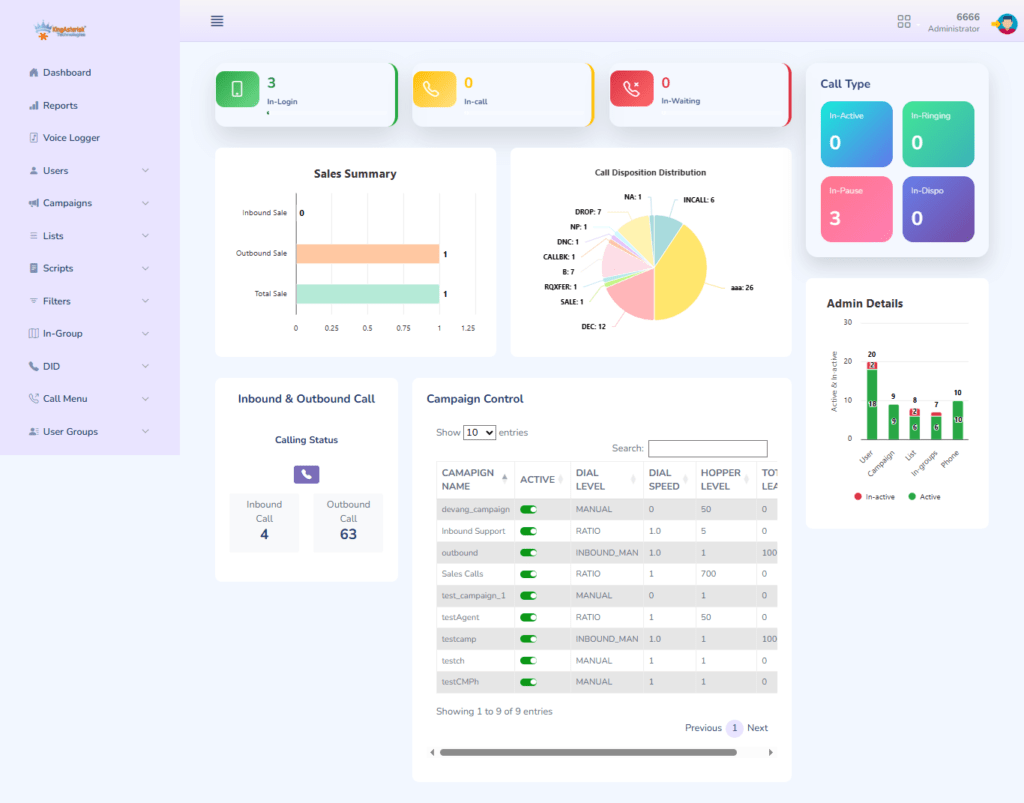
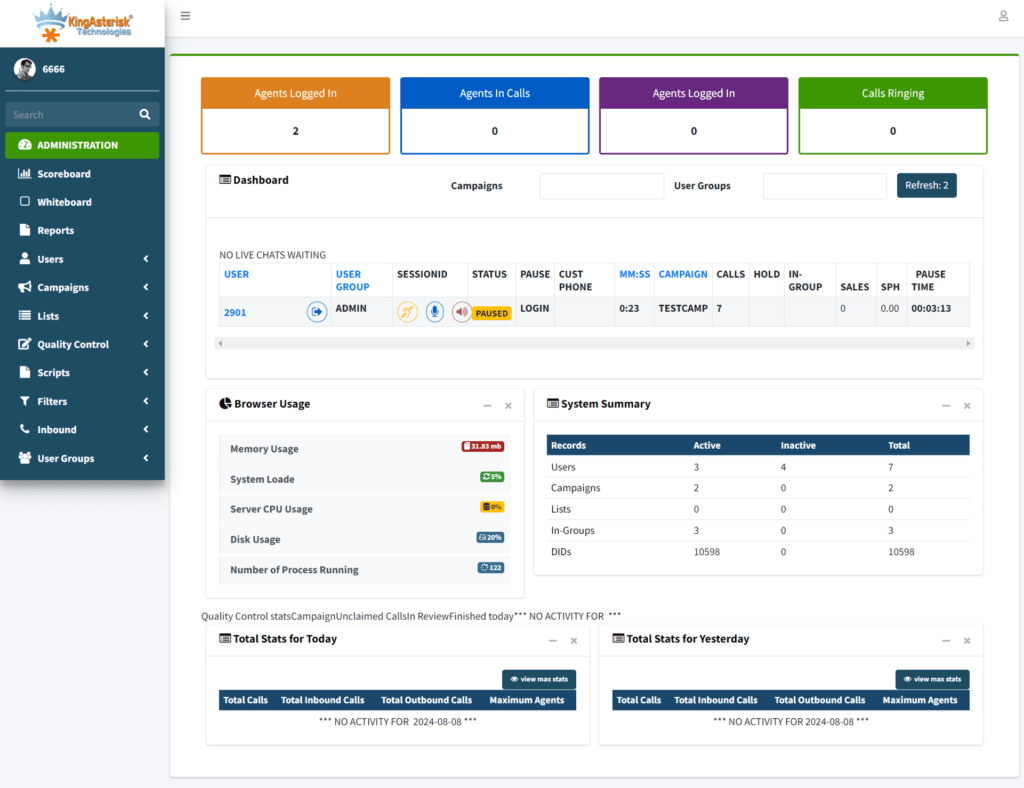
Out of the box, the Asterisk Management Interface (AMI) and its accompanying web panels are built for administrators – not for agents handling 300+ dials a day. The default layout prioritizes system diagnostics over agent workflows. Color contrast is poor, call disposition buttons are buried, and there is zero accommodation for brand identity.
For contact centers running VICIdial on top of Asterisk, this creates a double problem: VICIdial ships with its own agent screen (agc/), which inherits minimal styling, while the backend admin panel (vicidial/) has an entirely different visual language. Agents switching between screens lose time and make more errors.
A well-executed custom Asterisk theme solves both: it unifies the visual language, surfaces the controls agents use most, and gives your operations team a UI they can actually maintain over time.
Understanding the Asterisk Web UI Architecture
Before writing a single line of CSS, you need to understand what you are customizing and where those files live on the server.
The Core File Structure
A standard VICIdial + Asterisk deployment on a LAMP stack organizes its web-facing files under /srv/www/htdocs/ (or /var/www/html/ depending on your distro). The directories that matter for theming are:
- /vicidial/ – Admin and supervisor panel PHP files
- /agc/ – Agent interface (the screen agents stare at all day)
- /agc/images/ – Default image assets
- /agc/css/ (or inline <style> blocks in agent.php) – Presentation layer
- /vicidial/images/ – Admin panel assets
Asterisk itself does not serve the web UI directly – that responsibility falls to Apache (or Nginx). The telephony engine communicates with the PHP layer via AMI socket connections, which means your theme changes never touch Asterisk’s core configuration. That separation is important: you can iterate on the UI without restarting Asterisk or risking dial-plan integrity.
Where Styling Lives in VICIdial
VICIdial does not use an external stylesheet exclusively. A significant portion of visual rules are embedded directly inside PHP-generated HTML. This means a true custom theme requires both: (a) an overriding stylesheet loaded after the default rules, and (b) targeted edits to specific PHP template files. Attempting to theme VICIdial with CSS alone will get you 60–70% of the way there; the remainder needs template-level work.
Setting Up Your Custom Theme Directory
The safest approach is to keep your custom theme files isolated from the VICIdial core so that software updates do not wipe your work. Here is the directory structure we recommend at KingAsterisk for every custom theme deployment:
/agc/themes/[your-theme-name]/ By placing everything under /agc/themes/, you create a clean separation of concerns. When VICIdial releases an update, your customization directory is untouched. A single include line at the bottom of agent.php loads your theme on top of the defaults.
Linking Your Theme Stylesheet
Open agc/agent.php and locate the closing </head> tag. Add the following line directly before it:
<link rel="stylesheet" href="themes/your-theme-name/theme.css">Loading your stylesheet last guarantees that your rules override the inline and default styles VICIdial generates. Specificity battles are minimized because you are working at the end of the cascade.
CSS and Template Customization: Layer by Layer
Targeting the Agent Panel Layout
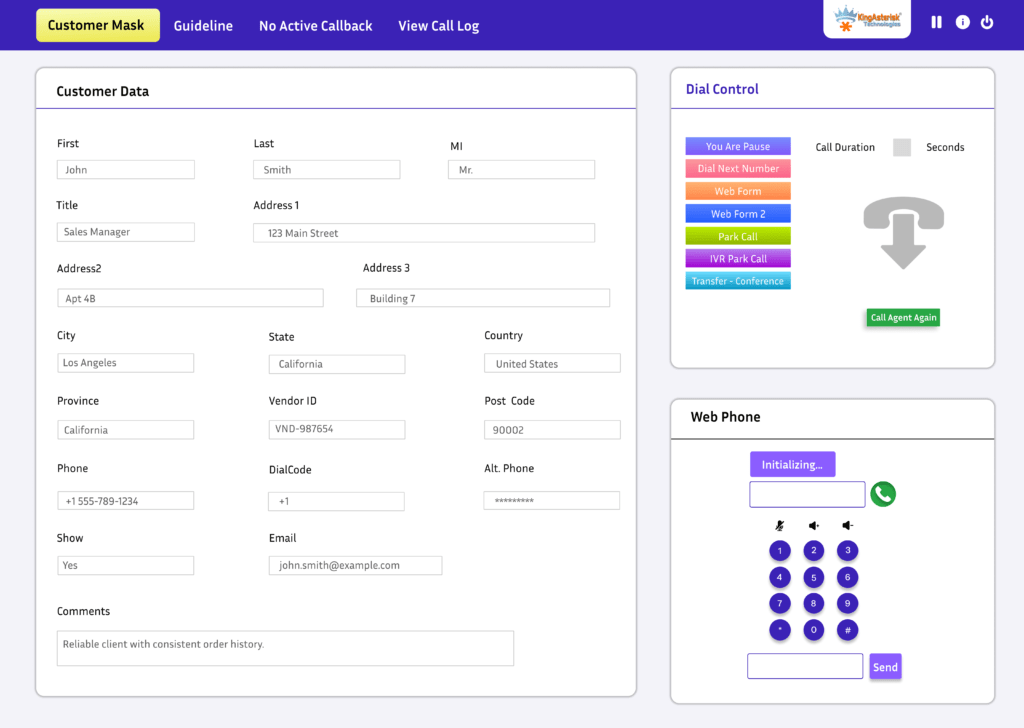
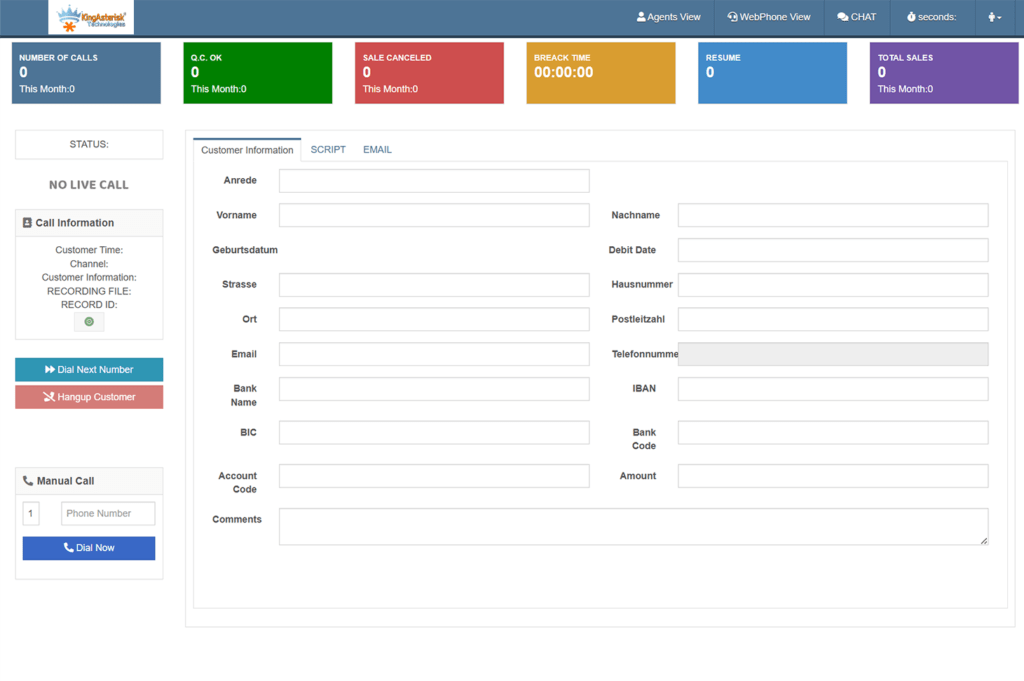
The VICIdial agent screen is divided into several functional zones: the top status bar, the dialing controls section, the script/form area, and the disposition buttons. Each maps to a predictable set of HTML IDs and class names that persist across VICIdial minor versions. Key selectors to override include:
- #agent_status_bar – Top strip showing agent name, campaign, and status
- #vicidial_form – The main call form and script pane
- .DONTHANG, .CLOSER – Disposition button classes
- #hupall_button – The hang-up / end-call control
- .agent_screen_body – Overall body wrapper for the agent view
Keep your overrides specific but not over-qualified. Avoid using !important wherever possible – if you find yourself relying on it heavily, your stylesheet load order is likely wrong.
Responsive Adjustments for Supervisor Screens
Supervisors monitoring live calls often use wider monitors or split-screen setups. Add a media query block in theme.css that expands the status grid at breakpoints above 1400px. This is especially useful for real-time dashboard views where agents-per-row density matters for floor managers.
Integrating a Custom Theme with VICIdial
VICIdial themes differ from pure Asterisk web UI themes because VICIdial generates much of its HTML server-side via PHP. That means some visual elements – button labels, color-coded statuses, form field widths – are controlled by PHP variables rather than CSS classes.
PHP Template Hooks
In vicidial/admin.php and agc/agent.php, look for the VICIDIAL_THEME constant (or its equivalent string in older builds). Some deployments expose this as a database setting in the system_settings table. Setting a theme name here lets VICIdial conditionally load theme-specific PHP partials:
define('VICIDIAL_THEME', 'kingasterisk-default');Custom Asterisk Theme Download – Packaging for Reuse
Once your theme is stable, package it as a compressed archive for repeatable deployment across multiple servers or clients. A clean custom Asterisk theme download package should include: the /themes/ directory, a README with load-order instructions, a themes-config.sql snippet for any database-driven settings, and a rollback script that restores the original include line in agent.php.
For teams evaluating options before committing to a full build, a custom Asterisk theme free starter kit – containing variables, a base stylesheet, and placeholder icons – gives developers a working foundation without starting from a blank file.
Real-World Example: Roofing Contact Center UI Overhaul
One of our clients – a roofing services company operating a 60-seat outbound operation on VICIdial with a proprietary CRM – came to KingAsterisk with a specific complaint: agents were regularly clicking the wrong disposition button because the color scheme of the default interface made active-call controls indistinguishable from post-call actions.
Their agents worked two distinct roles: appointment setters and quality verification callbacks. Both roles used the same VICIdial instance but different campaigns. The default UI gave no visual cue about which role context an agent was in.
The custom Asterisk theme we built for them introduced two role-specific color palettes loaded dynamically based on the campaign ID returned at login. Appointment setter screens used a cool blue-grey palette with large, high-contrast disposition buttons. Verification agents got a warm neutral theme with a condensed layout optimized for rapid form entry.
The result: average after-call work time dropped from 38 seconds to 23 seconds within the first two weeks. Floor supervisors reported fewer misdisposition incidents in the first month of rollout. The entire theme – from first CSS commit to live deployment – took four working days.
Troubleshooting Common Custom Web UI + Asterisk Dialer Issues
Theme changes not appearing? Work through this checklist before diving into code:
Browser Cache Is Serving the Old Stylesheet
Append a cache-busting version query string to your stylesheet link: theme.css?v=1.0.4. Increment the version number on every deployment. For production environments, automate this with a build step that hashes the file contents.
PHP Output Buffering Stripping Your Link Tag
Some VICIdial builds use output buffering aggressively. If your <link> tag is disappearing from the rendered HTML, confirm that ob_start() is not clearing the head section before your include fires. Move your theme to a later point in the file – after the first echo statement – as a diagnostic step.
VICIdial Custom Theme Not Loading After Upgrade
VICIdial upgrades frequently overwrite agent.php. Maintain a post-upgrade patch script (a simple sed command or a PHP include wrapper) that re-injects your theme link after any core update. Document this in your runbook so on-call engineers do not lose the theme after a late-night patch.
CSS Specificity Conflicts with Inline Styles
VICIdial generates inline style attributes on certain elements – particularly status indicators and button backgrounds. These cannot be overridden by external stylesheets without !important or JavaScript. For persistent inline style conflicts, a small JavaScript snippet using MutationObserver to reapply class-based styles is cleaner than scattering important declarations throughout your CSS.
AMI Events Not Updating the UI After Theme Changes
If the visual state of the agent screen stops updating in real time after a theme modification, the culprit is almost always a JavaScript conflict – not a CSS issue. VICIdial’s agent screen uses long-polling or WebSocket connections to receive AMI event updates. If your theme JavaScript accidentally redefines a global function like refresh_agent_screen(), those updates break silently. Use namespaced function names and keep your theme JS isolated in a self-invoking function block.
Frequently Asked Questions
Can I apply a VICIdial custom theme without programming experience❓
Basic VICIdial themes – color palette changes, logo replacement, font adjustments – require only CSS familiarity and the ability to edit a PHP file to add one include line. More advanced themes that adjust layout structure, add role-based UI logic, or hook into AMI events require PHP and JavaScript knowledge. Teams without in-house development capability can engage KingAsterisk’s implementation team for a production-ready custom build.
Is a custom Asterisk theme free to use or does it require licensing❓
The theming layer itself – your CSS, templates, and assets – is entirely yours and carries no licensing cost beyond what you already pay for your server and VICIdial installation. VICIdial is open-source under the Mozilla Public License. The cost is in development time and, if applicable, the professional services fee for a managed deployment. Starter theme files shared by the community are also freely available as a foundation.
Will a custom theme break after a VICIdial update❓
A correctly structured theme – stored in an isolated directory and linked via a single include hook – will not break from a VICIdial update. The only risk is if an update overwrites the agent.php file that contains your include line. This is mitigated by a post-update patch script or a wrapper file approach where agent.php simply loads a version-controlled master template that KingAsterisk maintains separately.
How do VICIdial themes differ from general Asterisk web UI customization❓
Asterisk itself does not ship a user-facing web interface – it is a telephony engine. Web UI customization in a VICIdial + Asterisk stack means modifying VICIdial’s PHP-generated agent and admin screens, not Asterisk’s internals. VICIdial themes specifically target the agc/ and vicidial/ directories, while Asterisk configuration changes live in /etc/asterisk/ and never intersect with the visual layer.
Conclusion
Building a custom Asterisk theme is not about cosmetic preference – it is an operational decision that directly affects agent efficiency, error rates, and onboarding speed. When your dialer interface reflects the workflows your team actually follows, the technology gets out of the way and lets your agents focus on conversations.
The approach outlined in this guide – isolated theme directories, CSS custom properties, PHP template hooks, and a JavaScript-safe integration strategy – gives contact center teams a durable, maintainable UI layer that survives upgrades and scales across deployments. Whether you are starting from a custom Asterisk theme free starter kit or building a fully bespoke interface from scratch, the same structural principles apply.
KingAsterisk has deployed custom Asterisk and VICIdial themes across dozens of contact center environments – from 10-seat outbound teams to 500+ agent multi-site operations. If your current interface is costing your team time, or if you are troubleshooting a custom web UI + Asterisk dialer issue that is holding up a go-live, our engineering team is ready to help.
Ready to Build Your Custom Asterisk Theme? Contact the KingAsterisk Team!