Every contact center that runs on VICIdial generates a significant volume of call recordings. The root of most of these problems is a poorly understood or misconfigured VICIdial recording path. These recordings serve legal, quality assurance, compliance, and training purposes.
Yet many operations struggle with the same recurring problems: recordings go missing, storage fills up without warning, file retrieval takes too long, or recordings land in the wrong directory entirely.
When you know exactly how VICIdial handles recordings, where the files go, and how to manage the directory structure intelligently, most of these issues disappear.
This guide covers everything from the default VICIdial recording path configuration to advanced storage management, security hardening, and custom development options for growing operations.
How the VICIdial Recording Path Works
VICIdial stores call recordings as audio files on the server running Asterisk. Each recording is written to a directory path that VICIdial constructs based on parameters you define in the system configuration. Understanding this path structure is the first step toward managing recordings effectively.
The Default Recording Directory Structure
Out of the box, VICIdial saves call recordings to:
/var/spool/asterisk/monitor/Within this directory, VICIdial stores recordings according to the configured recording and file-management setup. Depending on the installation, completed recordings may be moved to a separate directory such as monitorDONE.
A recording file’s name and directory structure depend on the system configuration. The filename may contain details such as the campaign name, date, timestamp, and call ID, depending on the configured naming convention.
Where Is My Call Recording Saved?
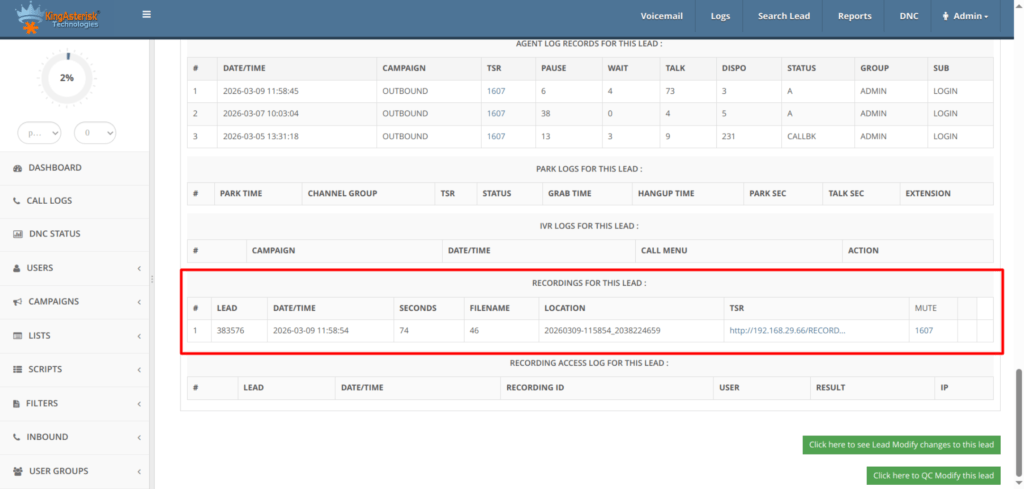
This is one of the most common questions from new VICIdial administrators. The short answer: your recording is saved on the Asterisk server at the path configured in your VICIdial admin panel under Admin > System Settings > Recording.
The full path depends on:
- The base recording directory configured in VICIdial
- The date the call was made (year/month/day subdirectory)
- The campaign name
- The call timestamp and unique leg ID
If you have modified the default path or use a custom recording location, check your /etc/asterisk/ configuration files, specifically extensions.conf and any custom dialplan includes, for path overrides.
Where Are FreePBX Call Recordings Saved?
FreePBX and VICIdial both use Asterisk as the underlying telephony engine, but they manage recordings differently. FreePBX typically saves recordings to:
/var/spool/asterisk/monitor/However, FreePBX also uses the Call Recording module, which may redirect recordings to:
/var/spool/asterisk/monitor/YYYY/MM/DD/The key difference is that FreePBX abstracts the recording path through its GUI, while VICIdial exposes more granular control at the admin level. In a VICIdial environment, administrators have direct access to the Asterisk recording path without needing to navigate a separate module, which gives more flexibility for custom storage configurations.
VICIdial Recording Path Configuration Options
VICIdial provides several levers for controlling where and how recordings are stored. Understanding each one helps you design a storage architecture that matches your operational volume and retention requirements.
Setting the Base Recording Path
In the VICIdial admin panel, navigate to Admin > System Settings. The “Recording Filename” and related fields let you define how recording filenames are constructed. You can incorporate variables like ${CALLID}, ${CAMPAIGN}, ${CURDATE}, and ${AGENT} to build a path and filename that works for your reporting and retrieval workflows.
Per-Campaign Recording Paths
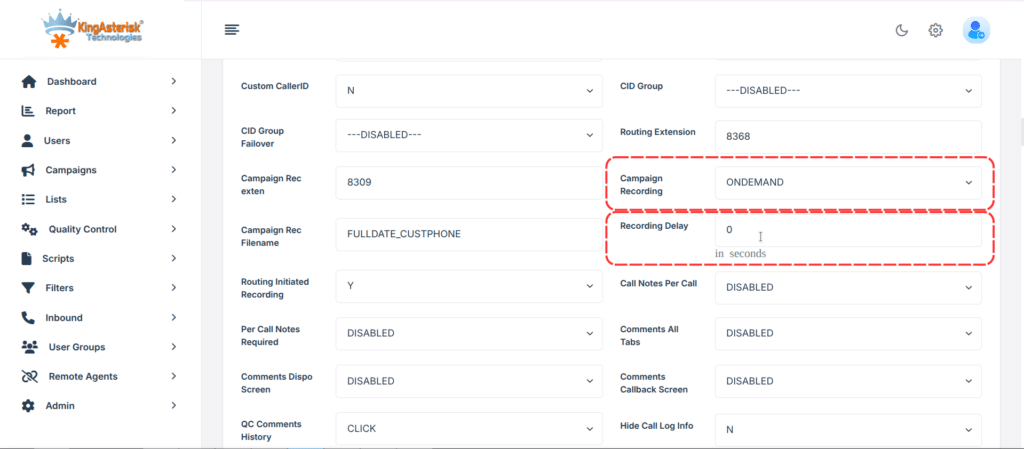
VICIdial allows you to override the recording path at the campaign level. This is useful when you run multiple clients or business units on the same VICIdial instance and need to physically separate their recordings on disk. Campaign-level path overrides let each campaign write to its own subdirectory, simplifying access control and billing for storage.
Inbound and Outbound Recording Differences
Outbound recordings are triggered by the campaign’s dial settings. Inbound recordings are typically configured through the inbound group settings. The VICIdial recording path applies to both, but the trigger mechanism differs. For inbound queues, you configure recording in the Inbound Groups section, and the recording follows the same path structure.
If your agents are using softphones or WebRTC browser phones connected to VICIdial, their recordings are managed by the VICIdial recording path on the server, not by any mobile dialer application.
For any agent using a mobile device as part of a VICIdial deployment (via SIP client or WebRTC), the server-side VICIdial recording path is what governs recording storage, not the mobile device.
Common VICIdial Recording Path Problems and Solutions
Even well-configured VICIdial systems develop recording issues over time. Here are the most frequent problems and their causes:
| Problem | Likely Cause | Solution |
|---|---|---|
| Recordings not saving | Incorrect path permissions | Set correct ownership: chown asterisk:asterisk /var/spool/asterisk/monitor |
| Storage full, new recordings failing | No automated cleanup or archival | Implement cron-based archival or remote storage sync |
| Recordings saved but not retrievable from VICIdial UI | Path mismatch between Asterisk and VICIdial config | Verify base path matches in both extensions.conf and VICIdial admin |
| Recordings appear in wrong campaign folder | Campaign recording path override misconfigured | Audit campaign-level recording path settings |
| .gsm files instead of .wav | Codec mismatch in recording config | Set MIXMON_FORMAT=wav in VICIdial system settings |
| Recording files with zero bytes | Disk I/O issues or permission errors during write | Check disk health and inode availability |
Diagnosing a Missing Recording
If a specific recording is missing, work through this sequence:
- Confirm the call actually completed (check vicidial_log in the database)
- Verify the recording flag was enabled for that campaign
- Check the Asterisk server at the expected VICIdial recording path using the call date and ID
- Review /var/log/asterisk/full for MixMonitor errors around the call time
- Check disk space and inode counts with df -h and df -i
Storage Management for Large-Scale VICIdial Deployments
A contact center handling 500+ agents can generate several terabytes of recording files each month. Without a structured storage management approach, the VICIdial recording path directory fills up, recordings start failing silently, and retrieval becomes slow.
Organizing Recordings for Long-Term Storage
The default date-based directory structure works well for short-term access but becomes unwieldy for long-term retention. A better approach for large deployments is to implement a secondary organization layer by client, campaign, or year-month, with automated scripts that move recordings from the active directory to an archive location after a configurable retention window.
Monitoring Disk Usage on the Recording Partition
Set up monitoring on the partition that holds your VICIdial recording path. A practical threshold is to alert at 75% usage and take automated action (archival, compression, or deletion of recordings past retention period) at 85%. Ignoring disk usage on the recording partition is the single most common cause of recording failures in production VICIdial environments.
Compressing Older Recordings
WAV files can require substantial storage space. For recordings that are accessed infrequently, an appropriate compression or archival strategy may reduce storage requirements.
Before converting recordings to another format, verify audio-quality requirements, compliance obligations, playback compatibility, and whether the VICIdial interface supports the resulting files. Do not assume that changing a file extension or moving a recording will automatically update its database reference. Test the process with sample recordings before applying it to production data.
Securing the VICIdial Recording Path
Call recordings contain sensitive customer data. PCI DSS, HIPAA, GDPR, and most local contact center compliance frameworks require that recordings be stored securely with access controls, audit trails, and defined retention policies.
File System Permissions
The recording directory should be owned by the asterisk user and group. Web server processes and VICIdial PHP scripts need read access to serve playback, but no process outside of Asterisk should have write access to the base recording directory. A common misconfiguration is setting the recording directory to world-writable, which creates a significant security exposure.
chmod 750 /var/spool/asterisk/monitor
chown -R asterisk:asterisk /var/spool/asterisk/monitorRestricting Playback Access by Role
VICIdial’s built-in user permissions allow you to restrict recording playback to supervisors and QA staff. Agents should not have playback access to their own or other agents’ recordings in most compliance environments. Audit the VICIdial user level permissions regularly to confirm that recording access matches your data governance policy.
Encryption at Rest
For PCI DSS-scoped environments, recordings that contain card data must be encrypted at rest. VICIdial does not natively encrypt recording files, but you can implement filesystem-level encryption on the recording partition using LUKS, or post-record encryption using a custom AGI script that encrypts the file immediately after MixMonitor closes it.
Custom VICIdial Recording Path Development by KingAsterisk
KingAsterisk builds custom recording management solutions for VICIdial deployments at every scale, from single-server setups handling a few dozen agents to multi-server architectures processing millions of calls per month.
What We Develop
Our recording path customization work covers:
Custom recording directory structures
We design and implement directory layouts that match your client segmentation, compliance requirements, and storage infrastructure, rather than the default single-path model.
Automated Archival and Retention Systems
Scripts and scheduled jobs that move, compress, or delete recordings based on configurable retention rules per campaign or client.
Recording Storage Optimization
Database query optimization for large vicidial_recordings tables, index tuning for fast retrieval, and MariaDB performance improvements for deployments with hundreds of millions of recording records.
Secure Recording Delivery APIs
Custom API endpoints that let authorized external systems (CRM platforms, QA tools, workforce management software) retrieve recordings by call ID without exposing the underlying VICIdial recording path or server filesystem.
Multi-Tenant Recording Isolation
For SaaS contact center platforms and VICIdial resellers, we build recording architectures that completely separate data at the filesystem and database level, ensuring one tenant’s recordings are never accessible to another.
Custom Recording Management Dashboards
Supervisor and admin interfaces that surface recording search, playback, download, and retention management without requiring direct server access.
Frequently Asked Questions
VICIdial saves call recordings to the Asterisk monitor directory, by default /var/spool/asterisk/monitor/, organized into subdirectories by year, month, and day. The exact VICIdial recording path can be customized at the system or campaign level through the admin panel.
FreePBX stores recordings in /var/spool/asterisk/monitor/ by default, using a date-based subdirectory structure. The FreePBX Call Recording module may modify this path, and recordings can also be managed via the FreePBX admin interface.
Yes, you can change the VICIdial recording path, but you should update the relevant system settings and campaign-level overrides. If you move existing recordings to a new location, ensure that VICIdial can still locate and play them. Test the changes with sample recordings before applying them to your production system.
Retention requirements depend on your industry and jurisdiction. Financial services typically require 7 years, healthcare varies by regulation, and general customer service is often 90 days to 1 year. Configure your VICIdial recording path archival system to match your specific compliance requirements.
Why the VICIdial Recording Path Deserves Dedicated Attention
Most VICIdial deployments treat recording path configuration as a one-time setup task. It is not. As call volume grows, as compliance requirements change, and as storage costs accumulate, the recording path configuration becomes a recurring operational concern.
Getting it right from the start means fewer production incidents, faster recording retrieval, cleaner storage cost management, and a defensible position when regulators ask how customer data is stored and protected.
Whether you need a targeted fix for a specific recording problem or a complete redesign of your recording storage architecture, KingAsterisk has the VICIdial depth to do it correctly.
Get in touch with our team to discuss your recording path requirements, storage challenges, or compliance needs.