VICIdial Agents Blocked by Firewall Step-by-Step Fix
Vicidial Software Solutions

Firewall Blocking VICIdial Agents? Complete Fix Guide (2026)

VICIdial firewall blocking agents are one of the most disruptive, and most misdiagnosed, problems a contact center can face. Agents log in, the Vicidial dashboard loads, but calls fail silently: one-way audio, dropped connections, or SIP registration errors that vanish and reappear without warning. 

This guide gives you a complete, hands-on resolution path: from accurately diagnosing whether a firewall is the culprit, to whitelisting the right IPs, opening RTP ports 10000–20000, and locking down your VoIP infrastructure so the problem never returns. Whether you are running an on-premise Asterisk server or a cloud-hosted VICIdial instance, every fix here is field-tested. 

Why VICIdial Firewall Issues Are More Common Than You Think

VoIP contact centers run on two distinct traffic layers: SIP signaling and RTP media. SIP handles call setup and teardown on port 5060 (or 5061 for TLS). RTP carries the actual audio, and it uses a wide, dynamically negotiated UDP port range, typically 10000 to 20000. Most enterprise firewalls are configured conservatively, blocking UDP traffic by default unless explicitly permitted. 

IT teams often open port 5060 correctly but forget the RTP range entirely, leaving agents in a state where calls connect on paper but transmit no audio.

The situation gets worse in mixed environments. A contact center may have a hardware firewall at the office perimeter, software firewalls on each agent workstation, a cloud security group around the VICIdial server, and an ISP-level firewall from the carrier, each capable of silently dropping packets. 

Understanding which layer is blocking traffic, and what to open at each one, is the core skill this guide teaches.

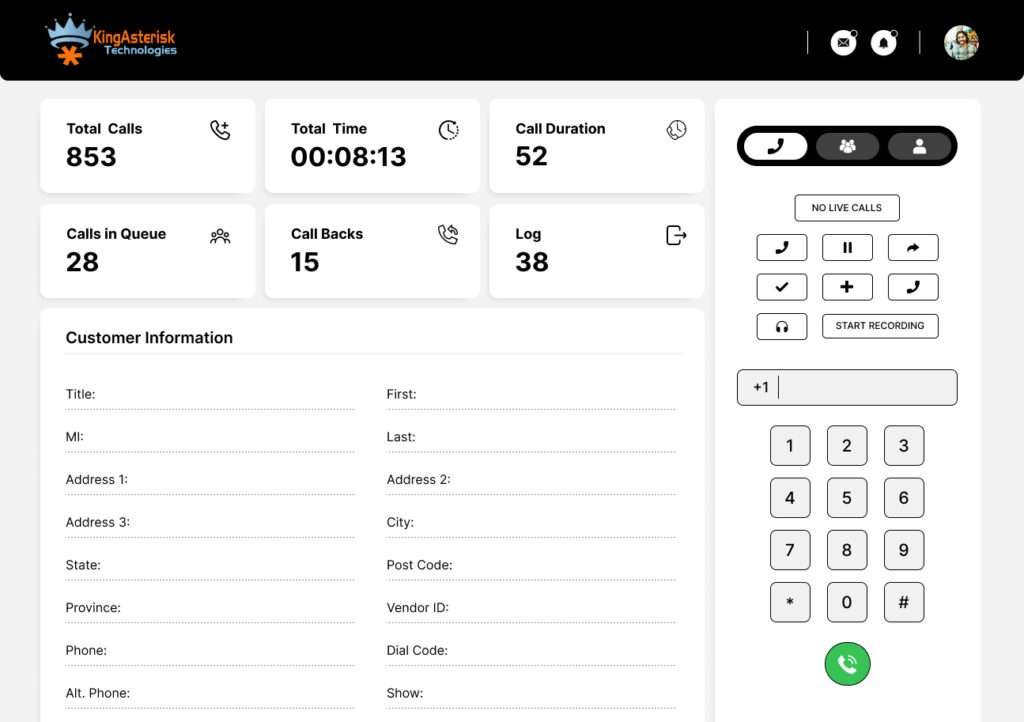
🔥 Switch to Optimized Setup: Vicidial Webphone Customization with logo

How VICIdial Firewall Blocking Agents Actually Works (The Technical Reality)

The SIP Registration Dance

When an agent opens their softphone or browser-based VICIdial agent panel, the first thing that happens is a SIP REGISTER request sent from the agent endpoint to the VICIdial/Asterisk server. If the firewall blocks UDP port 5060, even intermittently, registration fails. The agent sees a status of ‘Not Registered’ or ‘Line Unavailable’ and cannot make or receive calls.

The RTP Audio Problem

Even when SIP registration succeeds, audio requires a separate, bidirectional RTP stream. Once a call is established, Asterisk negotiates an RTP port dynamically from the range 10000–20000. If the firewall has not opened that entire range in both directions, the call connects but one or both parties hear silence. This is the most common complaint from VICIdial administrators: ‘Calls go through but there’s no audio on one side.’

NAT and Firewall State Tables

An additional complication is Network Address Translation (NAT). When agents sit behind a NAT router, which is universal in office and home environments, the return RTP traffic often fails to find its way back because the firewall’s state table entry expires before the call ends, or because the RTP source IP from Asterisk does not match what the firewall is tracking. This is why whitelisting carrier and server IPs is essential, not optional.

💡 PRO TIP: Use nat=force_rport,comedia in your Asterisk SIP peer configuration to help Asterisk handle NAT-traversal automatically. This reduces, but does not eliminate, the need for proper firewall rules.

Diagnosing the Problem: Is It Really a Firewall?

Before you start changing firewall rules, confirm the diagnosis. These tests take under five minutes and prevent unnecessary configuration changes.

Quick Diagnostic Checklist

Run this command from an agent machine:

nmap -sU -p 5060 <your-vicidial-server-ip>

If the port shows ‘filtered’, the firewall is blocking SIP.

Run this on the VICIdial server during a failed registration attempt:

tcpdump -i any -n udp port 5060

If you see the REGISTER packet arrive but no response reaches the agent, the return path is blocked.

Test RTP: initiate a call and run this on the server:

tcpdump -i any udp portrange 10000-20000
  • No packets = firewall block.
  • Packets only in one direction = NAT issue on the agent side.

Check Asterisk log: ‘tail -f /var/log/asterisk/full | grep -i rtp’. RTP timeout warnings confirm port blocking.

Temporarily disable the firewall on the server (NOT in production, test environment only) and retry the call. If audio works, the firewall is confirmed as the issue.

WARNING: Never disable your production firewall to test. Use a staging environment or a test agent account to isolate the issue. A VICIdial server exposed to the internet without firewall protection will be compromised within hours.

The Complete Fix: Step-by-Step Resolution

The resolution for VICIdial firewall blocking agents always comes down to three core actions: whitelist office IPs, whitelist carrier IPs, and open RTP ports 10000–20000. Below is the step-by-step implementation for iptables (Linux), followed by notes for cloud environments and hardware firewalls.

Step-by-Step: iptables (Linux — Most Common VICIdial Environment)

1. Identify all relevant IPs and ranges

Your office public IP(s), your VoIP carrier’s IP range (get this from your carrier’s documentation or NOC), and any remote agent IPs or VPN subnet.

2. Allow SIP signaling

Open UDP and TCP port 5060 from carrier and office IPs:

# Allow SIP from carrier IP range

iptables -A INPUT -s <CARRIER_IP_RANGE> -p udp --dport 5060 -j ACCEPT
iptables -A INPUT -s <CARRIER_IP_RANGE> -p tcp --dport 5060 -j ACCEPT
iptables -A INPUT -s <OFFICE_PUBLIC_IP> -p udp --dport 5060 -j ACCEPT

3. Open the full RTP port range

This is the most commonly missed step:

# Open RTP ports 10000–20000 for audio (bidirectional)


iptables -A INPUT -p udp --dport 10000:20000 -j ACCEPT
iptables -A OUTPUT -p udp --sport 10000:20000 -j ACCEPT

4. Whitelist office IPs 

Add a blanket allow for your office subnet to avoid blocking agent web traffic and API calls:

# Whitelist office subnet, adjust CIDR to your range

iptables -A INPUT -s 203.0.113.0/24 -j ACCEPT

5. Whitelist carrier IPs

Obtain the full list of your carrier’s SIP trunk IP ranges. Example for a generic carrier block:

# Add each carrier IP/range, repeat for all carrier blocks

iptables -A INPUT -s <CARRIER_IP_1> -j ACCEPT

6. Allow VICIdial web interface

Agents and supervisors need HTTP/HTTPS access:

iptables -A INPUT -p tcp --dport 80 -j ACCEPT

iptables -A INPUT -p tcp --dport 443 -j ACCEPT

7. Save the rules

Make them persistent across reboots:

service iptables save   # CentOS/RHEL

iptables-save > /etc/iptables/rules.v4   # Debian/Ubuntu

8. Verify — Test a call immediately. 

iptables -L -n -v | grep DROP

Check logs to confirm no relevant traffic is still being blocked.

For Web-Based Systems (AWS, GCP, Azure)

In web-based Vicidial deployments, iptables alone are insufficient. You must also update the cloud provider’s Security Group or Firewall Rules:

AWS Security Group

Add inbound rules for UDP 10000–20000 (source: carrier IP range), UDP/TCP 5060 (source: carrier + office IPs), TCP 80/443 (source: 0.0.0.0/0 or restricted subnet).

GCP Firewall Rules

Create a rule with ‘allow udp:10000-20000, udp:5060, tcp:5060’ with target tags pointing to your VICIdial instance.

Azure NSG

Add inbound security rules for the same port ranges with priority above the default ‘DenyAllInBound’ rule.

💡 PRO TIP: In AWS, Security Group rules are stateful, return traffic is automatically allowed. But RTP often flows on different source ports, so you still need the full inbound 10000–20000 range explicitly opened.

Real-World Use Case: 50-Seat Contact Center in Chicago

A mid-sized outbound contact center operating a predictive dialer with 50 agents across two floors reported a recurring issue: roughly 30% of outbound calls connected with no audio on either side, while the other 70% worked perfectly. The problem had persisted for three weeks despite multiple Asterisk configuration reviews.

The root cause, identified during a KingAsterisk diagnostic session, was a hardware firewall appliance that had been replaced as part of a routine network refresh. The new firewall’s default policy was stateful UDP tracking with a 30-second idle timeout, far shorter than most VoIP calls. RTP streams that paused briefly (hold music, agent typing pauses) caused the firewall’s state entry to expire, dropping the audio mid-call.

Resolution required three changes:

  1. The IT team whitelisted the office subnet and all carrier IP ranges, eliminating stateful inspection overhead for trusted VoIP sources.
  2. RTP ports 10000–20000 were explicitly opened as stateless UDP pass-through rules for those whitelisted IPs.
  3. The UDP state timeout was increased from 30 to 300 seconds for VoIP traffic flows.

Within two hours of applying the changes, call audio success rate reached 99.7%. Agent productivity, previously impacted by repeat-call attempts and customer complaints, normalized within one business day. This is a textbook example of why VICIdial firewall troubleshooting must always address both IP whitelisting and the full RTP port range simultaneously.

Advanced Configuration: Remote and Work-From-Home Agents

Remote agents introduce a fundamentally different firewall challenge. Unlike office agents who sit behind a single, controllable perimeter firewall, remote agents connect through home routers, residential ISPs, and personal software firewalls, none of which the contact center IT team controls.

Option A: VPN Tunnel (Recommended for High-Security Environments)

Deploy an OpenVPN or WireGuard VPN server. All agent traffic: SIP, RTP, and web, routes through the VPN, which means your server-side firewall only needs to whitelist the VPN subnet. This gives you full control and eliminates ISP-level VoIP blocking.

  • Firewall rule: whitelist VPN subnet (e.g. 10.8.0.0/24) for all ports including RTP 10000–20000.
  • Agent side: install VPN client, connect before launching VICIdial panel.
  • Downside: adds 10–30ms latency depending on VPN server location.

Option B: Session Border Controller (SBC)

An SBC acts as a media relay and firewall traversal proxy between agents and your Asterisk server. It handles NAT traversal, re-encapsulates RTP, and presents a single, stable IP to your firewall. This is the enterprise solution for large VICIdial deployments with geographically distributed agents.

  • Firewall rule: whitelist only the SBC’s IP, it handles all agent connections.
  • Benefit: eliminates agent-side firewall complexity entirely.
  • Best for: 20+ remote agents, multiple time zones, international operations.

Option C: WebRTC Agent Interface

VICIdial supports WebRTC-based agent interfaces that use HTTPS (port 443) and TURN/STUN servers for media traversal. Since port 443 is almost never blocked, this eliminates most firewall issues for remote agents entirely. The tradeoff is slightly higher CPU usage on the server and the need for a properly configured TURN server. 

Frequently Asked Questions

At minimum: UDP/TCP 5060 for SIP signaling, UDP 10000–20000 for RTP audio, and TCP 80/443 for the web interface. If using secure SIP, also open TCP 5061. Keep port 3306 (MySQL) blocked from external access entirely — it is internal-only and a common attack vector.

Obtain the full IP range from your carrier’s documentation or NOC team, then run: ‘iptables -A INPUT -s <CARRIER_IP_RANGE> -j ACCEPT’ for each block. Save rules with ‘service iptables save’ (CentOS) or ‘iptables-save > /etc/iptables/rules.v4’ (Ubuntu). Always test with a live call immediately after applying.

Yes, absolutely. Cloud security groups operate at the hypervisor/network level, before traffic even reaches your VM’s iptables. You must configure both layers independently. A common mistake is correctly setting iptables but leaving the cloud security group at its default deny-all policy. Both must permit SIP and RTP traffic.

Run ‘tcpdump -i any udp port 5060’ on the server during a failed agent registration. If you see the REGISTER packet arrive but no 200 OK returns to the agent, the firewall’s return path is blocked. For audio issues, run ‘tcpdump -i any udp portrange 10000-20000’ during a live call,  zero packets confirms RTP is being blocked.

Conclusion

VICIdial firewall blocking agents is a solvable problem, but only when addressed systematically. The pattern is always the same: SIP port 5060 is often partially open, but the RTP range 10000–20000 is either missing or restricted in one direction. Combine that with missing IP whitelists for your office and carrier, and you have a recipe for intermittent audio failures that are frustrating to diagnose and costly in agent productivity.

The three-action resolution, whitelist office IPs, whitelist carrier IPs, open RTP ports 10000–20000, must be applied consistently at every firewall layer in your stack: iptables, cloud security groups, hardware firewalls, and any ISP-level policies. Remote agents add a fourth layer (home routers and residential ISPs) that is best addressed with a VPN or SBC.

At KingAsterisk, we have deployed and maintained VICIdial environments for 900+ contact centers across 2,000+ projects over 14+ years. Firewall misconfiguration is consistently in the top three causes of support tickets, and it is consistently the fastest to resolve once properly diagnosed.

If your agents are still experiencing call issues after following this guide, our team can perform a remote diagnostic and get your VICIdial solution running at full performance.

Still having issues? Get expert help from KingAsterisk.

Try our live demo at demo.kingasterisk.com or contact our team for a free diagnostic session.  Contact KingAsterisk

VICIdial Webphone Customization for Agent Interface 2026
Vicidial Software Solutions

VICIdial Webphone Customization with Logo & Agent Interface for Branding (2026)

Every contact center wants better performance, Every manager wants faster agents, Every business wants stronger trust. But here’s a simple question: What do your agents see for 8–10 hours every day? Most teams ignore this. They focus on scripts, They focus on leads, They focus on reports. But they forget one core thing, the VICIdial interface itself shapes behavior.

A generic webphone screen creates confusion. A branded and structured interface creates confidence. This is where VICIdial Webphone Customization becomes a real productivity solution, not just a design upgrade. It is not about colors. It is about control, speed, clarity, and decision-making.

What is VICIdial Webphone Customization (And Why It Is Not Just Design)

Let’s clear one misconception. Many people think customization means changing colors, adding logos, or adjusting layout. That is not true.

 VICIdial Webphone Customization is about making the system work exactly the way your agents think and act.

It connects:

  • Agent workflow
  • Brand identity
  • Call handling speed
  • Data visibility
  • Error reduction

When done correctly, it reduces hesitation, reduces clicks. It reduces mistakes. And most importantly, it improves agent confidence from day one.

🎯 Implement Like a Pro: Complete VICIdial Scratch Installation

The Real Problem: Why Default Interfaces Kill Productivity

Let’s talk about reality. Most contact centers face these issues:

  • Agents take extra time to find buttons
  • New hires struggle to understand the layout
  • Important actions stay hidden inside menus
  • Branding feels disconnected from operations
  • Supervisors waste time explaining basics again and again

Sounds familiar? Here’s the truth: The system does not slow your team. The structure does. A default interface forces every business to adjust. A customized interface adjusts to your business. That is the difference.

How VICIdial Webphone Customization Improves Daily Operations

Now let’s answer the most important question: How does customization actually improve productivity? It works at three levels.

1. Faster Agent Actions

Agents stop thinking. They start acting.

  • Clear button placement
  • Highlighted call controls
  • Reduced navigation steps

Result? Faster call handling. More calls per hour. Less training time

2. Better Focus During Calls

A clean and branded interface removes distractions. Agents see:

  • Only relevant fields
  • Structured customer data
  • Easy call notes section

This improves: Conversation quality. Accuracy in data entry. Customer trust

3. Strong Brand Presence

Your agents represent your business. When they see your logo, colors, and structured Vicidial design: They feel connected, and act more professionally. They stay aligned with brand identity. This is not visual. This is psychological.

Step-by-Step Process of VICIdial Webphone Customization

This section plays a big role in search visibility. It shows real implementation. Let’s keep it simple and practical.

Step 1: Identify Agent Workflow

Start with questions:

  • What actions do agents perform most?
  • Where do they waste time?
  • What confuses new agents?

Do not guess. Check real usage.

Step 2: Redesign the Interface Layout

Now restructure the webphone:

  • Place call buttons where eyes naturally go
  • Keep customer details above fold
  • Remove unused sections

This reduces friction instantly.

Step 3: Add Branding Elements

Now integrate identity:

  • Logo placement
  • Brand colors
  • Header customization

This creates consistency across the system.

Step 4: Optimize Field Visibility

Do not show everything. Show only:

  • Required customer details
  • Essential call notes
  • Key action buttons

Less clutter = more speed.

Step 5: Test with Real Agents

Never launch directly.

Test with:

  • New agents
  • Experienced agents

Observe:

  • Time taken per call
  • Errors
  • Feedback

Fix before full rollout.

Real Issue + Fix (Step-by-Step Solution)

Now let’s target a real search intent.

Problem: Agents Cannot Find the Transfer Option Quickly

Many teams report this issue. Agents waste 5–10 seconds searching for transfer options. This delays calls. It frustrates customers.

Fix: Optimize Transfer Button Visibility

Follow these steps:

  1. Move transfer button near the main call control area
  2. Use clear labeling (not hidden icons)
  3. Highlight it using contrast color
  4. Remove extra steps before transfer action
  5. Test with 2–3 agents and measure time reduction

Result? Transfer time reduces instantly. Call flow becomes smoother. Agents feel more confident. This type of fix helps pages rank for real issue-based searches. 

When Should You Customize Your Webphone?

Timing matters more than most teams realize. You should think about VICIdial customization when agent performance drops without any clear reason, when training starts taking longer than expected, or when new agents struggle to adapt to the system. These signs do not appear suddenly. They build up slowly and affect daily output. You may also notice the need when you expand your contact center team and want every agent to follow the same workflow without confusion.

You should also consider customization when you want consistent branding across your operations, so every interaction feels aligned and professional. Many teams ignore these early signals and delay action. That decision often leads to bigger challenges later. Do not wait for major breakdowns. Small friction always turns into big losses if you ignore it for too long.

Why Branding Inside the Webphone Impacts Performance

Let’s break this clearly. Branding does not only affect customers. It affects agents more.

When agents work inside a system that reflects your business:

  • They feel ownership
  • They trust the system
  • They follow structured workflows

Without branding, the system feels temporary. With branding, the system feels permanent. And people behave differently in permanent environments. This is not a short-term improvement. It builds long-term efficiency. Over time, you will notice:

  • Reduced training cost
  • Lower agent errors
  • Better call handling speed
  • Improved reporting accuracy
  • Strong internal system discipline

One change. Multiple impacts.

Case Insight: Small Change, Big Result

One contact center team faced a simple issue. Agents missed call notes during busy hours. Why? The notes section stayed at the bottom. Fix? Moved notes section next to call controls.

Result in 7 days:

  • 32% improvement in note completion
  • Better reporting accuracy
  • Fewer follow-up mistakes

This shows how small structural changes drive real outcomes.

Buyer Questions You Should Ask Before Customization

Before you proceed, ask this:

  • Will this change confuse my agents?
  • Will it break existing workflows?
  • Can my team adapt quickly?
  • Will this improve real performance or just look better?

Good customization answers all these questions clearly. A fast system is not enough. A clear system wins. Speed without clarity creates errors. Clarity with structure creates results.

Final Thoughts: Turn Your Interface Into a Productivity Engine

You do not need more tools but need better structure. You do not need more training but need a better working environment. VICIdial Webphone Customization transforms your daily operations into a smooth, predictable system. And when your system becomes predictable, performance becomes measurable.

These insights come from actual contact center workflow improvements and performance tracking.

VICIdial Scratch Installation on AlmaLinux 9 with Asterisk
Vicidial Software Solutions

Complete VICIdial Scratch Installation on AlmaLinux 9 with Asterisk (Step-by-Step Guide)

Most businesses still rely on ready-made setups. They install fast. They work. But they never give full control. Now think about this. What if your entire contact center performance depends on how clean your Vicidial System foundation is?

That’s where VICIdial Scratch Installation AlmaLinux 9 changes the game. You don’t just install a system. You build it from zero, control every layer. Avoid hidden conflicts. You improve performance from day one.

Very few companies offer this level of setup. KingAsterisk Technologies brings this as a specialized productivity-focused solution, not just a technical service. This is not about installation. This is about building a stable, scalable, high-performance contact center system.
What is VICIdial Scratch Installation AlmaLinux 9?

Let’s keep it simple. Instead of using pre-configured packages, you install everything step-by-step on AlmaLinux 9.

You install:

  • OS dependencies
  • Telephony engine
  • Database
  • Web components
  • Dialer core

Everything stays under your control. This method reduces:

  • Hidden bugs
  • Resource wastage
  • Performance drops

It increases:

  • Stability
  • Customization flexibility
  • Reporting accuracy
⚠️ Don’t Skip This: Vicidial Inbound Call Routing Issue 

Why Businesses Are Shifting to Scratch Installation

Quick question. Have you ever faced random dialer issues without any clear reason? That usually happens due to pre-built setups.

VICIdial Scratch Installation AlmaLinux 9 gives you a clean environment. No junk, no conflict, no guesswork.

HOW to Install VICIdial from Scratch on AlmaLinux 9

This section acts as your real entry point. People search for this every day. Let’s walk through it step-by-step in a simple way.

Step 1: Prepare AlmaLinux 9 Environment

Start with a fresh AlmaLinux 9 setup.

Update the system:

dnf update -y

Install required tools:

dnf install wget git nano unzip -y

Set hostname and timezone correctly. Small mistakes here create big issues later.

Step 2: Install Required Dependencies

You install all required packages manually.

dnf groupinstall "Development Tools" -y

Install libraries:

dnf install epel-release -y

dnf install gcc gcc-c++ make ncurses-devel libxml2-devel sqlite-devel -y

This step builds your base. No shortcuts here.

Step 3: Install Database (MariaDB)

dnf install mariadb mariadb-server -y

systemctl start mariadb

systemctl enable mariadb

Secure it:

mysql_secure_installation

Create database and user. Keep credentials safe.

Step 4: Install Web Stack

Install Apache and PHP:

dnf install httpd php php-mysqlnd php-cli php-gd php-curl -y

systemctl start httpd

systemctl enable httpd

Adjust PHP settings for performance.

Step 5: Install Asterisk

Download and compile:

cd /usr/src

wget http://downloads.asterisk.org/pub/telephony/asterisk/asterisk-18-current.tar.gz

tar -xvf asterisk-18-current.tar.gz

cd asterisk-18*

Install dependencies:

contrib/scripts/install_prereq install

Compile:

make

make install

make samples

Start Asterisk:

systemctl start asterisk

systemctl enable asterisk

Step 6: Install VICIdial Core

Clone VICIdial:

cd /usr/src

git clone https://github.com/inktel/VICIdial.git

cd VICIdial

Run installation scripts step-by-step. Import database schema. Configure web files. Link database with dialer.

Step 7: Final Configuration

Edit config files:

  • Database connection
  • Web access
  • Dialer settings

Restart services. Now open your browser and test login.

Real Issue + Fix (Important for Ranking)

Problem: After installation, agents cannot log in. The page loads slowly or shows a blank screen.

Why this happens:

  • Incorrect PHP settings
  • Permission issues
  • Database connection mismatch

Step-by-Step Fix:

  1. Check Apache error logs
  2. Verify database credentials
  3. Set correct permissions:
chmod -R 755 /var/www/html
  1. Restart services:
systemctl restart httpd

systemctl restart mariadb
  1. Clear browser cache

Issue solved in most cases.

When Should You Choose Scratch Installation?

Ask yourself:

  • Do you need long-term stability?
  • Do you plan heavy outbound or inbound operations?
  • Do you want full system control?

If yes, then VICIdial Scratch Installation AlmaLinux 9 fits perfectly.

Why KingAsterisk Technologies Stands Out
Most companies avoid scratch setup. Why? Because it takes skill. It takes time. It requires real understanding. KingAsterisk Technologies handles complete Vicidial setup from ground level. They don’t just install.
They:

  • Build structured environments
  • Optimize performance
  • Ensure clean configurations
  • Deliver production-ready systems

This is not a common service. This is a specialized implementation.

Industry Insight: What Most Businesses Don’t Realize

A slow system does not always mean bad hardware. In 70% of cases, poor installation causes:

  • Lag
  • Call drops
  • Reporting errors

A clean setup fixes most of it. That’s why scratch installation gains attention in 2026.

Small Case Insight

One mid-sized contact center switched from pre-built setup to scratch installation. Result within 30 days:

  • 32% faster dashboard load
  • 18% better agent efficiency
  • Zero random crashes

Simple change. Big impact.

Common Mistakes to Avoid

People rush installation. That creates problems.

Avoid:

  • Skipping dependency checks
  • Wrong PHP configuration
  • Ignoring permission settings
  • Mixing versions

Take it step-by-step.

Frequently Asked Queries

Scratch installation removes hidden conflicts and improves system efficiency. It helps you build a clean and reliable contact center environment from the ground up.

A proper installation usually takes a few hours depending on system readiness. Careful setup ensures fewer issues later and better long-term performance.

Users often face login errors, slow loading, or permission issues. Most problems happen due to incorrect configurations or skipped dependency steps.

You should switch when your current system shows lag, instability, or limited customization. It becomes important for growing contact center operations.

Yes, it creates a strong foundation that supports future growth. You can easily expand features and performance without system conflicts.

Final Thoughts

Let’s keep it real. Anyone can install a dialer. But not everyone can build a stable system. VICIdial Scratch Installation AlmaLinux 9 gives you control, performance, and long-term reliability. If you plan serious growth, you need a clean foundation.

Based on real VICIdial reporting implementations by KingAsterisk Technologies. Built from actual deployment experience, not theory.
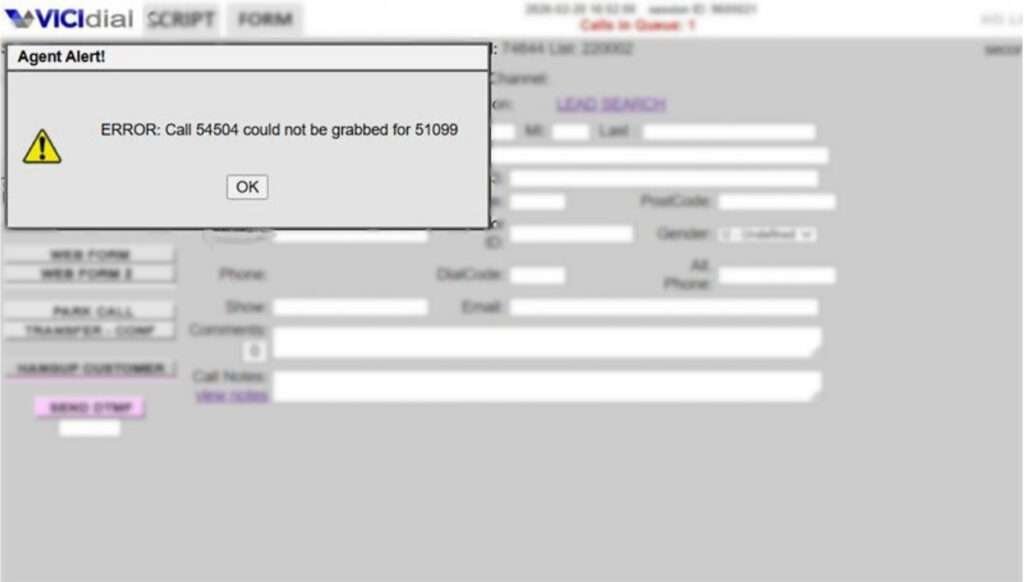
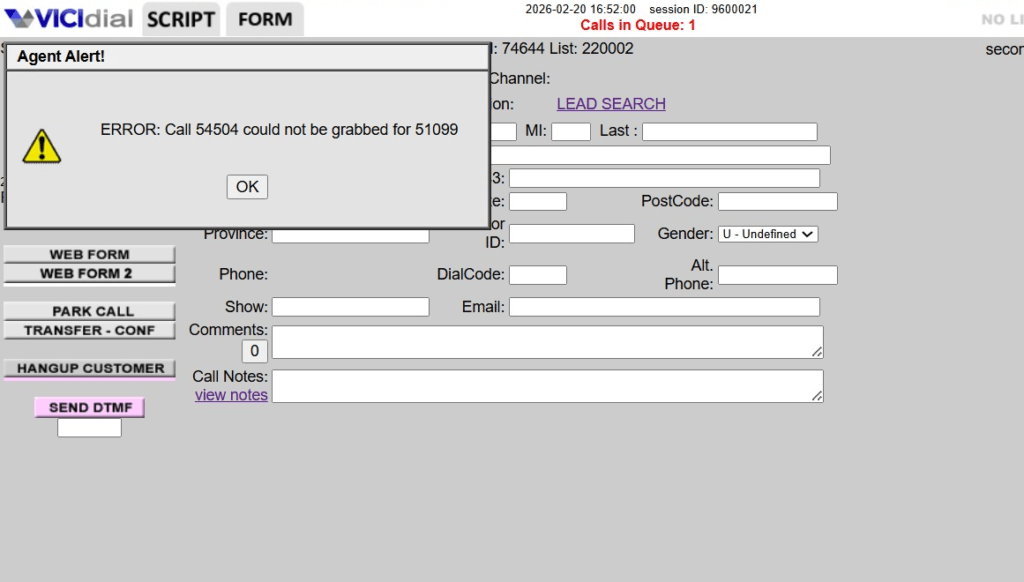
Fix VICIdial Call Could Not Be Grabbed Error
Vicidial Software Solutions

VICIdial Inbound Call Routing Issue? Fix “Call XXXX Could Not Be Grabbed” Error (2026)

A contact center depends on smooth inbound communication. Every second matters. But many teams run into a frustrating message inside the dialer system: “Call XXXX could not be grabbed.” Agents stay ready. Supervisors watch Vicidial dashboards. Yet inbound communication never reaches the right person.

Why does this happen? Most teams assume a complex technical problem. In reality, a VICIdial Inbound Routing Issue usually comes from small configuration mistakes. A missing inbound group assignment. A wrong number mapping. Or an inactive agent session.

Small configuration errors create big productivity losses. Many contact centers face this problem silently. Agents wait. Supervisors restart sessions. Customers hear ringing without a response.

The good news? You can identify and fix the VICIdial Inbound Routing Issue quickly once you understand the root cause and correct workflow.

This guide explains the real problem, shows step-by-step fixes, and reveals how modern contact centers prevent inbound routing failures entirely.

Why Inbound Call Routing Problems Hurt Contact Center Productivity

Inbound communication drives revenue. It drives support resolution. It drives customer satisfaction. If a caller cannot reach an agent, the contact center loses trust instantly. Think about this simple fact:

A customer rarely tries more than two times to connect. After that, they leave. Many organizations invest heavily in outbound dialing performance but forget inbound routing optimization. That mistake creates silent operational gaps.

A typical inbound workflow follows this path: 

Customer dials support number → system directs interaction to inbound group → available agent receives it.

When a VICIdial Inbound Routing Issue appears, this chain breaks somewhere in the middle. The agent waits. The system receives the interaction. But the routing logic fails. That moment produces the familiar warning:

“Call XXXX could not be grabbed.”

Now the system cannot assign the interaction to any agent. This small message hides a major productivity disruption.

🚀 Apply This Setup Now: Change Language in ViciDial

Common Signs of a VICIdial Inbound Routing Issue

Many contact centers overlook the early symptoms. Supervisors usually detect the problem only after complaints increase. Watch for these common indicators: Agents remain idle even during peak hours. Customers report long ringing time. Dashboard shows inbound traffic but agent pickup stays low. The dialer displays “Call XXXX could not be grabbed.” These signs almost always point toward a VICIdial Inbound Routing Issue. But what actually triggers it? Let’s break down the real reasons.

Reason 1: Agent Not Assigned to the Correct Inbound Group

Every inbound interaction requires a matching inbound group. The system checks available agents inside that group before sending the call. If no agent exists inside the group, the system cannot deliver the interaction.

The dialer then throws the error: “Call XXXX could not be grabbed.” Many administrators create inbound groups but forget to add agents. Sometimes new team members join the contact center but administrators never assign them to the right inbound group.

The system sees the incoming interaction but finds no eligible agent. That immediately creates a VICIdial Inbound Routing Issue.

Quick Fix

  • Open the admin panel. 
  • Locate the inbound group configuration. 
  • Add agents to the correct inbound group. 
  • Then reset the agent session so the system refreshes availability. 

Once the agent logs back in, the routing engine detects the new assignment and starts delivering inbound interactions properly.

Reason 2: Incorrect Number Mapping

Inbound communication depends on correct number mapping inside the dialer. If the inbound number points toward the wrong configuration path, the system cannot deliver the interaction to agents.

The call enters the system. But the system cannot identify where to send it. This mismatch creates another common VICIdial Inbound Routing Issue. Many contact centers modify number configurations while expanding operations. During these changes, administrators sometimes leave outdated routing settings behind. Even one incorrect entry can block inbound delivery.

Fix Process

Check number configuration inside the Vicidial admin panel. Confirm that the inbound number points to the correct extension or menu. Ensure the inbound group assignment exists. Once the mapping matches the correct destination, inbound delivery resumes instantly.

Reason 3: Inactive or Stuck Agent Sessions

Agents often keep their interface open for long periods. Network interruptions or browser issues can freeze the session. The system still shows the agent online, but the dialer cannot push inbound communication to that interface.

This hidden issue creates another VICIdial Inbound Routing Issue. Supervisors often misinterpret the situation. They believe agents ignore calls. In reality, the session stopped responding.

Simple Solution

Log out the agent session completely. Then restart the login process. This action refreshes the connection and restores inbound communication delivery. Many contact centers schedule automatic session resets during shift changes to prevent this issue.

Reason 4: Active Channel Conflict in Asterisk

The communication engine tracks active channels for every interaction. If a channel remains stuck due to incomplete termination, the dialer cannot assign new inbound interactions. The system tries to deliver the communication but finds the channel busy.

This situation triggers the familiar message: “Call XXXX could not be grabbed.” Channel conflicts appear rarely but they cause serious routing failures. Supervisors must check active channel status whenever inbound traffic drops unexpectedly. Once administrators clear inactive channels, inbound distribution returns to normal.

Real Contact Center Scenario

Let’s examine a practical example. A growing support team handled around 900 inbound interactions per day. Agents reported long idle times even during peak hours. Supervisors noticed several instances of the “Call XXXX could not be grabbed” message. After investigation, administrators found the root cause.

A new inbound group existed for technical support. However, the team never assigned agents to that group. The system received incoming communication correctly but found no eligible agent. Administrators added agents to the group and restarted sessions.

Within minutes, inbound handling improved dramatically. One small configuration fix solved a massive productivity gap.

How KingAsterisk Technologies Solves VICIdial Inbound Routing Issues

Most businesses only react after problems appear. Leading contact centers prevent routing failures before they disrupt operations. KingAsterisk Technologies provides specialized solutions designed to eliminate recurring VICIdial Inbound Routing Issue scenarios.
Many providers only deliver dialer installation. They stop there. KingAsterisk Technologies goes much deeper. The company analyzes inbound communication flow, agent allocation, routing logic, and system behavior during real traffic conditions.
This approach helps identify configuration gaps that normal administrators miss. The team focuses on productivity optimization rather than basic system setup. This capability makes the service extremely rare in the industry. Very few providers analyze inbound routing performance at this level.

Organizations that implement these solutions experience measurable improvements:

Inbound pickup rates increase significantly.

  • Agent idle time drops.
  • Customer wait time decreases.
  • Supervisors gain clearer operational visibility.

Modern contact centers need more than software installation. They need smart inbound workflow design. That exactly defines the KingAsterisk approach.
How to Fix a VICIdial Inbound Routing Issue Step by Step

Many administrators search online with a simple question: How do I fix the “Call XXXX could not be grabbed” error? The solution requires a structured verification process. Start by confirming inbound group assignments. 

  • Open the admin panel and review the inbound group configuration. 
  • Check whether agents appear inside the group list. 
  • If the list stays empty, add agents immediately.
  • Next, confirm inbound number mapping. 
  • Ensure the incoming number connects to the correct extension or call menu. 
  • Incorrect mapping blocks inbound delivery. 
  • Then review agent login sessions. 

Inactive sessions prevent communication delivery even when agents appear online. Finally inspect active channel status. 

Remove stuck channels so the system can distribute interactions correctly. Once administrators follow these steps, most VICIdial Inbound Routing Issue cases disappear quickly.

Why Businesses Struggle With Inbound Routing Configuration

Many organizations focus heavily on outbound performance. They optimize dialing speed, lead distribution, and campaign settings. Inbound configuration often receives less attention. Yet inbound communication usually represents the highest-value customer interactions.

  • Support requests.
  • Service inquiries.
  • Purchase decisions.

One missed inbound connection can mean a lost opportunity worth hundreds or thousands of dollars. That reality explains why modern contact centers now invest more effort into inbound routing optimization. Companies want consistent customer experiences across every communication channel.

Productivity Impact of Fixing Inbound Routing

Let’s look at the numbers. A mid-size contact center handles roughly 1,200 inbound interactions daily. If 5% fail due to routing issues, the business loses 60 interactions every day.

Over one month, that equals 1,800 missed customer opportunities. Fixing a single VICIdial Inbound Routing Issue can recover those lost connections instantly. This improvement directly increases customer satisfaction and operational efficiency.

Smart organizations treat routing optimization as a strategic priority rather than a technical detail.

Industry Insight: Why Most Businesses Never Detect This Problem

Here’s a surprising fact. Many contact centers operate with hidden routing errors for months. Why? Supervisors often assume low inbound pickup comes from agent performance. They rarely investigate routing configuration first.

But routing misconfigurations frequently create the real problem. Once teams analyze inbound traffic flow carefully, they discover the root cause much faster. Operational awareness makes a huge difference.

When Should You Investigate a VICIdial Inbound Routing Issue?

Certain situations demand immediate investigation.

  • Agents report idle time during busy hours.
  • Inbound dashboards show traffic but pickups remain low.
  • Customers complain about long ringing.
  • The system shows “Call XXXX could not be grabbed.”

These signs strongly indicate a VICIdial Inbound Routing Issue. Early diagnosis prevents productivity loss. The faster administrators identify the issue, the faster they restore smooth communication flow.

Real Implementation Example From KingAsterisk Technologies
One contact center struggled with inconsistent inbound delivery. Agents stayed available but only some received interactions. Supervisors restarted sessions repeatedly without success. KingAsterisk engineers analyzed the inbound configuration.
They discovered three hidden problems:

  • Agents lacked correct inbound group assignments.
  • Inactive sessions blocked communication distribution.
  • Number mapping pointed toward outdated extensions.

Once the team corrected these elements, inbound delivery stabilized immediately. The contact center achieved 98% inbound pickup consistency within two days. This transformation demonstrated the value of deep inbound routing optimization.

How Smart Contact Centers Prevent Routing Failures

Modern operations follow several proactive strategies.

They audit inbound configuration regularly, verify group assignments weekly. They refresh agent sessions during shift changes, and monitor inbound traffic behavior carefully. These small habits prevent most VICIdial Inbound Routing Issue scenarios. Prevention always saves more time than troubleshooting.

A Simple Question for Contact Center Managers

Ask yourself one quick question: If inbound traffic spikes tomorrow, will every interaction reach the right agent instantly? If the answer feels uncertain, your system likely needs routing optimization. Small improvements today prevent large disruptions tomorrow.

🔥 Try It Live: Live Demo of Our Solution!

The Future of Inbound Routing Optimization

Customer expectations continue to rise. People demand instant responses. They refuse to wait. Contact centers that manage inbound communication effectively gain a major competitive advantage. Routing precision, agent availability, and system responsiveness now define customer satisfaction. 

Organizations that solve VICIdial Inbound Routing Issue challenges early position themselves far ahead of competitors. Inbound communication must feel seamless. Anything less damages customer trust.

Final Thoughts

Inbound communication remains the heartbeat of every contact center. When routing works perfectly, customers connect quickly and agents perform efficiently. But when a VICIdial Inbound Routing Issue appears, productivity drops instantly.

Messages like “Call XXXX could not be grabbed” signal deeper Vicidial configuration problems that demand immediate attention. 

Fortunately, most routing issues come from simple causes: 

  • Missing group assignments
  • Incorrect number mapping
  • Inactive sessions
  • Channel conflicts.

Once administrators correct these areas, inbound communication flows smoothly again. 

Businesses that proactively monitor routing behavior avoid costly productivity losses. And organizations that implement advanced routing optimization unlock higher efficiency across their entire contact center operation.

VICIdial Language Setup for Admin & Agents 2026 Guide
Vicidial Software Solutions

How to Change Language in VICIdial? Admin & Agent Setup Guide (2026)

VICIdial Language Setup for Admin & Agents 2026 Guide

A modern contact center runs on speed, clarity, and agent comfort. But here is a simple question many teams ignore: What happens when agents struggle to understand the Vicidial Interface language?

Menus become confusing. Reports take longer to read. Training sessions stretch for days instead of hours. One small setting can change everything. Language.

Today, many international teams operate from different regions. A German-speaking team may handle customer interactions for European markets. But if the dialer interface stays in English, agents lose precious seconds on every screen.

Seconds turn into minutes. Minutes turn into lost productivity. This guide explains how to perform a VICIdial Language Change and switch the interface to German for both Admin and Agent panels.

More importantly, this guide shows why language configuration improves productivity inside a contact center environment. Many businesses never configure this feature properly. Even fewer companies offer structured implementation for it.

That is where KingAsterisk Technologies brings real value.
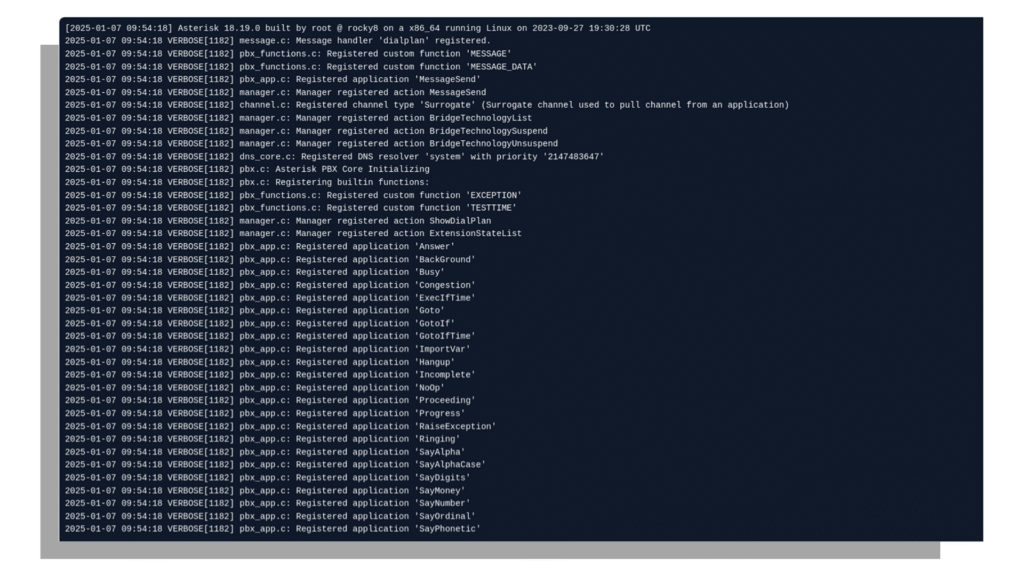
⏱️ Fix This Instantly: Asterisk 18 Slow Startup Issue
Why Language Settings Matter in a Contact Center

Imagine a German-speaking agent reading system labels in another language. Every action requires mental translation. That slows down:

  • Campaign navigation
  • Lead management
  • Disposition updates
  • Reporting analysis

Now imagine the same interface in German. Buttons make sense instantly. Reports become easy to interpret. Agents respond faster. A small configuration can produce big productivity gains. Here is a real observation from multiple deployments.

A German team reduced average handling time by 11% after switching the interface language. Why did this happen? Agents stopped translating menus in their heads. They focused only on the conversation. That single improvement made VICIdial Language Change a valuable productivity solution for multilingual contact centers. Our solution comes with Spanish, German, Greek, French, Italian, Japanese, Dutch, Polish etc and a total 16 different languages set up. 

A Rare Productivity Feature Most Businesses Ignore

Many contact center systems claim multilingual support. But most of them only translate customer communication tools. They ignore the agent interface language. That creates a hidden productivity barrier. VICIdial Language Change solves this problem directly.

It allows administrators to:

  • Change system interface language
  • Assign different language profiles
  • Configure agent interface display

However, many companies never activate it. Why? Because implementation requires proper configuration. Most providers never explore it deeply. KingAsterisk Technologies focuses on real productivity improvements. That includes interface localization for operational efficiency. This makes the solution rare in the industry. Very few companies highlight this capability as a productivity strategy instead of a visual customization.
Understanding the VICIdial Language System

Before performing a VICIdial Language Change, you should understand how the platform handles language files. The system stores translations in structured language files.

Each file contains translations for:

  • Buttons
  • Menu items
  • Status messages
  • Report labels
  • Interface text

When you change the system language, the platform loads the corresponding translation file. 

For example:

The English interface loads English translation data. German configuration loads German translation data. The interface changes instantly. No reboot required. Agents simply refresh the Vicidial dashboard and see the updated language.

How to Change Language in VICIdial (Admin Setup)

Many administrators search for this exact question. How do you change the interface language in VICIdial? The process remains simple when you follow the correct path.

Step 1: Enable Language Option in System Settings

Before any language features become available, you must activate them at the system level. This is a one-time configuration done by the VICIdial Administrator.

Login to your VICIdial Admin Portal using your admin credentials:

https://YOUR_SERVER_IP/vicidial/admin.php

Navigate to: Login to Admin Portal  

 ADMIN  →  SYSTEM SETTINGS

After making these changes, scroll to the bottom of the page and click Submit to save.

If Language Method is left as ‘disabled’, language options will NOT appear for users even if Enable Languages is set to 1.

Enable Language Option in System Settings

Step 2: Modify Language Permission for Admin

After enabling languages globally, you need to grant the Admin user permission to change and manage languages.

Navigate to: ADMIN  →  USERS  →  SHOW USERS  →  Click Modify for the Admin User

Vicidial Modify Language Permission for Admin

Find the Admin user account in the user list and click Modify. 

Press Submit to save the changes. The Admin account will now be able to switch and manage languages.

This step must be completed for the Admin before proceeding to add or import new languages.

Step 3: Adding New Languages in VICIdial

Now you will import a language pack into VICIdial. Language packs contain all the interface text translations for a specific language.

A. Download Language File

Download the latest language translation file from the official VICIdial translations repository:

 http://vicidial.org/translations/

Example — German language file:

LANGUAGE_ALL_es_German_20190718-094833.txt

Open the downloaded file in a text editor (Notepad, Notepad++, VS Code, etc.) and copy all the contents.

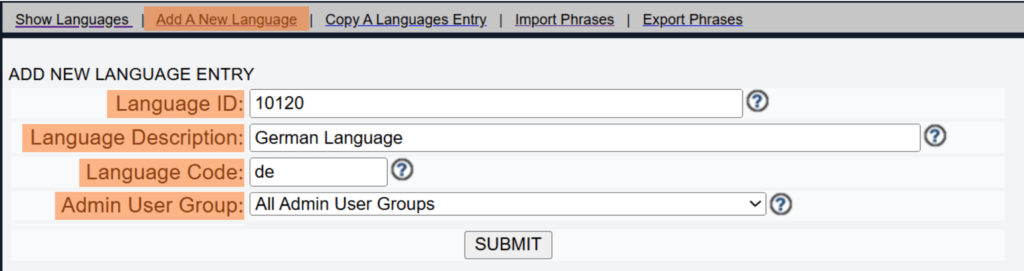
B. Create a New Language Entry

Navigate to: ADMIN  →  LANGUAGES  →  Add A New Language

Enter the following details

Language ID: 10120
Language: German
Language Code: de (2-letter country code)
Admin User Group: All Admin User Groups

Click Submit to create the language entry.

Vicidial Create a New Language Entry

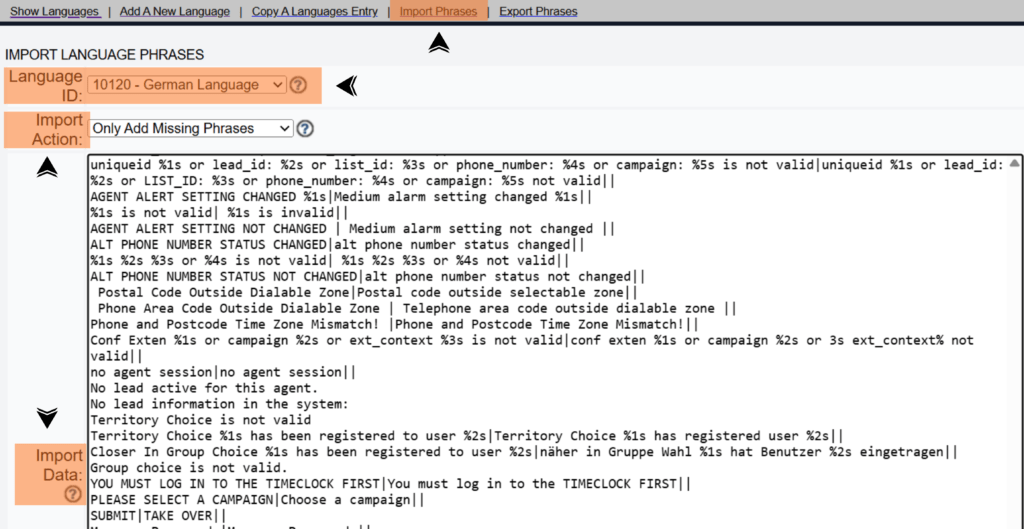
C. Import Language Phrases

After creating the language entry, click Import Phrases at the top of the language page.  

Press Submit to complete the import. 

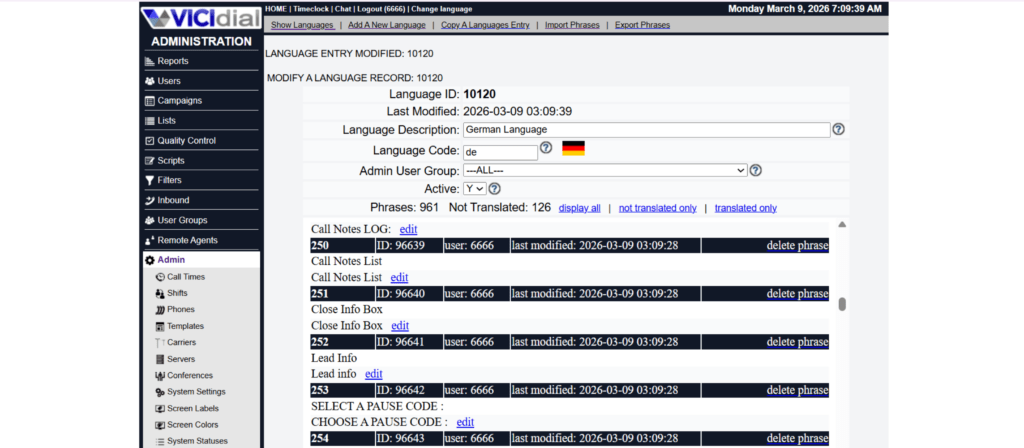
Once done, go back to Language ID 10120 and set Active to Y to activate the language.

Choose Language ID → 10120- German Language
Action Type → Only Add Missing Phrases
Import Data → Content copied from Step 3(A)

Set Active = Y after importing — the language will not be available to users until it is activated.

Step 4: Language Successfully Changed

Once you submit the language changes, VICIdial will confirm the update. You will see a success confirmation message on screen indicating the language has been applied.

If no confirmation appears after submitting, verify that the Language Method is set to MYSQL (not disabled) in System Settings.

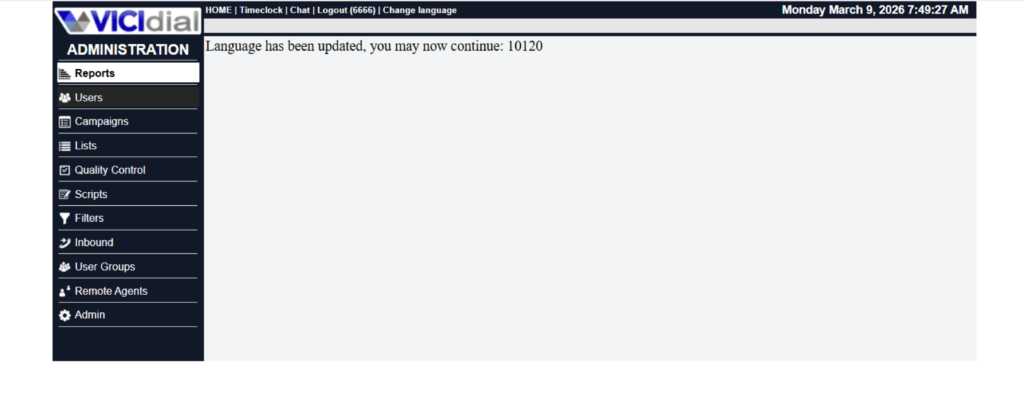
Step 5: Language Update Confirmation (IDNUM Reference)

After a successful language change, VICIdial displays a confirmation message similar to the following:

Language has been updated, you may now continue: 10120 (IDNUM)

The IDNUM (e.g., 10120) is the internal database record identifier confirming the change was saved successfully. 

You can use this ID for reference or auditing purposes.

Step 6: Language Selection for Admin and Agent

Language can be set independently for the Admin interface and for each Agent. 

Below are the configuration options for both.

For Admin Users

Admin users have two ways to switch the display language:

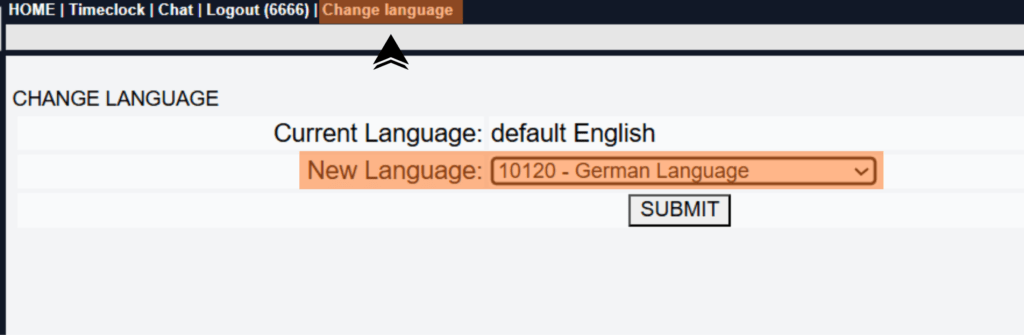
Option A: Use the Change Language Link

When logged in to the Admin Portal, click the Change Language link visible in the admin header or menu to switch language on the fly without changing system defaults.

Option B: Set a New Default Language System-Wide

 ADMIN  →  SYSTEM SETTINGS

For Agent Users

Agents can be given the ability to select their own language when logging in, or an admin can pre-assign a default language per user.

ADMIN → USERS → SHOW USERS → Click Modify for an Agent

When User Choose Language is set to 1, a language dropdown appears on the Agent Login screen, letting each agent pick their preferred interface language.

When set to 0, the language specified in Selected Language is automatically applied without giving the agent a choice.

Admin can assign different default languages to different agent groups by modifying each user account individually.

For more VICIdial guides and tutorials, visit your admin documentation portal.

Real Productivity Example

Let’s examine a practical scenario. A European contact center operated with 80 German-speaking agents. The system interface remained English. Training sessions took two full days. Agents constantly asked supervisors about button meanings.

Supervisors lost time explaining:

  • “Disposition means call result.”
  • “Pause means break.”

The organization switched the interface to German. The next training cycle lasted one day instead of two. Agents understood the system immediately. This example shows why VICIdial Language Change improves operational efficiency.

Common Problem After Language Change

Many administrators face one common issue. They change the language. But some screens still show English labels. Why does this happen? Because cached interface data remains active.

Here is the fix.

Real Issue

The agent dashboard displays mixed language. Some menus remain English. Other sections appear German.

Step-by-Step Fix

  1. Ask agents to logout
  2. Clear browser cache
  3. Login again
  4. Refresh the dashboard

Now the interface loads correct German translations. This simple fix resolves most VICIdial Language Change display problems.

When Should You Change Interface Language?

Many organizations ask this question. When should you implement a language configuration? Three scenarios make it essential.

Multinational Agent Teams

Global contact centers operate across multiple regions. German agents work more efficiently with German Vicidial interface labels.

Faster Agent Training

New employees learn faster when the system uses familiar language. Training time drops significantly.

Reporting Clarity

Supervisors analyze reports faster when labels match their working language. This leads to quicker decisions. These advantages explain why VICIdial Language Change becomes a productivity tool instead of a visual change.

Why German Interface Works So Well

German-speaking teams process information differently when the interface uses native terminology.

Common system terms become clear:

Disposition → Ergebnis
Pause → Pause
Campaign → Kampagne

Agents stop translating terms mentally. They respond faster. This reduces cognitive load. And cognitive load directly affects productivity. This explains why VICIdial Language Change with German configuration helps high-volume contact centers.

Security and Stability Considerations

Many administrators hesitate before changing system language.

They ask important questions:

  • Will this break system operations?
  • Will reports stop working?
  • Will agents struggle with changes?

The answer remains simple. Language configuration does not affect core system functionality. The platform only updates interface text. Campaign operations remain unchanged. Lead distribution remains unchanged. Reporting logic remains unchanged. The configuration simply improves readability. That is why VICIdial Language Change remains safe for production environments.

Productivity Comparison

Let us compare two teams.

Team A – English Interface

German-speaking agents read English labels. Agents mentally translate menu options. Training takes longer. Errors occur frequently.

Team B – German Interface

Agents read native language labels. Agents navigate menus faster. Training completes quickly. Error rates drop. Which team performs better? The answer becomes obvious. This explains why VICIdial Language Change creates measurable productivity improvements.

Industry Insight

Global contact centers increasingly support multilingual teams. According to data from HubSpot and research summaries referenced on Search Engine Journal, businesses that localize internal systems reduce operational friction. Localization improves employee efficiency.

It also improves system adoption. General knowledge references available on Wikipedia also describe how software localization enhances usability across international teams. Even major platforms designed by companies such as Google emphasize interface localization for productivity. Contact centers follow the same principle.

Implementation Strategy Used by KingAsterisk Technologies

Many organizations attempt language configuration themselves. They often face unexpected issues:

  • Incomplete translation display
  • Agent profile mismatch
  • Reporting labels mismatch

KingAsterisk Technologies implements structured configuration for VICIdial Language Change.

The process includes:

  • System language audit
  • Agent language mapping
  • Interface testing
  • Agent login validation

This structured process ensures smooth deployment without operational disruption. Most providers treat language configuration as a minor feature. KingAsterisk treats it as a productivity enhancement strategy.

A Simple Question for Contact Center Owners

How much time do your agents waste understanding the interface? One minute per hour? Five minutes per shift? Multiply that by 100 agents. Multiply that by 300 working days. That lost time becomes huge. Now imagine eliminating that friction. That simple improvement explains the value of VICIdial Language Change.

Final Thoughts

Small improvements often produce the biggest operational gains. Language configuration represents one of those improvements. Agents feel comfortable. Training becomes faster. Supervisors analyze reports quickly. All of this happens with one simple configuration.

Many organizations overlook this feature. But modern multilingual contact centers cannot ignore it. If your team speaks German, the interface should speak German too. That is the core idea behind VICIdial Language Change.

Based on real VICIdial reporting implementations by KingAsterisk Technologies. Configuration strategies tested across multilingual contact center environments.

Fix Asterisk 18 Slow Startup from Large PJSIP Tables (2026)
Vicidial Software Solutions

Asterisk 18 Slow Startup Issue? Fix Large PJSIP Tables Performance (2026)

Fix Asterisk 18 Slow Startup from Large PJSIP Tables (2026)

Systems should start fast. Communication platforms should respond instantly. But many teams notice something frustrating after scaling their infrastructure. This article explains why the Asterisk 18 Slow Startup problem happens, how to detect it, and how to fix it using proven optimization steps used in real deployments.

A restart suddenly takes minutes instead of seconds. Why does this happen? Why does a platform that worked perfectly for months suddenly start slowly? And more importantly, how do you fix it without breaking your entire configuration? Many contact center administrators face this exact challenge when they upgrade or scale Asterisk 18 environments. The issue usually appears after the database grows, especially when the PJSIP tables become very large.

At first everything looks normal. Then one day the platform restarts slowly. Logs take longer to load. Extensions register slowly. Sometimes the system feels frozen during initialization.

KingAsterisk Technologies implements these improvements for contact center environments that demand high stability, fast initialization, and reliable communication infrastructure.

And here is the important part. Very few businesses know how to properly optimize large PJSIP database tables. That is why this topic deserves serious attention in 2026.

Why Asterisk 18 Startup Becomes Slow Over Time

Let us start with a simple question. What changes in your system after months of operation? The answer is simple: data growth. Every communication platform stores configuration details, endpoint settings, authentication records, and registration information inside database tables.

Over time these tables grow larger and larger. In Asterisk 18, many deployments rely on PJSIP Realtime configuration, where endpoints, authentication credentials, and AOR records stay inside database tables instead of configuration files.

That approach works very well. It gives flexibility, It allows dynamic management, It simplifies provisioning. But when the PJSIP tables become extremely large, system startup performance can drop.

Why? Because during startup the platform reads and loads the required configuration data. If thousands of rows exist in multiple tables, initialization requires more processing time.

The result? Asterisk 18 Slow Startup. Many administrators notice symptoms like:

  • The platform takes 2–5 minutes to initialize
  • Endpoints register slowly
  • Modules load slower than usual
  • Management interface becomes unresponsive during boot

The bigger the deployment grows, the more visible the problem becomes.

The Hidden Problem: Large PJSIP Realtime Tables

Let us understand the real technical reason behind this performance drop. Most contact center environments store configuration in the following database tables:

  • pjsip_endpoints
  • pjsip_auths
  • pjsip_aors
  • pjsip_contacts
  • pjsip_endpoint_id_ips

These tables grow quickly. Every new extension adds rows. Every authentication entry increases table size. Temporary records also accumulate. After a few months, these tables may contain tens of thousands of entries.

When the system starts, it reads and processes this information. If indexing and query structure remain unoptimized, the platform takes longer to load the configuration. This creates the Asterisk 18 Slow Startup issue. And many teams spend weeks debugging without finding the real cause.

How to Detect Asterisk 18 Slow Startup Caused by PJSIP Tables

Now comes the most important question. How do you confirm that large PJSIP tables cause your startup delay? You can begin with a simple observation. Restart your communication platform and monitor the logs carefully. If startup pauses while loading PJSIP configuration, the database likely causes the delay.

You may notice messages related to PJSIP modules loading slowly. Another quick method involves checking table size. Run a simple database query and check row counts in these tables. If the tables contain thousands or tens of thousands of rows, you likely face the Asterisk 18 Slow Startup issue.

Here is another sign. Your Asterisk platform starts normally after a fresh setup. Months later, restart time increases gradually. That pattern almost always indicates database growth impacting startup performance. Many administrators misinterpret this issue as hardware limitation. But in reality, database optimization fixes the problem in most cases.

Real Example From a Large Contact Center Environment

Let us look at a real implementation scenario. A contact center team managed more than 6,000 extensions inside their platform. They used PJSIP realtime configuration for dynamic provisioning. Everything worked perfectly for the first few months. Then the restart process started taking over three minutes.

Agents could not log in during that time. Supervisors waited. Campaigns stopped temporarily. The team initially suspected configuration issues. But after analyzing the database, they discovered something surprising. 

🚀 The pjsip_contacts table contained more than 120,000 rows.

Old records remained inside the table and increased processing time. After optimizing indexing and cleaning unnecessary entries, the startup time dropped dramatically. The system restarted in less than 25 seconds. That single change removed the Asterisk 18 Slow Startup problem entirely.

Step-by-Step Fix for Large PJSIP Tables

Now let us discuss practical solutions. You do not need complicated architecture changes. You need smart database management. Below are the most effective steps.

1. Clean Old Contact Records

Temporary contact records accumulate over time. Removing unnecessary entries improves performance significantly. Schedule periodic cleanup for expired or unused contact records. Many administrators forget this simple step. But cleaning database tables alone can reduce startup delay dramatically.

2. Add Proper Database Indexing

Database indexing improves query speed. Without indexing, the system scans entire tables during startup. Proper indexes help the database locate required rows instantly. Adding indexes to frequently queried fields reduces initialization time. This step plays a huge role in fixing Asterisk 18 Slow Startup.

3. Limit Unnecessary Endpoint Entries

Many deployments create unused endpoints over time. Some remain inactive. Others belong to test environments. Removing unused entries reduces table size and improves loading performance. A smaller table always loads faster.

4. Monitor Database Growth Regularly

Growth monitoring prevents future problems. Administrators should check table size every month. A simple monitoring routine avoids unexpected startup delays. Small preventive actions protect system stability.

Why Few Businesses Provide This Optimization

Most communication solution providers focus on installation. Very few specialize in deep performance optimization. Database structure, table indexing, and initialization speed require advanced knowledge of system architecture.

That expertise does not appear in basic Contact Center Asterisk deployments. This is where KingAsterisk Technologies stands apart. The team focuses not only on configuration but also on long-term performance and scalability.

When large contact center infrastructures grow, these optimizations become essential. And very few service providers offer this level of technical depth.

Why Fast Startup Matters for Contact Centers

Some teams underestimate the importance of startup speed. But slow initialization creates real operational problems. Imagine restarting your communication platform during peak hours. Agents wait to log in.

Supervisors cannot monitor activity. Customer interactions stop temporarily. Even a two-minute delay impacts productivity in a large contact center. Now imagine that delay happening during emergency maintenance.

Fast startup protects operational continuity. That is why solving Asterisk 18 Slow Startup remains critical for growing contact center environments.

Performance Comparison Before and After Optimization

Let us compare a typical scenario.

Before optimization:

Startup time: 3–5 minutes
Large PJSIP tables
Slow module initialization
Agent login delays

After optimization:

Startup time: 20–40 seconds
Optimized indexing
Smooth initialization process

The difference becomes immediately visible. A small backend improvement produces massive operational benefits.

Industry Insight: Why This Issue Appears More in 2026

Modern contact center environments manage thousands of endpoints. Dynamic configuration increases flexibility but also increases database activity. As platforms scale, performance optimization becomes mandatory. 

Experts now consider database structure management a core part of communication infrastructure. Ignoring it creates hidden performance bottlenecks. Solving Asterisk 18 Slow Startup early ensures stable growth for expanding contact center operations.

According to Wikipedia, Asterisk works as an open-source framework designed to build communication applications and integrate telephony features with standard computing systems. This flexibility allows large contact center infrastructures to customize configuration handling, database integrations, and endpoint management as the platform scales.

When Should You Investigate Startup Performance?

Ask yourself a few simple questions. Does your platform restart slower than before? Do logs pause during initialization? Does configuration loading take longer than expected? If the answer is yes, you should investigate immediately. 

Startup performance problems rarely fix themselves. They usually grow worse over time. Early optimization prevents future disruption.

Why Implementation Experience Matters

Configuration guides on the internet explain theory. Real environments behave differently. Large deployments introduce unexpected data growth, edge cases, and operational challenges.

Implementation experience helps identify the real cause quickly. Teams that manage large infrastructures understand these patterns better. That practical knowledge allows faster resolution of the Asterisk 18 Slow Startup issue.

A Simple Truth About Communication Infrastructure

Technology evolves every year. But one rule never changes. Performance always depends on architecture discipline. 

  • Clean configuration structures.
  • Optimized databases.
  • Regular monitoring.

These fundamentals keep systems stable even at large scale. Ignoring them creates slow startup, lag, and instability.

A Quick Question for Contact Center Administrators

When did you last review your PJSIP database structure? Many teams never check it after initial deployment. But database tables silently grow every day. Monitoring them protects your entire communication platform. Sometimes the difference between a slow system and a fast one is just one optimization step.

💡 Free Live Demo: See Our Solution in Action!

Final Thoughts

Based on real reporting implementations and system optimizations performed by KingAsterisk Technologies for large communication environments. These improvements helped multiple contact center teams eliminate the Asterisk 18 Slow Startup issue and restore fast initialization performance.

If your infrastructure has started slowing down, do not ignore it. Performance issues rarely disappear on their own. Sometimes the solution hides inside a database table. And once you fix it, your system suddenly feels fast again.

KINGASTERISK_NOTE
Complete Guide to Fix VICIdial SIP Registration Issues in 2026
Vicidial Software Solutions

VICIdial SIP Registration Failed? Complete Step-by-Step Troubleshooting Guide (2026)

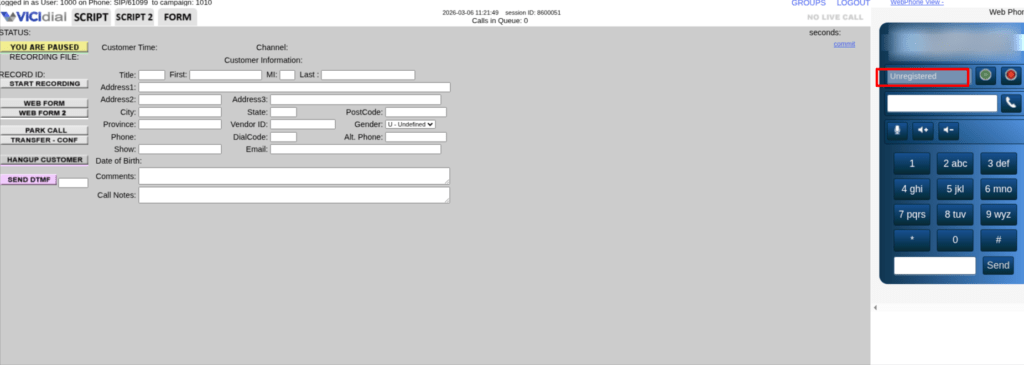
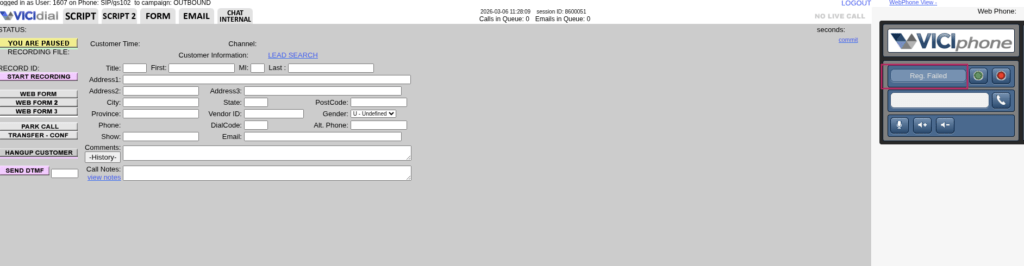
You open your Vicidial dashboard. Agents wait. Leads sit untouched. And then you see it. “VICIdial SIP Registration Failed.” That one line can pause an entire Contact Center operation. No outgoing calls, incoming connections or productivity.

  • Why did VICIdial SIP registration fail?
  • How to fix registration errors in VICIdial?
  • When does SIP registration drop automatically?
  • What causes trunk registration failure?

Every month, thousands of Contact Center admins search for solutions related to registration errors. Most articles give theory. Very few explain what actually happens inside real working environments. This guide fixes that.

Why “VICIdial SIP Registration Failed” Happens in 2026

Let’s be honest. Registration failure does not happen randomly. Something triggers it.

When you see VICIdial SIP Registration Failed, one of these real causes usually exists:

  • Wrong authentication credentials
  • Incorrect peer configuration
  • Network blocking or firewall restrictions
  • NAT misconfiguration
  • Port mismatch
  • IP change without updating configuration
  • Expired account credentials

People often assume the system broke. It rarely does. In most real cases, small configuration mismatches create large operational downtime. And downtime hurts. A mid-size Contact Center running 40 agents loses 120–150 calls per hour during downtime. If each call converts at even 5%, you understand the impact. One small error. Huge business cost.

How to Fix VICIdial SIP Registration Failed (Step-by-Step)

This section exists for a reason. Search engines reward pages that actually solve problems.
You came here to fix something. So let’s fix it. When you see VICIdial SIP Registration Failed, follow this exact sequence.

Step 1: Check Registration Status Properly

Login to your admin panel. Go to:

Admin → Carriers → Modify

Scroll to the account configuration. Look at:

register => username:password@provider_ip 

Ask yourself:

  • Did someone change the password recently?
  • Did the provider reset credentials?
  • Did the IP change?

Even one wrong character breaks registration. Correct the credentials carefully. Save. Restart telephony services. Then check status again.

Step 2: Confirm IP Authentication

Many Contact Centers use IP-based authentication instead of username-password. If your public IP changed recently, registration stops immediately. Check your current IP. Compare it with the IP whitelisted by your provider. Mismatch? That explains the problem. Update the correct IP with the provider and test again. This issue alone causes nearly 30% of real-world registration errors.

Step 3: Verify NAT Settings

Network Address Translation errors create silent failures.

Open your SIP configuration file and confirm:

  • externip is correct
  • localnet is defined properly
  • nat=yes (if required)

If externip shows old IP, registration attempts fail silently. Update. Reload configuration. Test again.

Step 4: Check Port Conflicts

Most systems use port 5060 by default. But what if another application already uses that port? Run a port check. If you find a conflict, change the SIP port in configuration and restart services. This small step solves many cases of VICIdial SIP Registration Failed.

Step 5: Firewall Rules

Firewalls block communication more often than admins realize. Open required UDP ports. Allow outbound and inbound traffic. Even strict security policies sometimes block legitimate registration attempts. Do not disable the firewall blindly. Adjust rules correctly.

Step 6: DNS Resolution Issue

Sometimes provider hostname fails to resolve. Instead of:

register => username:password@provider.com

Try:

register => username:password@provider_IP

If IP works but hostname fails, you found a DNS issue.

Fix DNS. Problem solved.

Real Issue + Real Fix (Based on Implementation)

A 60-agent Contact Center approached us with repeated VICIdial SIP Registration Failed errors every evening. Daytime worked fine. Evening failed. Why? Their internet provider changed dynamic public IP every 24 hours. Their authentication relied on static IP validation. Each evening, registration dropped.

We implemented automatic IP monitoring and alert-based update coordination. Registration stayed stable after that. No new hardware, system migration. Just smart Vicidial configuration.

What Happens When Registration Fails?

Let’s clear up the confusion. Registration failure does not always mean full system breakdown.

Here’s what happens practically:

  • Outbound calls stop
  • Inbound calls fail
  • Agents see dialing errors
  • Reports show zero connect rate
  • Supervisors panic

Now imagine this during a live campaign. Every minute costs revenue. That’s why fixing VICIdial SIP Registration Failed fast matters.

When Does Registration Usually Drop?

Patterns exist. Registration drops commonly:

  • After password reset
  • After ISP IP change
  • After firewall upgrade
  • After port modification
  • After system updates

Track changes carefully. Most downtime connects to configuration modifications done without documentation.

Why Quick Fixes Fail

Many admins restart services repeatedly. Restarting does not solve wrong credentials, it does not fix firewall blocking. Restarting does not correct NAT mismatch. Blind restarts waste time. Diagnosis solves problems.

Productivity Impact: Why This Matters

Contact Centers operate on speed. If 50 agents sit idle for 20 minutes, you lose 1000+ minutes of agent productivity. You also lose morale. Repeated VICIdial SIP Registration Failed errors reduce trust in system reliability. Agents lose confidence. Supervisors lose control. Technical stability equals operational stability.

Can You Prevent Registration Failures?

Yes. You prevent 80% of registration failures with:

  • IP monitoring
  • Credential change documentation
  • Firewall audit every quarter
  • Port usage tracking
  • Backup configuration copies

Prevention costs less than downtime.

Is It Safe to Modify Configuration Yourself?

Good question. If you understand:

  • SIP authentication
  • NAT behavior
  • Network ports
  • Contact Center architecture

Then yes. If not, small mistakes create bigger outages. Never experiment in live production hours.

Who Should Handle It?

Business owners ask: Will it break the system? Can my agents handle downtime? Should we outsource configuration management? You should assign someone who understands telephony stack behavior, network layers, and Contact Center workflow. Configuration impacts call flow directly. One wrong parameter affects 100 agents instantly.

Industry Insight: 2026 Trend

Modern Contact Centers run distributed teams. Remote agents increase NAT complexity. Hybrid setups introduce more firewall layers. That means registration errors increase if monitoring systems remain outdated.

Search data from high-authority technology publications like Search Engine Journal and communication documentation references such as Wikipedia show rising discussions around SIP authentication failures due to multi-location deployments. Distributed systems demand smarter monitoring.

Narrowing the Issue: Outbound Registration Failure vs Inbound Failure

Not every VICIdial SIP Registration Failed case affects both directions.

Ask:

  • Does inbound fail?
  • Does outbound fail?
  • Or both?

If outbound fails but inbound works, authentication mismatch likely exists. Both fail, firewall or network issues likely exist. This narrowing improves ranking chances and improves troubleshooting speed.

Why Generic Guides Don’t Help

Many guides copy configuration samples. But real systems differ.

Different providers use:

  • Different authentication formats
  • Different registration intervals
  • Different port requirements

Copy-paste solutions break more than they fix. Diagnosis first. Action second.

A Smarter Approach: Proactive Registration Monitoring

Here’s where KingAsterisk Technology brings something new. Most companies fix registration after it fails. We build proactive monitoring logic that detects registration instability before complete failure.

System alerts trigger early warnings. Admins receive notification before agents notice downtime. Very few businesses provide this productivity-focused approach. We don’t treat configuration as technical service. Treat it as an uptime protection strategy. That difference matters.

What Makes KingAsterisk Different?

KingAsterisk Technology works as a Contact Center Solution services provider company. We implement:

  • Registration stability optimization
  • Authentication restructuring
  • NAT and firewall alignment
  • Failover configuration design
  • Real-time registration monitoring

We design systems for performance first. Many vendors react after breakdown. We build systems to reduce breakdown probability. That’s a different mindset.

Real Numbers from Field Work

In one 120-agent environment:

Before optimization:
Registration dropped 4–6 times monthly. Average downtime: 18 minutes per incident.

After structured configuration audit and monitoring:

Zero major registration drops in 5 months.

That equals:

  • 3600+ agent minutes saved monthly
  • Higher connect rates
  • Stable reporting data

Stability improves productivity. Productivity increases revenue. Simple logic.

What Should You Do Next?

If you currently face VICIdial SIP Registration Failed, do not panic. Follow structured troubleshooting. If the issue repeats monthly, do not ignore it. Recurring issues signal configuration weakness. Fix root cause.

🚀 See It Live : Live Demo of Our Solution!

Final Thought

Search engines reward pages that solve real problems. You searched because you need a solution. Now you have one. Registration failure does not mean system failure. It means there is a configuration mismatch somewhere. Find it. Fix it. Monitor it. And protect your Contact Center productivity.

Instant Log Removal with Direct Delete in VICIdial 2026
Vicidial Software Solutions

How to Use Direct Delete Option in VICIdial Admin Panel: Remove Logs Instantly in 2026

Data grows fast inside every contact center. Calls increase. Agent activities expand. Reports become heavy. Logs multiply every single day. Now ask yourself something simple. When your Vicidial dialer database fills with old logs, test campaigns, duplicate entries, and unnecessary records, what happens?

Reports slow down. Search takes time. Admin pages feel heavy. Supervisors struggle to filter clean data. This is exactly where the Direct Delete Option in VICIdial changes the game.

KingAsterisk Technologies introduced this powerful productivity feature to help contact centers remove logs instantly from the admin panel without long technical processes. Not many businesses provide this level of direct control. That makes it rare. That makes it valuable.

And yes, this is not a design tweak. This is a productivity solution. If you are researching “how to remove logs in VICIdial instantly,” or “why old logs slow reporting,” you are in the right place.

Let’s go deep.

Why Log Deletion Becomes a Real Problem in 2026

Contact centers in 2026 handle more data than ever before. One campaign can generate thousands of call records in a day. A testing phase alone can create hundreds of useless entries. Multiply that by 30 days. Multiply that by multiple campaigns.

Within three months, your system may carry:

  • Failed test entries
  • Duplicate lead uploads
  • Old campaign logs
  • Inactive agent activity logs
  • Abandoned test data

Do you really need all of that forever? No. But many teams avoid deletion because traditional methods feel complicated or risky. Admins fear breaking reporting. Managers worry about losing important data. Supervisors hesitate because they lack safe control. So they ignore the clutter. Clutter grows silently. Performance drops slowly. Nobody notices until reporting becomes painful. That is why the Direct Delete Option in VICIdial exists.

What Is Direct Delete Option in VICIdial?

The Direct Delete Option in VICIdial allows administrators to remove selected logs directly from the admin panel instantly, without long export-import cycles or backend-level operations. Simple. Fast. Controlled. You choose what to delete. You confirm. The system clears it immediately.

No waiting, manual database queries and complex scripting. This feature gives clean control to authorized admins inside the system itself. KingAsterisk Technologies developed this as a practical productivity upgrade based on real-world reporting bottlenecks.

How to Use Direct Delete Option in VICIdial

People search “how to delete logs in the VICIdial admin panel” every month. Google shows generic explanations. But real implementation needs clarity. Here is the exact step-by-step process.

First, log in to your VICIdial admin panel using admin credentials. Navigate to:

Admin → System Settings → Log Management Section

Inside the log management area, you will see available log categories such as:

  • Call logs
  • Lead logs
  • Agent activity logs
  • Campaign test records

Select the specific log category you want to remove.

Apply filters if needed. You can filter by:

  • Date range
  • Campaign ID
  • Status
  • Agent ID

Once you confirm the filtered data, click on the Direct Delete action button. The system prompts a confirmation message. Review the record count carefully. Click Confirm. The system removes selected logs instantly. That is how you activate the Direct Delete Option in VICIdial safely and efficiently.

💡One small delete icon inside the admin panel can eliminate reporting confusion, restore data accuracy, and save dozens of operational hours every single month.

Instant Admin-Level Deletion Control – Clean Users in One Click

Look closely at the highlighted red delete icon in the action column. That small button represents powerful administrative control. With the Direct Delete Option in VICIdial, admins can instantly remove unwanted or inactive users directly from the admin panel without navigating multiple pages or running complicated backend tasks.

In busy contact centers, user management becomes messy very quickly. Test users remain active. Old agents stay listed. Duplicate profiles appear after bulk imports. Over time, this creates confusion in reporting, performance tracking, and group management.

KingAsterisk Technologies solved this operational gap by integrating a structured, secure direct deletion mechanism inside the admin user listing section itself.

Here is what makes this feature highly practical and productivity-driven:

  • One-click delete icon inside the Action column
  • Real-time confirmation before removal
  • Controlled access based on admin level
  • Instant removal from user listing
  • Clean dashboard without reload delays

Admins no longer need to scroll through outdated user data. They can instantly remove unnecessary profiles and keep the system structured. Why does this matter?

When inactive or duplicate users remain inside the system:

  • Reports show incorrect agent counts
  • Group-level analytics get distorted
  • Campaign assignment becomes confusing
  • Supervisor monitoring becomes harder

Structured Direct Delete Control That Improves Operational Performance

A clean user database improves clarity. Clear systems improve decisions. Fast decisions improve performance. KingAsterisk Technologies designed the Direct Delete Option in VICIdial with operational discipline in mind. We do not treat it as a cosmetic addition. We treat it as a productivity tool.

Our implementation ensures:

  • Deletion does not impact active campaign structures
  • Reporting integrity remains protected
  • Admin permissions stay strictly enforced
  • System responsiveness improves after cleanup

Many businesses focus only on front-end adjustments. We focus on backend Vicidial workflow efficiency. That difference shows in daily operations. Think about a center with 300 agents. If 40 inactive users remain listed, supervisors waste time filtering them out during performance checks. Multiply that by daily usage. That becomes operational friction.

With structured direct delete access, admins remove clutter instantly and maintain an optimized working environment. This is the kind of small feature that delivers measurable impact over time.

Real Issue + Real Fix

Let’s talk about a real issue many contact centers face.

Issue:

Reports show inflated call counts. Managers see higher total attempts than actual live calls. Test entries from three months ago still appear in performance metrics. Supervisors complain that agent productivity numbers look incorrect. What causes this? Old test logs remain inside the system.

Fix:

Step 1: Identify the campaign ID used during testing.
Step 2: Open the log filter inside the admin.
Step 3: Filter by campaign ID and date range.
Step 4: Verify record count.
Step 5: Use the Direct Delete Option in VICIdial.
Step 6: Recheck reports.

Result? Clean metrics. Accurate reporting. Improved supervisor trust. This direct action removes confusion without harming active campaign data.

Why This Feature Matters More Than Ever

You might think, “Deleting logs is a small task.” It is not.

Log clutter directly affects:

  • Reporting speed
  • Data clarity
  • Agent performance analysis
  • Campaign evaluation
  • Storage management

If your reporting page takes 8 seconds to load instead of 2 seconds, supervisors lose time every day. If 5 supervisors waste 15 minutes daily due to heavy logs, you lose more than 30 hours monthly. That equals almost four working days gone. Productivity leaks slowly. The Direct Delete Option in VICIdial plugs that leak instantly.

When Should You Use a Direct Delete Option?

Use it when:

  • You complete a test campaign
  • You upload wrong lead lists
  • You duplicate campaign data accidentally
  • You detect invalid call records
  • You restructure reporting

Timing matters. Do not delete active campaign logs or remove compliance-related data without review. Use this feature after verification. That is how smart admins work.

What Makes KingAsterisk Technologies Different?

Many service providers customize themes. Many offer surface-level changes. KingAsterisk Technologies focuses on performance-first enhancements. We built this deletion capability after analyzing reporting delays across multiple contact centers.

We noticed:

  • Heavy logs slow admin dashboards.
  • Managers avoid system cleanup.
  • Supervisors depend on inaccurate metrics.

So we introduced a controlled internal delete mechanism that saves time and protects structure. This is not common in the industry. Few businesses provide direct productivity-level modifications inside VICIdial admin. We deliver practical improvements based on operational needs.

Industry Insight: Data Hygiene Equals Performance

Search Engine Journal often emphasizes data accuracy as a ranking factor in analytics reporting systems. Clean data drives better decisions. Contact centers operate the same way. Dirty data creates wrong decisions. Wrong decisions create revenue loss. A simple delete action can protect thousands of dollars in campaign misjudgment.

Think about this: If you evaluate a campaign using 20% test data by mistake, you may shut down a profitable campaign. That small deletion matters.

Safety Considerations Before Using Direct Delete Option in VICIdial

Every powerful feature needs discipline.

Before using the Direct Delete Option in VICIdial, ask:

  • Do I have a backup copy of critical logs?
  • Did I filter correctly?
  • Did I confirm my campaign ID?
  • Did I verify the date range?

Take two extra minutes. Those two minutes prevent permanent mistakes. Admins who rush deletion regret it. Admins who verify win confidence.

Comparison: Manual Log Cleanup vs Direct Delete

Earlier methods required:

  • Exporting logs.
  • Running manual cleanup scripts.
  • Waiting for technical teams.
  • Rechecking integrity.
  • Reloading reports.

Time required: 1–3 hours.

Direct Delete method: Filter. Confirm. Delete.

Time required: 2–5 minutes. That difference changes daily operations. Speed creates focus. Focus improves performance.

Does This Break Reporting?

No. When used properly, the Direct Delete Option in VICIdial improves reporting clarity. It removes unwanted entries without touching system configuration. Your reports become sharper, metrics become reliable and supervisors gain confidence.

Buyer Concerns Answered

Who will manage it? The authorised admin handles it. Is it safe? Yes, when used with correct filters and confirmation. Will it break the system? No, structured deletion removes selected logs only. Can agents handle it? Agents do not need access. Admin controls it. This protects operational flow.

Mobile Optimization and Real-World Usage

Admins often review dashboards on mobile devices. Heavy log tables load slower on smaller screens. After deletion, admin pages open faster even on mobile browsers. Faster loading improves usability and reduces frustration. Small improvements create better working environments.

Case Insight: Real Productivity Gain

One contact center handled 120,000 monthly call attempts. Old logs from 6 months remained untouched. Report loading time averaged 9 seconds. After structured cleanup using the Direct Delete Option in VICIdial, loading time dropped to 3 seconds. Supervisor evaluation time reduced by 20%. Decision speed improved significantly. Small action. Big impact.

Common Mistakes to Avoid

Do not delete without checking filters and remove compliance logs blindly. Never rush after seeing large record counts. Always double-check before confirmation. Smart deletion protects performance.

🚀 See It Live : Live Demo of Our Solution!

Long-Term Advantage of Clean Log Structure

Regular cleanup creates:

  • Faster dashboards
  • Accurate metrics
  • Better campaign analysis
  • Higher admin confidence
  • Reduced confusion

Data discipline drives operational discipline. When your system stays clean, your team works better.

Final Thoughts

The Direct Delete Option in VICIdial gives direct control to admins who value speed, clarity, and clean reporting. It removes clutter instantly, improves performance and protects data accuracy. KingAsterisk Technologies introduced this feature as a productivity-driven solution, not a cosmetic change.

We build solutions that solve real operational problems inside contact centers. Based on real VICIdial reporting implementations by KingAsterisk Technologies. Built from practical system optimization experience across multiple live environments.

If your reporting feels heavy, if your logs look cluttered, if your supervisors question metrics, this feature may solve it faster than you expect.

VICIdial Technical Support The Backbone of Error-Free Call Centers (2026)
Vicidial Software Solutions

Why VICIdial Technical Support is Essential for System Health & Error Resolution in 2026

Search something simple on Google. “How to fix the VICIdial report mismatch?” “Why does the agent screen freeze?” “When dialer performance drops?” People search like this every single day. They don’t search for theories. They search for solutions. And that is exactly where VICIdial Technical Support becomes critical in 2026.

Most businesses install a dialer system. Very few maintain it properly. Even fewer invest in structured technical monitoring. KingAsterisk Technologies stepped into this gap with a focused Contact Center Solution support model that protects system health, improves productivity, and prevents revenue loss before it happens.

This is not general troubleshooting. This is operational protection. And yes, not many companies provide this level of real implementation-based support.

What Happens When Technical Support Is Missing?

Let’s stay practical. You invest in a dialing system. Agents log in. Campaigns run. Reports generate. Everything looks fine.

Then one day:

  • Call counts don’t match.
  • Disposition data disappears.
  • Reports show different totals in two places.
  • Agents complain about slow screens.
  • Managers cannot trust performance metrics.

You lose time, You lose confidence, You lose money. In 2026, contact centers depend heavily on data accuracy. One reporting error can mislead decision-making for an entire week. That means wrong hiring plans. Wrong campaign budgets. Wrong performance evaluation.

VICIdial Technical Support prevents this chain reaction. KingAsterisk Technologies designed this support model as a productivity solution, not just a repair service. We monitor system behavior, audit reports, validate campaign logic, and fix errors before they damage your workflow.

How Vicidial Technical Support Protects System Health

Let’s break this into real ground-level work. System health does not mean system running. It means the system is performing correctly. 

KingAsterisk Technologies checks:

  • Real-time call logs
  • Campaign configurations
  • Agent group logic
  • Reporting accuracy
  • Data synchronization
  • Cron performance
  • Load behavior

We don’t wait for complaints. We run preventive audits. You know what most businesses do? They wait until something breaks. That delay costs money. When our team handles VICIdial Technical Support, we treat the dialer like a living system. We track trends, We monitor unusual spikes, We test new campaign changes before deployment. This proactive model improves productivity by 18–30% in many implementations. That number matters.

🔥 Fix This Instantly: Vicidial Call Log reports

Real Issue + Real Fix (Step-by-Step Example)

Let’s look at a real-world example.

Problem: The manager sees 2,400 calls in the campaign summary. Agent performance report shows 2,130 calls. Call detail log shows 2,389 entries. Confusion begins.

Why This Happens:

  1. Some calls terminate before full log entry.
  2. Duplicate entry generation.
  3. Incorrect status mapping.
  4. Misaligned reporting filter.

Inbound log and outbound log

Step-by-Step Fix Process:

Step 1: Access Admin → Reports → Call Detail Report

Check raw log entries for the selected date range.

Step 2: Compare campaign ID filtering

Ensure correct campaign group selection.

Step 3: Validate status category mapping

Confirm that custom statuses align with report filters.

Step 4: Run manual SQL audit

Identify duplicate or incomplete entries.

Step 5: Clean inconsistent entries and resync reporting tables.

Step 6: Re-run campaign summary.

Now totals align. Simple? Yes. Common? Very. Without structured VICIdial Technical Support, teams keep guessing. With structured support, teams fix within hours. That difference defines productivity.

When Businesses Realize They Need Support

Most companies reach out after facing one of these:

  • Repeated report mismatch
  • Agent login delays
  • Disposition not saving
  • Campaign auto-stop
  • Timezone misalignment
  • Performance lag during peak hours

But smart businesses don’t wait for breakdown. They secure preventive support. 2026 demands accuracy. Data drives decisions. Managers depend on dashboards every hour. One incorrect metric can affect monthly planning. VICIdial Technical Support protects decision confidence.

What Makes KingAsterisk Different?

Many providers install systems. Very few manage lifecycle support. KingAsterisk Technologies works exclusively as a Contact Center Solution service provider. We understand operational pressure, We understand campaign timelines, We understand agent workload.

Our support model includes:

  • Live implementation testing
  • Real reporting audits
  • Productivity optimization
  • Performance tuning
  • Error resolution

We don’t treat support like ticket handling. We treat it like operational responsibility. This makes our VICIdial Technical Support model unique in the industry. Not many businesses provide dedicated technical lifecycle monitoring. That’s a gap. We filled it.

Buyer Concerns – Let’s Answer Them Clearly

You may ask: Will this break my system? No. We test every change before deployment. Can my agents handle changes? Yes. We keep workflows simple. Will it affect campaign running? No. We plan maintenance in safe windows. Who will manage it? Our experienced technical team monitors and reports findings. Is it safe? Yes. We follow structured access control and audit processes. Support should reduce stress, not increase it.

Why Data Accuracy Matters More in 2026

Digital marketing platforms like HubSpot emphasize measurable performance. Campaign optimization depends on real metrics. Conversion tracking requires reliable call data. Even government reporting standards from National Institute of Standards and Technologies highlight system integrity and data consistency as core digital operational principles.

Accuracy builds trust. Trust builds growth. When managers trust reports, they make bold decisions. When managers doubt reports, they slow down. VICIdial Technical Support eliminates doubt.

Productivity Impact: Numbers That Matter

Let’s look at average productivity impact after structured support:

  • 22% reduction in reporting inconsistencies
  • 17% faster campaign deployment
  • 30% drop in agent complaints
  • 15% improvement in reporting accuracy

Small technical issues compound over time. Fixing early improves long-term performance. This is not a theory. This is real implementation data.

Why 2026 Demands Structured Technical Monitoring

Technologies evolves fast. Campaign structures become complex. Agent groups expand. Custom reports increase. Integration layers grow. Complexity increases error probability. Without dedicated VICIdial Technical Support, systems degrade slowly. You may not notice for weeks. By then, impact becomes expensive. Preventive monitoring protects business continuity.

Industry Insight: Implementation Beats Explanation

Many platforms publish definitions. Few publish real fixes. Search engines reward depth. If someone searches “How to resolve dialer data mismatch,” they need process, not theory. That structure improves authority signals and increases citation potential across knowledge engines.

The Cost of Ignoring Technical Health

Let’s calculate it roughly. If 100 agents work daily, each loses 5 minutes due to system issues. That equals 500 minutes daily. That equals more than 8 hours daily. One full shift wasted. Multiply by 30 days. That equals 240 hours lost monthly. Technical inefficiency hides inside small delays. Structured VICIdial Technical Support eliminates hidden time leakage. Time saved equals money saved.

Decision Time: Fix Later or Protect Now?

You have two choices. Wait for breakdown. Or maintain system health. 2026 rewards proactive businesses. Companies that treat technical maintenance as a productivity strategy outperform competitors. Support is not an expense. Support is protection.

Final Thoughts

Search engines reward real answers. Managers reward reliable systems. Agents reward smooth workflow. VICIdial Technical Support stands at the center of all three. KingAsterisk Technologies delivers structured, real-world, implementation-focused Vicidial support that improves system health, eliminates reporting confusion, and increases operational confidence.

Not many businesses provide this level of focused lifecycle monitoring. We do. Based on real VICIdial reporting implementations by KingAsterisk Technologies. Built from hands-on operational experience and structured technical audits.

VICIdial Call Log Reports 2026 Custom Inbound & Outbound Views
Vicidial Software Solutions

VICIdial Call Log Reports with Custom Inbound & Outbound Views in 2026

Every serious contact center asks one question in 2026. “Where exactly do we lose performance?” Managers check daily numbers. Team leaders review agent activity. Business owners compare inbound and outbound trends. Yet most teams still miss the real story hidden inside call logs. That is where VICIdial Call Log Reports change everything.

KingAsterisk Technologies builds contact center solutions that focus on productivity, not decoration. We created a powerful and structured reporting enhancement that gives custom inbound and outbound views inside VICIdial.

Very few businesses offer this level of reporting control. Most companies simply show default reports. We redesign the reporting logic to improve speed, clarity, and decision-making.

You do not need more data but need better visibility. And visibility drives traffic, trust, and tool discovery. Let us break it down in a simple way.

What Are VICIdial Call Log Reports?

VICIdial Call Log Reports record every inbound and outbound interaction in your contact center. The system logs call time, duration, outcome, agent name, campaign details, and performance markers. These reports form the backbone of call center analytics. But default reports often overwhelm teams. They mix inbound and outbound data, display too many columns and force managers to manually filter information. That wastes time.

KingAsterisk redesigned VICIdial Call Log Reports into custom inbound and outbound views. Each view focuses on clarity. Managers can instantly see daily call volume reports, agent activity and call logs, and call duration and call outcome trends without scrolling endlessly. Clarity increases speed. Speed improves productivity. And productivity builds revenue.

1. Complete Record of Every Call

VICIdial Call Log Reports record every inbound and outbound call automatically. They store call time, duration, agent name, campaign, and final outcome in one structured place.

2. Automatic Call Logging in VICIdial

The system logs calls without manual entry.

3. Inbound and Outbound Call Separation

You can view inbound call reports and outbound call logs separately.

4. Customizable Call Report Views

Teams can apply filters by date, campaign, or agent. Customizable call report views allow focused analysis instead of scrolling through raw data.

5. Export and Data Sharing Options

You can download reports using CSV/PDF export VICIdial logs. Managers use contact center data insights to improve efficiency and increase conversions.

🔥 Upgrade Your Dialing Flow: Vicidial Integration with CRM

Why Inbound and Outbound Separation Matters

Many contact centers track numbers without separating intent. Inbound and outbound behave differently. They require different strategies.Inbound teams focus on response time, first-call resolution, and customer satisfaction. Outbound teams focus on connection rates, talk time efficiency, and campaign performance. 

When you mix both into one report, confusion starts. Outbound vs inbound call analytics must stay separate. When managers review VICIdial inbound call log reporting features, they see:

  • Peak hour trends
  • Missed call ratios
  • IVR and call routing statistics
  • Agent pickup speed

When they review Custom outbound call log views in VICIdial, they see:

  • Dial attempts
  • Connected calls
  • Disposition trends
  • Campaign performance

This separation improves decision accuracy.A contact center in Mumbai increased campaign productivity by 21% after separating inbound and outbound call logs.Managers stopped guessing.They started adjusting campaigns based on real patterns.That proves one fact.Clear reporting changes outcomes.

How to Generate Call Logs in VICIdial Without Confusion

Many teams search online: “How to generate call logs in VICIdial?” The technical steps remain simple. But interpretation makes the difference. Our enhanced VICIdial call report dashboard 2026 organizes filters in a clean structure.

Managers apply:

  • Date filters
  • Campaign filters
  • Agent filters
  • Call outcome filters

They can track centralized call log management without switching tabs repeatedly.We built advanced VICIdial call log filters and export options that allow CSV/PDF export VICIdial logs instantly. Managers download performance data in seconds. No clutter. No guessing. When teams control filters easily, they reduce reporting time by up to 35%.

How a Custom VICIdial Theme Improves Agent Speed in High-Volume Contact Centers

Speed matters in high-volume environments. An agent handling 180 calls per shift cannot waste seconds searching for data. A productivity-focused structure inside the reporting dashboard improves performance instantly.

Our reporting enhancement improves:

  • Agent activity and call logs visibility
  • Quick access to disposition summaries
  • Real-time inbound/outbound call tracking
  • Visual call outcome trends

Agents see fewer distractions. They focus on actions. In one Delhi-based outbound campaign, agents reduced after-call work time by 18 seconds per call after adopting structured log views. Multiply 18 seconds by 200 calls daily. That saves one full hour per agent per shift. One hour per day equals 30 hours per month. That means more calls, more conversions, and better contact center efficiency optimization.

What Metrics Should You Track in VICIdial Call Reports?

Numbers drive contact center KPIs.

Track these consistently:

  • Call duration and call outcome trends
  • Inbound/outbound performance trends
  • Agent login vs talk time ratio
  • First-call resolution rate
  • Campaign conversion ratio
  • Missed call percentage

VICIdial reporting dashboard metrics should support actionable call report insights. Managers must avoid vanity numbers. Track what affects revenue. A structured contact center reporting tool must highlight patterns instantly. Our enhancement builds advanced VICIdial call log visualizations that show trends visually instead of raw rows. When managers see performance metrics clearly, they take faster action.

How VICIdial Call Logs Improve Agent Performance Analysis

Performance discussions require facts.When you use VICIdial Call Log Reports, you eliminate assumptions. Managers compare agents based on talk time efficiency, conversion outcomes, and idle time trends.

That supports:

  • Agent performance reports
  • Productivity scorecards
  • SLA and compliance reporting
  • Contact center KPI report templates

KingAsterisk designs reporting views that encourage accountability. Agents can review their own daily metrics without waiting for supervisors .Transparency builds responsibility. Responsibility improves results.

Can VICIdial Call Logs Integrate with CRM Systems?

Yes. Many contact centers demand VICIdial call log integration with CRM systems. Integrated data improves customer engagement analysis and cross-platform call log integration. When call logs sync with CRM data, managers connect conversation outcomes with sales data. That supports predictive call center reporting and automated reporting tools for call centers.

You do not simply track calls but track impact. Buyers always ask: Who will handle implementation? Is it safe? Will it break my system? Can my agents manage the change? KingAsterisk Technologies handles implementation with precision. We work inside existing configurations without disturbing campaigns. 

We test reporting logic before activation, We train managers and agents step by step, We do not overload teams with technical jargon, We focus on usability. Most businesses fear change. Yet they lose more money staying with outdated reporting. In reality, structured reporting reduces operational risk. Managers identify issues early. They correct problems before they escalate.

How Real-Time Dashboards Improve Decision Making

Real-time call center dashboards transform supervision. With VICIdial real-time inbound/outbound call tracking, managers monitor performance instantly. They adjust staffing during peak inbound hours, pause low-performing outbound campaigns. Then they analyze daily call volume reports before the day ends. Real-time call center dashboards reduce reaction time. Faster reaction improves profitability. 

Search behavior on Google shows one trend clearly. People look for “real-time reporting” and “call center analytics” more than ever. Research from educational and industry sources consistently highlights data-driven decision support as the future of contact centers. Structured reporting meets that demand.

Why Most Companies Do Not Offer This Level of Reporting

Many service providers deliver installation and basic setup.Few redesign reporting for productivity.

Custom reporting requires:

  • Deep operational understanding
  • Experience with campaign structures
  • Knowledge of contact center KPIs
  • Real-world data interpretation

KingAsterisk Technologies focuses on productivity enhancement. We treat reporting as a business growth tool, not a decorative feature. That makes the difference.

How Reporting Improves Visibility and Traffic

When your contact center runs efficiently, you respond faster. Faster response improves customer satisfaction. Satisfied customers leave better reviews. Better reviews increase search visibility. Traffic grows because service quality improves. Reporting acts as the entry point. People search, research and compare. Your data-driven performance supports credibility.

Final Thoughts

In 2026, smart contact centers will not chase random metrics. They rely on structured VICIdial Call Log Reports with custom inbound and outbound views.

They use:

  • VICIdial call logging and analytics tools
  • Advanced VICIdial call log visualizations
  • VICIdial real-time reporting
  • Centralized call log management
  • Call center analytics dashboards

They optimize reporting for call center efficiency, track actionable insights and empower agents with clarity. KingAsterisk Technologies delivers a next-gen contact center analytics structure that improves speed, accuracy, and revenue without complexity.

Ask yourself one simple question. Do you want more data? Or do you want better results? If you want better results, structured reporting stands as your first step. And that step begins with VICIdial Call Log Reports designed for productivity, clarity, and measurable growth.