A default VICIdial agent screen was built for a single dialer, a single script, and a small operations team. A custom VICIdial theme fixes everything at the interface layer, without touching the dialer logic underneath.
Drop that same screen into a BPO floor running eight or ten campaigns at once, and the cracks show fast: agents lose track of which campaign they’re logged into, supervisors can’t read status at a glance, and every new client onboarding means retraining staff on a layout that never changed to fit the work.
This guide walks through what a custom VICIdial theme actually does, how it’s built for multi-campaign floors specifically, and how to diagnose the agent-side issues that a poorly built theme tends to hide rather than fix.
What a custom VICIdial theme actually changes
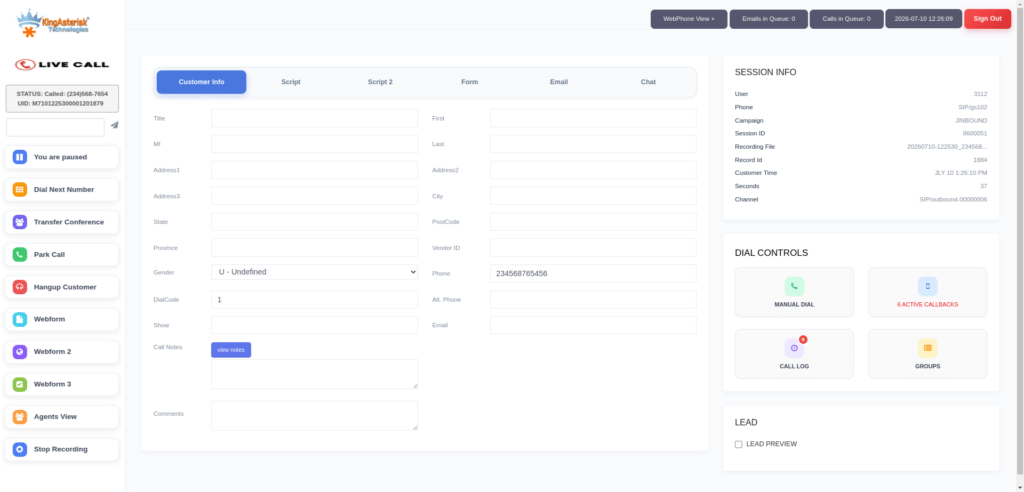
VICIdial ships with a default agent interface (vicidial.php) built on older PHP templates. That distinction matters for BPO decision-makers. Theming is a front-end project. It doesn’t require rewriting predictive dialing logic, hopper behavior, or lead scoring. It changes what the agent sees and how many clicks stand between them and a disposition.
For a single-campaign setup, this is a nice-to-have. For a multi-campaign floor, it’s closer to a requirement. Agents rotating between campaigns during a shift, or handling blended queues, need the screen to tell them instantly which script, which client, and which compliance rules apply to the call in front of them.
Why multi-campaign floors expose the default interface’s limits
A few patterns show up repeatedly once a BPO scales past two or three active campaigns on one server:
- Agents misidentify the active campaign mid-shift, especially during blended inbound and outbound queues, and read from the wrong script.
- Disposition lists grow long and generic across campaigns, so agents scroll or search instead of clicking the correct code in one motion.
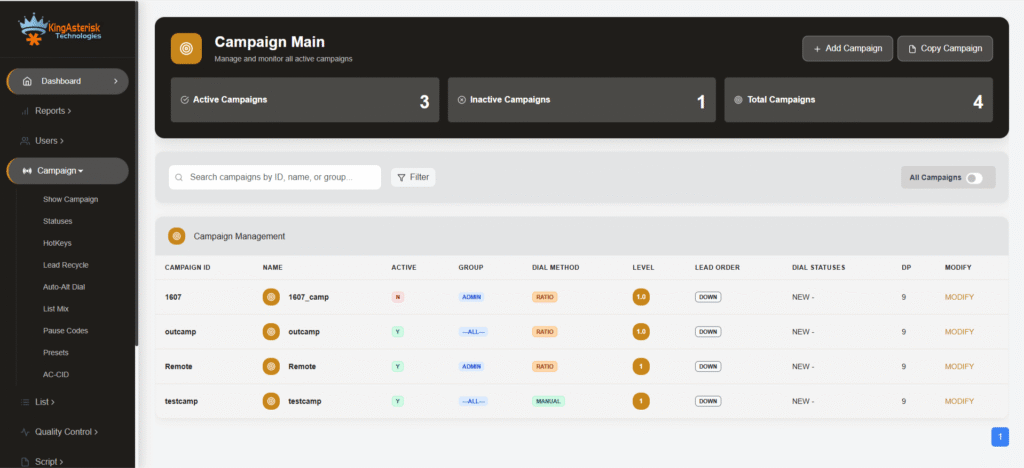
- Supervisors monitoring the floor can’t distinguish which agents sit on which campaign without opening a separate report, because the default screen gives campaign context low visual priority.
- New client onboarding takes longer than it should, because every campaign addition means agents relearning a static layout that was never designed to flex.
- None of these are dialer bugs. They’re workspace design problems, and they’re exactly what a custom theme is built to solve.
Core elements of an efficient multi-campaign agent workspace
A theme built specifically for multi-campaign BPO work tends to include the following, regardless of which agency builds it:
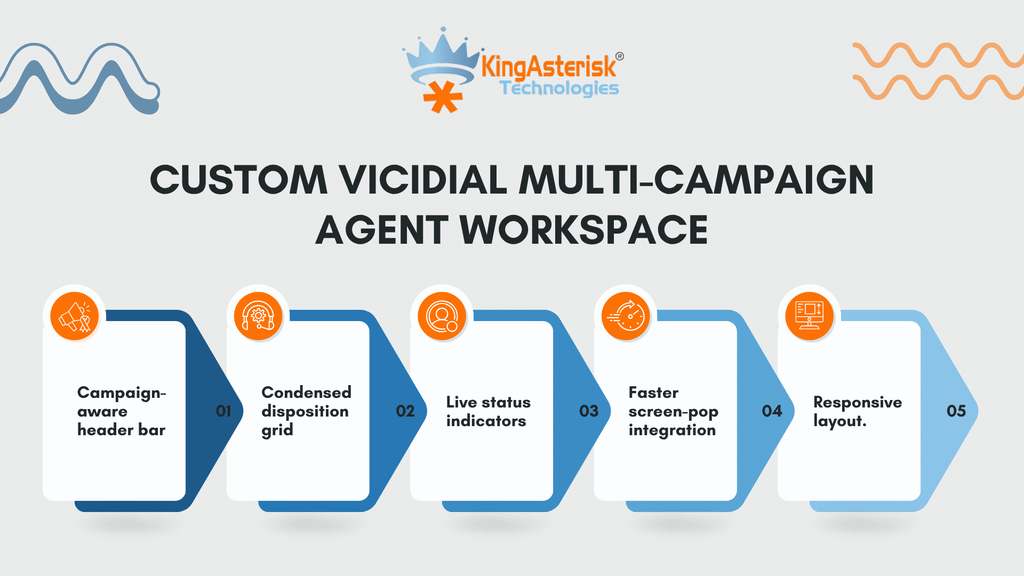
Campaign-aware header bar
The active campaign name, client identifier, and script version sit in a fixed, color-coded position that changes automatically when the agent’s session changes campaigns. Agents shouldn’t have to hunt for this.
Condensed disposition grid
Rather than one long list shared across all campaigns, disposition codes are scoped and grouped per campaign, cutting the number of clicks between call end and correct wrap-up.
Live status indicators
Pause reason, talk time, and queue position are surfaced prominently rather than buried in a sidebar, which helps both the agent and any supervisor glancing at a shared monitor.
Faster screen-pop integration
When a theme is paired with CRM or lead data integration, the pop should load in the same visual space every time, regardless of which campaign triggered it, so agents build muscle memory across campaigns instead of relearning the layout each time.
Responsive layout
Multi-monitor agent desks are common on BPO floors, and a theme should behave consistently whether it’s rendered on a single laptop screen or spread across a wider dual-monitor setup.
None of this changes what VICIdial does. It changes how fast an agent can act on what VICIdial tells them.
How a custom theme is actually built
A theme build for an existing VICIdial deployment starts with two pieces of version information: the ViciBox build in use and the SVN (VICIdial codebase) revision the server is running. Themes are built against a specific combination of these, because the underlying template structure and available hooks differ across versions. Skipping this step is the most common reason a theme looks broken after installation on a server it wasn’t built for.
Once versions are confirmed, development typically follows this order:
- Audit the existing campaign structure and agent workflow to identify where clicks and screen time are wasted.
- Design the layout, usually as a set of themed variants an operations team can preview and choose between.
- Build the front end. Current builds favor React for interface logic and Tailwind CSS for styling, layered on top of the existing VICIdial agent session and authentication flow rather than replacing it.
- Test against live campaign data on a non-production instance.
- Package the theme for handover, either as source code with installation steps, or installed directly if server access is provided.
After installation, the admin panel path on a themed deployment usually differs from the stock location. A standard build serves the admin dashboard at:
http://[YOUR_SERVER_IP]/vicidial/admin.phpA custom-themed deployment commonly serves it from a client-specific path instead, such as:
https://[YOUR_DOMAIN]/dialer/admin.phpThe authentication mechanism underneath is identical in both cases. Only the file path and the front-end rendering change, which is worth confirming with whoever manages the deployment before assuming a login page has moved for any other reason.
Previewing themes before committing to one
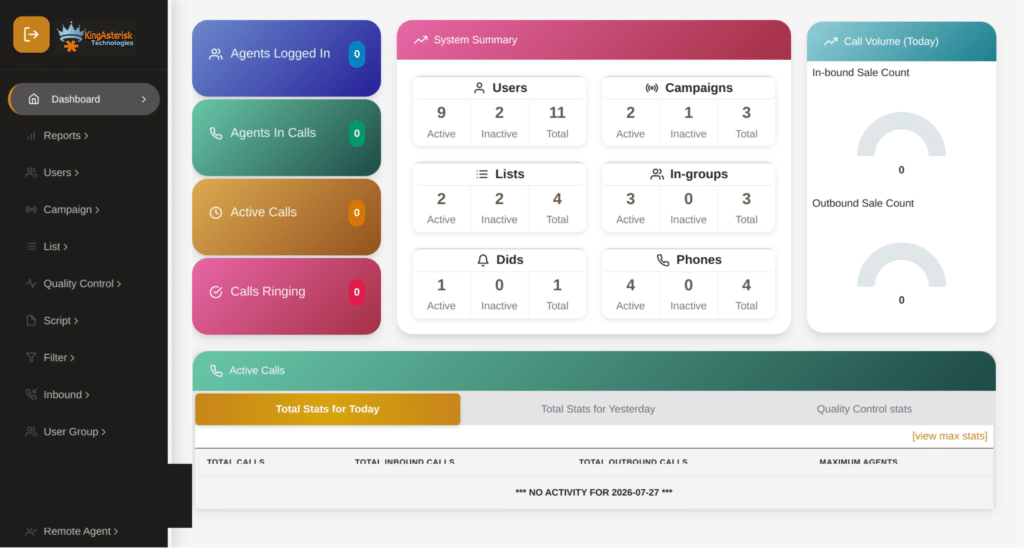
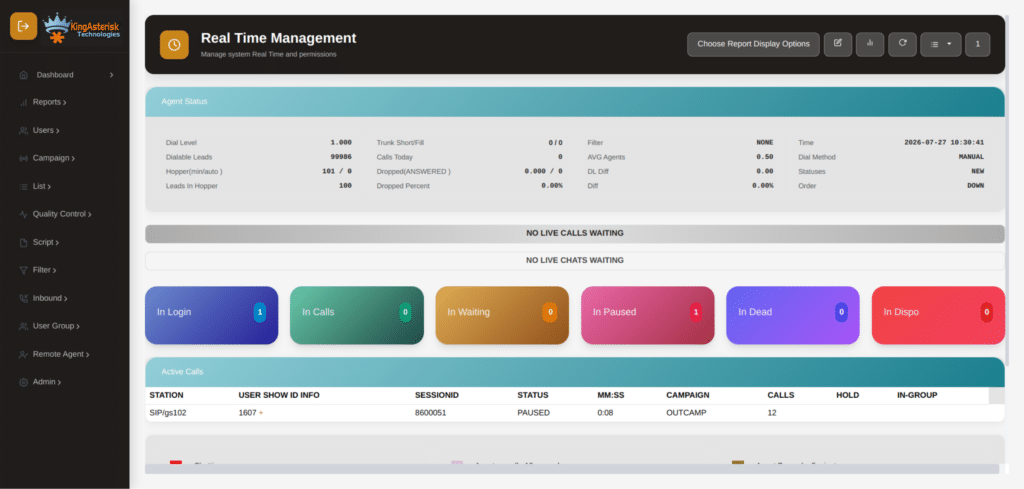
Most VICIdial theme providers, including KingAsterisk, run a public demo portal so operations teams can test a layout before it goes anywhere near a production floor. The general flow looks like this:
Visit the provider’s site and locate the live demo section. Select any available theme option from the list, log in with the demo credentials supplied on the page, and explore the admin dashboard as it would appear post-installation, covering campaign management, agent administration, lead and list handling, inbound and outbound routing, real-time reporting, and recording settings.
This step matters more than it looks. A theme that reads well in a screenshot can still feel cramped on an actual multi-campaign floor once real disposition lists and live agent counts are loaded in.
Diagnosing agent workspace problems: a technical walkthrough
Theme complaints and dialer complaints get reported to support desks in nearly identical language. “The agent screen isn’t working right” could mean the interface, the campaign configuration, or the dialer engine itself. Separating these before touching any front-end code saves hours of misdirected troubleshooting.
Start at the database level. A quick check on live agent state:
SELECT user,status,campaign_id
FROM vicidial_live_agents;Returns something like:
TEST_AGENT | PAUSED | SAMPLE_CAMPAIGNIf an agent reports the screen as frozen or unresponsive but their live status shows PAUSED, the issue may sit in session state rather than the theme rendering. This single query rules out half of the usual guesswork.
Manual dialing not working
A more specific case worth walking through: an agent logs in successfully, the theme renders the Dial Next Number button correctly, the agent clicks it, and nothing happens. No outbound call, no screen update, no Asterisk originate action, no visible VICIdial response at all.
Before assuming a theme rendering fault, check the campaign configuration:
Campaign: SAMPLE_CAMPAIGN
auto_dial_level=0An auto_dial_level of 0 on a campaign set to manual dialing is a common root cause here, not a front-end defect. The button click event is firing correctly through the theme; the dialer simply isn’t set to act on it. This is exactly the kind of issue a theme audit needs to rule out early, because rebuilding or restyling a button that was never the actual problem wastes development time that should go toward the interface itself.
The broader lesson for multi-campaign floors: any custom theme build should include a short diagnostic pass against agent state tables and campaign dial settings before styling begins, so the finished interface isn’t shipped on top of an unrelated configuration fault.
Non-Agent API and theme integration
Custom themes are frequently paired with lead and reporting integrations that run through VICIdial’s Non-Agent API, a separate interface from the live agent session itself. The Non-Agent API sits at:
http://your-server-ip/vicidial/non_agent_api.phpIt handles the administrative layer around a theme rather than live call control: injecting new lead lists, updating prospect records from an external CRM, pulling list tallies and campaign metrics, and adding leads directly into the active hopper without a supervisor opening the GUI. Themed dashboards that surface real-time metrics on the agent or supervisor screen are typically drawing from this endpoint in the background.
Live call control from inside an active agent session runs through a separate endpoint, agc/api.php, and is a distinct integration from theme styling itself.
Where to source a custom VICIdial theme
Searches for a custom VICIdial theme download or a custom VICIdial theme free tend to turn up two categories of result. The first is community-shared templates, sometimes distributed through a custom VICIdial theme GitHub repository, which can work as a starting point for a single-campaign setup but generally lack the campaign-aware logic multi-campaign floors need without further development.
The second is a purpose-built theme developed against your specific ViciBox and SVN version, which costs more upfront but is built around your actual campaign structure rather than a generic layout.
For BPOs running several concurrent campaigns, a generic download rarely holds up once real disposition lists, live agent counts, and screen-pop integrations are layered on top of it. Version mismatches between a downloaded theme and your server’s SVN revision are the most common cause of a theme that installs but renders incorrectly, so confirming compatibility before deployment saves a second round of fixes.
Server requirements for deployment
Theme installation and any accompanying customization work runs on infrastructure the operations team already controls. An AlmaLinux server with a dedicated IP is typically required from the client side for setup, along with server access during installation. Hardware sizing, whether on Intel or AMD builds, is generally recommended based on agent count and campaign volume rather than a fixed specification, so this is worth confirming with whoever handles the deployment before finalizing a theme build.
Frequently Asked Questions
No. It changes the agent-facing layout and workflow. Campaign logic, dialing modes, and the underlying database structure stay the same.
Community templates exist, including some shared on GitHub, and can be a reasonable starting point for a single campaign. Multi-campaign floors typically need custom logic that free templates don’t include out of the box.
Beyond community repositories, most development providers run a live demo portal where you can preview several theme options against real campaign data before committing to one.
Yes. Themes are built against a specific ViciBox build and SVN revision. Installing a theme built for a different version is the most common cause of broken rendering after setup.
Multi-campaign BPOs, lead generation teams, and appointment-setting agencies running several client campaigns on one dialer deployment are the most common users, since they get the most benefit from campaign-aware interface design.
Get a theme built for your campaign structure
KingAsterisk builds custom VICIdial themes against your specific ViciBox and SVN version, starting with a workspace audit rather than a template. Share your current setup details and campaign count, and the team will scope a layout, timeline, and cost estimate suited to a multi-campaign floor.