
Custom CRM Development for Scalable Business Growth
CRM Integration Solutions

Custom CRM Development: Features, Process & Best Practices for Scalable Business Growth

Key Takeaways

  • Custom CRM development gives contact centers full control over data models, workflows, and third-party integrations, unlike off-the-shelf alternatives.
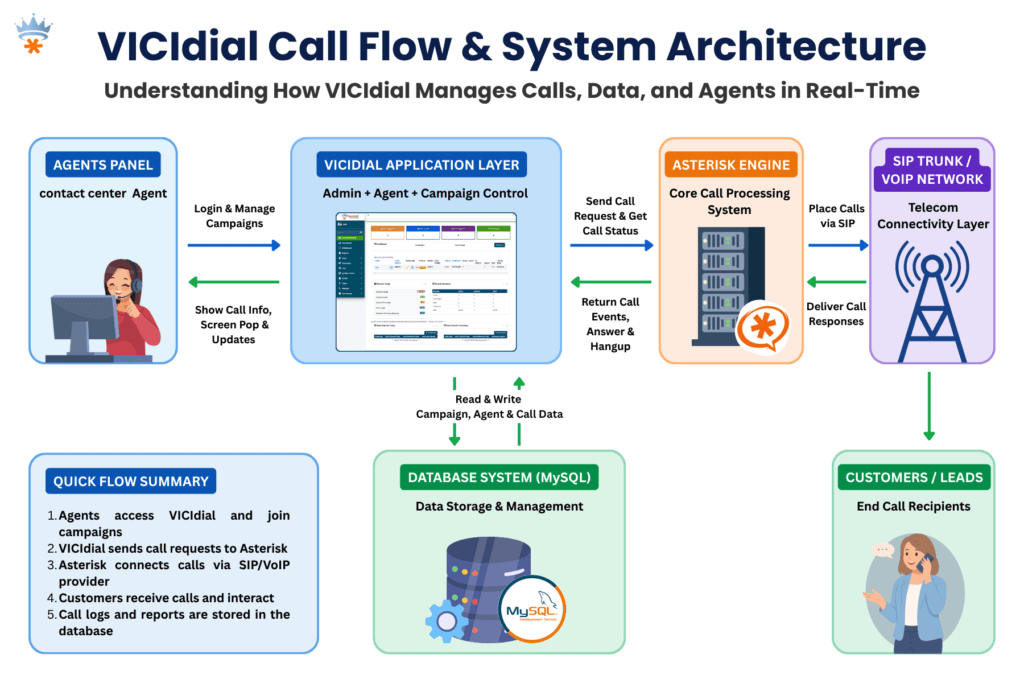
  • A well-structured CRM integrates directly with telephony platforms like Asterisk and VICIdial via REST APIs or AMI (Asterisk Manager Interface).
  • The build process follows a six-stage lifecycle: discovery, architecture, development, integration, QA, and deployment.
  • Scalable CRM design relies on modular architecture, normalized relational databases, and role-based access control (RBAC).
  • Businesses that invest in custom CRM development see measurable improvements in agent efficiency, data accuracy, and customer retention.

Custom CRM development is the process of designing and building a Customer Relationship Management system from scratch, or on top of an open framework, to match the exact operational requirements of your business. Unlike packaged CRM solutions that force you to adapt your processes around their feature set, a custom-built CRM is engineered around your workflows, your data structures, and your integration stack.

At KingAsterisk, we have spent over 15 years building and deploying contact center software solutions, from Asterisk-based telephony platforms to full-scale IVR systems. One of the most consistent pain points we see is teams using generic CRMs that were never designed to handle call dispositions, agent scripting, DNC (Do Not Call) compliance, or live queue data. Custom CRM development solves each of these problems at the root.
Why Contact Centers Need a Custom CRM

Off-the-shelf CRM platforms like Salesforce or HubSpot are powerful general-purpose tools. But “general-purpose” is precisely the problem when your operation runs on VICIdial, processes 10,000+ calls per day, and needs disposition codes to trigger automated follow-up sequences.

Here is what contact centers routinely sacrifice with packaged CRM tools:

No native CTI (Computer Telephony Integration): Most packaged CRMs require expensive middleware or third-party connectors to link with Asterisk or VICIdial. Even then, screen-pop functionality is often delayed or unreliable.

Rigid data models: Pre-built CRMs define their own fields, object relationships, and hierarchy. If your lead pipeline has five custom stages with conditional logic, you end up bending your process to fit their schema, which creates data quality issues downstream.

Licensing costs that scale against you: Per-seat licensing punishes growth. A contact center scaling from 50 to 200 agents can see CRM costs multiply four times with no corresponding improvement in functionality.

Limited reporting depth: Standard CRM dashboards show basic sales pipeline metrics. Contact centers need custom reporting on Average Handle Time (AHT), First Call Resolution (FCR), agent utilization, and call outcome analysis, all tied back to the same CRM record.

Custom CRM development eliminates each of these constraints by design.

Core Features of a Custom-Built CRM

A well-scoped custom CRM for contact center operations should include the following functional modules:

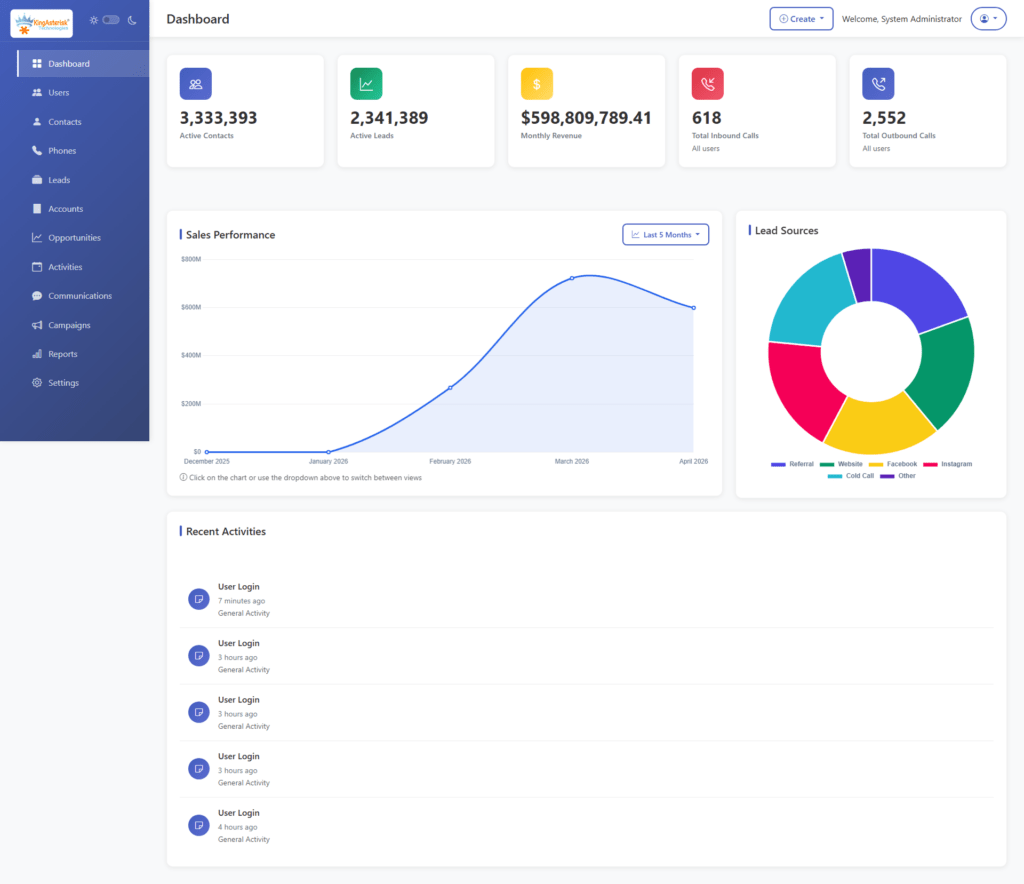
Contact & Lead Management

The foundation of any CRM is its contact database. A custom build allows you to define exactly what a “contact” means in your context, including custom fields, segmentation tags, account hierarchies, and interaction history. Unlike standard tools, you can enforce data validation rules at the database level using constraints and stored procedures.
Call Logging & Disposition Tracking

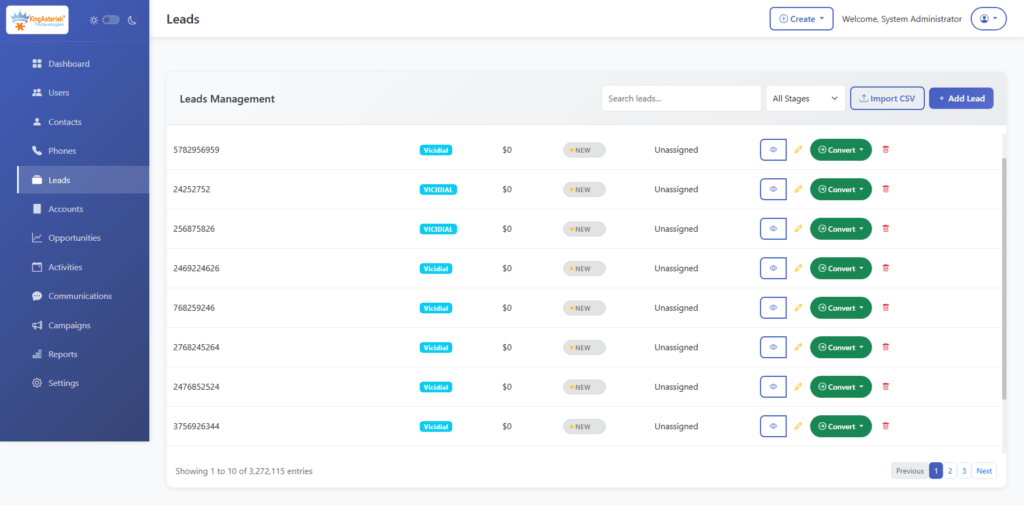
Every inbound and outbound call should automatically create or update a CRM record. This requires a direct integration with your telephony layer, typically through Asterisk’s AMI (Asterisk Manager Interface) or via a REST API bridge to VICIdial. Disposition codes entered by agents post-call should be written back to the CRM record in real time.

Capturing the UniqueID at call initiation and mapping it to a CRM record allows full call-to-disposition traceability.

Agent Scripting & Guided Workflows

A custom CRM can embed dynamic call scripts that adapt based on the contact’s data, past interactions, product interest, geographic segment. This reduces agent training time and ensures compliance with scripted disclosures.

Automated Follow-Up & Task Scheduling

Based on disposition codes, the CRM can automatically schedule callbacks, trigger email sequences, or escalate records to supervisors. This logic is typically implemented as a background job queue using tools like Redis or a cron-based task scheduler.

Role-Based Access Control (RBAC)

Different users: agents, team leads, compliance officers, administrators, need different levels of access. RBAC ensures that sensitive customer data is only visible to authorized roles, and that agents cannot modify records outside their assigned queue or campaign.

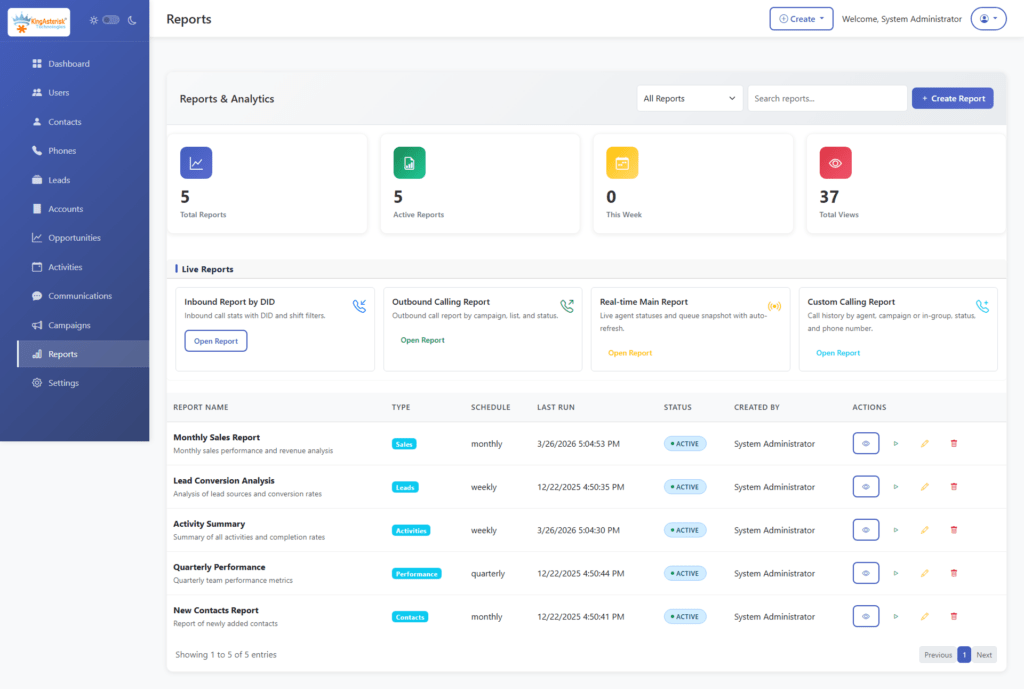
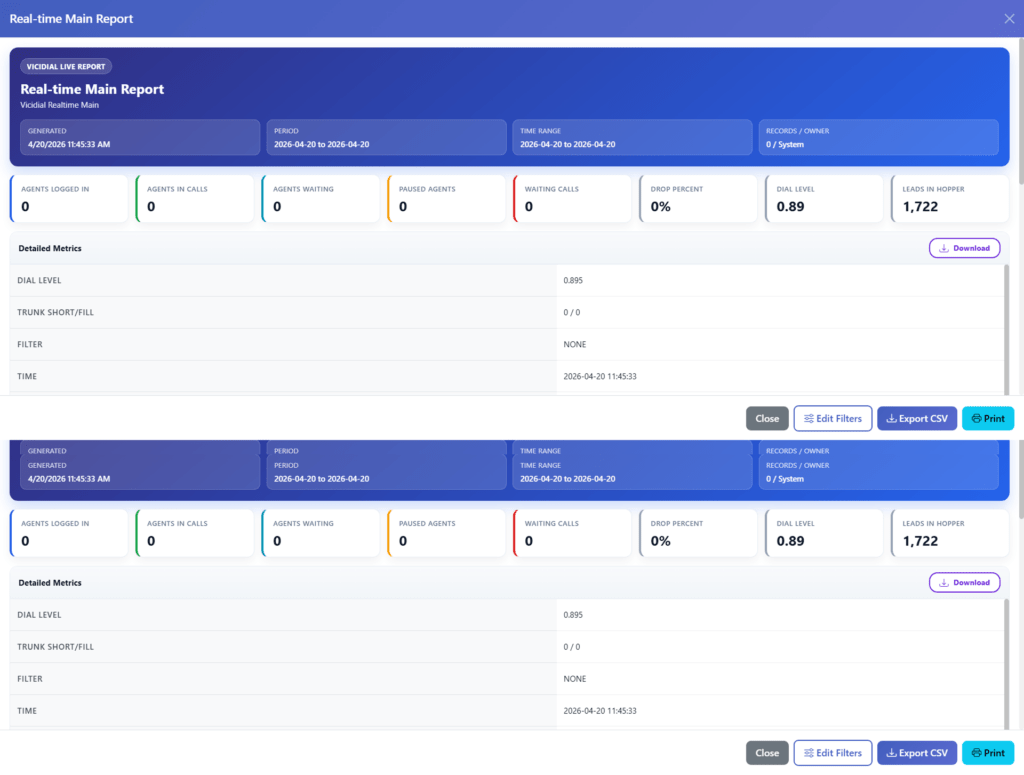
Reporting & Analytics Dashboard

Custom dashboards built on your own data model give you query-level flexibility. You can build reports on any combination of fields without worrying about API rate limits or export restrictions.
DNC & Compliance Management

For outbound contact centers, maintaining an updated Do Not Call list and automating suppression is a legal requirement. A custom CRM integrates this directly into the dialing logic, blocking calls to flagged numbers before they are ever assigned to an agent.

Custom CRM Development Process: Step-by-Step

Building a CRM is not a single sprint, it is a structured engineering lifecycle. Here is the process we follow at KingAsterisk when deploying a custom CRM alongside a contact center telephony stack:

Step 1: Requirements Discovery & Process Mapping Before any code is written, every workflow that touches customer data must be documented. This includes lead intake, agent interaction flows, escalation paths, reporting requirements, and compliance constraints. Output: a Business Requirements Document (BRD) and data flow diagrams.

Step 2: Data Architecture & Schema Design Design a normalized relational database schema (typically PostgreSQL or MySQL for contact center workloads). Define your primary entities, Contacts, Accounts, Interactions, Campaigns, Agents, and their foreign key relationships. Avoid over-normalization that creates excessive JOIN overhead on high-frequency queries.

Step 3: Technology Stack Selection Choose your backend framework, your frontend framework (React or Vue.js for modern SPAs), and your API architecture (REST or GraphQL). Define your authentication mechanism, JWT tokens with refresh rotation are standard.

Step 4: Core Module Development Build and unit-test each module independently before integration: contact management, interaction logging, user management, RBAC, and reporting. Use a microservices approach if the CRM needs to scale horizontally, or a well-structured monolith for smaller deployments.

Step 5: Telephony & Third-Party Integration Connect your CRM to your telephony layer. For Asterisk/VICIdial environments, this means building an AMI listener service that captures real-time call events and writes to the CRM database. For external integrations (email, SMS, payment gateways), build REST API adapters with retry logic and error logging.

Step 6: QA, User Acceptance Testing & Deployment Run integration tests across the full interaction flow, from call arrival to disposition to reporting. Conduct UAT (User Acceptance Testing) with actual agents. Deploy to a staging environment before production rollout.

Implement database migration scripts using a versioned migration tool like Flyway or Liquibase.

Technical Architecture & Integration Essentials

A scalable custom CRM for contact centers relies on several architectural decisions made early in the process.

Database Design

Use a relational database for transactional CRM data (contact records, interactions, dispositions). For high-frequency read operations like real-time dashboards, implement a read replica or a caching layer using Redis. Avoid storing call recordings directly in the CRM database, reference them by file path or object storage URI.

API-First Design

Build every CRM function as an API endpoint from the start. This enables future integrations,  with billing systems, reporting platforms, or additional telephony channels, without requiring rearchitecting. Document your API using OpenAPI 3.0 (Swagger).

Asterisk Manager Interface (AMI) Integration

The AMI is a TCP socket-based interface that streams real-time event data from an Asterisk server. A CRM integration service connects to AMI, filters for relevant events (Dial, AgentConnect, Hangup, AgentComplete), and writes structured records to the CRM database.

Webhooks for Event-Driven Workflows

Rather than polling the database for state changes, implement a webhook system that fires when key CRM events occur, a lead status change, a callback scheduled, a DNC flag triggered. This powers real-time notifications and downstream automation without database polling overhead.

Best Practices for Scalable CRM Development

These practices come directly from deployment experience across dozens of contact center environments:

Enforce data validation at the database layer, not just the UI. Application-level validation can be bypassed by direct API calls. Use database constraints, triggers, and CHECK clauses as your authoritative validation layer.

Version your API from day one. Even if you start with /api/v1/, the convention sets you up to introduce /api/v2/ without breaking existing integrations when requirements evolve.

Design for audit trails. Contact center operations are subject to regulatory scrutiny. Implement an audit log table that records who changed what and when for every sensitive record. A trigger-based approach works well:

Separate your reporting database from your transactional database. Heavy analytical queries running against your live CRM database will degrade performance for agents. Use ETL pipelines (even simple ones with logical or custom batch jobs) to populate a dedicated reporting schema.

Plan your indexing strategy before you have performance problems. Index foreign keys, frequently filtered columns (status, campaign_id, agent_id), and any field used in ORDER BY clauses on large result sets. Unindexed queries on a table with 5 million interaction records will cause visible latency in agent screens.
Types of Custom CRM Development

Not every CRM serves the same purpose. A sales team chasing quarterly targets has fundamentally different system requirements than a support team managing 500 open tickets or a marketing team running multi-touch drip campaigns. 

Before committing to a build, identifying which CRM type, or which combination, your operation actually needs is a critical architectural decision. Getting this wrong early means rework later.

Here are the four primary types of custom CRM development and what each one demands technically and operationally.

1. Sales CRM Development

A Sales CRM is engineered around one goal: moving leads through your pipeline faster and with greater visibility at every stage. For contact centers running outbound sales campaigns, this means the CRM must be tightly coupled with your dialer, leads enter the pipeline from your campaign lists, and their status updates in real time as agents work them.

Key capabilities in a custom-built Sales CRM include configurable pipeline stages with conditional logic, lead scoring based on interaction history and behavioral signals, automated follow-up task creation on specific dispositions, and quota tracking dashboards at the agent, team, and campaign level.

From an integration standpoint, a Sales CRM for contact center environments typically consumes lead data via REST API imports or direct database sync, and writes disposition outcomes back to the dialer, eliminating the dual-entry problem that plagues teams using disconnected systems.

A well-designed Sales CRM schema treats the lead lifecycle as a first-class data object:

Tracking stage_entered for every pipeline transition gives you conversion time metrics per stage,  data that directly informs where your pipeline has friction.

2. Customer Support CRM Development

A Customer Support CRM is built around tickets, resolution workflows, and service level adherence. In a contact center context, this type of CRM typically handles inbound customer queries arriving via phone, email, or web form, and it needs to manage the full lifecycle of each issue from first contact to resolution.

The core data model here is different from a Sales CRM. Instead of pipeline stages, the primary entity is a support ticket with an owner, a priority level, a status, an SLA deadline, and a complete interaction thread attached to it.

Critical features for a custom Support CRM include:

  • Automatic ticket creation triggered by inbound call events via AMI, so no agent has to manually open a ticket when a call arrives
  • SLA tracking with escalation rules that automatically reassign or flag tickets approaching their resolution deadline
  • Interaction threading that appends every call, email, and note to the same ticket record, giving the next agent full context without asking the customer to repeat themselves
  • CSAT (Customer Satisfaction) scoring integrated post-resolution, feeding back into agent performance reports

3. Marketing Automation CRM Development

A Marketing Automation CRM shifts the focus from individual interactions to population-level behavior, segmenting contacts, triggering campaigns based on lifecycle events, and measuring engagement across multiple touchpoints before a lead ever reaches a sales agent or support queue.

For contact centers, this type of CRM is particularly valuable for pre-call nurturing and post-call follow-up automation. Rather than agents manually following up every unresolved lead, the CRM handles the intermediate touchpoints, sending a follow-up SMS after a missed call, enrolling a contact in a drip email sequence after a product inquiry, or suppressing contacts who have already converted from active campaign lists.

Custom-built marketing automation CRMs for contact center environments typically implement a campaign enrollment engine, a rules-based service that evaluates contact records against defined criteria and enrolls them in the appropriate sequence:

Keeping this logic in a configuration layer, rather than hardcoded in application logic, means your marketing team can modify sequences without requiring a developer for every change.

Key technical considerations for this CRM type include message delivery tracking (opens, clicks, replies) feeding back into the CRM record, unsubscribe and suppression list management enforced at the send layer, and robust contact segmentation using indexed, queryable tag or attribute tables.

4. Enterprise CRM Development

An Enterprise CRM operates at a different scale and complexity level than the three types above. It is not just one of those CRMs built bigger, it is an integrated platform that spans multiple departments, teams, and often multiple business units, with centralized data governance, granular permission structures, and the infrastructure to handle millions of records without performance degradation.

For large contact center operations, multi-site deployments, hundreds of agent seats, multiple simultaneous campaigns across different business lines, an enterprise-grade custom CRM must address several architectural concerns that smaller builds can defer:

Multi-tenancy or strict data partitioning ensures that data from one business unit, campaign, or client cannot be accessed by another, even though it all lives in the same system. This is typically implemented at the database level using row-level security (RLS) policies in PostgreSQL:

Workflow orchestration for complex, multi-step business processes: approvals, escalations, compliance reviews, requires a proper workflow engine rather than simple status fields. Tools like Apache Airflow for batch processes or a custom finite-state machine (FSM) for record-level workflows handle this at enterprise scale.

The investment in enterprise CRM development is significantly higher than a departmental build,  but for organizations at that scale, the cost of not having a unified system shows up as operational inefficiency, compliance exposure, and data quality problems that compound over time.

Real-World Use Case: Contact Center CRM + VICIdial Integration

A mid-sized outbound collections contact center operating VICIdial across 120 agent seats approached KingAsterisk with a specific problem: their existing CRM had no knowledge of call outcomes. Agents were manually logging dispositions in two separate systems, the VICIdial agent interface and a generic web-based CRM, which created a 15–20 minute daily overhead per agent and introduced significant data inconsistency.

We designed and built a custom CRM that integrated directly with their VICIdial MySQL database. Disposition codes entered in the VICIdial agent panel were mapped via a real-time sync service to corresponding status fields in the CRM. Callbacks scheduled within VICIdial automatically created task records in the CRM, assigned to the responsible agent with the correct scheduled time.

🚨 The result: zero duplicate data entry, a unified interaction history visible to supervisors in real time, and automated compliance reporting that previously required three hours of manual spreadsheet work each week.

This is the operational value that custom CRM development delivers, not just features, but the elimination of friction at every point in the workflow.

Frequently Asked Questions

A functional CRM with core contact management, call logging, and basic reporting typically takes 3–5 months for a dedicated development team. A full-featured system with advanced reporting, IVR integration, RBAC, and multi-campaign support may take 6–12 months. The timeline depends heavily on the quality of the initial requirements and the complexity of existing system integrations.

There is no single correct answer, but for contact center environments, a common and proven stack includes PostgreSQL (database), or Laravel (backend API), React or Vue.js (frontend), and Redis (caching and job queues). The more important decision is API-first design and a normalized schema, the specific framework matters less than the architectural discipline.

Yes, this is one of the primary reasons contact centers choose custom CRM development. Integration is typically achieved through Asterisk’s AMI (Asterisk Manager Interface) for real-time event capture, or through direct database-level integration with VICIdial’s MySQL schema for disposition sync, lead management, and reporting.

Scalability is built in at the architecture stage, not added later. Key decisions include horizontal scaling support (stateless API servers behind a load balancer), database read replicas for reporting workloads, indexed schemas optimized for the most frequent query patterns, and a modular codebase that allows new features to be added without rewriting existing components.

Conclusion

Custom CRM development is one of the highest-leverage technology investments a contact center can make. When your CRM is built to match your exact workflows, integrated natively with your telephony stack, enforcing your data standards, and powering reporting that reflects your actual KPIs: every agent, supervisor, and operations manager works with better information and less friction.

The process requires disciplined planning: a solid requirements phase, a well-normalized data schema, an API-first architecture, and integration layers that connect cleanly with platforms like Asterisk and VICIdial. Done correctly, a custom-built CRM becomes the operational backbone of your contact center, not just a place to store contact records, but the system that ties together every touchpoint, every interaction, and every decision.

If you are evaluating whether custom CRM development is the right path for your operation: or if you already know it is and want to get the architecture right, the team at KingAsterisk has the contact center expertise and technical depth to build it properly.

Contact us to discuss your requirements and get an honest assessment of what your CRM should look like.


Smart Lead Upload Panel for Modern Dialer Systems
Call Center Dialer Software Solutions

How to Create Custom Lead Upload Panel for Dialer Systems in 2026

Key Takeaways

  • A custom lead upload panel eliminates manual CSV prep errors and accelerates lead deployment into active dialer campaigns.
  • Proper field mapping and deduplication logic at the upload stage directly improve answer rates and agent productivity.
  • VICIdial’s native list API and Asterisk AMI can both be leveraged to automate lead ingestion without third-party middleware.
  • Real-time validation rules: DNC scrubbing, format checks, and timezone filtering, should be enforced at the panel level before data reaches the dialer queue.
  • A well-architected upload panel integrates with your existing CRM, reducing duplicate data and giving supervisors a single source of truth.

A custom lead upload panel is one of the highest-leverage components you can build into a contact center’s dialer infrastructure, and yet most operations still rely on raw CSV drops and manual VICIdial list imports that introduce errors, delay campaigns, and bypass critical compliance checks. 

This article solves exactly that problem. By the end, you will have a clear blueprint for designing, configuring, and deploying a purpose-built upload panel that integrates with VICIdial, Asterisk-based systems, or any SIP-driven predictive dialer stack, giving your team complete control over how leads enter the system, how they are validated, and how they flow into active campaigns.

Why a Custom Lead Upload Panel Matters in 2026

Contact centers operating on VICIdial, FreeSWITCH, or custom Asterisk deployments face a persistent friction point: getting leads from a CRM, third-party data broker, or internal marketing platform into the dialer quickly, cleanly, and in compliance with DNC and TCPA requirements. Out-of-the-box list import tools handle simple CSV uploads, but they lack the field-level control, real-time validation, and automation hooks that high-volume operations demand.

The business cost of this gap is measurable. A 10,000-record import with 12% bad phone formats wastes 1,200 dial attempts. A campaign launched without timezone filtering generates regulatory exposure. An operator who has to manually remap column headers every Monday morning is a bottleneck that compounds across every new campaign.

A custom-built upload panel eliminates all of these issues at the source. It enforces your rules before a single record enters the dialer queue, automates repetitive mapping tasks, and connects your lead acquisition pipeline directly to your dialer campaign configuration, with zero manual intervention required once it is set up correctly.

⚠️ Don’t Skip This : Vicidial System Lag Issue Fix 

Core Components of a Lead Upload Panel

Before building anything, it is important to understand what a complete panel actually consists of. The following components are non-negotiable for a production-grade implementation:

File Ingestion Layer

This handles CSV, XLS, or direct API payloads. It must support multiple delimiters, encoding formats (UTF-8, ISO-8859-1), and file sizes up to at least 500,000 records without timeout failures. For large imports, chunked processing with a queue-backed worker (Redis + Python Celery or Node.js Bull) is the right approach.

Field Mapping Engine

A drag-and-drop or dropdown interface that lets operators map source columns (e.g., “Mobile_Number”, “ph1”, “contact_phone”) to your canonical schema (phone1, phone2, first_name, etc.). Saved mapping templates prevent repetitive work for recurring data sources.

Validation and Cleansing Rules

Phone number normalization (E.164 format), duplicate detection against existing lists, DNC file scrubbing, email format validation, and timezone assignment based on area code. These run before any record is committed to the lead management system.

Campaign Assignment Interface

After validation, leads are routed to one or multiple dialer campaigns. This interface exposes campaign IDs, priority settings, list mix ratios, and dial status defaults, matching VICIdial’s list management parameters directly.

Audit Log and Reporting

A per-upload summary: total records ingested, records rejected (with reasons), duplicates removed, and campaign destination. Stored for compliance review and troubleshooting.

Architecture: How the Panel Connects to Your Dialer

The panel sits between your lead sources and your dialer’s internal database. In a VICIdial environment, this means writing to the vicidial_list table in MariaDB/MySQL, with the correct population of fields like list_id, phone_number, status, phone_code, and custom fields configured per campaign.

For Asterisk AMI-based systems, the panel can also trigger real-time origination events via the Asterisk Manager Interface, allowing immediate dial initiation on high-priority leads without waiting for the next predictive dial cycle. This is particularly effective in inbound callback scenarios where a lead submits a web form and expects to be reached within seconds.

The recommended architecture for a contact list import at scale uses three layers:

  • Presentation layer: Browser-based React or PHP panel with drag-and-drop upload and live preview of the first 50 records.
  • Processing layer: Backend API (Laravel, FastAPI, or Node.js Express) that handles validation, deduplication, and database writes via connection pooling.
  • Integration layer: Direct MySQL writes to VICIdial tables, plus optional webhook dispatch to CRM systems on successful import completion.

Step-by-Step: Building a Custom Lead Upload Panel

The following process reflects how KingAsterisk engineers approach a ground-up panel build for VICIdial-based deployments. Adapt as needed for other dialer backends.

  1. Define your canonical lead schema. List every field your dialer campaigns require: phone1, phone2, first_name, last_name, address, state, zip, email, custom_1 through custom_20 (VICIdial supports up to 20 custom fields per list). This schema becomes the target for all field mapping.endpoints”.

  2. Set up the file ingestion endpoint. Create a POST endpoint that accepts multipart/form-data. Use a library like Papa Parse (JavaScript) or Python’s pandas.read_csv to parse the file. Stream large files rather than loading them entirely into memory, anything over 100MB will exhaust typical server resources if fully buffered.

  3. Build the field mapping UI. On upload, auto-detect column headers and present them in a mapping interface. Apply fuzzy matching to suggest the most likely canonical field for each source column (e.g., “Mobile” → phone1). Allow operators to lock in mapping templates by data source name for future automation.

  4. Implement validation rules engine. Write modular validators: phone format checker (strip non-digits, verify 10-digit North American or international format), email regex validation, state/zip pairing, timezone lookup by NPA (area code), and duplicate hash comparison against vicidial_list.phone_number for the target list ID.

  5. Apply DNC and compliance filters. Load your internal DNC list and optionally integrate with a third-party DNC scrubbing API. Flag records rather than delete them, pass them to a “DNC-Hold” list so the compliance team can audit the exclusions.

  6. Configure campaign assignment logic. Build a rule engine that assigns list_id and campaign_id based on lead attributes. For example: leads with state=TX go to campaign ID 4; leads from specific zip codes go to a dedicated agent group. This can also be configured as a manual selection step for operators who need full control.

  7. Execute the database write transaction. Use bulk INSERT with prepared statements, never individual row inserts for large batches. For VICIdial, write to vicidial_list in chunks of 1,000–5,000 rows. Wrap in a transaction and roll back on failure. After writing, call VICIdial’s API or update vicidial_lists to refresh the list lead count.

  8. Generate the upload audit report. Return a summary JSON to the frontend: total submitted, total inserted, total rejected (with per-reason counts), total DNC-flagged, and campaign breakdown. Store this log in an upload_audit table for compliance retrieval.

  9. Test with production-scale datasets. Before go-live, import a 50,000-record file and benchmark processing time, database lock duration, and error rate. Tune chunk size and connection pool settings based on results. Monitor vicidial_list index performance, add indexes on phone_number and list_id if not already present.

  10. Deploy with role-based access control. Only authorized roles (Campaign Manager, Admin) should trigger imports. Log every upload event with the user ID and timestamp. Implement upload rate limiting to prevent accidental mass imports from overloading the dialer during peak calling hours.

Real-World Use Case: Insurance Campaign Migration

A mid-sized insurance outbound center running VICIdial 2.14 was processing 8–12 daily lead files from four different brokers. Each broker used a different column naming convention. Operators spent 45–60 minutes per file remapping headers and cleaning phone formats manually before import. With an incorrect phone format, agents would encounter SIP 404 errors during the predictive dial cycle, wasting dial time and skewing abandon rate metrics.

After deploying a custom lead upload panel with saved broker-specific mapping templates, automated E.164 normalization, and a deduplication check against the last 90 days of dialed records, the team cut pre-import processing from 60 minutes to under 4 minutes per file. Duplicate records dropped by 31%. More importantly, the compliance team gained a full audit trail for every import, critical for their state-level insurance license reviews.

This is the practical value of a properly built custom lead upload panel: not just time savings, but measurable improvement in call connect rates, compliance posture, and supervisor visibility into the predictive dialer workflow.

Lead Validation and Compliance Logic

Validation deserves its own section because it is where most DIY implementations fall short. Common gaps include:

  • Phone format inconsistency: Numbers stored as “(555) 123-4567”, “5551234567”, “+15551234567”, and “555-123-4567” all refer to the same number but create four separate records. Normalize everything to E.164 at ingestion.
  • Timezone blind spots: Dialing a Florida number at 7:30 AM from a system configured for Pacific time violates TCPA’s 8 AM–9 PM local time rule. Assign timezone by NPA-NXX lookup at upload, not at dial time.
  • Soft duplicates vs. hard duplicates: Hard duplicates share the same phone number. Soft duplicates share the same first name + last name + zip but different phone numbers,  often indicating a re-list situation. Your panel should surface both.
  • Custom field data type enforcement: If custom_1 is used for a loan amount, enforce numeric-only input. If custom_5 is a date field, enforce ISO 8601 format. Downstream dialer scripts often break when unexpected data types appear in custom fields.

Connecting the Upload Panel to Your CRM

A standalone upload panel that does not talk to your CRM creates a data silo. For operations using Salesforce, HubSpot, Zoho, or a custom-built call center CRM integration, the panel should support bidirectional sync:

  • Inbound: Pull lead lists directly from CRM queries via REST API rather than manual CSV export. Operators configure a CRM filter (e.g., “all leads with status = New and source = Web Form”) and the panel fetches, validates, and imports automatically on a schedule.
  • Outbound: After a dialing session concludes, push disposition codes (Contacted, Callback Requested, DNC, Not Interested) back to the CRM record. This keeps the CRM accurate without requiring agents to log dispositions in two systems.

For VICIdial specifically, this sync can be handled via the VICIdial API server ( /vicidial/non_agent_api.php) using add_lead and update_lead actions, no custom database access required for basic operations.

Common Mistakes and How to Avoid Them

Ignoring Index Performance at Scale

Inserting 500,000 records into vicidial_list without checking existing index strategy can lock the table for several minutes, halting an active dialing campaign. Always run imports during low-traffic windows, and consider using INSERT DELAYED or staging tables for very large batches.

Skipping the Preview Step

Operators who cannot preview the first 20–50 parsed rows before committing an import will eventually import a file that was exported in the wrong format. A preview step that shows parsed field values with their mapped target column catches 90% of mapping errors before they affect the dialer.

Treating DNC as an Afterthought

DNC scrubbing should run as part of the validation pipeline, not as a separate monthly batch process. Any number added to your internal DNC list today should be unfindable in tomorrow’s upload, automatically.

No Rollback Mechanism

If an import of 80,000 records completes but the campaign assignment was wrong, can you undo it cleanly? Build a rollback function that deletes all records associated with a specific upload_id, restoring the list to its pre-import state without affecting other data.

💻 Start Live Demo: Live Demo of Our Solution!  

Frequently Asked Questions

Integration with VICIdial is achieved primarily through direct writes to the vicidial_list MariaDB table, using the target campaign’s list_id and the required schema fields. Alternatively, VICIdial’s non-agent API supports add_lead calls over HTTP, which is preferable when direct database access is restricted. After import, the system updates the list’s lead count so the dialer recognizes the new records immediately in its next dial cycle.

Yes. A well-built panel exposes a REST API endpoint that can receive a single lead record via POST request, triggered by a web form submission, a CRM workflow, or a third-party lead vendor’s delivery mechanism. The same validation rules apply in real time. For immediate dial initiation, the panel can also fire an Asterisk AMI originate command, placing the call within seconds of lead arrival.

Duplicate handling operates at two levels. Hard duplicates, identical phone numbers already present in the target list, are detected via a hash lookup or a SQL EXISTS query against vicidial_list. Soft duplicates, where the same contact appears with a different phone number, are detected by matching on name plus zip code. The panel flags duplicates in the audit report and gives the operator the option to skip, overwrite, or route them to a separate review list.

The choice depends on your team’s existing expertise. PHP (Laravel) integrates naturally with VICIdial’s LAMP-based architecture and is the most common choice for teams already maintaining VICIdial customizations. Python (FastAPI or Django) offers stronger data processing libraries for large-file operations. Node.js works well for real-time, event-driven ingestion scenarios. In all cases, use a background job queue for files over 10,000 records to avoid HTTP timeout failures during processing.

Conclusion

A custom lead upload panel is not a luxury for large contact centers, it is a foundational operational tool for any team running more than a handful of campaigns per week. The steps covered in this guide, schema definition, ingestion, field mapping, validation, compliance filtering, campaign assignment, and CRM integration, represent a complete architecture that eliminates the manual overhead and compliance risk associated with standard dialer list imports.

The key takeaways are simple: validate at the source, automate what is repetitive, audit everything, and design for rollback from day one. Whether you are building on VICIdial, a custom Asterisk stack, or an in-house predictive dialer platform, these principles hold.

At KingAsterisk, our engineers have built and deployed custom lead management solutions for contact centers across industries, from insurance and collections to healthcare scheduling and financial services. If you are ready to replace manual imports with a purpose-built, production-grade upload panel tailored to your dialer environment, we would be glad to help you get there.

Contact KingAsterisk to Discuss Your Setup →

Facing VICIdial Lag Optimize Your Dialer Performance Today
Vicidial Software Solutions

VICIdial System Lag Issue? Fix Slow Dialer Performance (2026)

Key Takeaways

  • A VICIdial system lag issue is almost always traceable to one of four root causes: under-resourced servers, untuned MySQL databases, Asterisk misconfiguration, or network congestion.
  • MySQL query optimization and regular database maintenance alone can reduce dial latency by 30–60% in high-volume deployments.
  • Asterisk real-time settings and correct SIP/PJSIP channel configuration have a direct, measurable impact on slow dialer performance.
  • Monitoring tools likehtop,mysqltuner, and Asterisk’s own CLI are essential for isolating the exact source of contact center latency.
  • Proactive maintenance: log rotation, database purging, and campaign dial ratio audits, prevents lag from recurring after initial fixes.

A VICIdial system lag issue occurs when the dialer platform fails to respond to agent actions in real time, whether that’s a delayed call connection, sluggish screen-pop loading, frozen campaign controls, or a backend that visibly struggles under concurrent sessions. This article diagnoses the exact causes of slow Vicidial dialer performance and gives you a structured, engineer-tested path to fix it.

VICIdial is a powerful, open-source predictive dialing platform built on top of Asterisk. When it runs well, it is exceptional. But it is not a plug-and-play system, it requires deliberate server configuration, ongoing database maintenance, and correct telephony stack settings to sustain performance at scale. When any of those layers develops a problem, the resulting contact center latency can cripple agent productivity and erode campaign results.

The good news: virtually every performance degradation scenario I have encountered across 15 years of deployment work has a clear, fixable root cause. Let’s find yours.

Root Causes of Slow Dialer Performance

Before touching any configuration file, understand that slow dialer performance in VICIdial typically originates from one or more of these four layers:

1. Underpowered or Over-Committed Server Resources

VICIdial runs its web interface, Asterisk telephony engine, MySQL database, and campaign manager concurrently on the same server in many single-box deployments. When CPU headroom drops below 15–20%, every layer suffers simultaneously. Swap usage is a death knell, if your system is actively swapping to disk, call handling latency spikes immediately.

2. MySQL Database Bloat and Unoptimized Queries

The asterisk database that VICIdial uses accumulates enormous table sizes over time, particularly in the vicidial_log, vicidial_closer_log, and recording_log tables. Without scheduled archiving and index maintenance, query times that were once milliseconds begin taking seconds. This is the single most common cause of Asterisk performance tuning complaints I receive from contact centers that have been live for 12+ months.

3. Asterisk Misconfiguration

Incorrect settings in sip.conf or pjsip.conf, particularly around qualified timers, registration intervals, and context routing, create unnecessary signaling overhead. A system dialing 200 channels simultaneously with an aggressive qualifying interval of 60 seconds is generating thousands of OPTIONS requests per minute that consume real CPU cycles and Asterisk thread time.

4. Network and Switching Bottlenecks

Packet loss above 0.5% or jitter above 20ms on the path between VICIdial and your SIP carrier causes Asterisk to buffer, retry, and re-negotiate. This manifests as call setup delay, one-way audio stuttering, and agents observing long ring durations before answer. Many operators misattribute this to “dialer lag” when it is a network problem at the transport layer.

Important: Never attempt tuning all four layers simultaneously. Isolate, test, confirm the change, then move to the next. Stacking multiple untested changes makes root cause analysis impossible if performance worsens.

💎 See Why Experts Prefer This : Vicidial Multi User Setup 

How to Diagnose the Problem

Check Server Resource Utilization

Start with the most immediate view of system health. Run htop or top on your VICIdial server and observe CPU usage per core, memory consumption, and swap activity over a 5-minute window during peak call hours.

Key thresholds:

  • CPU: sustained above 80% across all cores, server is resource-starved
  • Memory: less than 512 MB free, risk of swap thrashing
  • Swap: any active swap usage during production hours is unacceptable for a telephony system

Assess MySQL Performance

Install and run mysqltuner.pl, this script analyzes your running MySQL instance and produces a prioritized list of configuration recommendations specific to your workload. Pay particular attention to innodb_buffer_pool_size, query_cache_size, and table-level statistics for the VICIdial core tables. Check row counts for vicidial_log, anything above 10 million rows without partitioning is a significant performance liability.

Review Asterisk CLI for Errors and Thread Saturation

Connect to the running Asterisk instance with asterisk -r and issue core show channels and core show threads. A healthy system under moderate load will show channel counts proportional to active agents. If thread count is approaching Asterisk’s compiled maximum (maxcalls parameter), call queueing and answer detection delays occur at the platform level.

Network Path Analysis

Use mtr (My Traceroute) to your SIP carrier’s edge server during a live production window. Observe packet loss percentage and worst-case jitter per hop. If you see loss at any hop inside your own network, your switch, firewall, or WAN router, that is your first priority, regardless of any software tuning you plan.

Step-by-Step: Fix VICIdial System Lag Issue

This is the practical resolution sequence I follow when engaging with a new contact center reporting a VICIdial system lag issue. Work through each step before advancing to the next.

Baseline your metrics before touching anything

Record current CPU load average, free memory, swap usage, MySQL slow query count, and a sample agent screen-pop time. You need before/after data to confirm improvement.

Archive and purge oversized MySQL tables

Export vicidial_log records older than 90 days to a separate archive table or external file. Then run OPTIMIZE TABLE vicidial_log; to reclaim fragmented space and rebuild indexes. Repeat for vicidial_closer_log, recording_log, and vicidial_dial_log.

Tune MySQL InnoDB buffer pool

Edit /etc/my.cnf and set innodb_buffer_pool_size to 60–70% of total available RAM. For a server with 16 GB RAM, this means 10–11 GB. Restart MySQL and monitor query execution times, most deployments see immediate reductions in query latency for VICIdial’s real-time reporting tables.

Adjust Asterisk SIP qualify intervals

In sip.conf (or the PJSIP equivalent), set qualifyfreq=120 rather than the default 60. For trunks where endpoint health is managed by your carrier, disable qualify entirely with qualify=no. This can reduce background Asterisk CPU consumption by 10–20% on systems with 20+ registered trunks.

Review and reduce VICIdial real-time refresh intervals

In astguiclient.conf, the variable VD_REFRESH_INTERVAL controls how frequently the agent interface polls the server. Increasing this from the default 1 second to 2–3 seconds on high-agent-count deployments reduces PHP and MySQL load without a meaningful impact on agent experience.

Audit campaign dial ratio settings

An aggressive campaign dial ratio generates more concurrent Asterisk channels than the system can handle gracefully. Review each active campaign’s dial_ratio and auto_dial_level. Temporarily reducing these during peak hours while you complete the other tuning steps prevents the problem from compounding.

Resolve any network packet loss before concluding

If your mtr analysis revealed loss, address it: replace faulty patch cables, update switch firmware, adjust QoS policies to prioritize RTP/SIP traffic, or engage your ISP if loss is occurring at their edge. Software tuning cannot compensate for a leaky network.

Reboot cleanly and re-baseline

After completing all changes, perform a scheduled maintenance reboot. Allow the system to warm up under light load for 30 minutes before re-running your baseline checks. Compare every metric from step 1. Document improvements and outstanding issues for your next maintenance window.

Real-World Use Case: 200-Seat Outbound Contact Center

Real-World Deployment Example

A financial services contact center running 200 outbound agents on a single VICIdial server (32-core, 64 GB RAM) began experiencing severe call setup delays, agents reported 4–6 second gaps between accepting a call and hearing the connected party. Screen-pop data was arriving 3–5 seconds after connection. Campaign managers also noticed the predictive dialer was underpacing against its configured dial ratio.

Our diagnosis revealed three concurrent issues. First, the vicidial_log table had grown to 38 million rows across 30 months of operation with no archiving policy in place. MySQL was spending 800–1,200ms on every real-time report query. Second, the InnoDB buffer pool was configured at the default 128 MB, a setting appropriate for a test environment, not production. 

Third, the SIP qualify interval was set to 30 seconds across 48 registered trunks, generating roughly 96 OPTIONS messages per second as constant background noise for Asterisk.

The resolution took a single 4-hour maintenance window. After archiving 28 million log records, setting the buffer pool to 40 GB, increasing qualification frequency to 120 seconds, and optimizing all four primary log tables, screen-pop latency dropped from 3–5 seconds to under 400 milliseconds. Call setup delay normalized to under 1 second. The slow dialer performance was entirely a database and Asterisk configuration problem, the hardware was never the bottleneck.

Advanced Tuning for High-Volume Deployments

Separate MySQL onto a Dedicated Server

For deployments above 150 concurrent agents, the most impactful architectural change is removing MySQL from the VICIdial/Asterisk host and placing it on a dedicated database server. 

This eliminates the resource contention between Asterisk’s real-time audio processing and MySQL’s I/O-heavy query execution. A dedicated database server with NVMe storage can reduce query latency by a further 40–60% compared to a co-located spinning disk deployment.

Enable MySQL Slow Query Log During Peak Hours

Temporarily enable the slow query log with a threshold of 1 second to capture the specific queries that are causing delays in your environment. Different deployments accumulate different reporting table sizes, so the slow queries in your system may differ from a reference installation.

# Add to /etc/my.cnf under [mysqld] slow_query_log = 1 slow_query_log_file = /var/log/mysql/slow.log long_query_time = 1 log_queries_not_using_indexes = 1

Asterisk Real-Time Performance Settings

Review /etc/asterisk/extconfig.confto ensure only the tables that VICIdial actually requires are loaded via real-time. Unnecessary real-time table lookups add database round trips to every call routing decision. Removing unused real-time mappings is a low-risk, moderate-impact optimization.

Operating System Kernel Tuning

For high-concurrency telephony servers, set the following in /etc/sysctl.conf to increase network socket performance and reduce TIME_WAIT state accumulation:

net.core.rmem_max = 16777216 net.core.wmem_max = 16777216 net.ipv4.tcp_fin_timeout = 15 net.ipv4.tcp_tw_reuse = 1 fs.file-max = 65536

Preventing VICIdial Lag from Coming Back

Fixing a VICIdial system lag issue once is straightforward. Keeping it fixed requires proactive operational discipline. These are the maintenance practices that separate well-run contact centers from those that call for emergency support every few months:

  • Scheduled log archiving: Set a monthly cron job to move VICIdial log records older than 60 days to an archive table. Keep the working tables lean.
  • Weekly OPTIMIZE TABLE runs: Schedule mysqlcheck –optimize during a low-traffic window each week to prevent index fragmentation from accumulating silently.
  • Asterisk log rotation: Verbose Asterisk logging fills disk quickly on busy systems. Configure logrotate for /var/log/asterisk/ with a 7-day retention policy.
  • Monthly capacity review: Compare current agent count and dial volume against the server resources provisioned at deployment. Contact center growth frequently outpaces the original hardware specification within 12–18 months.
  • Quarterly network path testing: Re-run mtr to your carrier edge during production hours quarterly. Network paths change, and a carrier route update can introduce new latency without any action on your part.
💻 Start Live Demo: Live Demo of Our Solution!  

Frequently Asked Questions

Enable the MySQL slow query log with a 1-second threshold during peak operating hours. After 30–60 minutes, review the log file for the most frequent offenders. In the majority of deployments, vicidial_log and vicidial_list dominate the slow query output because they grow unchecked without a maintenance policy. Row count combined with the absence of OPTIMIZE TABLE runs is the primary culprit.

Yes, indirectly but significantly. An excessively high campaign dial ratio generates more concurrent Asterisk channels than the server can sustain cleanly. This doesn’t directly slow the database, but it saturates Asterisk’s thread pool, delays answer supervision processing, and causes the dialer to appear unresponsive. Temporarily lowering dial ratios while performing other tuning steps prevents the issue from masking your improvements.

Running OPTIMIZE TABLE on large tables like vicidial_log acquires a table lock for the duration of the operation, which can stall real-time queries for several minutes. Always schedule this during a low-traffic or after-hours maintenance window. For systems that cannot tolerate downtime, consider using pt-online-schema-change from Percona Toolkit, which performs the optimization without full table locking.

For a single-server deployment supporting 50 concurrent agents with predictive dialing, a minimum of 8 physical CPU cores, 32 GB RAM, and SSD-based storage is recommended. InnoDB buffer pool should be set to at least 18–20 GB. Below these thresholds, the system will perform acceptably at low load but degrade noticeably during peak calling hours, particularly when real-time reporting is active alongside live campaigns.

VICIdial Multi-User Setup Manage Multiple Users on One Server
Vicidial Software Solutions

VICIdial Multi User Setup: Run and Manage Multiple Users on a Single Server (2026)

Key Takeaways

  • A proper VICIdial Multi User Setup lets you run dozens of concurrent agent sessions on a single, well-tuned server without additional licensing costs.
  • Role separation: administrators, managers, agents, and quality analysts, is the foundation of a secure, auditable contact center deployment.
  • Campaign-level user assignment controls which agents see which queues, preventing configuration bleed between clients or departments.
  • Correct Linux resource limits (ulimit, file descriptor counts) and Asterisk channel settings are non-negotiable for stability under concurrent load.
  • KingAsterisk has deployed and maintained VICIdial environments for 15+ years, this guide reflects real-world production patterns, not theory.

A well-planned VICIdial multi user setup is the difference between a contact center that scales predictably and one that collapses under the weight of its own configuration debt. VICIdial, built on Asterisk and the VICIDIAL Contact Center Suite, is engineered to support concurrent agent sessions, blended inbound/outbound campaigns, and granular role-based access, all from a single physical or virtual server when configured correctly.

For contact center operators and IT managers, the core question is not whether VICIdial can handle multiple users. It can, and does so in production environments worldwide. The real question is: how do you structure that setup so it remains maintainable, secure, and performant at 10, 50, or 150 seats?

This guide answers that question precisely, drawing on patterns we have refined through 15+ years of VICIdial deployment at KingAsterisk.

Prerequisites and Server Requirements

Before configuring users, your server baseline must be solid. Running multiple concurrent agents stresses every layer of the stack, the database, the Asterisk engine, the web server, and the kernel’s own file-handling subsystem.

  • OS: CentOS 7 / AlmaLinux 8 (VICIdial-tested distributions)
  • RAM: 8 GB minimum for up to 30 concurrent agents; 16–32 GB for 50–120 seats
  • CPU: 4 cores minimum; 8+ cores recommended for blended campaigns
  • Storage: SSD-backed RAID for /var/spool/asterisk/monitor (call recordings) and MySQL data directory
  • Network: Dedicated NIC for SIP trunk traffic; separate interface for agent web traffic where possible
  • MySQL: 5.7 or 8.0 with InnoDB tuned for high-concurrency writes

VICIdial’s VICIDIAL Auto-Dialer (AST_VDauto_dial.pl) spawns threads proportional to active campaigns. On a multi-user setup, under-provisioned RAM is the most common cause of agent login failures under load.

Understanding User Roles in VICIdial

VICIdial’s access control model is built around user groups and user levels. Before creating individual accounts, you need to understand this hierarchy, misassigning a user level is a common source of security incidents in shared environments.

User levels explained

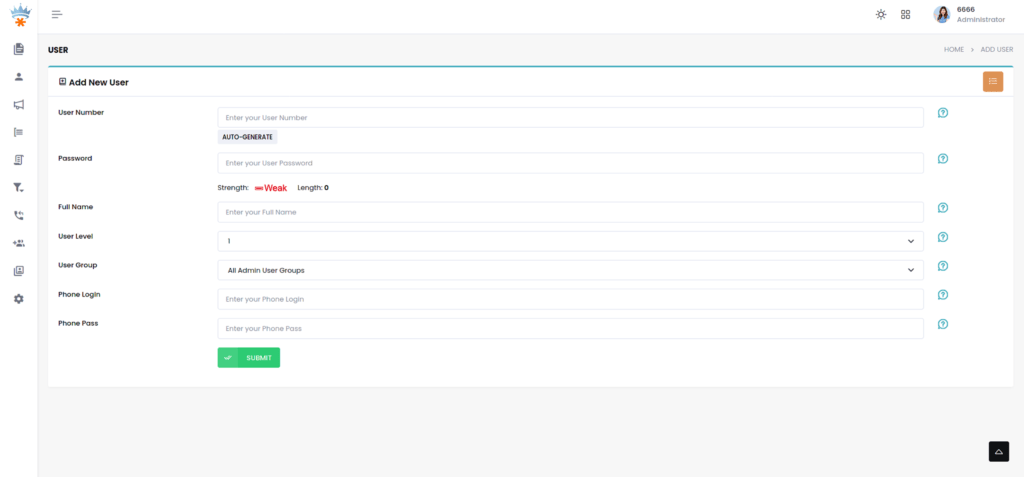
  • Level 1 — Agent: Can log into a campaign, handle calls, use dispositions, and access the agent screen. No administrative access.
  • Level 4 — Manager (limited): Can view reports, listen to live calls, and manage agent sessions within their assigned campaigns. Cannot modify system-wide settings.
  • Level 7 — Manager (full): Can create campaigns, IVR menus, inbound groups, and user accounts up to their own level. Commonly assigned to team leads.
  • Level 8 — Administrator: Full access including server configuration screens, carrier settings, and system-level scripts. Restrict this level aggressively.
  • Level 9 — Superadmin: Root-equivalent within the VICIdial interface. Typically one or two accounts maximum per installation.

User groups and campaign scoping

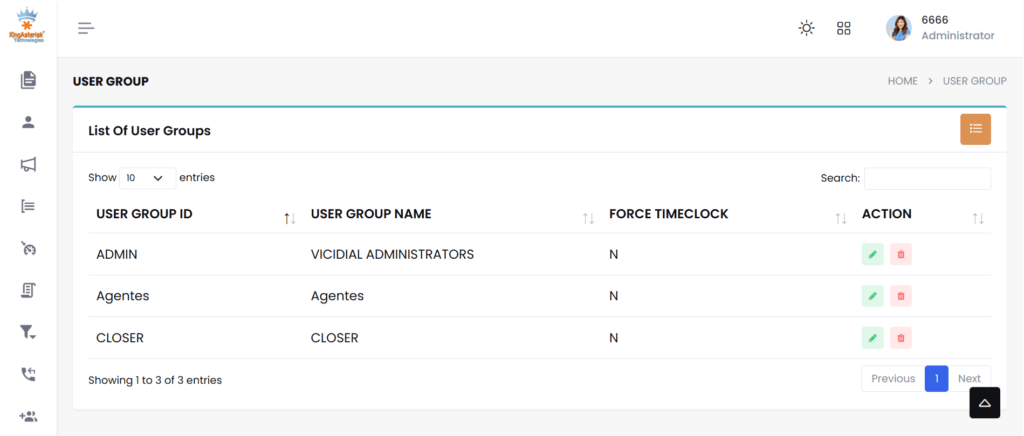
Each user belongs to a user group. User groups control which campaigns and reports are visible to that user. For multi-tenant or multi-department deployments, creating one user group per department or client is the cleanest architecture, agents in “Sales_Team_A” simply cannot see the queues or recordings belonging to “Collections_Team_B”.

Step-by-Step: Configuring Multiple Users on One Server

The following process assumes a freshly installed VICIdial instance (VICIDIAL Contact Center Suite 2.14-917a or later). If you are adding users to an existing system, skip to step 3.

Log in as Superadmin and verify server configuration

Navigate to Admin → Servers. Confirm your server record has the correct local IP, Asterisk version string, and active status. An incorrect server IP will cause agent sessions to fail silently — agents will appear logged in but receive no calls.

Create user groups before creating users

Go to Admin → User Groups and add a group for each team or department (e.g., SALES_OUTBOUND, SUPPORT_INBOUND). Set campaign access restrictions and report permissions at the group level, not per individual user. This scales cleanly as headcount grows.

Create individual user accounts

Navigate to Admin → Users → Add New User. Assign: username (alphanumeric, no spaces), full name, user group, and user level. Set a temporary password and force change on first login via the Pass Change field. For bulk provisioning, use the Admin → Bulk Account Add utility or the VICIdial API endpoint /vicidial/non_agent_api.php.

Create a phone extension for each agent seat

Go to Admin → Phones and add a phone record for each concurrent seat (not per user, seats are shared in hot-desk environments). Set the dialplan number, voicemail box, and server IP. Enable login campaign if you want agents to be auto-assigned to a campaign on extension login.

Assign phone extensions to users (or leave open for hot-desking)

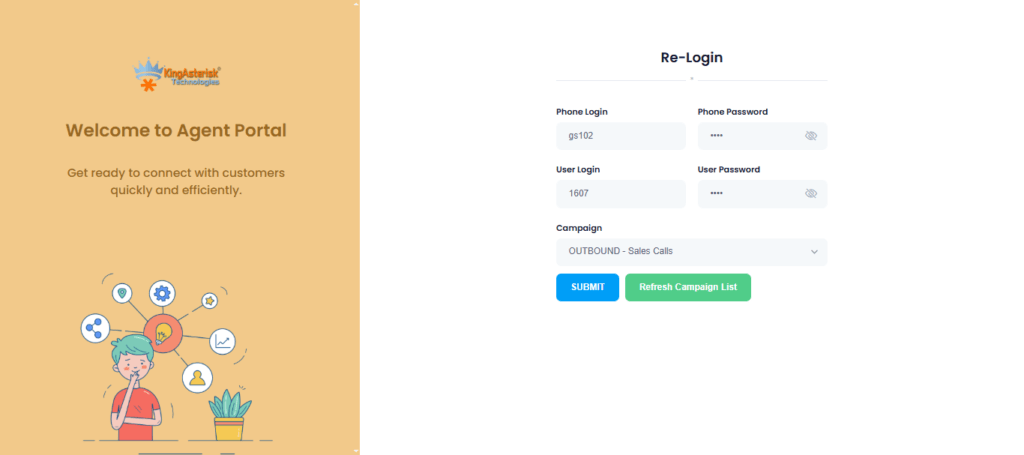
In the user record, set the Phone Login field to the agent’s dedicated extension, or leave it blank to enable hot-desk login where any agent picks any available extension. For fixed-seat deployments, a one-to-one mapping between user and phone record is simpler to audit.

Configure agent options per user

Per-user overrides include: max_inbound_calls, manual_dial_filter, scheduled_callbacks permission, and closer_default_campaign. These override the user group defaults, use them sparingly to avoid configuration inconsistencies across your agent pool.

Test login with a non-admin account before go-live

Log out of the Vicidial admin account and log in as a level-1 agent. Verify you see only the assigned campaigns, that the phone registers, and that a test call routes correctly. This catches 90% of configuration errors before they affect live traffic.

Manage Multiple Users Seamlessly on a Single VICIdial Server Without Data Overlap

Running multiple users on one system sounds complex, but with VICIdial, it’s surprisingly simple. You can organize each client using dedicated user groups, assign specific agents (like 10 for Client A and 20 for Client B), and connect them to their own campaigns, inbound flows, and reports. 

Everything stays structured, clean, and fully separated. Agents only see what they are supposed to see, and users never interact with each other’s data. This setup works perfectly for BPOs and growing contact centers that want to scale without investing in multiple servers. One system, multiple cusers, zero confusion, that’s the real power of a well-configured VICIdial environment.

💡You can easily manage everything using user groups — assign 10 agents to one group and 20 to another without any overlap. This keeps each client or team fully organized, separate, and easy to control within the same system.

Assigning Users to Campaigns and Inbound Groups

In a multi-user environment, campaign-level access is the primary tool for partitioning your agent pool. VICIdial does not automatically expose all campaigns to all users, access is controlled through the user group’s campaign list.

Outbound campaigns

Navigate to Admin → Campaigns → [Campaign Name] → Allowed User Groups. Add the relevant user groups. Agents in those groups will see the campaign in their login dropdown. Agents outside those groups will not, even if they are on the same server.

Inbound groups (queues)

Inbound routing in VICIdial uses In-Groups (equivalent to queues in a standard ACD). Go to Admin → In-Groups and under the Allowed User Groups field, restrict queue visibility. An agent handling only outbound sales should never see, or accidentally log into, a technical support queue.

Blended agent configuration

For agents handling both inbound and outbound calls, enable Dial Method: INBOUND_MAN or use the Auto-Dial with inbound blend setting. Blended agents require slightly more Asterisk channel overhead, accounting for this in your server resource planning.

Server Tuning for Multi-User Concurrency

The most common production failure in a multi-user VICIdial setup is not a configuration error, it is a resource exhaustion event. When 40 agents log in simultaneously, each opening a SIP channel and a browser session, the server’s kernel and MySQL instance face significant concurrent demand.

Linux file descriptor limits

Each Asterisk channel consumes file descriptors. The default Linux limit of 1,024 per process is insufficient for any production contact center. Add the following to /etc/security/limits.conf:

asterisk soft nofile 65536
asterisk hard nofile 65536

Also set fs.file-max = 200000 in /etc/sysctl.conf and apply with sysctl -p.

Asterisk channel limits

In /etc/asterisk/asterisk.conf, set maxcalls to at least 1.5× your expected peak concurrent call count. For a 50-agent setup with blended traffic, a value of 200 provides adequate headroom.

MySQL InnoDB buffer pool

VICIdial is database-intensive, every call event, agent status change, and disposition writes to MySQL. Set innodb_buffer_pool_size to 50–70% of available RAM. On a 16 GB server, 8G is a reasonable starting point. Monitor slow query log output during peak hours and index accordingly.

Apache / web server concurrency

The VICIdial agent interface is a browser-based application served by Apache. Set MaxRequestWorkers (Apache 2.4) to accommodate your agent count plus administrative sessions. A value of 150 handles 80–100 simultaneous agent browsers without queue buildup.

Real-World Use Case: 50-Seat BPO on a Single Server

A business process outsourcing firm running three client campaigns, debt collection, appointment scheduling, and customer satisfaction surveys, approached KingAsterisk needing to consolidate from three separate VICIdial instances onto one server to reduce infrastructure overhead.

The solution used a single VICIdial server (16 GB RAM, 8-core processor, SSD storage) with the following structure:

  • Three user groups matching the three client campaigns, each with isolated report visibility.
  • 50 phone extension records configured for hot-desking, no agent was bound to a physical extension, reducing seat licensing complexity.
  • Two level-7 manager accounts per client, giving team leads the ability to pull their own reports and monitor live calls without touching each other’s campaigns.
  • One level-8 administrator at KingAsterisk with remote SSH access for server-level maintenance.

Peak concurrent call load reached 63 simultaneous channels (including auto-dialer lines). With the file descriptor tuning and InnoDB buffer settings described above, the server maintained sub-200ms agent screen refresh times throughout. Call recording storage was the only resource that required ongoing monitoring; at average call lengths, 50 agents generated approximately 80–100 GB of audio per week.

Frequently Asked Questions

There is no hard-coded user limit in VICIdial itself. Practical capacity is constrained by server hardware, specifically RAM, CPU, and MySQL throughput. A well-tuned server with 16 GB RAM and 8 cores comfortably supports 50–80 concurrent agent sessions. Beyond that, a multi-server architecture with a separate database node is recommended for production stability.


Yes. VICIdial’s user level system (levels 1 through 9) and user group framework provide granular, layered permission control. You can restrict which campaigns a user sees, which reports they can access, whether they can perform manual dials, and whether they can view other agents’ call recordings, all independently configurable per user or user group.

Yes, you can assign agents based on user groups or campaigns. For example: One group of agents can work for Client A. Another group can work for Client B. This keeps operations organized and secure.

Yes, each campaign can have its own dialer settings. For example: Client A can use predictive dialing. Client B can use manual dialing. This flexibility helps match different business needs.

You can manage multiple users  using:

  • User Groups
  • Campaigns
  • Access Permissions
  • Reports Filtering

This structure keeps everything clean and scalable.

Top 7 Asterisk Issues Breaking Your Contact Center (Fix Fast)
Asterisk Development Solutions

Top 7 Asterisk Issues Disrupting Your Contact Center Workflow (Fix Them Quickly with Our Team)

Asterisk issues are one of the most common, and most operationally damaging, sources of downtime in modern contact center environments. When your open-source Asterisk telephony backbone starts misbehaving, the ripple effects are immediate: agents can’t connect calls, IVR flows break mid-customer-journey, and your SLA metrics collapse in real time. 

At KingAsterisk, we’ve been deploying and maintaining Asterisk-based contact center platforms for over 15 years, and we’ve seen these problems firsthand across operations of every size, from 10-seat inbound support desks to 500-agent outbound sales floors.

The difference between a 15-minute fix and a 4-hour outage almost always comes down to knowing exactly where to look. This guide doesn’t deal in generalities. Each section below names a specific failure mode, explains precisely why it happens, and gives you actionable steps to resolve it, whether you’re troubleshooting a live outage right now or hardening your system against the next one.

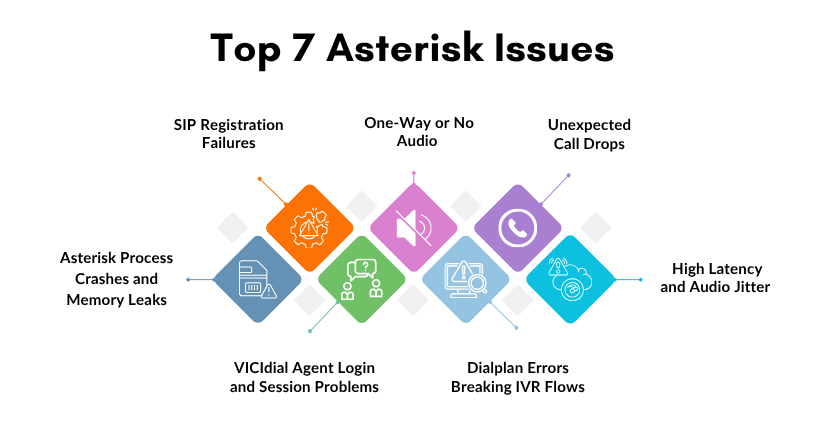
Issue #1 — SIP Registration Failures

What It Looks Like

Agents report that their softphones show “Registration Failed” or “401 Unauthorized.” Inbound routes stop receiving calls entirely. Your trunk provider’s portal shows the line as offline or unregistered. Sometimes this affects only certain extensions; other times the entire SIP trunk goes dark.

Why It Happens

SIP registration failures are among the most frequent Asterisk issues and typically stem from one of three root causes:

  • Incorrect credentials in sip.conf or pjsip.conf — passwords changed at the provider end but not updated locally, or a copy-paste error introduced a hidden character
  • Firewall blocking UDP port 5060 — especially common after a server migration, OS-level security update, or cloud security group change
  • NAT traversal misconfiguration — the externip and localnet parameters are missing or incorrect, causing Asterisk to send a private IP address in its SIP Contact header, which the provider cannot reach

How to Fix It

  1. Check peer registration status from the CLI: asterisk -rx “sip show peers” — look for peers showing UNREACHABLE or UNKNOWN status. For chan_pjsip: asterisk -rx “pjsip show endpoints”.

  2. Enable SIP debug logging in real time: asterisk -rx “sip set debug on” — watch for 403 Forbidden, 401 Unauthorized, or 404 Not Found responses from your provider.

  3. Verify firewall rules are not blocking port 5060: iptables -L -n | grep 5060 and ufw status verbose on Ubuntu systems.

  4. In sip.conf, confirm that externip= and localnet=192.168.x.x/255.255.255.0 are correctly set under [general].

  5. Reload the SIP channel driver without a full Asterisk restart: asterisk -rx “module reload chan_sip.so”, this applies credential and NAT changes immediately.

      Issue #2 — One-Way or No Audio (RTP Problems)

      What It Looks Like

      Calls connect successfully, the SIP handshake completes and the agent’s phone shows an active call, but one or both parties hear complete silence. The agent hears the customer but the customer hears nothing, or vice versa. Occasionally both sides are silent. This is one of the most frustrating Asterisk issues precisely because the call technically “works” at the signaling layer.

      Why It Happens

      Audio in Asterisk travels over RTP (Real-Time Protocol), which uses a completely separate port range, typically UDP 10000–20000, from SIP signaling on port 5060. One-way audio almost always points to a NAT or firewall problem at the media layer rather than the signaling layer:

      • RTP packets are being sent to a private IP address because nat=yes is not set for the SIP peer, and Asterisk is trusting the IP in the SDP body rather than the source IP of the packet
      • The RTP port range is blocked by a firewall while SIP port 5060 is open, a common misconfiguration when rules are set up quickly
      • A codec mismatch between Asterisk and the remote endpoint, one side is sending G.711 audio and the other is only prepared to decode G.729, so the media stream is received but not rendered

      How to Fix It

      1. Confirm that nat=force_rport,comedia is set under [general] in sip.conf for any NAT environment. For chan_pjsip, ensure direct_media=no for NATted endpoints.

      2. Open the full RTP port range: ensure UDP 10000–20000 is allowed both inbound and outbound on your host firewall and any upstream security groups.

      3. Check active codec negotiation mid-call: asterisk -rx “sip show channel “, look at the Codecs and Format fields.

      4. IControl codec priority explicitly in sip.conf: set disallow=all first, then allow=ulaw and allow=alaw in order of preference. Remove any ambiguous wildcard allowed entries.

      5. If your server runs on a cloud platform (AWS, DigitalOcean, Google Cloud, Azure), verify that the cloud security group or network ACL rules cover the full RTP range, not just port 5060.

      Issue #3 — Unexpected Call Drops

      What It Looks Like

      Calls that were connecting and progressing normally suddenly drop at the 30-second mark, the 90-second mark, or some other suspiciously consistent interval. The timing is too regular to be random. Agents are complaining. Customers are calling back frustrated. Call recordings end abruptly.

      Why It Happens

      Timing-based call drops are a classic symptom of SIP session timer expiry or missing re-INVITE handling, and they’re among the trickier Asterisk issues to diagnose because the problem is often rooted in how a stateful firewall is treating mid-call SIP traffic:

      • SIP session timers are set by your carrier to refresh the session at a defined interval; the re-INVITE packet used for this refresh is being dropped by your firewall, which treats it as a new out-of-state connection
      • rtptimeout and rtpholdtimeout values in sip.conf are configured too aggressively, terminating calls when Asterisk detects a gap in RTP traffic, this hits IVR hold scenarios particularly hard
      • Carrier-side BYE is being sent because the carrier’s session timer expires without receiving a re-INVITE response, often looping back to the one-way audio problem causing the carrier to abandon the session

      How to Fix It

      1. In sip.conf, set session-timers=refuse to reject session timer requests from the carrier if your provider supports sessions without timers, or session-timers=accept to defer the interval decision to them.

      2. Adjust RTP timeout values: rtptimeout=60 and rtpholdtimeout=300 for standard contact center use. Set rtptimeout=0 to disable RTP-based hangups entirely in environments with long IVR hold periods.

      3. Enable qualify=yes for all SIP peers to send OPTIONS keepalives every 60 seconds, this maintains NAT bindings and keeps stateful firewall sessions open.

      4. If using Linux’s netfilter, load the SIP conntrack helper: modprobe nf_conntrack_sip, this allows the firewall to track SIP dialogs properly and permit re-INVITEs.

      5. Consider switching from UDP to TCP for SIP signaling (tcpenable=yes in sip.conf) if your UDP packets are being dropped by intermediate stateful firewalls.

        Issue #4 — High Latency and Audio Jitter

        What It Looks Like

        Agents report that callers sound robotic, words cut in and out, or that there is a noticeable echo on the line. The problem worsens during peak calling hours and improves overnight. Call quality scores drop. CSAT surveys show audio quality complaints spiking. Supervisors can hear it on call recordings.

        Why It Happens

        Audio jitter and high latency in Asterisk deployments are usually infrastructure or configuration issues rather than core Asterisk bugs, but Asterisk configuration choices directly amplify or reduce the problem:

        • Codec transcoding overhead — if Asterisk is converting between G.729 and G.711 at high call volumes, the CPU load during peak hours causes audio buffer starvation, introducing gaps and jitter
        • Insufficient or shared server resources — Asterisk is CPU and I/O sensitive; running your PBX, database, web server, and dialer on a single physical host is a recipe for resource contention during peak campaigns
        • Incorrect jitter buffer configuration — Asterisk’s native jitter buffer is disabled by default; when enabled improperly, it introduces additional latency rather than smoothing out packet arrival variation

        How to Fix It

        1. Monitor CPU usage in real time during peak call hours: htop filtered to the asterisk process — sustained CPU above 70% during calls is a warning sign.

        2. Eliminate transcoding wherever possible: if your SIP trunk and agent endpoints both support G.711 ulaw, force allow=ulaw and disallow=all on both sides. Passthrough audio requires zero CPU for codec conversion.

        3. If a jitter buffer is genuinely needed (high-latency WAN links): set jbenable=yes, jbmaxsize=200, and jbimpl=fixed in sip.conf under [general] — avoid adaptive jitter buffer in contact center environments where latency consistency matters more than flexibility.

        4. Separate Asterisk from your database server — MySQL/MariaDB for VICIdial should run on a dedicated host or at minimum have I/O scheduling priority (ionice -c 1 -n 0 -p ).

        5. Run Asterisk with elevated CPU scheduling priority: nice -n -10 /usr/sbin/asterisk — or set OOMScoreAdjust=-100 in the systemd unit file to protect Asterisk from being killed under memory pressure.

          Issue #5 — Dialplan Errors Breaking IVR Flows

          What It Looks Like

          Callers reach your IVR menu but get dumped to a fast busy tone unexpectedly, hear silence after making a selection, or get trapped in an infinite loop. Your extensions.conf was working correctly until a recent configuration change touched it. Sometimes only specific menu paths are broken; the main greeting plays fine.

          Why It Happens

          IVR-related Asterisk issues almost always trace back to dialplan logic errors, missing context definitions, or silent failures in AGI scripts:

          • A called extension references a context name that doesn’t exist or contains a typo, Asterisk fails to find it and routes to the [default] context or hangs up
          • An AGI or FastAGI script fails silently (non-zero exit code, missing Python library, broken database connection) and the dialplan has no h extension error-handling branch to catch it
          • A Goto() or GotoIf() application targets a label or extension that was renamed or deleted during a configuration update
          • The [default] context is unintentionally catching calls it should never reach, masking the real missing-context error

          How to Fix It

          1. Inspect the loaded dialplan without touching a live call: asterisk -rx “dialplan show ” — if the output is empty, the context isn’t loaded or has a name mismatch.

          2. Enable verbose dialplan tracing on the CLI: asterisk -rx “core set verbose 5” — then run a test call. Watch exactly which extensions are matched and where execution diverges from expectation.

          3. Check AGI script health independently: run the script directly from the shell as the asterisk user — sudo -u asterisk /usr/share/asterisk/agi-bin/your_script.agi — and check its exit code with echo $?. Any non-zero value signals a failure Asterisk will silently route around.

          4. Audit Goto(), GotoIf(), and GoSub() targets after any dialplan edit — confirm every referenced extension, context, and label exists in the current loaded configuration.

          5. After every dialplan change, reload without restarting Asterisk: asterisk -rx “dialplan reload” — then immediately verify with dialplan show to confirm the new configuration is active.

          Issue #6 — VICIdial Agent Login and Session Problems

          What It Looks Like

          Agents are unable to log into VICIdial at shift start, receive “session expired” errors in the middle of active calls, or find themselves listed as logged in after they’ve clocked out. Campaign managers see incorrect real-time agent counts on the supervision screen. The predictive dialer calculates abandon rates incorrectly because it thinks more agents are available than actually are.

          Why It Happens

          VICIdial runs on top of Asterisk and introduces its own session management layer through the vicidial_live_agents MySQL table. Breakdowns here are compound problems, they can involve Asterisk, the database, the AMI connection, or all three simultaneously:

          • Stale session records remaining in vicidial_live_agents from a previous crash, server restart, or agent who closed their browser without logging out properly
          • Asterisk AMI connection instability — VICIdial communicates with Asterisk exclusively through the Asterisk Manager Interface; if this connection drops and doesn’t reconnect cleanly, agent state events stop flowing and VICIdial’s view of call state diverges from reality
          • MySQL max_connections exceeded during high-agent-count shifts, causing VICIdial’s PHP processes to fail silently on database writes

          How to Fix It

          1. Clear stale sessions that are preventing fresh logins: UPDATE vicidial_live_agents SET status=’DEAD’ WHERE last_update_time < NOW() - INTERVAL 10 MINUTE AND status NOT IN ('DEAD'); — run this during a shift transition, not during active calling.

          2. Check AMI connectivity health: grep “AMI” /var/log/asterisk/full | tail -50 — look for “Lost Connection” or “Authentication Failed” entries correlating with the time agents started reporting problems.

          3. In manager.conf, verify the VICIdial AMI user has complete permissions: read = all and write = all — a partially permissioned AMI user is one of the most common causes of intermittent VICIdial session desynchronisation.

          4. Increase MySQL’s connection limit to accommodate peak agent load: in /etc/mysql/my.cnf, set max_connections = (number_of_agents × 3) + 100 — restart MySQL during a maintenance window to apply.

          5. Restart VICIdial’s server-side processes cleanly when stale state has accumulated: /usr/share/astguiclient/ADMIN_restart_vicidial_servers.pl — this script handles process teardown and restart in the correct order.

          Issue #7 — Asterisk Process Crashes and Memory Leaks

          What It Looks Like

          Asterisk stops unexpectedly during active operations, sometimes in the middle of a campaign peak. If a watchdog process is configured, it auto-restarts Asterisk within seconds, but all calls in progress drop instantly. Over days or weeks, you notice memory usage climbing steadily until the server becomes sluggish and then unresponsive, requiring a manual restart to recover.

          Why It Happens

          Process stability Asterisk issues are less common in recent LTS versions but still surface in specific environments and configurations:

          • Module memory leaks: certain third-party modules and older builds of app_queue.so have documented leak patterns under sustained high call volume. The leak is slow enough to go unnoticed for days but eventually critical.
          • Core dump files filling the disk: when Asterisk crashes and core dumps are enabled, /tmp or /var fills up rapidly; subsequent Asterisk restarts then fail because the filesystem is full, turning a recoverable crash into a prolonged outage
          • Improper forced kills: using kill -9 on the Asterisk process instead of graceful shutdown corrupts in-memory state, increases the frequency of subsequent crashes, and can leave SIP sessions in a half-open state at the carrier

          How to Fix It

          1. Run Asterisk under systemd supervision with automatic restart: in /etc/systemd/system/asterisk.service, set Restart=on-failure and RestartSec=5; this provides sub-10-second recovery for most crash scenarios.

          2. Monitor RSS memory growth over time: watch -n 30 “ps -o pid,rss,vsz,comm -p \$(pgrep asterisk)“: if RSS grows continuously over hours without stabilising, a scheduled graceful reload every 24 hours during off-peak is a pragmatic interim measure.

          3. Control core dump behavior in /etc/asterisk/asterisk.conf: set dumpcore = no for production systems, or redirect to a controlled path with a size cap using systemd’s LimitCORE directive.

          4. Always stop Asterisk gracefully: asterisk -rx “core stop gracefully”: this command waits for all active calls to complete before exiting, preventing mid-call drops and carrier-side session corruption. Never use kill -9 unless the process is completely unresponsive.

          5. Stay current on patch releases: review Asterisk’s CHANGES and UPGRADE.txt for your major version branch: the majority of crash-inducing bugs in production environments have already been fixed in a point release.

          Step-by-Step: How KingAsterisk Diagnoses and Resolves Asterisk Issues

          When a contact center brings an active problem to our team, our senior engineers follow a structured diagnostic process that minimises downtime and avoids the “restart everything and hope” trap. Here is the exact approach we use:

          1. Establish live CLI access first: connect to the running Asterisk process: asterisk -rvvv (three to five vs for appropriate verbosity). Never rely solely on log files written hours ago for an active fault.
          2. Reproduce the fault in a controlled way: place a test call that triggers the issue while watching the CLI output in real time. A fault you can reproduce consistently is a fault you can fix.
          3. Isolate the layer: determine precisely whether the problem lives at the SIP signaling layer, the RTP media layer, the dialplan execution layer, or the application layer (VICIdial, AGI scripts, database connections).
          4. Anchor to the change timeline: review /var/log/asterisk/full and server change logs for the exact timestamp when the issue began. Correlate with any configuration edits, OS or kernel updates, network topology changes, or carrier notifications.
          5. Inspect the relevant configuration files: sip.conf or pjsip.conf, extensions.conf, queues.conf, manager.conf: for the specific feature area identified in Step 3.
          6. Test the fix in isolation before applying to production: if the environment allows it, replicate the call path on a test extension or staging system. If not, apply the smallest possible change and observe.
          7. Apply the targeted fix: make only the minimum necessary configuration change, then reload only the affected module (asterisk -rx “module reload chan_sip.so”) rather than a full service restart whenever possible.
          8. Monitor actively for 30–60 minutes: watch the system under normal production load after the fix is applied. A problem that appears resolved in testing can resurface under concurrent call volume.
          9. Set up an automated alert: if the fault had no existing monitoring, add a check in Nagios, Zabbix, or your monitoring tool of choice on the specific metric that failed. Don’t leave the next occurrence to chance discovery.
          10. Document root cause and resolution: record both the cause and fix in your internal runbook. Asterisk issues, especially those caused by carrier behaviour changes or OS interactions, have a pattern of recurring months later when team knowledge has shifted.

          Real-World Use Case: Outbound Campaign Recovery

          A mid-sized collections contact center with 120 VICIdial agents came to KingAsterisk after experiencing a 40% call drop rate that appeared exactly three days after a scheduled server OS upgrade. Agents were logging in, campaigns were running, and calls were connecting — but they were dropping consistently at the 32-second mark with no obvious pattern to which agents or campaigns were affected.

          Our diagnosis: the OS upgrade had reset the server’s iptables rule set to default, and the Linux conntrack module’s default configuration was treating SIP re-INVITE packets at 30 seconds as out-of-state connections and silently dropping them. The carrier’s session timer was set to 30 seconds, meaning every active call that hit that interval was being immediately terminated by the carrier when the re-INVITE went unanswered.

          The fix took under 20 minutes to implement: we loaded nf_conntrack_sip with proper configuration to enable SIP-aware connection tracking, adjusted session-timers=refuse in sip.conf for the affected trunk peer, and flushed the stale conntrack table entries. Call drops fell from 40% to under 0.5% within the first monitored hour. No Asterisk restart was required. The entire resolution happened during a live shift with zero agent disruption.

          This case illustrates the core principle behind how we approach every Asterisk issues engagement: the problem is almost never what it looks like on the surface, and the right diagnostic path gets you to a precise, minimal fix rather than a disruptive restart that buys hours of relief before the fault reappears.

          Frequently Asked Questions

          Enable real-time SIP and RTP debugging directly from the Asterisk CLI with zero service disruption. Run asterisk -rvvv to attach a console to the running process, then execute sip set debug on to begin capturing SIP negotiation output in real time. For RTP-level inspection, use rtp set debug on. Both debug modes are fully safe to enable on a production system and can be turned off with the corresponding off command once you have captured the data you need.

          Calls dropping at consistent intervals, commonly 30, 60, or 90 seconds, almost always indicate a SIP session timer problem. The SIP protocol allows either party to set a session expiry interval; when the re-INVITE used to refresh that session is blocked by a firewall or rejected by one endpoint, the other party sends a BYE and terminates the call. The fix typically involves either adjusting session-timers in sip.conf to refuse or accept, or configuring the Linux kernel’s SIP conntrack module to allow mid-call SIP re-INVITEs to pass through properly.

          Yes, significantly. VICIdial depends on Asterisk’s AMI (Asterisk Manager Interface) for every real-time agent event and call state update. If the AMI connection becomes unstable, due to authentication errors, network interruption, or excessive event volume overwhelming the socket,  VICIdial loses synchronisation with the actual call state. This manifests as agents appearing logged in when they have disconnected, calls not being credited correctly to campaigns, and the predictive dialer calculating abandon rates and dial ratios based on phantom agent availability. Stabilising the AMI connection is always the first remediation step before adjusting any campaign or dialer settings.

          Production contact centers should track Asterisk’s Long-Term Support releases, which receive security and bug fix updates for five years after release. Apply patch releases, for example, moving from 20.x.1 to 20.x.5, within a 30-day window after testing in a staging environment. Never apply them immediately to production, and never delay them indefinitely. Major version upgrades should be treated as a full migration project with a staging environment test, agent impact assessment, and a documented rollback plan ready before the maintenance window begins.

          Key Takeaways

          • The most disruptive Asterisk issues, including SIP failures, one-way audio, and call drops, have clear, proven fixes when diagnosed correctly.
          • Many problems stem from misconfigured NAT settings, codec mismatches, or inadequate server resources rather than Asterisk itself.
          • VICIdial deployments built on Asterisk require careful tuning of dialplan logic, database connections, and agent session management.
          • Proactive monitoring with tools like asterisk -rvvv and log analysis can catch issues before they escalate to full outages.
          • KingAsterisk’s engineering team has resolved these exact problems across hundreds of contact center deployments spanning 15+ years.

          Conclusion

          Asterisk issues don’t have to mean hours of downtime, frustrated agents, and damaged customer relationships. The seven problems covered in this guide, SIP registration failures, one-way audio, call drops, audio jitter, dialplan errors, VICIdial session problems, and process crashes, each have clear diagnostic paths and proven, targeted fixes. The key is knowing which layer of the stack to examine, having the right CLI commands ready, and approaching each fault methodically rather than reactively.

          What separates a 15-minute resolution from a 4-hour outage is almost always experience,  knowing what a 32-second call drop pattern means before you’ve even opened a log file, or recognising a codec mismatch from a single line of SIP debug output. That depth of hands-on knowledge is exactly what KingAsterisk brings to every engagement.

          With over 15 years of specialised experience in Asterisk, VICIdial, IVR systems, and contact center telephony infrastructure, our engineering team has seen, and resolved, every Asterisk issue in this guide and hundreds more. Whether you’re managing an active outage right now or want to harden your system before the next failure strikes, we’re ready to help.

          Contact the KingAsterisk team to speak directly with an engineer who works with Asterisk every day.

          Authored by the KingAsterisk Senior Engineering Team, specialists in Asterisk, VICIdial, IVR, and contact center telephony infrastructure with 15+ years of hands-on deployment experience across inbound, outbound, and blended contact center operations.

          Build Custom VICIdial Dashboard & WebRTC Agent Interface 2026
          Vicidial Software Solutions

          How to Build Custom VICIdial Admin Dashboard & WebRTC Agent Interface for Contact Centers (2026)

          Building a custom VICIdial admin dashboard is one of the highest-leverage improvements a contact center can make, and yet most operations run on VICIdial’s default interface long after they’ve outgrown it. The default UI was designed for broad compatibility, not for the specific workflow of a 50-seat outbound BPO, a healthcare scheduling team, or a financial services inbound center. 

          This guide covers, in practical terms, how to design and deploy a tailored admin dashboard alongside a browser-based WebRTC agent interface that modern agents actually want to use.

          Whether you’re an IT manager evaluating an overhaul or a contact center director looking to justify the investment to stakeholders, this article walks you through architecture choices, must-have features, and a field-tested build process, drawn from KingAsterisk’s deployment experience across hundreds of live contact centers.

          Why a Default VICIdial UI Is Not Enough in 2026

          VICIdial is a powerful open-source platform: proven, scalable, and incredibly flexible at the Asterisk level. But its admin panel, built over many years of incremental updates, was never designed as a modern management interface. Supervisors often have to navigate five or six separate pages to get a coherent picture of a single campaign’s live performance. 

          Agents work inside a thin PHP interface that doesn’t adapt to browsers, breaks on mobile, and offers no integration hooks for CRM widgets or scripting.

          VICIdial exposes agent activity through its native API endpoint: 

          GET /vicidial/non_agent_api.php?source=test&user=admin&pass=***&function=version

          In 2026, contact center leaders are competing on speed and personalization. A real-time call monitoring interface that refreshes every 30 seconds is no longer acceptable when WebSocket-based dashboards can push live data at sub-second latency. Custom dashboards solve this by sitting on top of VICIdial’s database and API layer, pulling exactly the data each role needs and surfacing it in a way that actually accelerates decisions.

          Industry note: According to multiple contact center technology studies, supervisors using role-specific dashboards identify and resolve agent performance issues up to 3x faster than those using generic reporting screens.

          Architecture Overview: Dashboard + WebRTC Stack

          💡 Custom Admin Dashboard
          We develop a modern, clean, and fully customized admin dashboard tailored to your contact center’s exact needs. From live agent monitoring to campaign-level analytics, every panel is built for speed, clarity, and role-based access, so your supervisors always have the right data at a glance.

          Before writing a single line of front-end code, it’s critical to get the architecture right. A custom VICIdial solution typically has three layers:

          Data Layer

          VICIdial MySQL/MariaDB tables, Asterisk AMI event stream, and campaign configuration tables.

          AMI connects on port 5038. A basic login handshake looks like: 

          Action: Login / Username: admin / Secret: yourpass

          API Middleware

          Node.js or Python FastAPI layer translating VICIdial DB queries into clean JSON endpoints with WebSocket push for real-time events.

          Presentation Layer

          React or Vue.js front end consuming API endpoints. Separate views for admin, supervisor, and agent roles, all served over HTTPS.

          The middleware layer is the most critical architectural decision. Direct queries from the front end to the VICIdial database work in development but create security holes and break on every VICIdial upgrade. An API middleware insulates your custom UI from schema changes and lets you add authentication, rate limiting, and audit logging in a single place.

          For the WebRTC agent interface, the stack adds a SIP-over-WebSocket gateway, typically FreeSWITCH or a Kamailio proxy, that bridges between the browser’s WebRTC stack and VICIdial’s Asterisk backend. This is the component that replaces physical desk phones and soft-phone executables.

          What Your Custom VICIdial Admin Dashboard Should Include

          Supervisor / Operations View

          The operations view is where most of the dashboard value lives. It should surface, in real time, the metrics that answer the question supervisors ask dozens of times per shift: “What’s happening right now?”

          Admin / IT View

          The admin view handles VICIdial customization, campaign configuration, DID routing, carrier trunk management, and system health monitoring. Importantly, this view should be separate from the supervisor dashboard, restricted by role, and include an audit log of every configuration change so that issues can be traced quickly.

          Reporting & Analytics View

          Custom dashboards can pull VICIdial’s raw call log data and present it through interactive charts,  hourly call volume heatmaps, agent scorecard trends, and campaign ROI summaries, far beyond what VICIdial’s built-in reports offer. Connecting this view to an export pipeline (CSV, Google Sheets webhook, or BI tool like Metabase) gives management self-service analytics without needing a developer every time they want a new cut of data.

          Building the WebRTC Agent Interface

          The agent-facing side of the project is where WebRTC integration changes the operational picture most dramatically. A browser-based softphone embedded inside the agent workspace eliminates hardware maintenance, enables remote and hybrid work, and centralizes login management, all from a single URL the agent opens in Chrome or Firefox.

          💡 WebRTC Agent Interface

          Our WebRTC Agent Interface runs entirely in the browser, no desk phones, no extra software, no hardware costs. Agents get a clean, responsive screen with built-in softphone, call disposition controls, and CRM data side by side, so they can handle calls faster and with fewer errors.

          Core Components of a WebRTC Agent UI

          Embedded SIP Softphone

          JsSIP or SIP.js library connected via WebSocket to a FreeSWITCH or Kamailio proxy that bridges to Asterisk.

          Script & Disposition Panel

          Campaign-specific call scripts, live customer data pulled from CRM, and post-call disposition codes in one view.

          Status Controls

          One-click pause, ready, break, and wrap-up state changes that sync instantly with VICIdial’s agent status table.

          Integrated CRM Widget

          Iframe or API-driven customer record display, no tab switching. Screen-pop on inbound call using ANI lookup.

          Performance note: In KingAsterisk deployments, WebRTC agent interfaces reduce average handle time by 8–12% due to eliminating the screen-switching friction between a legacy softphone application and the VICIdial agent panel.

          Audio Quality Considerations

          WebRTC audio quality depends heavily on the network path between the browser and your SIP proxy. For contact centers with agents on standard broadband or corporate LAN, G.711 codec delivers near-PSTN quality. For geographically distributed or remote agents, enabling Opus codec with jitter buffer tuning on the FreeSWITCH side significantly reduces packet-loss artifacts. Always deploy STUN/TURN servers for NAT traversal, this is the most common cause of one-way audio in initial WebRTC deployments.

          Step-by-Step: How KingAsterisk Builds Custom VICIdial Dashboards

          This is the process we follow for every contact center software customization engagement,  whether the client is running 20 agents or 500.

          Requirements Discovery & Role Mapping

          We start with a structured workshop with stakeholders from operations, IT, and compliance. We map out exactly which data points each role: admin, supervisor, team lead, agent, needs to see, and which actions they need to trigger. This prevents scope creep and ensures the build is sized correctly from day one.

          VICIdial Database & AMI Audit

          We audit the client’s VICIdial version, database schema, and Asterisk Manager Interface (AMI) configuration, We identify which real-time events are available (agent status changes, call disposition events, queue events) and which data needs to be polled vs. pushed via WebSocket, We never modify core VICIdial tables, all custom data goes into separate schemas.

          After “which data needs to be polled vs. pushed via WebSocket”, one line showing the key table supervisors care about most:

          The two most queried tables during a live shift are vicidial_live_agents and vicidial_log — the latter alone can hold millions of rows on a busy system, making indexed queries non-negotiable.

          SELECT user, status, campaign_id FROM vicidial_live_agents WHERE campaign_id = 'CAMP01';

          API Middleware Development

          We build a Node.js/Express or FastAPI middleware service that exposes clean, versioned REST endpoints and WebSocket channels. Authentication uses JWT tokens with role claims, the same token determines what data the front end can request. Rate limiting and query caching (Redis) keep the VICIdial database from being hammered by dashboard refresh cycles.

          A decoded JWT payload for a supervisor looks like:

          { "user": "sup_01", "role": "supervisor", "campaigns": ["CAMP01","CAMP02"] }
          

          Front-End Dashboard Build

          We use React with a component library aligned to the client’s brand. Each widget (agent grid, queue depth chart, campaign scorecard) is an independent component that subscribes to its own WebSocket channel or API endpoint. This makes it easy to add or remove dashboard elements without touching unrelated code.

          WebRTC SIP Integration

          We deploy a FreeSWITCH instance (or configure an existing one) as the WebSocket SIP proxy, configure Kamailio for load balancing if the seat count warrants it, and integrate JsSIP into the agent UI. STUN/TURN is configured using Coturn. We run a full codec negotiation test across all agent network environments before sign-off.

          JsSIP registers the agent’s browser as a SIP endpoint in one call: 

          new JsSIP.UA({ sockets: [socket], uri: 'sip:agent01@pbx.yourserver.com', password: '***' })

          UAT, Load Testing & Go-Live

          User acceptance testing runs with a pilot group of 10–15 agents on live traffic. We instrument the middleware with logging to catch edge cases, calls that drop mid-transfer, browsers that fail STUN negotiation, dispositions that don’t write back to VICIdial. Load testing simulates peak concurrent connections (typically 120–150% of expected maximum). Go-live is a rolling cutover, never a big-bang switch.

          Post-Launch Monitoring & Iteration

          We set up Grafana dashboards on the middleware server and a lightweight error tracking integration (Sentry or similar). The first 30 days post-launch typically surface a handful of workflow edge cases that weren’t visible in UAT, we address these in sprint cycles without impacting live operations.

          Important : Never deploy a custom VICIdial admin dashboard that reads directly from the live_sip_channels or vicidial_live_agents tables at high polling frequency without a caching layer. Unthrottled queries to these high-write tables cause measurable performance degradation on busy servers.

          Real-World Use Case: BPO Outbound Campaign Overhaul

          A business process outsourcing firm running three simultaneous outbound campaigns for financial services clients approached KingAsterisk with a specific pain point: their supervisors couldn’t tell which campaign was experiencing a spike in abandoned calls until the end-of-hour report fired. By that point, 40–60 minutes of degraded performance had already impacted SLA scores. 

          We built a custom VICIdial admin dashboard with a campaign-level abandon-rate widget that triggers a color-coded alert within 90 seconds of the rate crossing a configurable threshold. Supervisors can drag agents between campaigns directly from the grid. In the first month post-deployment, average SLA breach incidents dropped by 68%. 

          The WebRTC agent interface, deployed simultaneously, eliminated 130 desk phones and reduced IT hardware tickets by over 80%.

          💡 Multi-Language Support for Agent Teams

          Our interface includes built-in multi-language support, letting agents switch between English and Spanish instantly without logging out or reloading. Perfect for diverse BPO teams and contact centers managing multilingual campaigns across different regions.

          Common Mistakes to Avoid

          1. Building on VICIdial’s PHP UI Instead of Building Alongside It

          Modifying VICIdial’s PHP files directly is the fastest path to a maintenance nightmare. Every VICIdial upgrade, and they happen regularly, overwrites your changes. Build your custom dashboard as a separate application that communicates with VICIdial via its API and database, not by editing its source files.

          A reliable rule of thumb: if your change lives inside /var/www/html/vicidial/, it will be overwritten. Custom code belongs in its own app directory entirely

          2. Skipping RBAC Design

          Contact centers have complex permission hierarchies. A team lead should see their 15 agents, not all 300. A campaign manager should see financial metrics; agents should not. Designing RBAC as an afterthought means a complete rework of API endpoint security. Define roles and their data scopes before writing the first endpoint.

          3. Underestimating WebRTC Network Requirements

          WebRTC is unforgiving of network asymmetry. A contact center that runs happily on SIP desk phones at 80kbps per call may see WebRTC quality problems if the corporate firewall blocks UDP or if the TURN server is not geographically close to remote agents. Network assessment is not optional, it’s week-one work.

          4. No Fallback for VICIdial Downtime

          Custom dashboards that are tightly coupled to a single VICIdial server with no read replica create a single point of failure. For any deployment over 50 seats, configure a MySQL read replica for dashboard queries and ensure the middleware degrades gracefully (showing cached data with a stale-data indicator) rather than showing a blank screen when the primary DB is briefly unreachable.

          Point your dashboard queries to the replica:

          DB_HOST_DASHBOARD=replica.internal vs DB_HOST_VICIDIAL=primary.internal

          Frequently Asked Questions

          Not if it’s built correctly. The API middleware layer is the key: it abstracts your custom UI from VICIdial’s internal database schema. When VICIdial is upgraded, only the middleware needs to be reviewed and updated, the front-end dashboard code remains untouched. We always version our API endpoints so that breaking schema changes are handled gracefully.

          Yes, this is one of the strongest use cases for WebRTC. Remote agents need only a browser, a headset, and a stable internet connection (minimum 1 Mbps symmetric). With a properly deployed TURN server and Opus codec, audio quality for remote agents is comparable to office-based desk phones. VPN is recommended for the API/dashboard traffic but is not required for the WebRTC media stream itself.


          A skin changes the visual appearance of VICIdial’s existing PHP pages, it modifies CSS and layout but doesn’t change the underlying data architecture or add new functionality. A custom VICIdial admin dashboard is a completely separate application built on modern web technology (React, Vue.js) that surfaces VICIdial data in new ways, adds real-time features, and integrates with external systems like CRMs and reporting tools.

          Yes. KingAsterisk offers maintenance contracts that cover VICIdial version compatibility updates, dashboard feature additions, bug fixes, and 24/7 technical support. Given that we built the system, support response times are significantly faster than engaging a generic VoIP consultant who needs time to understand the codebase. Support plans are scoped based on seat count and SLA requirements.

          Conclusion

          A custom VICIdial admin dashboard is not a luxury upgrade, for contact centers operating at scale in 2026, it’s an operational necessity. The default VICIdial interface was built to work everywhere; a custom dashboard is built to work perfectly for your specific team structure, your specific campaigns, and your specific performance metrics. 

          Paired with a WebRTC agent interface, the combination eliminates hardware debt, enables remote work, and puts real-time decision-making data in front of the people who can act on it.

          The key success factors are consistent across every deployment: a clean API middleware layer that insulates the UI from VICIdial internals, a role-based access design that is done upfront rather than retrofitted, proper STUN/TURN configuration for WebRTC, and a phased go-live that doesn’t gamble live operations on a big-bang cutover.

          With over 15 years of Asterisk and VICIdial deployment experience, more than 900 contact centers served, and 2,000+ completed projects, KingAsterisk has the engineering depth to build, deploy, and support custom VICIdial solutions that go into production and stay there, reliably.

          Ready to Build Your Custom VICIdial Dashboard?

          Share your current setup and operational requirements with KingAsterisk’s engineering team. We’ll provide a no-obligation scoping assessment and a realistic timeline, usually within 48 hours.

          Talk to a VICIdial Engineer → 

          No sales pressure. Just honest technical guidance from a team that has deployed this hundreds of times.