


Key Takeaways
- Custom CRM development gives contact centers full control over data models, workflows, and third-party integrations, unlike off-the-shelf alternatives.
- A well-structured CRM integrates directly with telephony platforms like Asterisk and VICIdial via REST APIs or AMI (Asterisk Manager Interface).
- The build process follows a six-stage lifecycle: discovery, architecture, development, integration, QA, and deployment.
- Scalable CRM design relies on modular architecture, normalized relational databases, and role-based access control (RBAC).
- Businesses that invest in custom CRM development see measurable improvements in agent efficiency, data accuracy, and customer retention.
Custom CRM development is the process of designing and building a Customer Relationship Management system from scratch, or on top of an open framework, to match the exact operational requirements of your business. Unlike packaged CRM solutions that force you to adapt your processes around their feature set, a custom-built CRM is engineered around your workflows, your data structures, and your integration stack.
At KingAsterisk, we have spent over 15 years building and deploying contact center software solutions, from Asterisk-based telephony platforms to full-scale IVR systems. One of the most consistent pain points we see is teams using generic CRMs that were never designed to handle call dispositions, agent scripting, DNC (Do Not Call) compliance, or live queue data. Custom CRM development solves each of these problems at the root.
Why Contact Centers Need a Custom CRM
Off-the-shelf CRM platforms like Salesforce or HubSpot are powerful general-purpose tools. But “general-purpose” is precisely the problem when your operation runs on VICIdial, processes 10,000+ calls per day, and needs disposition codes to trigger automated follow-up sequences.
Here is what contact centers routinely sacrifice with packaged CRM tools:
No native CTI (Computer Telephony Integration): Most packaged CRMs require expensive middleware or third-party connectors to link with Asterisk or VICIdial. Even then, screen-pop functionality is often delayed or unreliable.
Rigid data models: Pre-built CRMs define their own fields, object relationships, and hierarchy. If your lead pipeline has five custom stages with conditional logic, you end up bending your process to fit their schema, which creates data quality issues downstream.
Licensing costs that scale against you: Per-seat licensing punishes growth. A contact center scaling from 50 to 200 agents can see CRM costs multiply four times with no corresponding improvement in functionality.
Limited reporting depth: Standard CRM dashboards show basic sales pipeline metrics. Contact centers need custom reporting on Average Handle Time (AHT), First Call Resolution (FCR), agent utilization, and call outcome analysis, all tied back to the same CRM record.
Custom CRM development eliminates each of these constraints by design.
Core Features of a Custom-Built CRM
A well-scoped custom CRM for contact center operations should include the following functional modules:
Contact & Lead Management
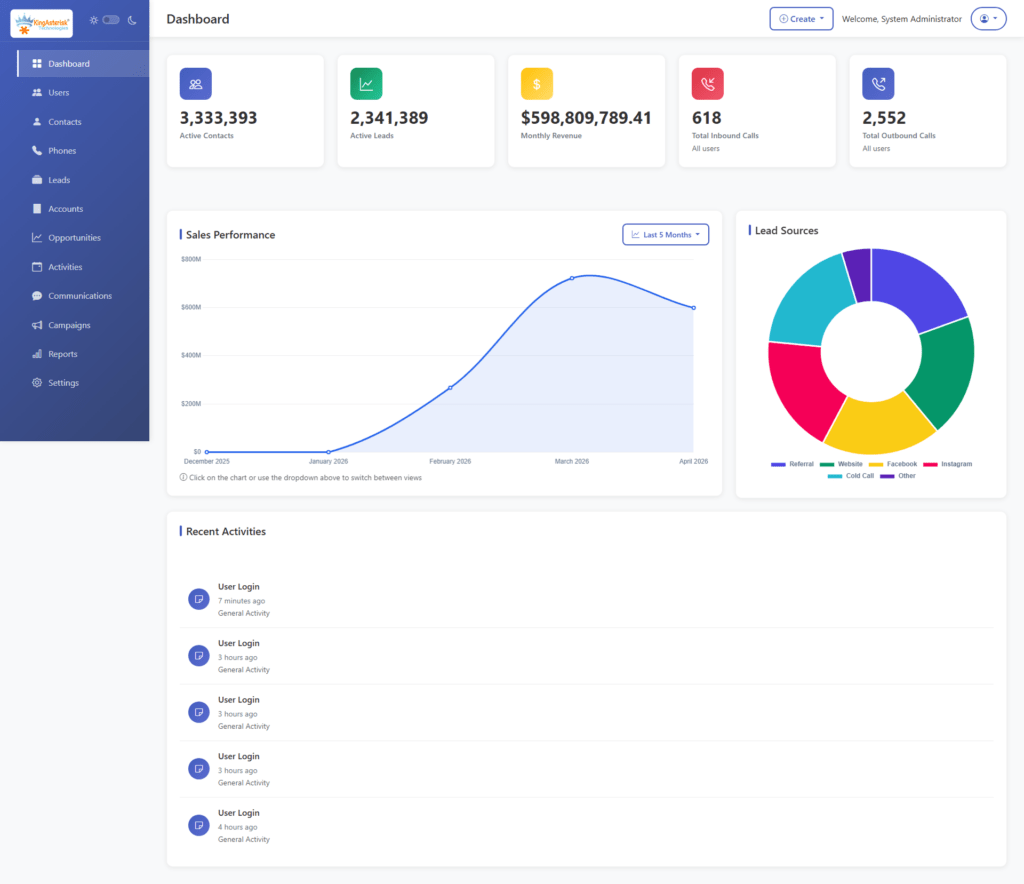
The foundation of any CRM is its contact database. A custom build allows you to define exactly what a “contact” means in your context, including custom fields, segmentation tags, account hierarchies, and interaction history. Unlike standard tools, you can enforce data validation rules at the database level using constraints and stored procedures.
Call Logging & Disposition Tracking
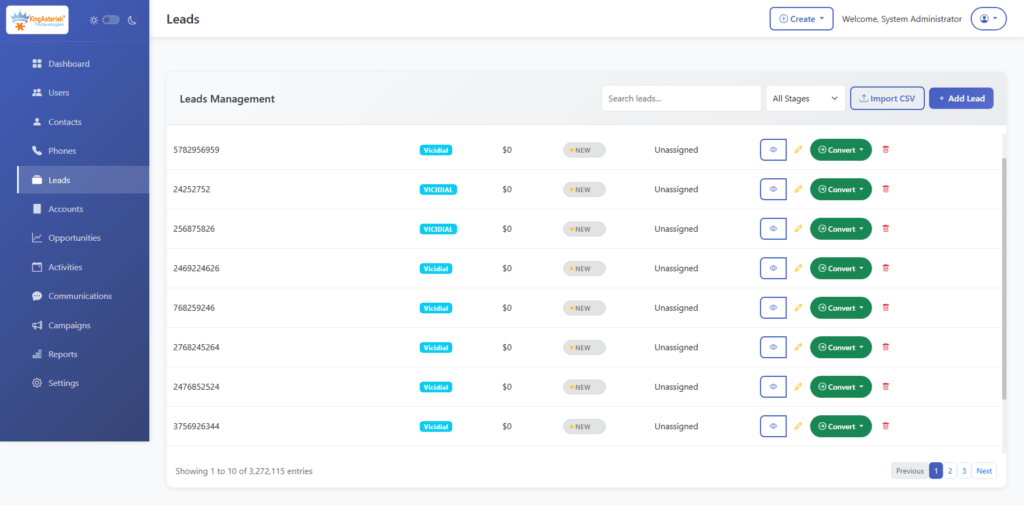
Every inbound and outbound call should automatically create or update a CRM record. This requires a direct integration with your telephony layer, typically through Asterisk’s AMI (Asterisk Manager Interface) or via a REST API bridge to VICIdial. Disposition codes entered by agents post-call should be written back to the CRM record in real time.
Capturing the UniqueID at call initiation and mapping it to a CRM record allows full call-to-disposition traceability.
Agent Scripting & Guided Workflows
A custom CRM can embed dynamic call scripts that adapt based on the contact’s data, past interactions, product interest, geographic segment. This reduces agent training time and ensures compliance with scripted disclosures.
Automated Follow-Up & Task Scheduling
Based on disposition codes, the CRM can automatically schedule callbacks, trigger email sequences, or escalate records to supervisors. This logic is typically implemented as a background job queue using tools like Redis or a cron-based task scheduler.
Role-Based Access Control (RBAC)
Different users: agents, team leads, compliance officers, administrators, need different levels of access. RBAC ensures that sensitive customer data is only visible to authorized roles, and that agents cannot modify records outside their assigned queue or campaign.
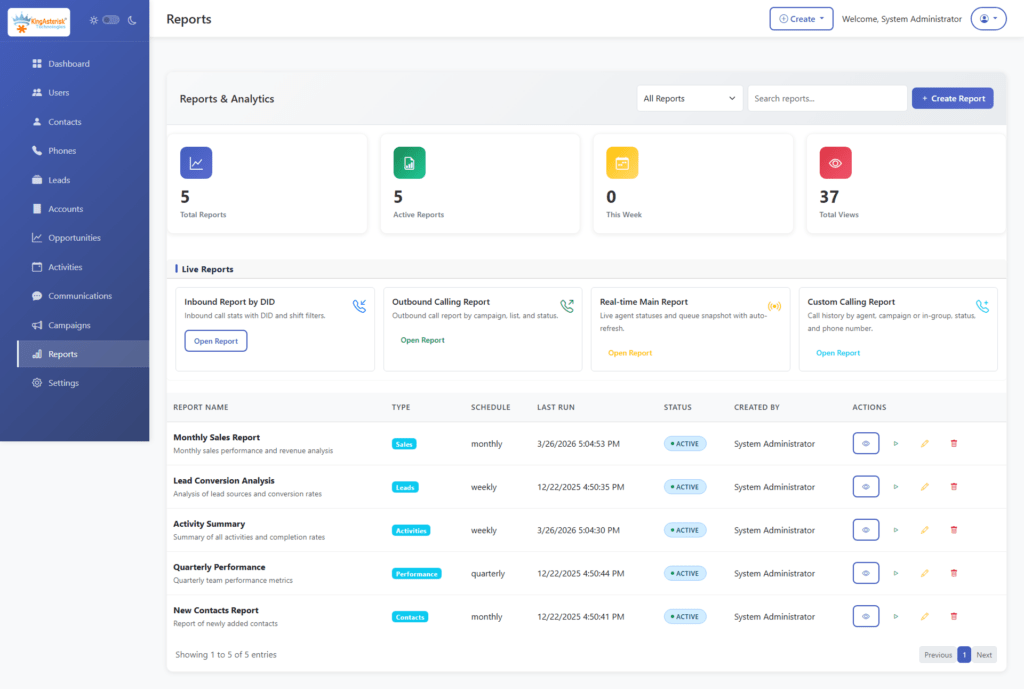
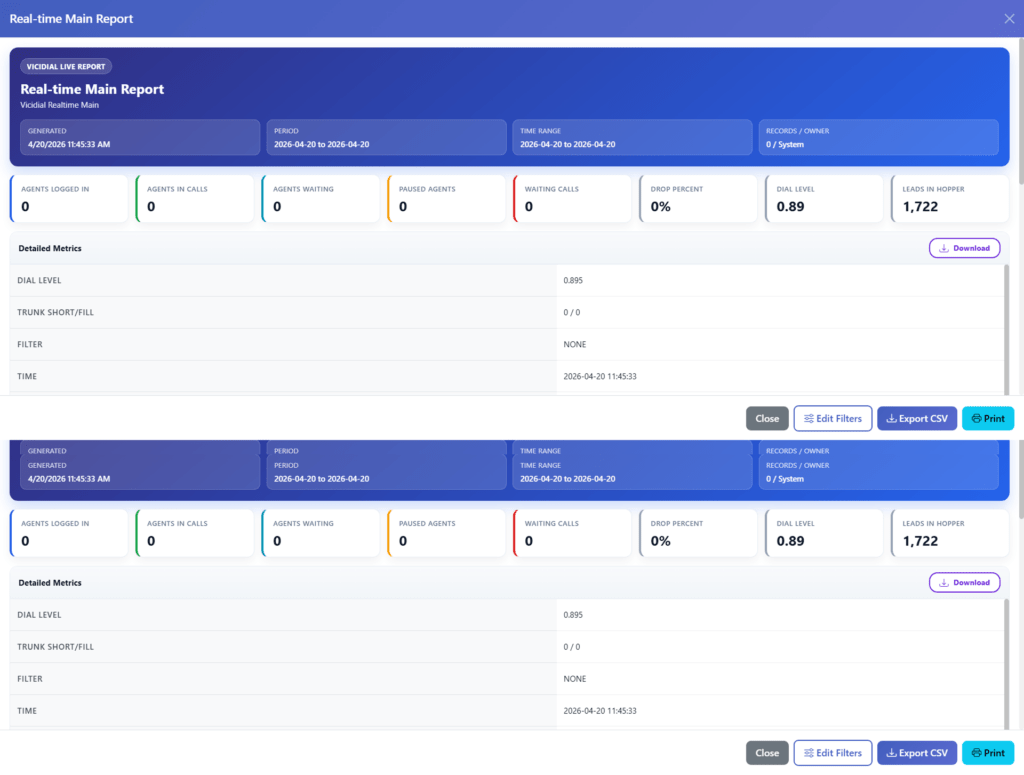
Reporting & Analytics Dashboard
Custom dashboards built on your own data model give you query-level flexibility. You can build reports on any combination of fields without worrying about API rate limits or export restrictions.
DNC & Compliance Management
For outbound contact centers, maintaining an updated Do Not Call list and automating suppression is a legal requirement. A custom CRM integrates this directly into the dialing logic, blocking calls to flagged numbers before they are ever assigned to an agent.
Custom CRM Development Process: Step-by-Step
Building a CRM is not a single sprint, it is a structured engineering lifecycle. Here is the process we follow at KingAsterisk when deploying a custom CRM alongside a contact center telephony stack:
Step 1: Requirements Discovery & Process Mapping Before any code is written, every workflow that touches customer data must be documented. This includes lead intake, agent interaction flows, escalation paths, reporting requirements, and compliance constraints. Output: a Business Requirements Document (BRD) and data flow diagrams.
Step 2: Data Architecture & Schema Design Design a normalized relational database schema (typically PostgreSQL or MySQL for contact center workloads). Define your primary entities, Contacts, Accounts, Interactions, Campaigns, Agents, and their foreign key relationships. Avoid over-normalization that creates excessive JOIN overhead on high-frequency queries.
Step 3: Technology Stack Selection Choose your backend framework, your frontend framework and your API architecture (REST or GraphQL). Define your authentication mechanism, JWT tokens with refresh rotation are standard.
Step 4: Core Module Development Build and unit-test each module independently before integration: contact management, interaction logging, user management, RBAC, and reporting. Use a microservices approach if the CRM needs to scale horizontally, or a well-structured monolith for smaller deployments.
Step 5: Telephony & Third-Party Integration Connect your CRM to your telephony layer. For Asterisk/VICIdial environments, this means building an AMI listener service that captures real-time call events and writes to the CRM database. For external integrations (email, SMS, payment gateways), build REST API adapters with retry logic and error logging.
Step 6: QA, User Acceptance Testing & Deployment Run integration tests across the full interaction flow, from call arrival to disposition to reporting. Conduct UAT (User Acceptance Testing) with actual agents. Deploy to a staging environment before production rollout.
Implement database migration scripts using a versioned migration tool like Flyway or Liquibase.
Technical Architecture & Integration Essentials
A scalable custom CRM for contact centers relies on several architectural decisions made early in the process.
Database Design
Use a relational database for transactional CRM data (contact records, interactions, dispositions). For high-frequency read operations like real-time dashboards, implement a read replica or a caching layer using Redis. Avoid storing call recordings directly in the CRM database, reference them by file path or object storage URI.
API-First Design
Build every CRM function as an API endpoint from the start. This enables future integrations, with billing systems, reporting platforms, or additional telephony channels, without requiring rearchitecting. Document your API using OpenAPI 3.0 (Swagger).
Asterisk Manager Interface (AMI) Integration
The AMI is a TCP socket-based interface that streams real-time event data from an Asterisk server. A CRM integration service connects to AMI, filters for relevant events (Dial, AgentConnect, Hangup, AgentComplete), and writes structured records to the CRM database.
Webhooks for Event-Driven Workflows
Rather than polling the database for state changes, implement a webhook system that fires when key CRM events occur, a lead status change, a callback scheduled, a DNC flag triggered. This powers real-time notifications and downstream automation without database polling overhead.
Best Practices for Scalable CRM Development
These practices come directly from deployment experience across dozens of contact center environments:
Enforce data validation at the database layer, not just the UI. Application-level validation can be bypassed by direct API calls. Use database constraints, triggers, and CHECK clauses as your authoritative validation layer.
Version your API from day one. Even if you start with /api/v1/, the convention sets you up to introduce /api/v2/ without breaking existing integrations when requirements evolve.
Design for audit trails. Contact center operations are subject to regulatory scrutiny. Implement an audit log table that records who changed what and when for every sensitive record. A trigger-based approach works well:
Separate your reporting database from your transactional database. Heavy analytical queries running against your live CRM database will degrade performance for agents. Use ETL pipelines (even simple ones with logical or custom batch jobs) to populate a dedicated reporting schema.
Plan your indexing strategy before you have performance problems. Index foreign keys, frequently filtered columns (status, campaign_id, agent_id), and any field used in ORDER BY clauses on large result sets. Unindexed queries on a table with 5 million interaction records will cause visible latency in agent screens.
Types of Custom CRM Development
Not every CRM serves the same purpose. A sales team chasing quarterly targets has fundamentally different system requirements than a support team managing 500 open tickets or a marketing team running multi-touch drip campaigns.
Before committing to a build, identifying which CRM type, or which combination, your operation actually needs is a critical architectural decision. Getting this wrong early means rework later.
Here are the four primary types of custom CRM development and what each one demands technically and operationally.
1. Sales CRM Development
A Sales CRM is engineered around one goal: moving leads through your pipeline faster and with greater visibility at every stage. For contact centers running outbound sales campaigns, this means the CRM must be tightly coupled with your dialer, leads enter the pipeline from your campaign lists, and their status updates in real time as agents work them.
Key capabilities in a custom-built Sales CRM include configurable pipeline stages with conditional logic, lead scoring based on interaction history and behavioral signals, automated follow-up task creation on specific dispositions, and quota tracking dashboards at the agent, team, and campaign level.
From an integration standpoint, a Sales CRM for contact center environments typically consumes lead data via REST API imports or direct database sync, and writes disposition outcomes back to the dialer, eliminating the dual-entry problem that plagues teams using disconnected systems.
A well-designed Sales CRM schema treats the lead lifecycle as a first-class data object:
Tracking stage_entered for every pipeline transition gives you conversion time metrics per stage, data that directly informs where your pipeline has friction.
2. Customer Support CRM Development
A Customer Support CRM is built around tickets, resolution workflows, and service level adherence. In a contact center context, this type of CRM typically handles inbound customer queries arriving via phone, email, or web form, and it needs to manage the full lifecycle of each issue from first contact to resolution.
The core data model here is different from a Sales CRM. Instead of pipeline stages, the primary entity is a support ticket with an owner, a priority level, a status, an SLA deadline, and a complete interaction thread attached to it.
Critical features for a custom Support CRM include:
- Automatic ticket creation triggered by inbound call events via AMI, so no agent has to manually open a ticket when a call arrives
- SLA tracking with escalation rules that automatically reassign or flag tickets approaching their resolution deadline
- Interaction threading that appends every call, email, and note to the same ticket record, giving the next agent full context without asking the customer to repeat themselves
- CSAT (Customer Satisfaction) scoring integrated post-resolution, feeding back into agent performance reports
3. Marketing Automation CRM Development
A Marketing Automation CRM shifts the focus from individual interactions to population-level behavior, segmenting contacts, triggering campaigns based on lifecycle events, and measuring engagement across multiple touchpoints before a lead ever reaches a sales agent or support queue.
For contact centers, this type of CRM is particularly valuable for pre-call nurturing and post-call follow-up automation. Rather than agents manually following up every unresolved lead, the CRM handles the intermediate touchpoints, sending a follow-up SMS after a missed call, enrolling a contact in a drip email sequence after a product inquiry, or suppressing contacts who have already converted from active campaign lists.
Custom-built marketing automation CRMs for contact center environments typically implement a campaign enrollment engine, a rules-based service that evaluates contact records against defined criteria and enrolls them in the appropriate sequence:
Keeping this logic in a configuration layer, rather than hardcoded in application logic, means your marketing team can modify sequences without requiring a developer for every change.
Key technical considerations for this CRM type include message delivery tracking (opens, clicks, replies) feeding back into the CRM record, unsubscribe and suppression list management enforced at the send layer, and robust contact segmentation using indexed, queryable tag or attribute tables.
4. Enterprise CRM Development
An Enterprise CRM operates at a different scale and complexity level than the three types above. It is not just one of those CRMs built bigger, it is an integrated platform that spans multiple departments, teams, and often multiple business units, with centralized data governance, granular permission structures, and the infrastructure to handle millions of records without performance degradation.
For large contact center operations, multi-site deployments, hundreds of agent seats, multiple simultaneous campaigns across different business lines, an enterprise-grade custom CRM must address several architectural concerns that smaller builds can defer:
Multi-tenancy or strict data partitioning ensures that data from one business unit, campaign, or client cannot be accessed by another, even though it all lives in the same system. This is typically implemented at the database level using row-level security (RLS) policies in PostgreSQL:
Workflow orchestration for complex, multi-step business processes: approvals, escalations, compliance reviews, requires a proper workflow engine rather than simple status fields. Tools like Apache Airflow for batch processes or a custom finite-state machine (FSM) for record-level workflows handle this at enterprise scale.
The investment in enterprise CRM development is significantly higher than a departmental build, but for organizations at that scale, the cost of not having a unified system shows up as operational inefficiency, compliance exposure, and data quality problems that compound over time.
Real-World Use Case: Contact Center CRM + VICIdial Integration
A mid-sized outbound collections contact center operating VICIdial across 120 agent seats approached KingAsterisk with a specific problem: their existing CRM had no knowledge of call outcomes. Agents were manually logging dispositions in two separate systems, the VICIdial agent interface and a generic web-based CRM, which created a 15–20 minute daily overhead per agent and introduced significant data inconsistency.
We designed and built a custom CRM that integrated directly with their VICIdial MySQL database. Disposition codes entered in the VICIdial agent panel were mapped via a real-time sync service to corresponding status fields in the CRM. Callbacks scheduled within VICIdial automatically created task records in the CRM, assigned to the responsible agent with the correct scheduled time.
This is the operational value that custom CRM development delivers, not just features, but the elimination of friction at every point in the workflow.
Frequently Asked Questions
How long does it take to build a custom CRM for a contact center❓
A functional CRM with core contact management, call logging, and basic reporting typically takes 3–5 months for a dedicated development team. A full-featured system with advanced reporting, IVR integration, RBAC, and multi-campaign support may take 6–12 months. The timeline depends heavily on the quality of the initial requirements and the complexity of existing system integrations.
What technology stack is best for custom CRM development❓
There is no single correct answer, but for contact center environments, a common and proven stack includes PostgreSQL (database), or Laravel (backend API), and Redis (caching and job queues). The more important decision is API-first design and a normalized schema, the specific framework matters less than the architectural discipline.
Can a custom CRM integrate with Asterisk or VICIdial❓
Yes, this is one of the primary reasons contact centers choose custom CRM development. Integration is typically achieved through Asterisk’s AMI (Asterisk Manager Interface) for real-time event capture, or through direct database-level integration with VICIdial’s MySQL schema for disposition sync, lead management, and reporting.
How do you ensure a custom CRM scales as the contact center grows❓
Scalability is built in at the architecture stage, not added later. Key decisions include horizontal scaling support (stateless API servers behind a load balancer), database read replicas for reporting workloads, indexed schemas optimized for the most frequent query patterns, and a modular codebase that allows new features to be added without rewriting existing components.
Conclusion
Custom CRM development is one of the highest-leverage technology investments a contact center can make. When your CRM is built to match your exact workflows, integrated natively with your telephony stack, enforcing your data standards, and powering reporting that reflects your actual KPIs: every agent, supervisor, and operations manager works with better information and less friction.
The process requires disciplined planning: a solid requirements phase, a well-normalized data schema, an API-first architecture, and integration layers that connect cleanly with platforms like Asterisk and VICIdial. Done correctly, a custom-built CRM becomes the operational backbone of your contact center, not just a place to store contact records, but the system that ties together every touchpoint, every interaction, and every decision.
If you are evaluating whether custom CRM development is the right path for your operation: or if you already know it is and want to get the architecture right, the team at KingAsterisk has the contact center expertise and technical depth to build it properly.
Contact us to discuss your requirements and get an honest assessment of what your CRM should look like.


