PBX One-Way Audio Issue Quick Fixes for Perfect Calls
PBX Solution

PBX One-Way Audio Issue? Proven Fixes for Crystal Clear Calls

You’re in your Chicago, IL call-centre, mid-call your customer hears you but you don’t hear them. That’s the dreaded PBX one-way audio issue. Or maybe you’re at your New York headquarters and your sales rep in Miami can’t hear a prospect while the prospect hears them clearly. 

At KingAsterisk Technology, we’ve helped hundreds of contact-centres, service desks, global enterprise offices, and regional SMBs fix exactly this kind of problem. In this friendly, straight-talk blog we’ll walk you through why this PBX issue happens, how to fix it, and what you should check so you don’t lose revenue or damage your brand.

What is a PBX one-way audio issue?

It’s when a call connects normally through your PBX or VoIP system, but audio works only in one direction—either you can hear the other party and they can’t hear you, or vice versa. This often stems from NAT/firewall problems, codec mismatches, or mis-routing of RTP streams.
Why This Matters (And Why You Should Care)

  • In a Houston, TX oil-&-gas enterprise phone system, a single long call dropping audio means lost revenue and angry clients.
  • In a London-based international support team, one-way audio erodes trust with global customers.
  • In a Las Vegas hospitality contact-centre, poor audio means higher repeat calls and lower quality scores.

Though specific global numbers for PBX one-way audio aren’t widely published, many forum posts describe “every 1 in 6 or 7 calls” encountering one-way audio when NAT/firewall mis-configurations exist. 

Given the boom in remote work, global contact-centres and multi-site operations (US cities like Atlanta, Seattle, Dallas; APAC hubs like Singapore, Manila; EMEA hubs like Berlin), a smooth PBX experience is no longer optional—it’s essential.

Understanding the PBX One-Way Audio Issue

Let’s break the term down so it doesn’t sound like tech jargon. What exactly happens during a PBX one-way audio issue?

  • The call connects. Ring tone, answered, all seems fine.
  • One party speaks. The other party either cannot hear them, or vice versa.
  • Often it happens when calling in from another region, or when a call crosses a site boundary (e.g., New York → Manila, Chicago → Mexico City).
  • Internally calls may work fine, but external or trunked calls mis-behave.
  • Frequently random: one call works, next call fails, then works again.

Common root-causes of PBX one-way audio

Having deployed and troubleshooted many systems, here are the frequent culprits:

1. NAT / Firewall / Router Issues

Your PBX (for example an Asterisk-based system) sits behind NAT. The signalling (SIP) works, but the voice-stream (RTP) gets blocked or mis-routed.

2. Double NAT / Multiple Firewalls

Example: You have a branch in Vancouver, BC connecting into a US HQ in Denver, CO. The VPN does NAT, your firewall at HQ also does NAT. The RTP path gets confused.

3. RTP Port Range Blocked/Mis-Routed

Your firewall might only open SIP (5060) but not the full UDP range your carrier uses. A common symptom: one audio direction only.

4. SIP ALG / SIP Helper Issues

Some routers try to “help” SIP by rewriting headers—but often they corrupt the media path, leading to one-way audio.

5. Codec Incompatibility or Packet Loss

If your call flows from your LA-based support desk to a New Delhi, India branch and the codec is mismatched or packet loss extreme, you might not hear the other side. The signalling succeeded, but audio failed.

6. Multi-Site/Conference Topologies 

If a global enterprise in Melbourne, Australia links into a LA support centre and also uses a data centre in Miami, routing loops or mis-configured media servers can cause asymmetric flow (only one direction audio).

7. Carrier/Trunk Issues

Sometimes the external SIP/Trunk provider mis-advertises media IP/port or uses a different range that your firewall doesn’t catch — you’ll see “calls working one moment, failing next”.

Proven Fixes to Resolve PBX One-Way Audio Issue

This is where things get actionable. If you’re running a contact-centre in San Francisco, CA; a global operations centre in Singapore; or a retail support hub in Dallas, TX—these steps apply.
Start with basic checks and quick fixes

Ensure the audio flow is truly one-way (you hear them but they don’t hear you, or vice versa). That confirms the manifestation of the PBX one-way audio issue. Test with a local call (same office) vs external trunk call. If local work, the problem is likely network/internet/trunk. Check equipment: phones/headsets, cables, firmware. Equipment issues seldom cause one-way only (they tend to cause no audio or both directions bad).

Firewall, NAT & RTP Port Fixes

Define your RTP port range in your PBX (e.g., UDP 10000-20000). Document it. Open that range on your external firewall/NAT device. Also allow inbound/outbound. Ensure NAT is correct — in your PBX settings, list the external IP address, local network ranges, and make sure “External Address / Local Networks” fields are correct. (In Asterisk, for example, these appear under “Asterisk SIP Settings”.) 

Disable SIP ALG on your firewall/router unless your provider explicitly uses it. SIP ALG often breaks media by rewriting SDP headers incorrectly. Avoid double NAT if possible — If your branch office (say Austin, TX) uses NAT + VPN to HQ in Atlanta, GA and then HQ NATs again to the internet, consider using VPN tunnel or single NAT point to simplify. Test with Wireshark / packet capture: Check RTP flows in both directions. If you see flow one way only (192.168.x.x → external, but no return), you’ve found the culprit.

Configuring Call Routing & Multi-site Media

In global setups (e.g., servicing APAC from LA), route media to the closest media server to reduce latency and mismatched NAT hops. Segment SIP signalling and RTP media where possible: signalling may go to HQ, media may stay local. Use STUN/TURN servers when remote agents (e.g., home-based agents in Chicago, IL or London, UK) call in. 

That helps with NAT traversal. In cloud-PBX or hybrid setups, request your carrier/trunk provider to send you their media IP/port list, and whitelist them.

Codec, Packet Loss & Quality Considerations

Use common codec sets across sites (G.711, G.722) and avoid exotic ones unless necessary. Some endpoints may not support them properly. Monitor your packet loss/latency/jitter especially between tied sites (e.g., New York ↔ Manila). High one-way packet loss = potential one-way audio. Set QoS / DSCP properly in your WAN links so voice packets get priority.

Example: For a retail contact-centre in Phoenix, AZ with backup site in Dublin, Ireland — if the Dublin link is congested at 40 ms+ latency and 3% packet loss one direction, you’ll likely see the PBX one-way audio issue crop up.

Vendor/Carrier/Trunk Interface Checks

Ensure the trunk provider is sending the correct IP/port for media and that your firewall has allowed them. Ask the provider if they are using “Media Anchoring” where the voice media flows through their servers; then you must allow those IP ranges inbound/outbound. For global operations (e.g., LA-based support and London partner call centres), pick a trunk provider that has geographically distributed media centres else you’ll suffer regional latency and potential one-way audio.

Case Study Snapshot: Multi-City Support in the US & APAC

Our LA-based service desk for a tech vendor had agents in Los Angeles, Dallas and Sydney. Calls to the Sydney team from California occasionally dropped audio one direction. Root cause: Sydney branch NAT’d VPN + local firewall NAT + trunk provider used unexpected media IP. We re-configured: allowed correct RTP range, disabled SIP ALG, and used STUN server for remote agents. Result: >98% reduction in one-way incidents within a week.

How KingAsterisk Technology Can Help You Globally

Here at KingAsterisk Technology, we serve enterprises and contact centre operations across the US, EMEA, APAC and Latin America. Whether you’re in Boston MA, Denver CO, Toronto ON, Singapore, Melbourne or Johannesburg—this one-way audio issue doesn’t respect time zones.
We audit your PBX/VoIP stack (on-prem, cloud, hybrid) for root causes of PBX one-way audio issues. We work with your network/firewall teams in Houston, TX or Frankfurt, Germany to align NAT, RTP, signalling correctly. We help integrate your global SMB or multi-site operations (for instance: a retailer in Miami + branch in São Paulo) to ensure flawless voice across regions. 

We provide continuous monitoring and reporting so you can show your C-suite in New York or Chicago the improvement in call quality KPIs after fix. We drive tool-discovery: you’ll get visibility of your call-flow, bridging technology and network performance across sites in Mumbai and San Francisco.

Ready to generate leads and improve your call clarity? Let’s talk.

🧠 Pro Tip: : Live Demo Of Our Solution

FAQs

Q1: I hear them, they don’t hear me — is that the PBX one-way audio issue?

Yes—that’s a classic manifestation of the PBX one-way audio issue. It means signalling worked, but media (RTP) is blocked or not returning in one direction.

Q2: Does this issue only happen with on-prem PBX systems?

No. It can happen in cloud-PBX, hybrid, or on-prem systems. Anywhere VoIP + NAT + firewall + trunking are involved. For example a cloud-hosted PBX servicing Latin America and the US can still suffer one-way media flow issues.

Q3: How fast can this be fixed?

With the right people looking, many setups fix basic NAT/port issues in 2–4 hours; multi-site global deployments might take 1–3 days to validate and roll out. At KingAsterisk we aim to deliver root-cause and patch within one business day for most regional sites.

Summary

If you run a contact-centre in Los Angeles, a service desk in Seattle, a retail support team in Dallas, or a multi-region enterprise with hubs in New York, London, Mumbai and Sydney — the PBX one-way audio issue is more than a nuisance. It hurts your brand, frustrates your agents, and costs you revenue.

Here’s what you should do now:

  1. Run a quick self-check: place internal vs external calls and observe one-way audio.
  2. Check your NAT/firewall settings against the RTP port range and disable SIP ALG where applicable.
  3. If you’re multi-site, map your media path global-wide and note delay/packet-loss asymmetries.
  4. Reach out to a voice-expert partner (like us at KingAsterisk Technology) to audit your PBX and network stack.

Let’s fix this together. Ready for clarity? Reach out today.
WebRTC Development Services for Telecom (1)
Browser-Based Mobile Dialers

WebRTC Development Services for Telecom: Boost Network Efficiency and Reliability

Our WebRTC Development Services for Telecom make this low-latency performance a reality for your business. KingAsterisk partners with carriers, providers, and call centers to fundamentally improve their networks, making them faster, more streamlined, and rock-solid reliable.

In this post, I’ll walk you through how WebRTC can transform telecom, show you trends for 2025, and explain why KingAsterisk Technology is uniquely positioned to deliver those solutions—whether you’re in New York, Dallas, Seattle, Miami, or anywhere worldwide.

Why Telecom Needs WebRTC: Agitate the Pain, Then Show the Promise

  • Network congestion & latency—voice or video calls drop or stutter in high load periods
  • Legacy infrastructure costs—maintaining old switching and media servers drains budgets
  • Fragmented customer channels—voice, SMS, chat, video are often siloed

That’s the promise of WebRTC Development Services for Telecom.

What Are WebRTC Development Services for Telecom?

When we say “WebRTC development services for telecom,” we refer to custom design, integration, deployment, and support of real-time communication (RTC) features—built with WebRTC APIs—into telecom systems, contact centers, carrier networks, and B2B communication platforms. These services might include:

  • Building voice/video calling via browser or mobile without plugins
  • Integrating WebRTC with SIP/IMS core networks
  • Media server / SFU/MCU development and scaling
  • Gateway development between WebRTC and PSTN/SS7/TDM
  • Securing media streams (encryption, SRTP, DTLS)
  • Performance tuning (e.g. codec negotiation, adaptive bitrate)
  • Monitoring, analytics, QoS dashboards
  • AI/ML enhancement: real-time transcription, noise cancellation, conversational agents

So when a telecom operator in Atlanta, GA or Houston, TX asks for “WebRTC development services for telecom,” that covers a ton of ground.

Why Telecom Is a Natural Fit for WebRTC

works across browsers and platforms without requiring plugins. It can interoperate with SIP, VoIP, PSTN via gateways—so you don’t have to throw away your legacy core. It scales best when cloud-native and containerized (spin up SFUs as demand increases). These strengths make WebRTC a perfect match for telecom demands: real-time, scalable, interoperable, and efficient.

WebRTC development services for telecom refer to building real-time voice, video, and data communication features—using WebRTC APIs—integrated into telecom systems, with support for SIP/PSTN interconnect, scaling, security, and monitoring.

How WebRTC Development Services Transform Telecom Networks

Let me walk you through five direct wins telecoms get when they adopt full WebRTC architecture, and how KingAsterisk helps deliver them.

1. Cost Reduction & Infrastructure Simplification

Replace expensive proprietary media servers with elastic SFUs. You are hosted in the cloud or edge. You slash licensing costs.

2. Lower Latency & Real-Time Experience

As telecoms roll out 5G, OTT, edge computers, WebRTC complements these by delivering ultra-low latency communications. 

3. Seamless Omnichannel & Unified Communications

You can plug WebRTC into contact center platforms so agents can serve voice, video, chat from one interface. That’s especially powerful in big markets like New York, San Francisco, and Chicago. 

4. Future-Proofing with AI & Enhanced Services

Your network becomes a foundation for generative AI agents, real-time transcription, sentiment analysis, visual assistance, video chatbots. A recent telecom AI voice agent pipeline even combined streaming ASR, TTS, and conversational models for real-time telecom interactions. 

Case in point:

In Boston, MA, a regional telecom spun up a WebRTC-based video support feature. Their agents could see the customer’s camera feed, diagnose issues faster, and improve first-call resolution. In Austin, TX, one operator rolled out browser-based calling to customers, bypassing app downloads.

When we (KingAsterisk) design such systems, we embed redundancy, autoscaling, and observability so that your network keeps singing even under stress.

Trends, Data & Insights for 2025 — Why WebRTC Will Explode

If you think WebRTC is niche, think again. The global WebRTC market is projected to grow by USD 247.7 billion from 2025–2029 (~CAGR 62.6%). According to Persistence Market Research, the market may grow at CAGR 39.1% from 2025–2032. Grand View Research values the 2025 market at USD 12.37 billion and projects growth to USD 81.10 billion by 2030. Fortune Business Insights expects growth from USD 9.56B in 2025 to USD 94.07B by 2032 (CAGR ~38.6%).

Growing adoption in telecom, contact centers, live broadcasting, healthcare, education. So when carriers in San Diego, San Jose, Phoenix, Denver or regions like North America, Europe, APAC consider scaling, WebRTC is no longer optional—it’s inevitable.

We’re experts in WebRTC Development for Telecom — from architecture to deployment, we handle it all. Partner with KingAsterisk Technology to build real-time, reliable, and future-ready telecom communication systems.

How KingAsterisk Delivers WebRTC Development Services for Telecom

Okay, enough theory. How do we at KingAsterisk make WebRTC real? Our Approach & Differentiators

1. Cost Reduction & Infrastructure Simplification

Replace expensive proprietary media servers with elastic SFUs. You are hosted in the cloud or edge. You slash licensing costs.

2. Lower Latency & Real-Time Experience

As telecoms roll out 5G, OTT, edge computers, WebRTC complements these by delivering ultra-low latency communications. 

3. Seamless Omnichannel & Unified Communications

You can plug WebRTC into contact center platforms so agents can serve voice, video, chat from one interface. That’s especially powerful in big markets like New York, San Francisco, and Chicago. 

4. Future-Proofing with AI & Enhanced Services

Your network becomes a foundation for generative AI agents, real-time transcription, sentiment analysis, visual assistance, video chatbots. A recent telecom AI voice agent pipeline even combined streaming ASR, TTS, and conversational models for real-time telecom interactions.

Why Us vs. Generic Dev Shops

  • We specialize in contact center + telecom domains
  • We understand SS7, SIP, IMS deeply
  • We’ve done deployments in Detroit, Cleveland, Phoenix, Chicago
  • We build for AI-ready future, not just “today’s MVP”
  • We treat your network as a product: observability, feedback loops, continuous improvement

Through our WebRTC development services for telecom, we help global operators—from the U.S.

🚨 Quick Tip: : Live Demo Of Our Solution

Objections You Might Have — Let’s Address Them

“We already have a call core; why rip it out?” No need. We integrate WebRTC with gateways. You can keep your voice core, billing, routing intact. “Is browser-based calling secure?” Yes. WebRTC includes strong encryption (DTLS, SRTP). We enforce auth, tokens, certificate pinning. “What about latency and congestion?” We architect SFUs at edges, use adaptive bitrate algorithms, fallback paths, network redundancy. 

“Is WebRTC mature enough for telecom scale?” Absolutely. With HTTP/3, WebTransport, WebCodecs, and 5G edges, WebRTC is evolving fast. “Do we have compliance concerns (HIPAA, GDPR)?” We design systems to be compliant—data localization, encryption, audit logs. 

FAQs

Q1: Can WebRTC handle thousands of simultaneous calls?

Yes. With scalable SFU clusters, autoscaling, edge placement, load balancing, robust signaling, you can support large concurrency (in telecom deployments in Chicago, Boston, or Dallas).

Q2: How future-proof is WebRTC for 2025+ telecom?

Very. WebTransport, HTTP/3, WebAssembly, generative AI integration, and codec improvements expand its capabilities. 

Q3: Do we lose call quality in weak networks?

WebRTC includes adaptive bitrate, forward error correction, and packet recovery algorithms. Also, fallback strategies (e.g. relay servers) help preserve quality.

Summary

Look, telecom is at a crossroads. You can cling to siloed legacy stacks—or you can leap into a unified, AI-ready, real-time future with WebRTC Development Services for Telecom.

When you partner with KingAsterisk Technology, you get more than code. You get domain expertise, telecom-grade reliability, AI-forward thinking, and a global mindset (from Seattle to Miami to London to Mumbai). 

Omni Channel Contact Center Software
Call Center Dialer Software Solutions

Omni-Channel Contact Center Software: The Future of Customer Engagement

Hey — imagine you call your favorite brand’s customer care, then switch to chat, then send a tweet, and all those threads blend into one seamless conversation. That’s not magic. That’s omni-channel contact center software in action — and it’s the future of customer engagement.

At KingAsterisk Technology, we believe this is a turning point. In this post, I’ll walk you through why Omni-Channel Solution is not just nice to have — it’s essential for every business in 2025 and beyond. Whether you operate in New York, Los Angeles, Chicago, or serve clients in Seattle, Dallas, or Miami — this applies to you.

I’ll also sneak in recent data, trends, and how we at KingAsterisk help you build the next-gen contact center to win, not just play.

Why Omni-Channel Contact Center Software Matters (Now)

The pain customers feel — and companies ignore. Customers hate repeating themselves. “I already told the chatbot, why are you asking again?”. They jump channels mid-conversation: from email to chat to phone — and expect the same context. Agents juggle 3–5 screens just to fetch context from across systems. Some queries slip through cracks, and you lose loyalty, not just a ticket.

That friction erodes trust, and in 2025 you can’t afford it. Check out some fresh numbers: The global contact center software market is projected at USD 72.62 billion in 2025, growing to ~USD 172.64 billion by 2030 (CAGR ~18.9 %). Omni-channel routing already took ~28.4 % share within contact center software in 2024 — showing the shift from siloed systems to unified experiences.

What “Omni-Channel Contact Center Software” Really Means (and Why “Multi-Channel” No Longer Cuts It)

Omni-channel vs Multi-channel vs Cross-channel

  • Multi-channel: You offer many channels (phone, email, chat, social), but each sits in its own silo.
  • Cross-channel: You can jump from one channel to another, but context may get lost or disconnected.
  • Omni-channel: True integration — the entire conversation history, profile, sentiment, attachments all move with the user across channels.

When you adopt omni-channel contact center software, agents get a unified customer view. You no longer have “chat support team vs telephony team vs social support team” — everything blends.

Key capabilities you really need

To deliver real value (and not just buzzwords), look for:

  • Omni-channel routing and orchestration (voice, chat, email, SMS, social, video)
  • Context persistence (so when a customer switches from chat to call, the agent sees all prior interactions)
  • AI / ML / predictive intelligence (to suggest next best actions, auto-tag, detect sentiment)
  • Workforce management & scheduling (unified across all channels)
  • Analytics and reporting (multi-touch attribution, cross-channel KPIs)
  • Bot + human handoff (chatbot starts, agent finishes)
  • APIs and integration (connect to CRM, ERP, knowledge base, custom systems)
  • Security, compliance, data privacy (especially for U.S. markets, HIPAA, PCI, CCPA)

How Omni-Channel Contact Center Software Transforms Industry Verticals

Let’s zoom into real industries and U.S. geographies, and see how this software becomes a game changer.

Retail & E-commerce (e.g. New York, Los Angeles, Chicago)

If you run an online retailer in Los Angeles, CA, you might get:

  • Customer tweets about missing order
  • Customer emails about a return
  • Customer calls about delayed shipping

With omni-channel, your contact center merges all into one journey. Agents see the social post, email history, order status — no more toggling. Benefit: reduce average handle time by 12-15 %, cut cost to serve by ~20 % (observed in retail after smart agent assist). Trend: Retailers now offer conversational commerce, allowing customers to order, track, or modify orders via chat or social. Omni-channel platforms enable that.

Healthcare & Telemedicine (e.g. Houston, Phoenix, Miami)

In Miami, FL, a telehealth provider gets appointment calls, chat inquiries, SMS reminders, and patient portal questions. Omni-channel software allows:

  • Agents to see patient history (with permissions)
  • Safe transfer between chat and voice
  • Real-time sentiment detection (if patient is anxious)
  • Full audit trails for HIPAA compliance

The healthcare vertical is among the fastest growing adopters of contact center tech, with emphasis on 24×7 hotline services and secure multi-channel interactions.

At KingAsterisk, we specialize in building powerful Omni-Channel Solutions that unify all your customer interactions. From AI automation to predictive routing, our systems are designed to simplify workflows and deliver exceptional experiences.
Explore Our Solutions

Finance, Insurance & Banking (e.g. New York City, Charlotte, Atlanta)

In New York, NY, a bank might support:

  • Fraud alerts via SMS
  • Chatbot for balance inquiries
  • Calls for account resolution
  • Email for statements

Omni-channel contact center software helps here:

  • Prioritize high-value users
  • Route fraud calls vs billing calls correctly
  • Add voice biometrics for secure authentication
  • Use sentiment analytics to flag potential churn

Given tight regulation, you want compliance features like logging, voice recording, encryption.

Telecom, IT & Utilities (e.g. Seattle, Denver, Dallas)

In Dallas, TX, a utility company handles calls about outages, web chat about billing, email about new connections. Omni-channel helps:

  • Proactively push notifications (SMS/email)
  • Manage ticket handoff across channels
  • Let users chat with bots, escalate to voice
  • Use analytics to detect recurring issues

You also get more efficient workforce planning when demand spikes (storms, outages).

B2B, SaaS & Technology (e.g. San Francisco, Boston, Austin)

Your SaaS company based in Boston, MA sells to global clients. Support requests come via portal chat, Slack, email, phone calls. With omni-channel:

  • Agents see customer usage logs
  • Seamless shift between internal Slack, external chats, calls
  • AI suggests knowledge base articles
  • Escalation rules (VIP, enterprise) embed in routing

In B2B, context matters: no worse thing than an agent asking “which account?”

How KingAsterisk Technology Delivers Your Omni-Channel Solution

Here’s how we work with you — and why we believe we stand out. We sit with you (virtually or on-site in places like New York, Chicago, Atlanta) and map:

  • Your customer journey (all touchpoints)
  • Current systems and pain points
  • Key performance metrics you care about
  • Regulatory or compliance needs

We might ask: What percent of your support is chat vs phone vs social? Our team migrate data and channels carefully:

  • Run parallel systems to avoid downtime
  • Migrate historical context (chat transcripts, call logs)
  • Train agents to use the unified interface
  • Test channel handoffs, bot → agent flows

In Boston & Austin, we’ve done clean migrations where agents used to have 5 systems; now they have 1. We embed:

  • Chatbots, virtual assistants
  • Sentiment & speech analytics
  • Predictive routing
  • Agent assist tools

This layer cleans up noise and frees up agents to handle tricky issues. We deliver dashboards with:

  • Cross-channel KPIs
  • Touchpoint attribution
  • Trend alerts (e.g. rising negative sentiment)
  • Optimization loops (we help you tweak scripts, flows)

We also help you iterate and scale — opening new regions (e.g. serving clients in San Diego, Phoenix, or even expanding globally — London, Berlin, Sydney). Our clients often see ROI within 6–12 months thanks to cost savings, improved CSAT, and better agent efficiency.

Trends to Watch in 2025 & Beyond

These aren’t just buzzwords — these are shaping how contact centers evolve next.

1. Generative AI & autonomous agents

More firms will deploy AI that can resolve entire conversations end-to-end without human intervention (for simple requests). By 2026, Gartner predicts conversational AI deployments will cut agent labor costs by $80 billion globally. 

2. Zero UI & voice assistants

Customers may use Alexa, Google Assistant, Siri to reach support. The omni-channel platform must include voice assistants as a channel.

3. Emotion & sentiment prediction in real time

Agents will see cues — tone, pauses, words — and get nudges: “customer seems frustrated, escalate now.”

4. Silent abandonment in chat & messaging

A 2025 study found in text-based contact centers, 3 % to 70 % of customers may abandon silently (i.e. leaving without generating a visible “hang-up”) — hurting efficiency and capacity.  We must design to mitigate that (e.g. proactive “are you there?” messages).

5. Hyper-personalization & voice biometrics

Your platform will anticipate needs (e.g. “we see you had an outage last week, is it resolved?”), and authenticate via voice without passwords.

🎬 Don’t Miss: : Live Demo Of Our Solution

FAQs

Q: Can small businesses afford omni-channel contact center software?

Yes. Cloud vendors and modular pricing make it accessible — you can start with 2–3 channels (chat, phone) and expand.

Q: How many channels are “enough”?

You don’t need every channel. Pick the ones your customers use (e.g. phone, chat, social). Then gradually add SMS, WhatsApp, voice assistants gradually.

Q: Does omni-channel really improve CX?

Yes. Studies show 71 % of consumers expect personalized interactions, and poor experience frustrates 76 % if not delivered. With unified experience, NPS and retention go up.

Summary

Omni-channel contact center software isn’t a fad. It’s the next frontier of customer engagement. From New York to San Francisco, Chicago to Miami, in retail, healthcare, finance, telecom or SaaS — every sector benefits when customer experience flows seamlessly across channels. The data backs this shift, and 2025 is the tipping point.

At KingAsterisk Technology, we build your roadmap, craft your architecture, migrate you safely, and turn omnichannel vision into reality. Ready to future-proof your customer engagement? Reach out, and let’s map your omni-channel journey.

Vtiger CRM Integration with VICIdial Made Easy
CRM Integration Solutions Vicidial Software Solutions

Vtiger CRM Integration with Vicidial: Optimize Your Call Center Workflow

Vtiger CRM Integration with VICIdial Made Easy

Imagine this: your sales team is toggling between a CRM screen and a dialer, juggling tabs, missing context, losing time. Now picture everything—leads, calls, logs, dispositions—all in one interface. That’s the power of Vtiger CRM Integration with Vicidial right there.

At KingAsterisk Technology (your friendly contact center Vicidial solutions partner), we help organizations—from New York, NY, to San Diego, CA, to Houston, TX, and beyond—streamline call center operations using this integration. In this blog, you’ll learn why the integration matters, how it works, where it’s used (industries & cities), and how to get started—without any fluff.

Why Vtiger CRM Integration with Vicidial Matters (and Why 2025 Demands It)

You might ask: “Why fix what seems okay already?” A fair question. But a few data points show that “okay” soon becomes “inefficient”. Companies using CRM tools see a 27% increase in customer retention. Nearly 75% of call centers now support omnichannel communication—and your phone dialer must talk to your CRM or you’ll fragment the user experience. 

The global CRM market is projected to hit ~US$57 billion in 2025, driven by demand for integrated, all-in-one platforms. In 2025, call center trends emphasize automation, data analytics, remote/hybrid models, and integration as the pillars for staying competitive. So, if your contact center still runs disjointed systems—one tool for calling, another for CRM—you’re leaving money (and time) on the table.

How Vtiger CRM and Vicidial Talk to Each Other (and You)

The Core Integration Features

When you integrate Vtiger CRM with Vicidial, here’s what you unlock:

  • Click-to-call directly from Vtiger records (contacts, leads, accounts)
  • Auto pop-ups or lead display when an inbound or outbound call hits, showing CRM context
  • Bi-directional data sync (lead status, dispositions, call logs)
  • Call recording and playback inside the CRM
  • Disposition tracking (call outcomes, notes)
  • Call routing / agent availability data in CRM (if you choose deep integration)
  • Single Sign-On (SSO) or unified login (in advanced setups)
  • Widget embed or iframe to bring Vicidial UI inside Vtiger (in some custom builds)

These features remove context switching, reduce errors, and make agents more effective.

Technical Approaches & Challenges

Integrations generally adopt one of two models (or a hybrid):

  1. CRM-centric integration (bring dialer features into CRM)
    • Agents work mostly inside Vtiger; call controls are embedded
    • Ideal for sales teams that prefer CRM front and center
  2. Dialer-centric integration (open CRM context inside Vicidial)
    • Dialer is the hub; CRM windows pop when needed
    • Good when calling campaigns dominate

Version mismatches

Vtiger and Vicidial versions must remain compatible. Vtiger’s documentation notes support for certain VICIdial versions like v2.11, v2.12, or v2.14. Upgrading either the CRM or dialer can break mapping or UI integrations.

Deep integration maintenance

Some community contributions warn that deep tie-ins (like full widget embedding) became hard to maintain for newer Vtiger versions. Many setups need hand-written PHP, middleware, or scripts to map data fields reliably.

At KingAsterisk, we design integration templates and fallback strategies so you don’t lose data or agent context when versions change.

Integration Workflow Example (Simplified)

Here’s how data might flow once integrated:

  1. Inbound call arrives in Vicidial → call is routed to available agent
  2. Integration triggers a lead lookup in Vtiger
  3. CRM pops up the lead/contact record
  4. Agent talks, logs disposition, writes notes
  5. Those details sync back into Vicidial for reporting
  6. If new lead, CRM record auto-created
  7. If agent clicks any phone number in CRM, it triggers Vicidial call logic via API

This loop ensures one version of truth and minimal duplication.

Using This Integration in Cities & Industries: Real Use Cases

Because we at KingAsterisk serve clients across Global markets, let’s talk local. A Chicago-based mortgage lead generation firm used to juggle leads in Vtiger and call campaigns in Vicidial

  • Call pop-ups showed borrower history
  • Agents closed more leads per hour
  • Call recordings automatically attached to lead records
  • Reporting became unified

This helped them scale campaigns across Illinois and neighboring states with confidence. A travel startup in Miami had to manage support calls (flights, hotels) plus outbound up-sell calls. With Vtiger CRM Integration with Vicidial:

  • Support and sales agents worked from same platform
  • Inbound calls triggered CRM case creation
  • Outbound calls used CRM lead segmentation
  • Customer journey stayed consistent

Utility companies in Texas run massive call centers for billing queries, outage calls, service requests. By using Vtiger–Vicidial integration:

  • Agents see service history, outage logs, payment history instantly
  • Dispositions like “scheduled maintenance” or “balance dispute” feed back into asset management
  • Supervisors see unified dashboards

Other Industries That Benefit

We’ve implemented for clients in LA, Atlanta, Seattle, Denver, and rural states too. Wherever you are, this integration scales.

  • Healthcare / Telemedicine call centers (HIPAA-compliant setups)
  • E-commerce / Retail support & upsell calls
  • Financial services / insurance lead follow-up
  • Education / enrollment call centers
  • Non-profits / donor engagement call campaigns

Step-by-Step Roadmap to Deploy Vtiger CRM Integration with Vicidial

You can also adapt this roadmap. Provision a Vicidial admin / API user. Setup SSO or authentication bridge if desired. Match server environments (PHP versions, database compatibility)

Write or deploy the mapping scripts (e.g. API calls from Vtiger to Vicidial). Add vtiger_search.php (or equivalent) to the Vicidial side (common community step). Embed or configure click-to-call functions (e.g. from CRM, triggering API). Setup inbound call pop-ups or lead context fetch

Use iframe or widget approaches to embed Vicidial functions inside Vtiger (pause, transfer, wrap-up). Create SSO flows so the user doesn’t log twice. Adjust CSS, UI tweaks to make it seamless

Testing & QA

  • Run test calls (inbound + outbound)
  • Validate data sync for leads, dispositions, logs
  • Test error conditions (failover, version mismatch)
  • Do load testing if call volume high

Deployment & Agent Training

  • Roll the integration into production
  • Train agents on new UI & processes
  • Monitor errors, logs, and user feedback
  • Offer quick fixes or patches

Maintenance & Upgrades

  • Track version upgrades (Vtiger, Vicidial)
  • Maintain backward compatibility
  • Update mappings when new fields added
  • Monitor sync failures and resolve

With this roadmap, we reduce risk and ensure smooth adoption.

Benefits You Can Measure (and Sell)

Here’s what your ROI dashboard might look like after integration:

  • Agent productivity increases by 20–40% (less switching, better context)
  • Call wrap-up times drop
  • Fewer mis-logged calls or lost dispositions
  • Higher first call resolution (because agent sees full history)
  • Better supervisor reporting (all data in one place)
  • Shorter ramp time for new agents
  • Higher customer satisfaction (CSAT)

Given that integrated CRM-contact center solutions are among the top levers for performance improvement, this is no surprise. Also, modern call centers rely heavily on analytics and real-time dashboards—and your integrated setup means richer data to feed those insights.

👨‍💻 Trending Now: : Live Demo Of Our Solution

Objections & How We Handle Them (Yes, You’ll Hear These)

“Won’t this break when I update Vtiger or Vicidial?” We build upgrade-safe connectors, version guards, and fallback scripts so integration gracefully degrades while you upgrade. “We don’t have dev resources for custom API work.” That’s why KingAsterisk steps in—we deliver plug-and-play templates plus custom tweaks so you don’t write every line.

“Latency or data sync delays?” We implement near-real time sync (webhooks, polling, error queues) and monitor for lag. Most syncs happen sub-seconds in our deployments. For industries like healthcare, we layer additional controls. “We’re small — is this overkill?” Even small teams (5–15 agents) see benefits: less data entry, fewer errors, quicker response. Think of it as future-proofing.

Summary 

You’ve seen how Vtiger CRM Integration with Vicidial transforms a fragmented setup into a seamless, agent-friendly, high-efficiency workflow. In cities from Phoenix, AZ, to Boston, MA, to Dallas, TX, businesses across sectors—finance, healthcare, e-commerce, utilities—are making this move.

If you’re ready for fewer toggles, fewer data errors, faster agent onboarding, and unified reporting—KingAsterisk is here to guide you.

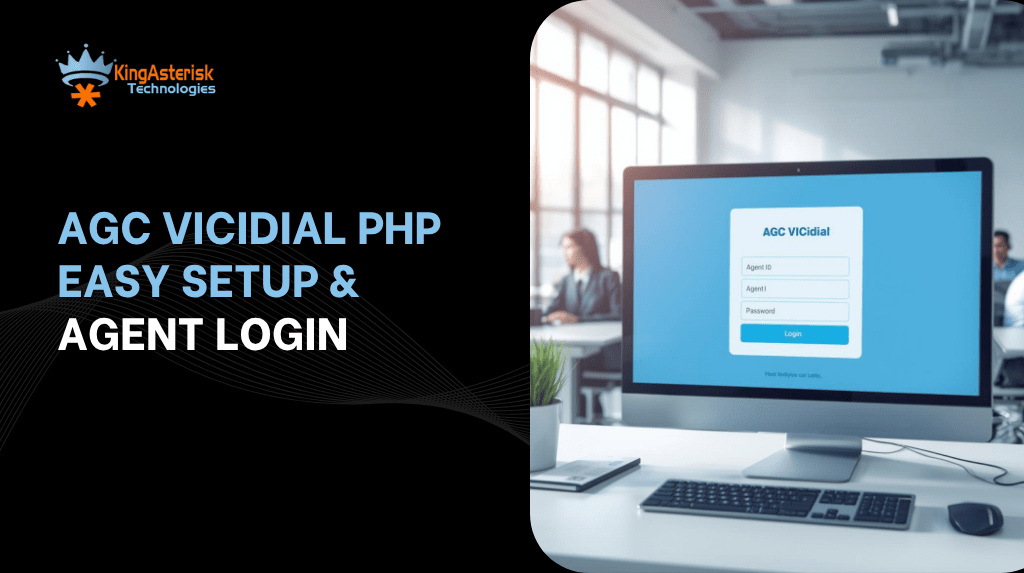
AGC VICIdial PHP Easy Setup & Agent Login
Vicidial Software Solutions

AGC (Agent Control GUI) VICIdial PHP: Setup & Agent Login Guide

If you’ve ever typed AGC VICIdial PHP into a search bar hoping for a simple, step-by-step agent control GUI setup guide—then welcome. You’re in the right place. In this post, I’ll walk you from zero to hero: installing, configuring, and logging agents into the AGC module of VICIdial. Whether you run a contact center in New York, Miami, Seattle, or Dubai, this guide will serve you. Let’s dive.

Why AGC VICIdial PHP matters for contact centers

You may already know VICIdial is one of the most popular open-source contact center platforms, with over 14,000 installations in more than 100 countries. Its agent-facing interface (the AGC, or Agent Control GUI) is where agents log in, handle calls, pause, wrap up, and more. The “vicidial.php” file in the AGC folder is the heart of it all.

When you get AGC wrong or misconfigure it, your agents can’t log in properly. That kills productivity. When you get it right, it becomes a fluid, stable, and powerful window into your contact center world. In this article, you’ll learn:

  • How to install and configure AGC/VICIdial PHP step by step
  • How agents in Chicago, LA, or Dallas can log in
  • How to troubleshoot common login errors
  • Best practices, security, and tips that KingAsterisk uses in our deployments

By the end, you (or your technical lead) should feel confident rolling out AGC VICIdial PHP across any US city or global branch.

AGC VICIdial PHP Setup — Step by Step

Now we will be discussing how to set up the AGC (Agent Control GUI) for VICIdial, from folder structure to agent login readiness.

Prerequisites & environment checks

Before diving into code:

  • You need a working VICIdial + Asterisk installation.
  • Apache or Nginx with PHP (7.x or 8.x, depending on your build).
  • MySQL / MariaDB configured with your VICIdial database.
  • Proper DNS/SSL if agents will connect from remote offices (e.g. Houston, TX or Seattle, WA).
  • Proper port forwarding / firewall rules, especially for HTTP, HTTPS, RTP, and SIP.
  • Ensure agents’ softphones or physical phones are registering correctly.

If any of these break, AGC won’t behave well.

AGC folder structure & where vicidial.php lives

Inside your web root, you should see something like:

  • /var/www/html/agc/vicidial.php  
  • /var/www/html/agc/style  
  • /var/www/html/vicidial/admin.php  

The agent interface runs from /agc/vicidial.php. If you ever need to customize text or languages, the AGC module supports editing via languages in the admin panel (without touching code). Also, you’ll find options-example.php inside the AGC directory — copy and rename it to options.php to enable toggles and custom vicidial configuration options. 

Permissions, ownership & file settings

The AGC folder to your web user (e.g. www-data:www-data or apache:apache). Set correct permissions — avoid 777; use 755 or 750 for directories, 644 for files. Double-check SELinux contexts (if using CentOS/AlmaLinux) so Apache/PHP can read/write as needed.

Database & user configuration

Create your phone’s entries in the phones table (login_user, login_pass). Create your vicidial_users entries (user + pass). Assign that phone login to a campaign or user group. Make sure agent permissions include “Agent Call Manual” or other relevant rights if using APIs. If your phone’s table has login_user or login_pass set to NULL, the AGC login will fail. 

Agent login flow & nuances

When an agent opens https://yourserver.com/agc/vicidial.php, the login screen will ask:

  1. Phone Login and Phone Password (from phones table)
  2. Agent User and Agent Password (from vicidial_users)
  3. Campaign (if multiple campaigns exist)

If any of these is wrong or inactive, the system throws a “Login incorrect” error. Once logged in, the agent web screen (powered by AJAX) polls status updates every second instead of full page reloads. 

Agent Login Guide & Troubleshooting (AGC VICIdial PHP)

You’ve installed AGC. Now you must ensure your agents (in Phoenix, San Francisco, Austin, etc.) can log in and stay logged in smoothly.

Agent login instructions for your team

  1. Instruct agents to use https://dialer.yourcompany.com/agc/vicidial.php
  2. Enter Phone Login / Phone Password (from your provisioning sheet)
  3. Enter Agent User / Agent Password
  4. Select Campaign (if requested)
  5. Click Login

If any credential is wrong, they’ll get Login incorrect, please try again.

Enabling remote agents & global deployment

One of VICIdial’s strengths is supporting remote agents. You can run contact centers anywhere in the world. Agents can dial in from anywhere, as long as they can reach your server via SSL. To support this:

  • Use a domain name + valid SSL certificate
  • Use VPN or VoIP-optimized routing
  • Keep firewalls and NAT settings correct

Also, to support enterprise-level scale, some AGC redesign efforts are underway to port the interface to React or Angular, but that’s advanced work.

🚀 Ready to master AGC in VICIdial? Let KingAsterisk guide you through seamless setup, customization, and agent onboarding for a smoother call center experience. Connect with our experts today to optimize your VICIdial Agent Control GUI and unlock next-level performance for your contact center.

Best Practices, Security & Scale (Your KingAsterisk Edge)

You now have AGC VICIdial PHP set up and agents logging in. Let’s step it up for reliability, security, and scale.

Harden your AGC & server

Rename or protect sensitive files like valid8.php (a known attack vector). Enable IP restrictions or allow-listing for admin areas. Run all server software (OS, Asterisk, VICIdial) on the latest stable versions. Periodically audit logs for login failures or brute-force attempts

Use options.php to tune behavior

As mentioned, you can copy options-example.php to options.php and tweak agent-screen settings, polling intervals, AJAX parameters, and script execution. This helps reduce server load and latency for large teams in New York or Los Angeles branches.

Monitor & scale

Use dashboards and real-time monitoring for agent statuses. Cluster your dialers if running multiple servers for different US regions. Segment by industry: e.g. healthcare call centers in Boston, financial services in Charlotte, insurance support in Phoenix. Use analytics and reporting to track KPIs (calls per agent, average handle time, wrap up rates)

Trends in 2025 you should watch

  • AI-powered call routing & sentiment scoring
  • Omni-channel contact center (voice + SMS + chat)
  • WebRTC browser phones instead of physical phones
  • Cloud-native deployment / containerization
  • Edge computing for low-latency calls in cities like Austin, Denver, Phoenix

These trends mean your AGC interface must stay nimble and upgradeable.

💡 Latest Trends: Live Demo Of Our Solution

How do agents log in via AGC VICIdial PHP?

Agents open https://yourserver.com/agc/vicidial.php, enter their Phone Login / Password, Agent User / Password, select a Campaign, then click Login — provided their phone and user creds exist and are active in the database.

FAQs 

Q1: Why do I get “Login incorrect” even though credentials are correct?

Because either the phone’s entry has null login credentials, or they are inactive. Populate login_user and login_pass, set active = ‘Y’, and ensure they link to your campaign.

Q2: Can agents login from home / remote locations?

Yes, as long as your server is reachable via Internet, SSL, NAT/port forwarding is correct, and firewalls allow VoIP traffic. 

Q3: How do I change the text in agent GUI (buttons, labels)?

Use the language editing feature inside VICIdial’s admin settings. You need not edit PHP files manually.

Summary

AGC VICIdial PHP is the lifeblood of your agent experience. A flawless setup empowers agents in New York to Miami, San Francisco to Dallas, or even abroad in London or Singapore. A broken one kills productivity.

If you want KingAsterisk to deploy, customize or audit your AGC setup (for Houston, Seattle, Chicago, or any region), reach out. We help mid-size to enterprise contact centers globally. Let’s make your AGC rock-solid so your agents stay focused, not frustrated.

Ready to get AGC VICIdial PHP running smoothly? Contact Us Today!

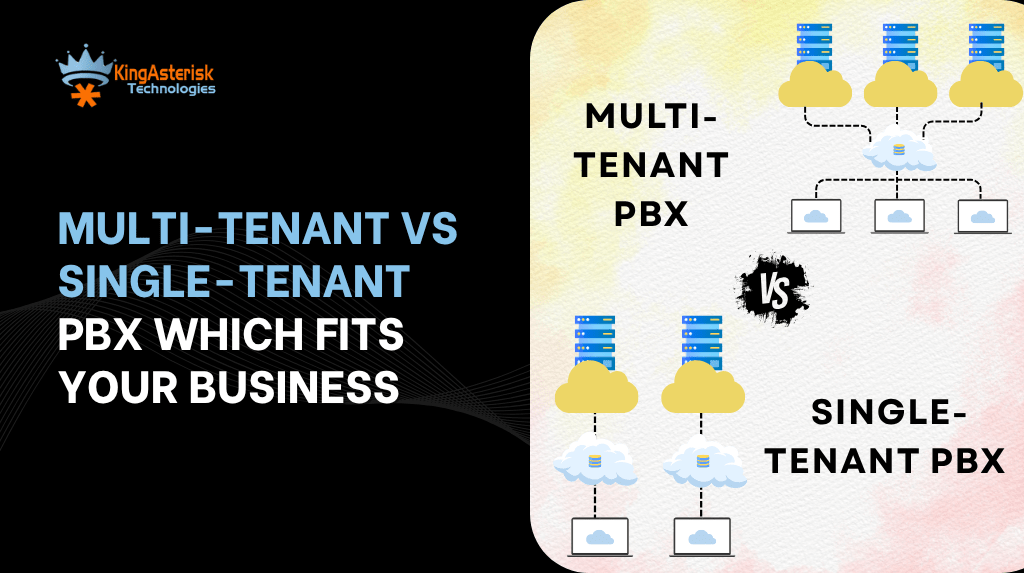
Multi-Tenant vs Single-Tenant PBX Which Fits Your Business
PBX Solution

Multi-Tenant PBX vs Single-Tenant PBX: Key Differences, Benefits, and ideal Use Cases

Choosing a new phone system for your contact center? You’re likely wondering what’s best: a shared Multi-Tenant PBX vs Single-Tenant PBX. That one question shapes your cost, flexibility, security, and future roadmap.

In this post, I’ll walk you through the PBX Solution key differences, benefits, and ideal use cases — with real data, opinions, and advice tailored for U.S. enterprises, SMBs, and contact centers. Along the way, I’ll drop trending keywords (cloud contact center, CCaaS, AI-driven routing, hybrid architectures) so this blog stands strong in 2025 search results.

Let’s dive in — and by the end, you’ll know which model fits your business best (and how KingAsterisk can help you deploy it smoothly).

What Are Multi-Tenant PBX and Single-Tenant PBX — Quick Comparison

Multi-Tenant PBX (aka shared-instance PBX)

A single PBX platform (in the cloud) serves multiple customers (tenants). In this shared setup, every user stays separate and secure despite using the same underlying systems, updates, and resources. Better yet, your vendor takes care of all the upkeep, sizing, and new versions.

Single-Tenant PBX (aka dedicated instance / private PBX)

Each customer gets its own instance, server(s), and database. No sharing with other customers. With a single-tenant, you get full control — but you also bear more responsibility.

Why the Debate Matters

Before choosing one, let’s stir the pot a bit. What are the trade-offs? What risk do you assume with each? You invest in a system and it can’t scale when your call volume doubles. surprise costs or vendor lock-in after going live. You fear performance hiccups, latency, or noisy neighbors in shared infrastructure. These are real concerns. And they tip the balance for many enterprise buyers.

Multi-Tenant PBX vs Single-Tenant PBX — Benefits & Ideal Use Cases

We’ll examine where each system excels, the benefits you get, and the trade-offs you make. The core distinction typically between Multi-Tenant and Single-Tenant PBX comes down to how your company handles matters of growth, data safety, and budget. These distinct PBX setups offer different perks that will define how adaptable and efficient your communication is.

Benefits of Multi-Tenant PBX

It’s the top pick for those  VoIP service providers in the U.S. that don’t want to spend a fortune on equipment.

Cost Efficiency & Lower CAPEX/OPEX

Because infrastructure is shared, hosting costs typically get amortized across multiple tenants. That reduces your total cost of ownership (TCO).

Rapid Deployment & Agility

You don’t need to wait for provision servers or typically install software. Multi-tenant systems often go live in days or weeks.

Automatic Upgrades & Maintenance

The provider usually rolls out new features, bug fixes, and patches centrally. You get all the benefits without having to schedule upgrades yourself in general.

Built-in Scalability & Elasticity

As your team or call volume grows, the system can scale horizontally without gross overhauls.

Shared Innovation & Continuous Improvement

Because providers serve many customers, feature development is often faster. AI routing, analytics, and new modules arrive more quickly.

Lower Barrier for Smaller Businesses

SMBs or contact centers in smaller U.S. cities (e.g. Dayton, OH; Boise, ID) can typically adopt enterprise-grade features without enterprise budgets in general.

Benefits of Single-Tenant PBX

Perfect for large U.S. corporations and regulated industries, Single-Tenant PBX delivers stability, scalability, and the freedom to tailor every communication workflow.

Maximum Isolation & Security

Since typical instances don’t share infrastructure, you control firewalls, network segmentation, encryption, and compliance. For regulated sectors—healthcare, finance, legal—this often is non-negotiable.

Deep Customization & Flexibility

You can build bespoke workflows, custom call routing, API integrations, and tailor the system end to end.

Predictable Performance / QoS Guarantees

Without “noisy neighbors,” you can guarantee resource reservations and performance metrics.

Vendor Independence / Control

You decide upgrade timing, backup strategies, migration plans—no surprise forced upgrades.

Real Data, Trends & 2025 Insights You Should Know

Whitepapers now caution that while multi-tenant PBX is budget-friendly, it may not meet the security or scaling demands of high-growth enterprises. Some companies that migrated to multi-tenant public stacks are now migrating part of their critical workloads back to dedicated or hybrid models due to cost and latency issues.

The future is hybrid. Many smart buyers adopt a multi-tenant core for standard workloads while pushing mission-critical voice paths to single-tenant or private lanes.

🚀 Flexible Cost Models

Multi-Tenant PBX solutions, being a shared infrastructure, generally allow for lower initial investment and follow a more predictable “pay-as-you-grow” or per-user subscription model.

Conversely, Single-Tenant PBX often requires a larger upfront capital expenditure (CapEx) for dedicated hardware or a premium recurring fee for full isolation.

Our Work in Action

Multi-Tenant PBX vs Single-Tenant PBX — Ideal Use Cases (U.S. Focus)

Let’s walk through what types of organizations in the U.S. benefit from each Advanced Asterisk PBX Configuration model. (Yes, I’ll mention some U.S. state / city contexts.)

Best Fit for Multi-Tenant PBX

  • Growing startups / scaleups in cities like Austin, TX or Denver, CO
  • Contact centers with 50–300 agents that want to avoid heavy upfront cost
  • Customer support teams in e-commerce, SaaS, travel, or retail
  • Regional franchises / multi-local operations needing unified telephony
  • Businesses that prioritize rapid time-to-value and want managed infrastructure

Example: A mid-sized SaaS company in Seattle wants to spin up call support and chatbot integrations. Multi-tenant PBX gives them fast deployment without requiring telecom engineers.

Best Fit for Single-Tenant PBX

  • Enterprises in highly regulated industries
  • Organizations with strict compliance, such as HIPAA, PCI, or FedRAMP
  • Big contact centers (1,000+ agents) in major metros
  • Companies that already maintain a hybrid cloud approach
  • Those that demand predictable performance, SLAs, QoS guarantees

Decision Guide — Which One Should You Choose?

Choosing between Multi-Tenant PBX vs Single-Tenant PBX depends on your business size, compliance needs, and growth goals. If you want a cost-effective, scalable, and low-maintenance setup, go for a multi-tenant PBX. But if your focus is security, customization, and total control, a single-tenant PBX is the smarter long-term investment for your contact center success. Here’s a checklist + decision logic to help your team pick.

Security / Compliance Needs

If you must meet regulatory standards (HIPAA, GLBA, etc.), lean single-tenant or hybrid.

Budget and CapEx Sensitivity

Tight budgets favor multi-tenant (OPEX model), while large budgets might absorb single-tenant overhead.

Customization Requirements

If you foresee deep integrations, unique workflows, or custom plug-ins, single-tenant is safer.

Operational Maturity

Do you have internal teams to manage telecom, network, backups, DR? If not, outsource (multi-tenant) might be safer.

Performance Sensitivity

If latency, jitter, or QoS is critical, single-tenant gives you tighter control.

Suggested Paths

If you’re an SMB or mid-sized firm launching new voice operations, start with multi-tenant PBX and grow. As your volume, regulation, or complexity escalates, migrate or bifurcate into a hybrid / single-tenant architecture for your core workloads. Always test via pilot runs (e.g., a site in Phoenix, AZ) to validate performance, integration, and manageability.

💡 Latest Trends: Live Demo Of Our Solution

Objections & Common Questions

“Will multi-tenant PBX be less secure because it’s shared?” You’re right to ask. But reputable providers isolate tenants at the logical level, use encryption, and apply strict firewalling. For many organizations, that is sufficient. If you demand full physical isolation, single-tenant is safer.

“Can I switch from multi-tenant to single-tenant later?” Yes—you can migrate. But you should plan for lift & shift of configurations, data, number migrations, and ensure minimal downtime. We at KingAsterisk help clients through that migration road.

“Is single-tenant always more expensive?” Not always. Over time, scale and optimized management may make it comparable. But upfront, single-tenant demands infrastructure and operational cost.

“Will performance degrade for multi-tenant in peak times?” It depends on provider architecture. A well-engineered multi-tenant network isolates resources. Still, in heavy usage, the provider’s underlying infrastructure becomes critical. Over time, as you scale or require stricter controls, migrating parts to single-tenant may pay off.

Does single-tenant PBX eliminate vendor lock-in? It reduces some types of lock-in (you can control upgrades, migration, backup), but you still depend on software vendors or platform support. Well-chosen platforms support portability.

Final Thoughts 

If you’re weighing Multi-Tenant PBX vs Single-Tenant PBX, there’s no universal “winner.” Your ideal choice depends on your scale, security needs, customization appetite, and team capabilities.

At KingAsterisk Technology, we often guide U.S. clients through selection, pilot deployments (e.g. in Dallas, TX or Charlotte, NC), and migrations. We help you avoid pitfalls, optimize cost, and adopt next-gen features (AI routing, analytics, hybrid models).

Want a free audit or architecture review? Drop us a line. Let’s build your future-ready PBX / contact center stack — whichever model fits you best. Ready to take the next step? Contact us at KingAsterisk — we’ll map out your ideal setup, pilot deployment, and long-term roadmap.

Custom VICIdial Setup Cost Explained Clearly
Vicidial Software Solutions

Custom VICIdial Setup Cost – Complete Pricing Guide & Expert Insights

Ever wondered how much a custom VICIdial setup costs before you even talk to a vendor? You’re not alone. Many contact center managers in Miami, FL or Dallas, TX feel stuck trying to budget for a dialer system. In this post, I’m going to walk you through every component of Customized VICIdial, share real 2025 pricing data, and give you expert insights (from 10+ years in the call center trenches). Let’s make this painless.

Why a Custom VICIdial Setup Doesn’t Have a “One-Size” Price

Before you jump to numbers, I want you to see the big picture: custom VICIdial setup cost depends heavily on your use case, scale, integrations, and support. Two companies in Atlanta, GA using ten agents might pay a totally different cost than a 200-agent shop in Phoenix, AZ, even though they both say “VICIdial.”

Let’s break down what really drives cost.

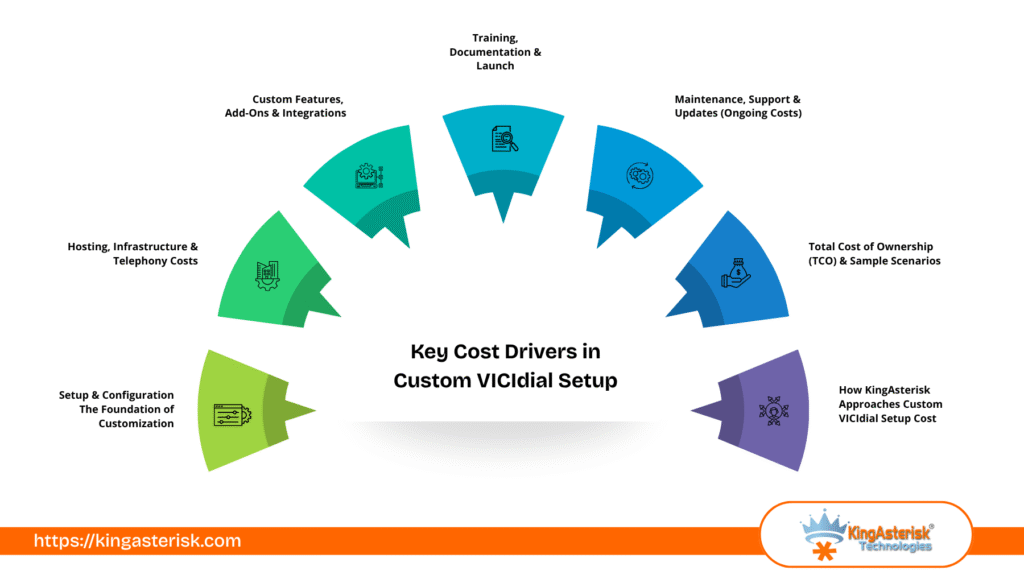
Key cost drivers for a custom VICIdial setup

  • Number of agents / concurrency
  • Hardware / server infrastructure (cloud or on-prem)
  • SIP trunking and telephony minutes
  • Integrations (CRM, SMS, analytics, AI voice)
  • Custom modules or scripts (predictive dialer tweaks, features)
  • Setup, configuration, training
  • Ongoing maintenance, support, updates
  • Compliance, security, backup/disaster recovery

As you go through the sections below, keep asking: “Which of these apply to me?”

What is the typical custom VICIdial setup cost? A realistic custom VICIdial setup cost (for small to medium deployments) ranges from $1,500 to $15,000+ one-time, plus $300 to $1,500+ per month in hosting, SIP, and support, depending on agent count, features, and integrations.

(That’s the quick, straight answer. Below, I’ll unpack how you get there.)

key cost drivers in custom vicidial setup

1. Setup & Configuration — The Foundation of Customization

When someone says “custom setup,” they mean tailoring VICIdial to your workflow, business rules, dialing logic, GUI tweaks, etc. This is rarely trivial.

Typical setup cost components

  • Requirements gathering & design: $500 – $2,000
  • Dialplan & call logic scripting: $300 – $2,000
  • IVR / menu flows & voice prompts: $200 – $1,500
  • Agent interface customization (UI tweaks): $100 – $1,000
  • Integration with CRM / external systems: $500 – $5,000+
  • Testing, staging, user acceptance: $200 – $1,000

If you only need a standard outbound predictive dialer with basic CRM sync, your custom setup might stay near the low end. But if you want complex inbound blending, AI voice, dynamic routing, and custom dashboards — you could hit high quotes.

A typical mid-size (say 50 agents) custom Vicidial configuration might run $5,000–$10,000 one time.

KingAsterisk often bundles some of these steps (voice prompt production, basic CRM linking) to reduce client friction and prevent surprise costs.

Also, note: VICIdial.com’s remote installation package starts at $800 USD for a baseline setup with configuration support.

2. Hosting, Infrastructure & Telephony Costs

Software is only half the battle — the underlying infrastructure and phone connectivity eat your budget fast.

Hosting / Server costs

You have two main paths:

  • Self-hosted / on-premises: You manage servers, networking, power, etc.
  • Cloud / managed hosting: You lease servers (AWS, Azure, DigitalOcean, or specialized VICIdial hosts).

Many hosted VICIdial solutions advertise a $400 / server / month baseline.

Telephony / SIP trunking / minute charges

You’ll pay per minute (or per call) and for telephone numbers (DIDs):

  • Outbound SIP minute rates: ~1.5¢ per minute (or variable).
  • Inbound / toll calls: ~2.8¢ per minute or higher for toll-free lines.
  • DID / phone number cost: $1-$10 / number / month or more based on country & type
  • Optional premium routing / backup lines: extra

One case from a forum: a small 4-agent center had weekly bills of ~$757 with 51,666 minutes (and DIDs, taxes). So, for a moderate volume center, telephony costs could easily run $500–$2,000/month (or more) depending on call volumes and routing.

3. Custom Features, Add-Ons & Integrations

This is where “custom” really flexes. Each extra module or bespoke integration adds:

  • Development / scripting time
  • Testing & QA
  • Maintenance complexity

Some common add-ons:

  • Real-time dashboards or BI integration
  • AI voice / speech recognition / NLP
  • Webchat, SMS, WhatsApp bridges
  • Omnichannel blending (email, social)
  • Advanced campaign logic (time-of-day rules, retry logic)
  • Agent coaching features (whisper, barge)
  • White label UI and branding
  • Custom reports

Each module could cost from a few hundred dollars to multiple thousands, depending on complexity. Pro tip: Build modularly. Start with core dialing, pick most urgent integrations first, then expand.

4. Training, Documentation & Launch

You don’t just “flip the switch.” Your team needs to get fluent. Poor training causes frustration and lost productivity. Typical costs:

  • User training sessions (live) – $200–$1,000
  • Admin training & handover – $300–$800
  • Documentation, user manuals – $100–$500
  • Pilot & launch support – $200–$1,000+

A well-planned launch with go-live support can dramatically solve Vicidial Login Errors and reduce issues and surprises.

5. Maintenance, Support & Updates (Ongoing Costs)

Once your system is live, you must keep it running, patched, secure, and evolving. Recurring cost buckets:

  • System updates, OS / Asterisk patches
  • Bug fixes, configuration tweaks
  • Telephony troubleshooting & queue tuning
  • Backup, disaster recovery, redundancy
  • Security, compliance audits
  • SLA / 24×7 support

Depending on service level, budget $300 – $1,500+ monthly (or a percentage of initial cost). Some providers charge hourly support above a base.

6. Total Cost of Ownership (TCO) & Sample Scenarios

Putting all the pieces together, you can estimate your custom VICIdial setup cost + ongoing running cost. If you run a 30-agent center in Charlotte, NC, with blended inbound/outbound + CRM + SMS, expect custom VICIdial setup cost of $6,000–$12,000, plus $1,000–$2,500 monthly after go-live. Always look at TCO over 3–5 years. Sometimes a slightly higher starting cost gives you lower maintenance or fewer surprises down the road.

7. 2025 Trends & Benchmarks You Should Know

To stay competitive, these trends matter — and they influence cost.

  • AI voice / conversational bots: Many contact centers now plug AI voice agents into VICIdial for first-pass screening.
  • Omnichannel blending: Instead of pure voice, centers manage voice + SMS + chat.
  • Cloud-native / containerized deployments: Helps scalability and reduces hardware overhead.
  • Real-time dashboards & analytics: Executives demand live visibility instead of static reports.
  • Security & compliance: GDPR, TCPA, HIPAA — tighter requirements push up audit & encryption cost.
  • Edge / hybrid deployments: Some centers distribute infrastructure to reduce latency for remote agents.

A quick 2025 pricing insight: many open-source dialer platforms advertise $400/month per server baseline for hosted deployments. As vendors adopt AI, integrations, and security, expect custom features to command premium pricing.

8. How KingAsterisk Approaches Custom VICIdial Setup Cost

Since you asked for a candid, slightly opinionated take — here’s how I (via KingAsterisk) look at pricing:

  • I hate surprises. We aim for transparent, modular quotes.
  • We often start with a “core baseline” dialer + CRM sync, then build extras.
  • We reuse common modules (voice menus, dashboards) across customers to save cost.
  • For US customers (e.g. in New York, NY or San Francisco, CA), we tailor latency, cloud region, and telephony choices.
  • We push for a “phase 1 → phase 2” rollout to reduce risk and initial cost.
  • We offer ongoing support packages and SLAs so you don’t get left hanging.

In some cases, we may absorb smaller setup tasks (voice prompt design, user onboarding) to build long-term relationships. At KingAsterisk, our goal is to align your success with ours.

Don’t Miss: Live Demo Of Our Solution

Objections, FAQs & Common Misunderstandings

Let me tackle a few things people always ask. These also help your readers find answers (good for search and AI citation).

FAQ 1: “Isn’t VICIdial free? Why am I paying so much?”

Yes, the VICIdial software is open-source and has no licensing fee. But custom setup, hosting, telephony, integrations, and support cost money. Many call it “free” but then lose hours and budget in hidden cost hell.

FAQ 2: “How many agents can one VICIdial server handle?”

It depends on server specs and CPU, but many sources suggest a single well-tuned server can serve 50-100 agents (with moderate load). Beyond that, you often split roles (DB server, telephony server). Providers like VoipPlus require extra servers for scaling.

FAQ 3: “Will a cloud setup in AWS cost more than a managed VICIdial host?”

It depends. AWS gives flexibility and global footprint, but costs (eg. bandwidth, autoscaling) can grow. A managed VICIdial host often bundles support, monitoring, and backups, which may cost more per month but reduce overhead and risk.

FAQ 4: “What if I only want an outbound dialer (no inbound) — will the cost drop a lot?”

Yes — no inbound IVRs, fewer routing rules, simpler logic generally reduces setup and telephony complexity. Expect 20–40% lower cost versus full blending.

Summary

Your custom VICIdial setup cost depends on agent count, server setup, telephony network, integrations, and support. Expect $1,500 to $15,000+ upfront, and $300 to $5,000+ monthly — depending on scale and features. Watch out for hidden costs like minute charges, UI tweaks, AI modules, and maintenance.

If you want a tailored quote that maps to your agent size, campaign type, and tech stack — we at KingAsterisk Technology can help. We’ll walk you through cost estimates, phase plans, risk mitigation, and scaling strategies.

You can Contact us for a free custom VICIdial cost audit — we’ll help you avoid overpaying and waste.

Expert Asterisk Development Services in USA
Asterisk Development Solutions

Expert Asterisk Development Services in USA for Reliable Telephony Systems

Have you ever wondered why some contact centers never drop calls, scale effortlessly, and feel like they read your mind? The secret often lies in Asterisk development—and KingAsterisk Technology is the US-based partner that builds those telephony systems with precision.

In this blog, I’ll walk you through what Asterisk Software Development really means in 2025, why it matters (especially in cities like New York, Dallas, Seattle, and Boston), how KingAsterisk stands out, and what you should ask before hiring a provider. 

Stick around — you’ll walk away with clarity and maybe even some ideas for your own contact center upgrade.

Why Asterisk Development Still Matters in 2025

What is Asterisk Development (and why should you care?). In short, Asterisk development means building, customizing, and maintaining communication systems (PBX, IVR, conferencing, contact centers) using the open-source Asterisk telephony engine.

  • It gives you total control.
  • It avoids perpetual vendor lock-in.
  • You pay for features and scaling, not per-seat licensing.

Many organizations realize that customizing your communication layer gives you a competitive edge — and Asterisk is often at the center of that strategy.

Currently Trending: Browser-Based Mobile Dialer with WebRTC Support

Trends Driving Asterisk & Telephony in 2025

Asterisk development is the process of customizing and deploying telephony systems (like PBX, IVR, contact center) using the open-source Asterisk platform, giving full control over your communications infrastructure. Let me drop a few numbers and movements that are shaping this space — so you can see the winds behind the sails:

The global VoIP market is growing at ~10.2% CAGR and is expected to reach USD 140.74 billion by 2027. So, if you’re building or upgrading a contact center in Chicago, Atlanta, Los Angeles, or any US location, Asterisk development gives you that flexibility with performance — not just a boxed solution.

How KingAsterisk Technology Delivers Top-Notch Asterisk Development

Alright, now let’s get to the juicy part: what we at KingAsterisk do, how we do it, and why clients across the US love it.

Our Approach: From Vision to Deployment

We don’t sell “telephony boxes.” We build systems. Think of us as your telephony architects and coders, building for your business logic, your volume, your rules.

Here’s our process (simplified):

  • Discovery & mapping — we sit with you (virtually or onsite) and map your contact flows, agent roles, escalation patterns, CRM logic, call routing, etc.
  • Design & prototyping — we sketch call-flows, dashboard mocks, API connections, and agree on features.
  • Core development (Asterisk customization) — we implement dialplan, AGI / FastAGI, modules, custom features, integrations.
  • Testing & load simulation — we simulate peaks (e.g. Black Friday, seasonal surges) in a staging setup.
  • Deployment & cutover — we roll to production with fallback paths, training, and careful monitoring.
  • Support, maintenance & evolution — we monitor, tune, add new features, respond to changes, scale horizontally.
  • We embed scalability, security, high availability, and flexibility into every build.

Core Services We Offer (All under our Asterisk Development banner)

  • Custom contact center / call center solution development
  • IVR and intelligent conversational voice systems
  • Multi-tenant PBX / hosted PBX setups
  • Migration from legacy PBX systems
  • Maintenance, support, upgrades

We’re a US-based call center solution provider (serving cities like San Francisco, Denver, Miami, Detroit), but our engineers can deploy for clients coast to coast. Our location gives you confidence in compliance, responsiveness, and local knowledge of US telecom regulations.

Deep Dive: Key Aspects of Asterisk Development

To show you we know this inside-out, let me walk through a few technical and architectural areas we focus on. This also helps you understand what to ask a provider (or what to demand).

Dialplan Logic & Call Routing

We don’t use generic trees; we build dynamic, context-aware dialplans that can branch based on customer profiles, CRM data, geolocation, time of day, agent skills, etc. We embed fallback routing, overflow paths, conditional routing. our code transitions between IVR, queues, agents, voicemail, SMS, etc.

Conversational IVR & NLP Integration

Rather than rigid IVR menus, we enable conversational menus using voice recognition, NLP libraries, or third-party AI services. Your IVR can ask natural questions like, “How may I assist you today?” and route intelligently. You can integrate sentiment analysis, predictive routing, and AI insights (e.g., route angry customers to senior agents).

High Availability & Redundancy

We design active-active or active-passive clusters of Asterisk servers. We build failover mechanisms, database redundancies, and load balancing (using SIP proxies, HA proxies, etc.). In a US datacenter (say in Dallas or Northern Virginia), we can deploy hot backups to another region (e.g. Phoenix) to ensure uninterrupted uptime.

Scaling & Performance

We benchmark calls-per-second, concurrency limits, codec overhead, hardware capacity. We scale via clustering, sharding, distributed media servers, and stateless front ends. monitor resource metrics (latency, packet loss, jitter) proactively.

Integration & API

We write custom connectors (REST, Webhooks, gRPC) to interface with CRM, database, and analytics. For example: when an agent picks up the call, the CRM shows the customer profile; after call end, the call log auto-syncs. We build logic triggers (e.g. escalate calls, open tickets, send SMS, invoke chat bots).

Logging, Analytics & Dashboards

We capture call metadata, agent performance, queue stats, SLAs, dropped calls. Our dashboards (live and historical) so contact center ops in Houston, Charlotte, Phoenix can see anomalies. We can integrate with BI tools (Tableau, Looker, PowerBI).

Security, Encryption & Compliance

We enforce TLS / SRTP for voice encryption. We embed authentication, logging, rate limiting, session expiration, and anomaly detection. For sensitive verticals (e.g. HIPAA, PCI), we build additional controls like masked recording, consent flows, data partitioning.

Must Read: Live Demo Of Our Solution

Client Use Cases & Industry Examples

Let me paint you a few real (anonymized) scenarios — because stories stick.

Use Case A: Fintech Contact Center in Charlotte, NC

A mid-sized financial services company wanted a call center to handle inbound/outbound calls, integrate with their custom customer portal, log calls, and scale during monthly billing cycles.

We built a full Asterisk-based contact center: click-to-call integration in their web app, smart routing based on account type, and voice encryption to satisfy PCI compliance. During peak days, call concurrency doubled without a hitch.

Use Case B: Healthcare Telephony Hub in Boston, MA

A regional clinic needed HIPAA-compliant appointment systems, secure patient callback, and integration with its EMR (Electronic Medical Records). We built an Asterisk system with encrypted IVR, masked recordings, consent prompts, and logging. Agents see patient records before the call. We maintain strict audit trails.

Use Case C: SaaS Startup in Austin, TX

A software company launched a helpdesk + telephony module for their SaaS offering. They needed multi-tenant architecture, per-tenant isolation, and dynamic provisioning. We built a multi-tenant PBX design using Asterisk. When they onboard a new client, a new “instance” config spins up automatically. They avoided recurring vendor VoIP fees and controlled their margin.

FAQs 

Q1: What is the cost range of Asterisk development for a contact center?

It varies a lot — small projects (10–20 users with basic IVR) may run in low tens of thousands USD; mid-level systems (hundreds of agents, integrations, HA) can go from $100K–$500K+ over time. Much depends on features, scale, compliance, integrations.

Q2: Can Asterisk handle video + voice calls?

Yes. You can integrate video conferencing modules (or WebRTC) alongside voice in Asterisk, though you need to plan media path, bandwidth, codecs, and UI carefully.

Q3: How difficult is migration from a legacy PBX to Asterisk?

It’s not trivial, but doable. You typically run both systems in parallel, port numbers gradually, map features, test routing, train staff, then cut over. A good dev partner should guide you and minimize downtime.

Q4: Do I need my own servers or can I go cloud?

You can choose either. Many deployments run on cloud VMs (AWS, Azure, GCP) in US regions. Others use on-prem or hybrid. What matters is design: you need redundancy, latency control, and reliable media paths.

Objection Handling & My Opinion

You might think: “Why reinvent when I can buy a hosted VoIP platform?” Fair point — but here’s my take: hosted platforms eventually stretch you. You’ll hit limits, pay extra for features, or compromise workflows. With Asterisk development, you build what you need. The initial investment can pay off threefold over time.

Another objection: “Asterisk is old tech.” That’s a myth. As of 2025, developers still choose Asterisk for its flexibility, community, and battle-tested reliability. We adapt it, extend it, and bring in modern AI, NLP, scaling, cloud, etc.

You might worry about maintainability. Yes — codebase discipline, modular architecture, documentation, test suites, and version control are crucial. We follow best practices so your system doesn’t become a fragile mess.

Summary 

Asterisk development gives you control, flexibility, scalability, and independence. Telephony trends in 2025 (AI, security, integration, cloud) make this the perfect time to invest. KingAsterisk Technology brings deep US-based expertise, strong process, custom architecture, and support to every project. Whether you’re in New York, Seattle, Atlanta, Phoenix, or any US city, we can design your next-gen contact center telephony system.

Ready to start? Let’s chat. Drop us a line or schedule a free call. We’ll audit your current system and propose a tailored Asterisk roadmap (no strings). Let’s turn your telephony stack into a business asset, not a bottleneck.