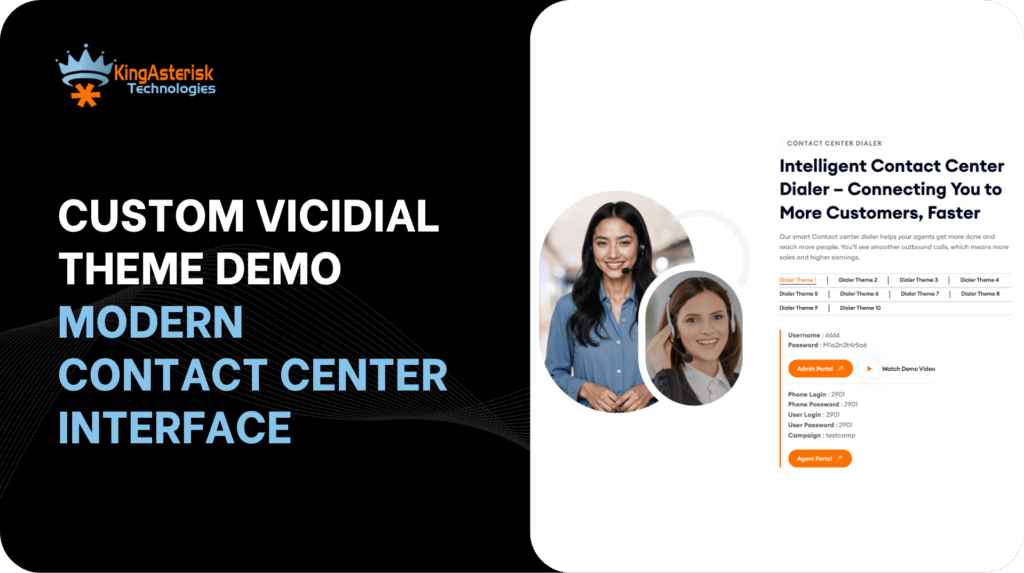
A custom VICIdial theme demo is the fastest way to answer the question most contact center managers avoid asking: is a dated dialer interface quietly dragging down agent performance? The standard VICIdial GUI was engineered for reliability, not ergonomics.
It works, but after a decade of largely unchanged design, agents navigating dense menus, low-contrast layouts, and single-language screens carry a measurable cognitive load that shows up in handle times, disposition accuracy, and onboarding speed.
KingAsterisk’s theme programme rebuilds that interface from the ground up, and the demo portal at demo.kingasterisk.com lets any team evaluate the difference before a single file touches their production server.
This guide covers what the demo contains, how each theme is structured, why multilingual support matters operationally, how themes are delivered and installed, and what questions to ask before requesting a build quote.
What the KingAsterisk Custom VICIdial Theme Demo Actually Includes
The demo is not a mockup or a slide deck. It is a fully operational VICIdial environment running on KingAsterisk’s servers, accessible through a public URL, with pre-loaded demo credentials that give you actual admin and agent-level access.
Inside the demo portal you will find:
- 10 individually styled themes for both the agent interface and the admin panel
- A multilingual theme set with pre-built language packs covering English, Spanish, German, and additional languages
- Live routing, disposition, and campaign views – not static screenshots
Agent screen and supervisor dashboard previews accessible within the same demo session
Each theme represents a distinct design philosophy. Some prioritise high-density data display for experienced agents working multiple campaigns simultaneously; others use larger controls and simplified colour coding suited to newer or part-time staff. Testing them directly against your actual workflows, rather than reviewing screenshots, is the practical purpose of the demo.
How to Access and Test the Live Demo – Step by Step
The process takes under five minutes from a browser with no software installation required.
- 1. Open the KingAsterisk Live Demo in any modern web browser.
- https://demo.kingasterisk.com
- 2. Browse the 10 available themes displayed on the portal landing page.
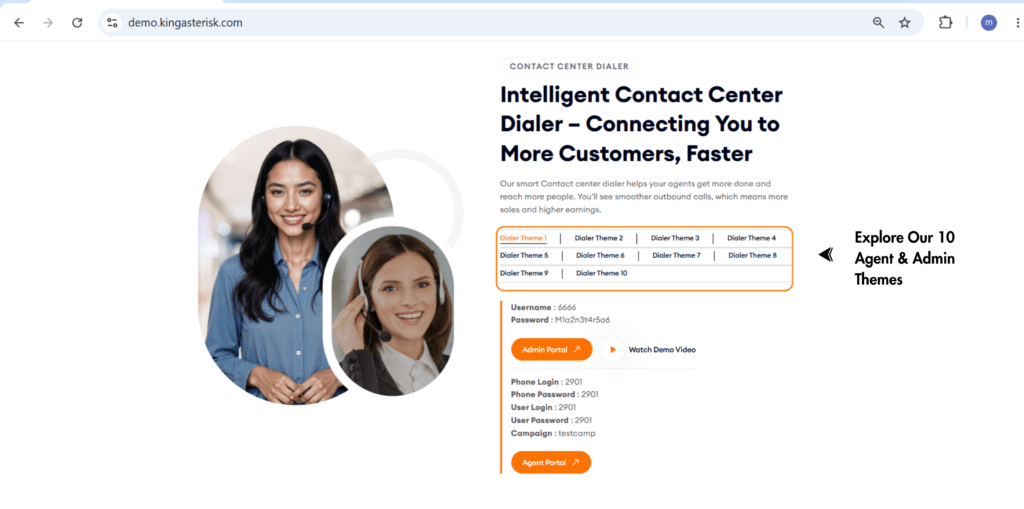
- 3. Select a theme – (for example, Theme 4) – and click the Admin or Agent button to enter that interface
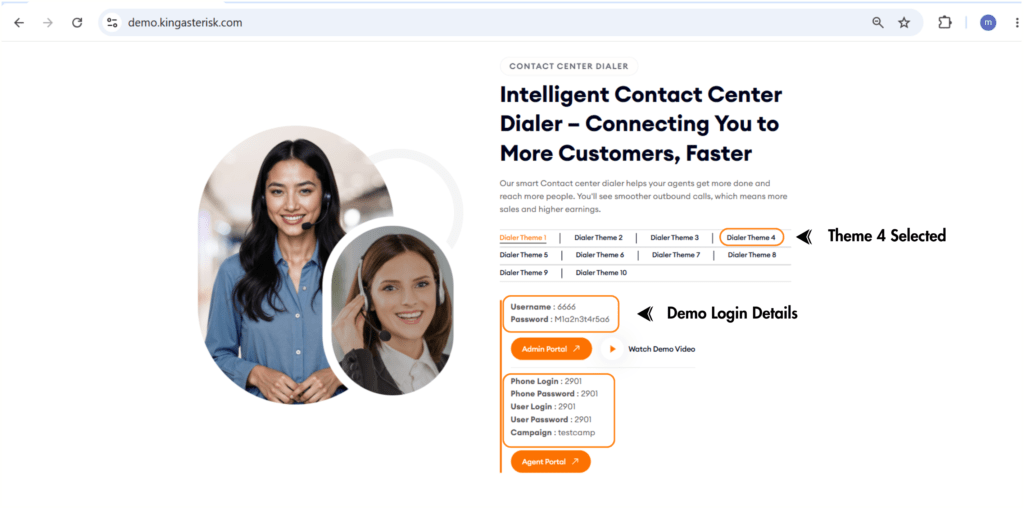
- 4. Use the demo credentials shown on screen. For the admin panel, the default demo login is Username: 6666, Password: M1a2n3t4r5a6 . Agent interfaces have their own session credentials listed alongside each theme.
- 5. Navigate through the dashboard – campaign management, user administration, real-time reporting, inbound and outbound routing, CRM integration panels, and call recording settings are all accessible.
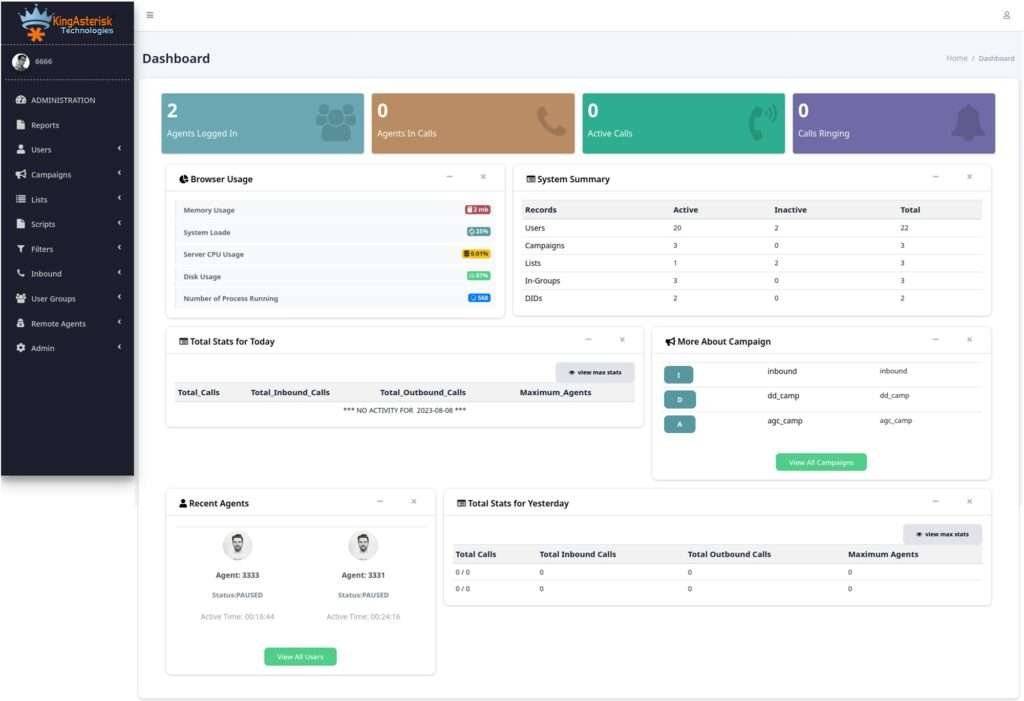
- 6. Return to the portal to switch themes and compare layouts side by side across multiple browser tabs.
If you want to test a specific multilingual theme, those are available directly on the KingAsterisk website and can be loaded in the same way. Spanish, German, and English packs are currently live for evaluation.
A Closer Look at the Agent Interface Redesign
The standard VICIdial agent screen was built around functionality. Every control an agent could conceivably need is present, but the layout assumes the user already knows where everything is. For high-turnover environments or multilingual teams, that assumption is expensive.
KingAsterisk’s custom agent interfaces address three specific operational pain points:
1. Disposition Speed
Disposition codes are the most time-critical click an agent makes after a call ends. In several of the demo themes, disposition buttons are relocated to a persistent panel that does not require scrolling or nested menu navigation. In timed testing across a 50-seat operation, this single change reduced average wrap-up time by several seconds per call – meaningful at scale across hundreds of daily interactions.
2. Visual Hierarchy and Contrast
Custom themes apply a consistent visual hierarchy: active call status is always prominent, contact information is grouped logically, and secondary controls are de-emphasised until needed. Colour contrast ratios are calibrated to reduce eyestrain during extended shifts, particularly in themes intended for 24-hour operations.
3. Responsive Layout for Mixed Workstation Environments
Agents working across different monitor sizes or resolution configurations previously experienced layout drift in the standard interface. The newer custom builds use structured CSS frameworks including Tailwind CSS, ensuring the layout holds consistently across hardware configurations without requiring per-workstation adjustments from the IT team.
The Admin Dashboard: What Changes and What Stays the Same
A common concern when evaluating custom themes is whether familiar admin workflows will still function correctly after the interface changes. The answer is unambiguous: the underlying VICIdial platform is unchanged. Themes modify the presentation layer – HTML, CSS, and JavaScript rendering – not the backend logic, the database schema, or any API endpoints.
Every administrative function available in standard VICIdial remains fully accessible:
| Admin Area | Available in Custom Theme | Details |
|---|---|---|
| Campaign Management | ✔ Yes | Full access to create, edit, clone, and pause campaigns. |
| User & Agent Administration | ✔ Yes | User groups, permissions, and access level controls remain intact. |
| Lead & List Management | ✔ Yes | Upload, purge, recycle, and manage lead lists without changes. |
| Inbound Routing | ✔ Yes | Configure queues, IVR menus, and skill-based routing. |
| Real-Time Reporting | ✔ Yes | Monitor live agent status, queue metrics, and campaign performance. |
| Call Recording Settings | ✔ Yes | Manage recording rules for campaigns and individual agents. |
| Carrier & Trunk Configuration | ✔ Yes | Configure SIP trunks, routing priorities, and failover settings. |
| CRM Integration Panels | ✔ Yes | Manage API credentials, CRM connections, and field mappings. |
| System Monitoring | ✔ Yes | View server health, resource usage, and performance indicators. |
What does change is the navigation model. Custom themes consolidate related admin functions into fewer top-level menu items, reducing the number of clicks required to reach frequently used screens. The custom theme admin path (/dialer/admin.php) versus the standard VICIdial admin path illustrates this directly – the same underlying backend functions, presented through a restructured navigation shell.
Multilingual Themes – Built for Global Operations
Deploying a contact center across multiple countries – or staffing a domestic operation with agents whose first language is not English, creates a practical problem that most dialer vendors solve with documentation rather than software: they tell agents to work in English and provide translated training materials.
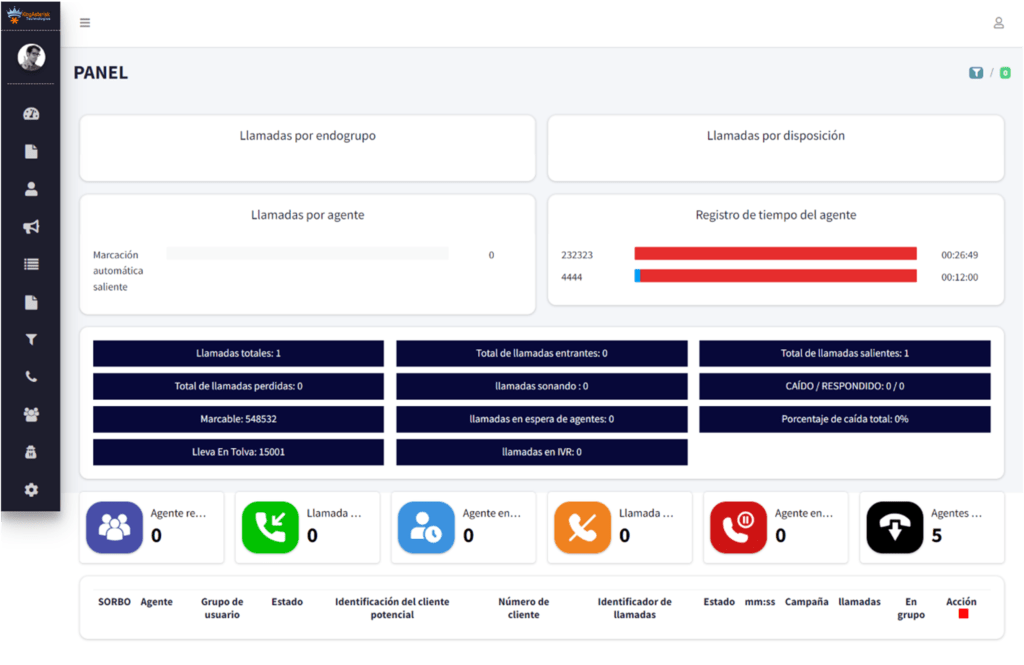
KingAsterisk takes a different approach. Multilingual themes swap the interface language at the session level, meaning an agent logging in with a Spanish-language profile sees every label, button, status indicator, and system message in Spanish. The data layer remains unified — supervisors see the same campaign metrics regardless of which language their agents are operating in.
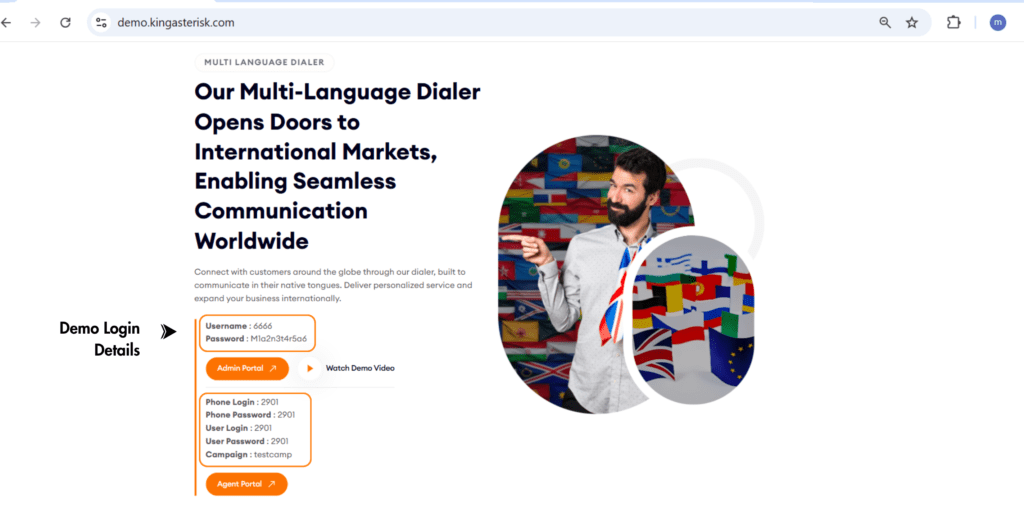
Languages currently available for live demo testing:
- English 🇺🇸
- Spanish 🇪🇸
- German 🇩🇪
- Italian 🇮🇹
- Greek 🇬🇷
- Portuguese 🇵🇹
- French 🇫🇷
Additional language packs are developed as part of the custom build process. If your operation requires a language not currently listed, it is added during theme development rather than retrofitted later.
From an operational standpoint, multilingual themes reduce the specific error type that occurs when agents misread or misinterpret system status labels – dispositions applied to the wrong outcome, calls transferred to incorrect queues, or pause codes selected incorrectly. These are low-frequency but high-cost errors in compliance-sensitive verticals such as healthcare, financial services, and regulated outbound programmes.
How KingAsterisk Builds Themes to Your Environment
Unlike generic templates downloaded from a repository, KingAsterisk themes are built against the specific VICIdial environment already running in your operation. This is a technical requirement, not a preference.
VICIdial’s front-end files are tightly coupled to the SVN version of the codebase. A theme built against one SVN revision will not render correctly on a significantly different revision without modification. ViciBox version differences introduce server-level path and dependency variations that affect how theme assets load.
The development intake process:
- You provide your current ViciBox version and SVN revision number.
- KingAsterisk’s team reviews compatibility and scopes the build.
- Development is completed against your exact version combination.
- Delivery options: source code package with installation documentation, or direct server installation if you provide access credentials.
- Post-installation support packages are available for ongoing maintenance needs.
Hardware recommendations are provided where needed, with support for both Intel and AMD server configurations. The standard recommended setup is an AlmaLinux server with a dedicated IP – if your environment already matches this specification, installation can proceed without any additional preparation on your side.
Server and Infrastructure Requirements
Themes themselves add minimal server overhead – they are presentation-layer assets. The infrastructure requirements that matter are those for the VICIdial platform running beneath them.
Operating System
AlmaLinux is the recommended server environment for new deployments. Ubuntu-based environments are also supported for existing installations. The theme files are compatible with any Linux-based server running a properly configured VICIdial instance built on Asterisk.
Network Configuration
A dedicated IP address is required for correct SIP and web interface routing. Shared IP environments introduce complications that affect both the dialer and the admin portal accessibility.
File Path Structure
Standard VICIdial agent paths can be remapped as part of the theme deployment. KingAsterisk’s custom builds use a separate directory structure – /dialer/admin.php for the admin panel, with corresponding agent paths, which keeps the custom theme installation cleanly separated from the original VICIdial files and simplifies rollback if ever needed.
Real-World Use Case: Multilingual BPO Deployment
A mid-sized business process outsourcing firm running 120 agent seats across two countries, one English-speaking floor, one Spanish-speaking floor – faced a recurring problem during annual compliance reviews. Disposition data showed a pattern of incorrect codes applied by Spanish-speaking agents, specifically confusion between two disposition labels that had similar meanings in Spanish but distinct operational consequences in the English-language system.
After deploying a KingAsterisk multilingual theme with a Spanish-language agent interface, the incorrect disposition rate on the Spanish-speaking floor dropped within the first billing cycle. The root cause – agents guessing at ambiguous English labels under time pressure during high-volume periods, was eliminated through the interface change rather than through additional training spend.
The admin panel remained in English for supervisors, maintaining reporting consistency across both floors. Real-time queue monitoring continued to aggregate data from both language environments into a single dashboard without modification to any backend configuration.
This is the practical value of multilingual theme support: not localisation as a feature, but localisation as an operational control that reduces a specific, measurable error type.
Frequently Asked Questions
Q: Is the KingAsterisk custom VICIdial theme demo free to access❓
Yes. The live demo at demo.kingasterisk.com is publicly accessible at no cost. You can browse all 12 themes and log in with the provided demo credentials without creating an account or submitting payment details. Development and deployment of a custom theme for your specific environment is a paid engagement, scoped after reviewing your ViciBox and SVN versions.
Q: Can I download the custom VICIdial theme from GitHub or another public repository❓
KingAsterisk does not publish its custom theme codebase to public repositories. Themes are developed per-client against specific environment versions, which makes a generic public download impractical from a compatibility standpoint. Community GitHub projects exist for VICIdial theming but carry the version and support caveats outlined in the comparison section above.
Q: How long does theme development and deployment take❓
Timeline depends on the complexity of the customisation and the number of language packs required. After you provide your ViciBox version and SVN revision, KingAsterisk confirms the timeline and cost. Standard single-language theme builds are typically faster; multilingual builds with custom dashboard components take longer. Managed server installation can proceed as soon as the build is validated.
Q: Will a custom theme affect my VICIdial performance or break existing integrations❓
No. Custom themes operate at the presentation layer and do not modify the VICIdial database schema, backend PHP scripts, API endpoints, or Asterisk dialplan. Existing CRM integrations, Non-Agent API connections, reporting structures, and campaign configurations remain fully operational after theme deployment.
Conclusion: See the Custom VICIdial Theme Demo Before You Decide
A custom VICIdial theme demo is not a cosmetic exercise. The interface agents use every shift has a direct and measurable effect on handle time, disposition accuracy, training speed, and retention in high-turnover environments. The multilingual dimension adds a second layer of operational value that generic theming projects rarely address with the same depth or version-level precision.
KingAsterisk’s approach – 10 live, testable custom VICIdial themes with real admin and agent access, multilingual packs already running in demo, and a development process built around your specific ViciBox and SVN environment – gives contact center managers an unusually concrete basis for an interface decision.
The demo is already open. Visit demo.kingasterisk.com, select a theme, and log in with the credentials provided. If what you see raises questions about deployment scope, timeline, or multilingual requirements for your operation, the KingAsterisk team is available to walk through the specifics directly.
About the Author
Written by a senior solutions engineer at KingAsterisk with hands-on deployment experience across contact centers in healthcare, financial services, and BPO operations. All technical guidance reflects direct deployment experience with VICIdial, Asterisk, and custom interface development.