Key Takeaways
- Custom CRM software development gives businesses full control over workflows, data, and integrations, unlike off-the-shelf tools.
- The right CRM can unify contact management, sales pipeline tracking, and customer support in a single platform.
- Contact centers benefit most from CRM solutions built with PBX, call tracking, and multi-channel communication support.
- Custom CRM development typically involves six structured phases: requirement gathering, UI/UX design, development, testing, deployment, and ongoing maintenance.
- A well-built custom CRM is a long-term investment that scales with your business and eliminates recurring per-seat licensing costs.
Custom CRM software development is the process of building a customer relationship management platform designed specifically around how your business operates, not how a software vendor assumes you should operate. For contact centers, BPO companies, and sales-driven organizations, this difference is enormous. Off-the-shelf CRM platforms are powerful, but they are built for the average business.
The moment your workflows become even slightly non-standard, custom call dispositions, unique escalation paths, specific reporting requirements, or deep integration with a PBX like Asterisk, those platforms start showing their limits. You end up paying for features you don’t use while constantly working around the ones you need.
This guide covers everything a business decision-maker or IT manager needs to understand about custom CRM development: what it is, how it works, which features matter most, how to evaluate a development partner, and what the complete build process looks like from start to finish.
What Is Custom CRM Software and Why Does It Matter?
A CRM, Customer Relationship Management system, is the central nervous system of any customer-facing business. It stores contact records, tracks every interaction, manages sales pipelines, automates follow-ups, and gives managers visibility into team performance.
Standard CRM platforms are pre-built products sold on subscription. They work well for generic use cases and small teams with common workflows.
Custom CRM software development means building the system from scratch (or heavily extending an existing platform) so that every feature, data field, workflow rule, and integration matches exactly how your business actually works.
The key reasons companies choose to build rather than buy:
- Their processes don’t map cleanly to standard templates
- They need deep integration with internal tools, telephony systems, ERPs, proprietary databases
- They operate in a regulated industry with strict data handling requirements
- They want to own the system outright, without per-user licensing fees that scale against them as they grow
- They need performance at scale, millions of contacts, thousands of concurrent users, real-time dashboards
For contact centers specifically, a custom-built CRM that integrates directly with Asterisk or VICIdial creates a unified agent desktop: call controls, customer history, call notes, disposition codes, and automated follow-up workflows, all in a single screen.
Types of CRM Software: Choosing the Right Model
Before development begins, it’s important to identify which type of CRM your business actually needs. Most custom projects combine elements of more than one type.
Operational CRM
Focused on automating and streamlining day-to-day customer-facing processes: lead capture, contact management, follow-up scheduling, and sales pipeline management. This is the most common type and the foundation of most custom builds.
Analytical CRM
Built around data. Collects customer behavior, purchase history, call records, and interaction data to generate reports, identify trends, and support business decisions. Best suited for organizations where reporting and performance visibility are primary goals.
Collaborative CRM
Designed for teams that need to share customer information across departments: sales, support, billing, and field operations all working from the same customer record. Common in B2B businesses with long sales cycles and multiple touchpoints.
Sales CRM
A specialization of operational CRM focused specifically on the sales funnel: lead scoring, opportunity management, quota tracking, and sales forecasting. Built for sales teams that need pipeline clarity and deal velocity metrics.
Customer Support CRM
Centered on ticket management, resolution tracking, SLA enforcement, and customer satisfaction scoring. Often built alongside or integrated with a helpdesk system. Essential for contact centers and support teams.
Industry-Specific CRM
Real estate CRMs with property listings and buyer matching. Healthcare CRMs with HIPAA-compliant patient record handling. Financial services CRMs with KYC workflow support. Education CRMs with enrollment and student lifecycle tracking. When a vertical has highly specific requirements, a purpose-built CRM is almost always the better choice.
Core Features Every Custom CRM Should Include
The features below represent the functional baseline for a production-grade custom CRM. The specific depth and configuration of each will depend on your industry and team size.
Lead Management
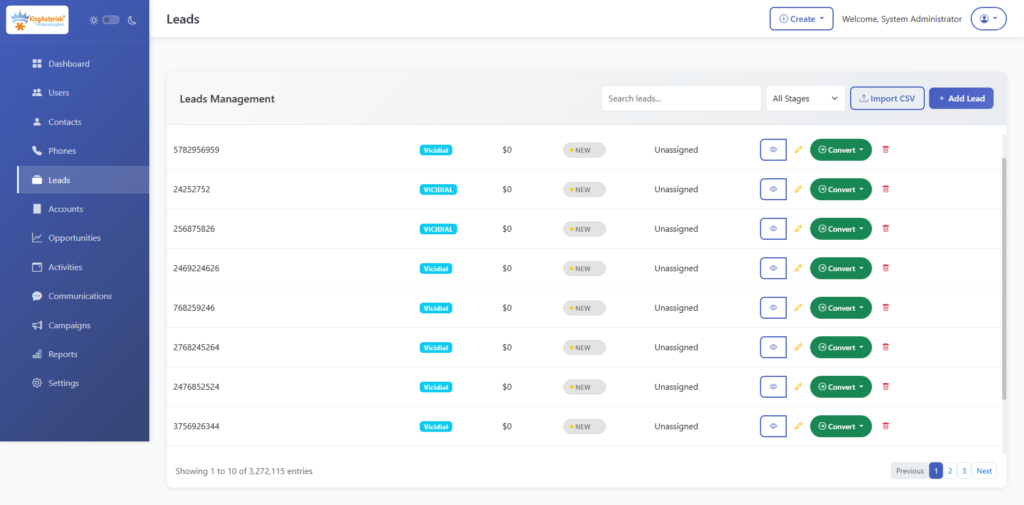
Capture leads from multiple sources: web forms, inbound calls, third-party APIs, manual entry, and route them to the right agent or sales rep automatically. Include lead scoring based on behavior or firmographic data, duplicate detection, and conversion tracking.
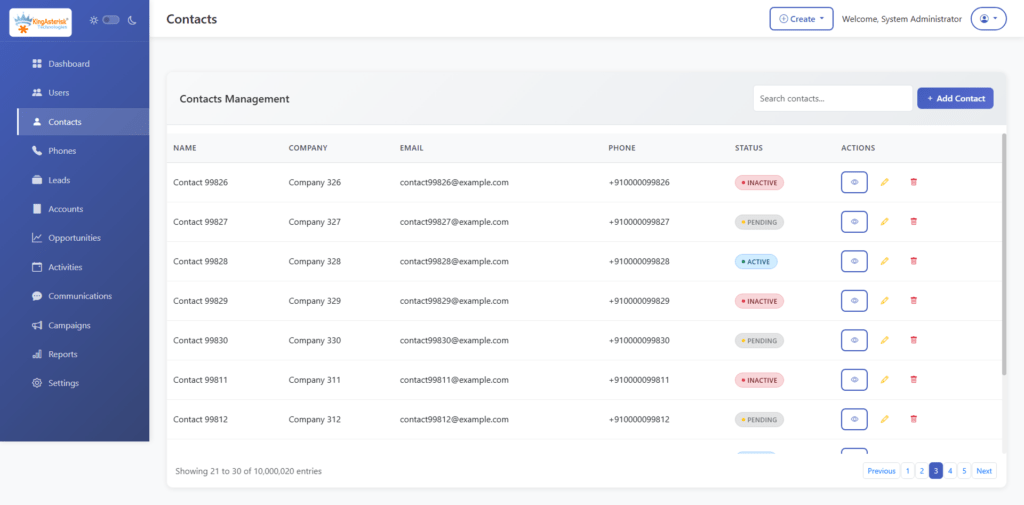
Contact Management
A clean, well-structured contact record is the foundation of everything else. This means full name, organization, communication history, associated deals, linked tickets, call recordings, notes, and custom fields specific to your business. Good contact management also includes segmentation and tagging for targeted outreach.
Sales Pipeline Tracking
Visual pipeline views (kanban or list), stage-based workflows, deal value tracking, close probability, and revenue forecasting. For contact centers managing outbound sales campaigns, this integrates directly with call queues and disposition outcomes.
Workflow Automation
Rules-based automation that triggers actions based on events: send an email when a lead reaches a certain stage, assign a follow-up task when a call goes unanswered, escalate a ticket when SLA is breached. Good automation reduces manual work and ensures nothing falls through the cracks.
Reporting and Analytics
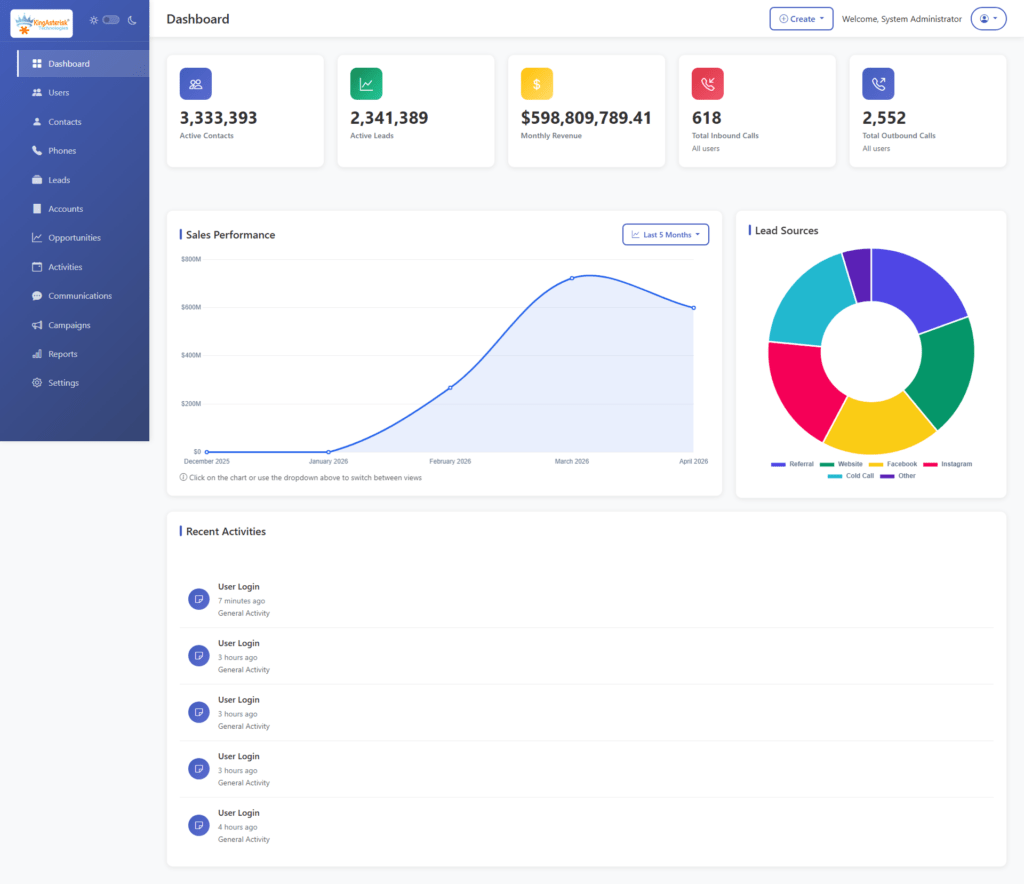
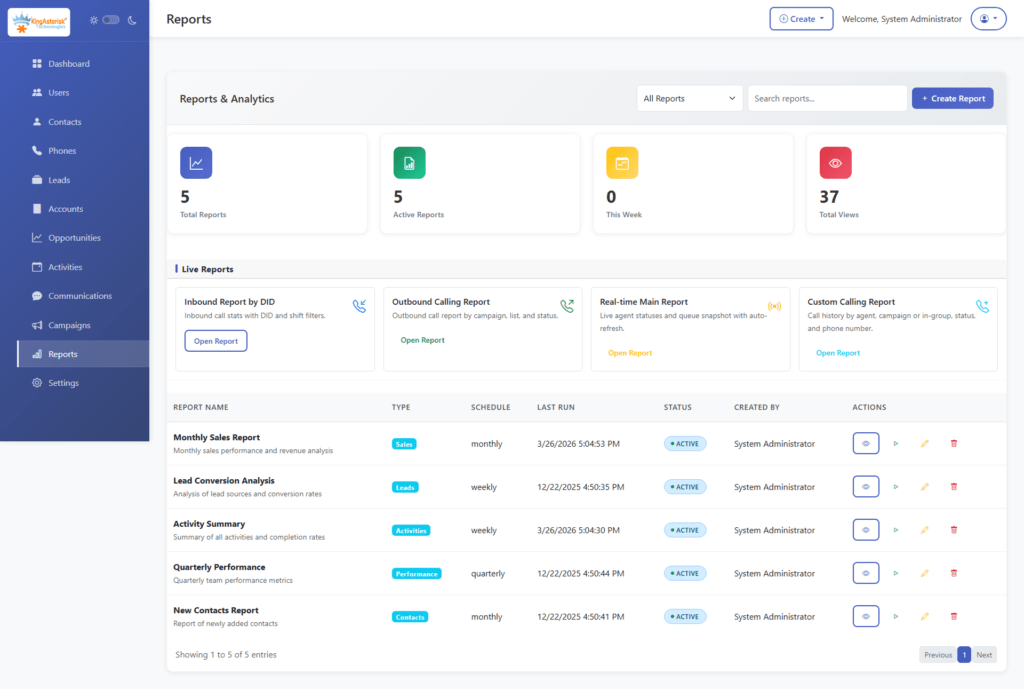
Custom dashboards, scheduled reports, and drill-down analytics. The metrics matter here, not just vanity numbers, but actionable KPIs: conversion rate by source, average handle time, first-call resolution rate, pipeline velocity, agent performance comparisons.
Call Tracking and Telephony Integration
For contact centers, this is non-negotiable. Call logs linked to contact records, call recordings with playback, click-to-call from the CRM interface, live call status, and disposition tracking. When built on Asterisk or VICIdial, this integration can be extremely deep and entirely real-time.
Role-Based Access and Multi-User Management
Different users need different access levels. Agents see their own contacts and calls. Supervisors see their team’s data. Administrators see everything. Role-based permissions keep sensitive data protected while keeping workflows clean.
Third-Party API Integrations
A modern CRM doesn’t operate in isolation. It should connect to email platforms, payment gateways, marketing tools, ERP systems, and communication channels. A well-designed integration layer (REST API, webhooks) makes the CRM extensible as your technology stack evolves.
Mobile Accessibility
Field sales reps and remote agents need CRM access from mobile devices. A responsive web interface or dedicated mobile application keeps the team productive regardless of location.
Real-World Use Case: Custom CRM in a Contact Center Environment
Consider a mid-size BPO handling outbound collections and inbound customer service across three campaigns simultaneously. They were running VICIdial for call management and a generic spreadsheet-based system for contact tracking. Agents had to toggle between multiple screens, no unified view, no automatic contact matching on inbound calls, no call outcome data feeding back into follow-up workflows.
After deploying a custom CRM integrated directly with their VICIdial instance, the results shifted significantly:
- Inbound calls now automatically pull up the matching contact record with full history before the agent even picks up
- Outbound call dispositions (callback scheduled, payment promised, number invalid) automatically trigger the correct follow-up action in the CRM
- Supervisors have a real-time dashboard showing agent status, call outcomes, and campaign performance, without running a separate report
- Compliance team can access call recordings directly from the contact record, linked by call ID
The efficiency gain wasn’t from adding more technology, it was from eliminating the manual bridging between systems that agents were doing on every single call.
The honest answer: if your processes are standard and your team is small, a ready-made CRM is fine. If you’re running a contact center with complex telephony requirements, managing high call volumes, or operating in a regulated industry, custom CRM software development pays for itself within 18–24 months.
Industries That Benefit Most from Custom CRM Development
Contact Centers and BPO
The deepest need for custom CRM exists here. Call volume, agent performance, campaign management, telephony integration, real-time supervision, none of this is handled well by generic CRM tools. A custom build that talks directly to Asterisk or VICIdial is the professional standard.
Healthcare
Patient relationship management requires HIPAA compliance, appointment scheduling integration, referral tracking, and secure communication. Off-the-shelf tools rarely meet all these requirements without expensive add-ons.
Real Estate
Buyer and seller lifecycle management, property matching, offer tracking, document management, and commission calculations. Real estate businesses have highly specific pipeline stages that generic CRMs don’t accommodate well.
Financial Services
KYC workflows, loan pipeline management, compliance audit trails, and integration with banking systems. Regulatory requirements alone often make custom development the only viable option.
E-commerce
Order history linked to customer records, return and refund workflows, abandoned cart follow-up automation, and loyalty program management. Integration with order management systems and payment gateways is typically too deep for off-the-shelf tools.
Education
Admissions funnel management, student lifecycle tracking from inquiry to enrollment to graduation, fee payment integration, and alumni relationship management. EdTech companies often need CRM features embedded directly in their learning platform.
Critical Integrations That Make or Break a CRM
A custom CRM’s value multiplies when it integrates well with the rest of your technology stack.
PBX and Telephony Integration
The most important integration for contact centers. Direct connection to Asterisk or VICIdial enables click-to-call, real-time call status, automatic call logging, and call recording linkage. This is KingAsterisk’s core strength, the CRM and the telephony platform are built by the same team, so the integration is native, not bolted on.
WhatsApp and Messaging APIs
Customer communication increasingly happens outside of phone calls. WhatsApp Business API integration within the CRM keeps all communication channels visible from a single contact record.
Email APIs
Bidirectional email sync (Gmail, Outlook, custom SMTP) so that every sent and received email is automatically logged against the contact. Combined with email sequence automation, this turns the CRM into a complete outreach platform.
ERP Systems
For businesses where customer data needs to sync with inventory, billing, or operations systems, ERP integration prevents double data entry and keeps records consistent.
Marketing Automation Tools
Lead scoring based on email engagement, campaign attribution, and behavioral triggers require a live data connection between the CRM and your marketing platform.
Helpdesk Integration
Bi-directional sync between CRM contact records and support tickets gives both sales and support teams full context on every customer interaction.
The Custom CRM Development Process: Phase by Phase
Phase 1: Requirement Gathering
This phase is more important than the code. Good developers spend time understanding your current processes, your team structure, your pain points, and your growth plans. The output is a detailed specification document: features list, user stories, data model, integration requirements, and acceptance criteria.
Phase 2: UI/UX Planning
Wireframes and prototypes before a single line of production code. Good UX in a CRM means agents can complete tasks quickly, supervisors can find information without drilling through menus, and administrators can manage the system without developer support.
Phase 3: Development
Backend infrastructure (database design, API development, business logic), frontend interface, and integration development happen in parallel where possible. Agile development with regular sprint reviews keeps the project aligned with requirements.
Phase 4: Testing
Unit testing, integration testing, load testing, and user acceptance testing. For contact center CRMs, load testing is especially important, the system needs to handle hundreds of simultaneous agent sessions without degradation.
Phase 5: Deployment
Server setup, data migration from existing systems, user account configuration, and go-live support. A phased rollout (pilot team first, then full deployment) reduces risk.
Phase 6: Maintenance and Ongoing Development
Software doesn’t stay static. A good CRM development partner provides bug fixes, security updates, and feature additions as your business evolves. This ongoing relationship is as important as the initial build.
Common Challenges and How Good Developers Handle Them
High Development Cost
Mitigated by phased delivery. Build the core system first, validate it with real users, then extend. This approach also reduces the risk of building features that turn out to be unnecessary.
Complex Integrations
The most common source of project delays. Address this by defining integration requirements in detail during Phase 1, building with standard API patterns, and choosing a development partner with proven experience in the specific systems you need to connect.
Data Migration
Moving years of customer data from spreadsheets, legacy systems, or another CRM requires careful mapping, deduplication, and validation. Plan for this to take longer than expected and build it into the project timeline explicitly.
User Adoption
The best-built CRM fails if the team doesn’t use it consistently. Good adoption comes from involving end users in the design process, building workflows that match how people actually work (not how management thinks they work), and providing proper training at launch.
Security
Access controls, data encryption, audit logging, and regular security reviews. For regulated industries, compliance certification may be required.
How to Choose the Right CRM Development Company
The decision matters more than most businesses realize. A poorly executed CRM project is expensive to recover from.
Industry Experience
Look for a partner who has built CRM systems for businesses similar to yours. Contact center CRM is a specialty, it requires deep understanding of telephony, real-time data requirements, and agent workflow design.
Technical Depth
Can they demonstrate competence in the specific stack you need? Ask about their database design approach, how they handle API integrations, and how they manage performance at scale.
Portfolio and References
Ask to see completed projects. Ask to speak with previous clients. Specifically ask about projects that run into complexity, how a company handles problems tells you more than how they handle smooth projects.
Support Model
What happens after launch? Understand their maintenance contracts, response time commitments, and how feature requests are handled.
Communication Style
Custom software development is a collaborative process. If a vendor can’t explain technical decisions in plain language during the sales process, the relationship will be frustrating once the project starts.
Where CRM Technology Is Heading (2026–2030)
Automation Everywhere
Intelligent automation is moving beyond simple rule-based triggers. Predictive lead scoring, automatic meeting scheduling, real-time call coaching suggestions, and automated follow-up drafting are becoming table stakes for enterprise CRM builds.
Predictive Analytics
CRMs that surface insights proactively rather than waiting for a manager to run a report. Which deals are at risk? Which leads are most likely to convert this week? Which agents need coaching?
Voice Integration
Real-time transcription, call sentiment analysis, automatic call summarization, and keyword flagging integrated directly into the CRM interface. This is especially relevant for contact centers where call quality directly impacts business outcomes.
Omnichannel Unification
Phone, email, WhatsApp, SMS, social media, and live chat all feed into a single customer timeline. The contact center of 2026 is channel-agnostic, the CRM needs to match.
On-Premise and Private Deployments
Regulatory and data sovereignty requirements are driving a renewed interest in fully on-premise and private-network CRM deployments, particularly in healthcare, finance, and government sectors.
Frequently Asked Questions
How much does custom CRM development cost❓
Cost varies significantly based on complexity, feature scope, integration requirements, and the development team’s location and rate structure. A basic custom CRM with core contact management, a sales pipeline, and one or two integrations might start around $1500-$3500 .
Enterprise-grade systems with deep telephony integration, complex automation, and multi-tenant architecture can run significantly higher. The better question is total cost of ownership, custom CRM often becomes cost-neutral against licensing fees within two to three years.
Which businesses need CRM software most urgently❓
Any business that manages more customer relationships than one person can track mentally needs a CRM. The urgency is highest for contact centers, sales teams making high call volumes, businesses with complex multi-step sales cycles, organizations managing thousands of support tickets, and companies in regulated industries where interaction records must be retained and auditable.
Is custom CRM better than Salesforce or Zoho❓
For standard use cases, Salesforce and Zoho are excellent products. For contact centers requiring deep PBX integration, businesses with highly specific workflows, or organizations that need complete data ownership and control, a custom-built CRM is typically the better long-term choice. The comparison isn’t about which platform is “better” in the abstract, it’s about which approach fits your specific requirements and growth plans.
How long does custom CRM development take❓
A well-scoped custom CRM with core features typically takes three to five months from requirement finalization to go-live. Complex projects with multiple deep integrations, large data migrations, and advanced analytics can take six to nine months. Rushing this timeline is one of the most common causes of CRM project failure, the planning and testing phases should not be compressed.
Conclusion
Custom CRM software development is not the right choice for every business, but for contact centers, BPO operations, and organizations with genuinely complex customer relationship workflows, it is often the most strategically sound investment in their technology stack.
The businesses that get the most from a custom CRM are the ones that treat it as an operational foundation rather than a software purchase. Built correctly, with the right integrations and proper user adoption, a custom CRM becomes the system of record that every team member relies on every day, and that gives management the real-time visibility needed to make better decisions.
The key takeaways from this guide: know which type of CRM your business actually needs before development begins, prioritize integration depth over feature breadth in your initial build, choose a development partner with verifiable experience in your industry, and plan for ongoing development as your business evolves.
Contact KingAsterisk Technologies to discuss your project.