Every contact center uses tools. But not every contact center looks different. Most teams still work on plain, old-style Vicidial screens. Agents feel bored. Supervisors struggle to find data fast. New staff take longer to learn. Small design issues create big performance gaps. Here is the good news. You can now change that story. Custom VICIdial Theme with Source Code gives full control over how your system looks, feels, and works.
You do not just change colors, You shape the entire experience, You design screens that match your brand, You place buttons where agents need them, You remove clutter, You speed up work.
KingAsterisk Technology builds this from the ground up. Very few businesses offer this level of control. Most only change logos. We change the full interface. We work on structure, layout, flow, and usability.
Want faster agents? Better focus? Less training time? It starts with the screen they see all day.
A smart interface does not just look nice. It improves numbers. Studies from major usability research groups show that better UI/UX design for call center software increases task speed and reduces errors. Clear layouts cut confusion. Simple dashboards improve focus.
Let us explore how Custom VICIdial Theme with Source Code changes everything in 2026.
Why Interface Design Now Drives Contact Center Performance
A dialer screen acts like a cockpit. If the cockpit feels messy, pilots struggle. Agents face the same problem.
Many contact centers still use default layouts. These layouts try to fit everyone. But no two teams work the same way. Sales agents need fast lead info. Support teams need ticket history. Collection teams need payment tools. A single layout never fits all.
So what happens?
Agents click more. They search longer, lose time and lose energy. Small delays repeat thousands of times daily. That wastes hours.
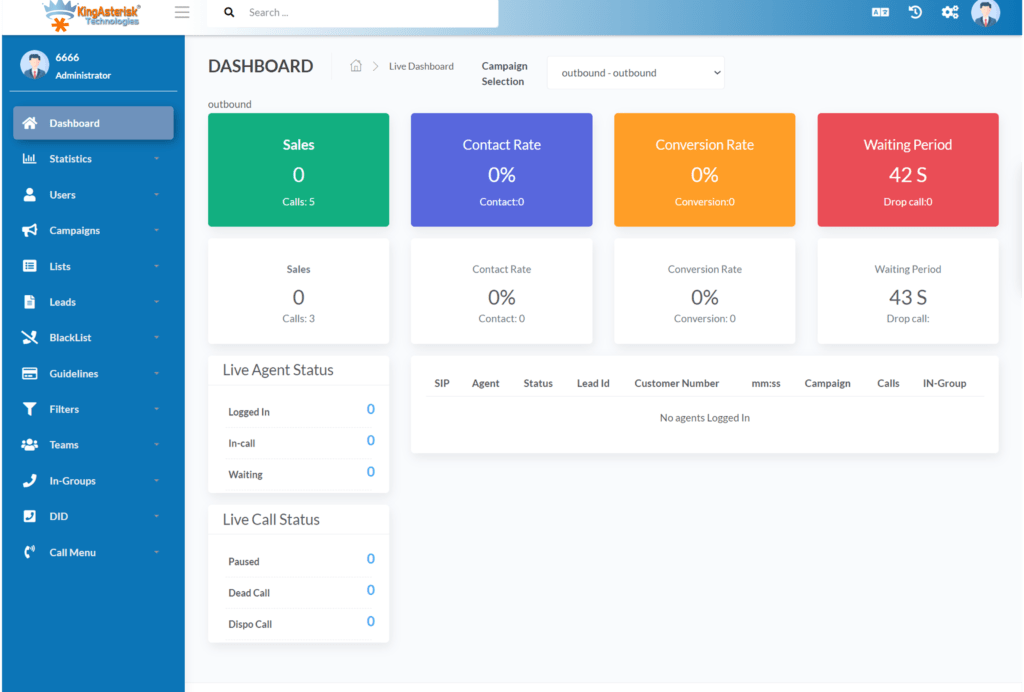
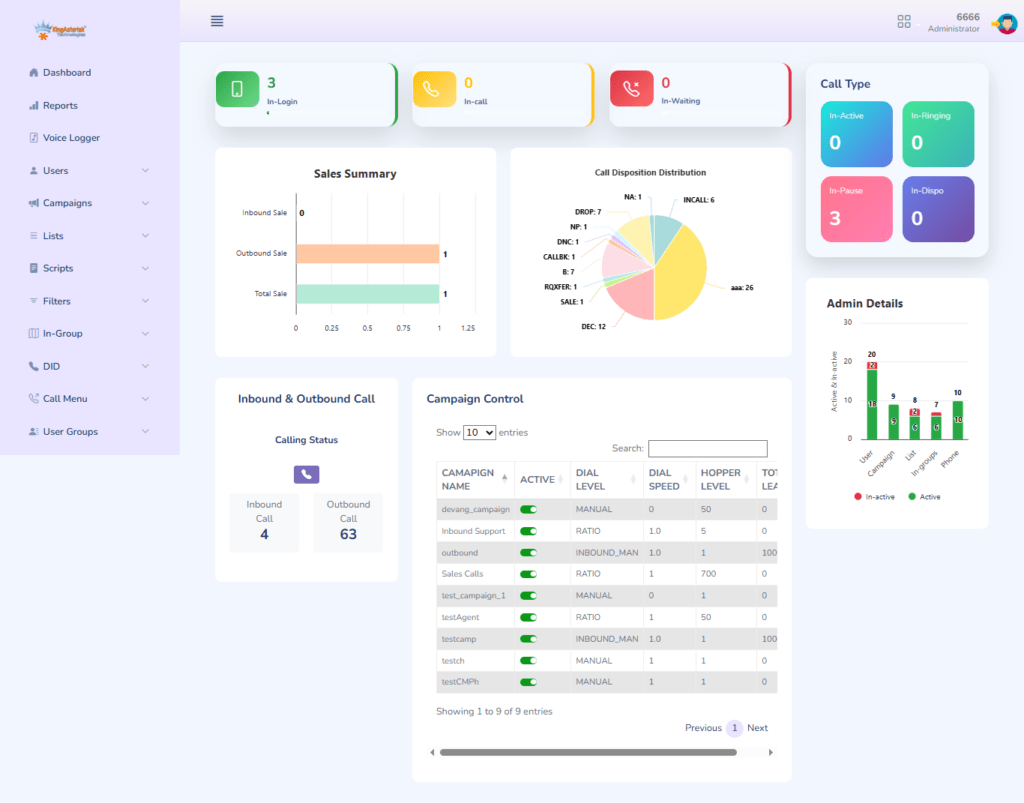
A branded VICIdial interface design solves this issue. You build your own VICIdial UI around your workflow, You move important panels to the center, You reduce extra menus, You highlight critical actions.
Simple change. Huge effect.
Think about these questions:
- How many clicks does an agent make per call?
- How many seconds do they spend searching for buttons?
- How often do they open the wrong tab?
Each second matters. Ten seconds saved per call turns into hours every week.
Custom VICIdial Theme with Source Code gives control at the code level. You do not depend on fixed layouts. You shape the system the way your agents think.
2026 call center UI trends show clear direction. Teams want responsive VICIdial theme 2026 designs. They want mobile-friendly layouts, They want clean dashboards, They want interactive user interface features.
Old systems show crowded tables and tiny text. Modern systems show card layouts, big buttons, and clear alerts.
KingAsterisk Technology studies real agent behavior. We redesign based on how teams actually work. We do not guess.
A strong VICIdial frontend UX enhancement gives:
- Faster navigation
- Less eye strain
- Lower stress
- Better call focus
Want a catchy truth?
“Better screens create better calls.”
This shift also supports performance-first design in dialer systems. Clean UI reduces load time. Light layouts improve speed. Agents feel the difference instantly.
Many managers ask, “Can design really change performance?”
Yes. When agents feel comfortable, they work faster. When tools feel simple, they make fewer mistakes.
VICIdial user interface design now stands equal to technology features. Both matter. One without the other limits growth.
What Is a Custom VICIdial Theme with Source Code?
Let us keep it simple.
A Custom VICIdial Theme with Source Code means you get full design control plus editable files. You do not just use fixed templates, You own the structure.
You can:
- Change layout
- Change colors
- Change fonts
- Change button styles
- Change panel positions
- Add new visual elements
And you can do all this using source code for VICIdial custom skin.
This falls under open source VICIdial theme solutions. You work with HTML, CSS, and script files. Developers can adjust every detail.
Some people ask, “Can VICIdial interface be fully customized without coding?”
Yes, small changes work with no-code or low-code customization solutions. But deep personalization needs code. And that brings power.
You can create:
- Customizable agent dashboard themes
- Unique admin layouts
- Role-based screen designs
- Special widgets for supervisors
This goes far beyond simple color edits.
Let us break it into parts.
1. Visual Identity
Your brand matters. Colors build trust. The layout shows professionalism. A white-label VICIdial theme development approach keeps your identity strong. Agents feel proud to work on a system that looks modern. Clients who visit your office see branded screens. That builds confidence.
2. Workflow Alignment
Each team works differently. Sales agents need fast dial and notes. Support agents need history and case tools. With custom VICIdial theme development, you match the screen to the task. That reduces friction.
3. Responsive Design
A responsive HTML5 call interface adapts to different screens. Supervisors can check dashboards on tablets. Managers review reports on laptops. The layout stays clear.
4. Performance Focus
Heavy layouts slow systems. Smart CSS and clean HTML templates keep pages fast. A performance-first UI helps large teams.
5. Upgrade-Safe Structure
Many fear updates. They worry changes break after system upgrades. Good theme design follows a VICIdial admin UI redesign guide. It keeps the structure safe and modular. KingAsterisk Technology builds themes that stay stable. We use structured customization, not random edits.
So when someone asks, “What is a custom VICIdial theme with source code?”
You can answer: It is full control over the look, flow, and usability of your call center software UI theme, backed by editable files.
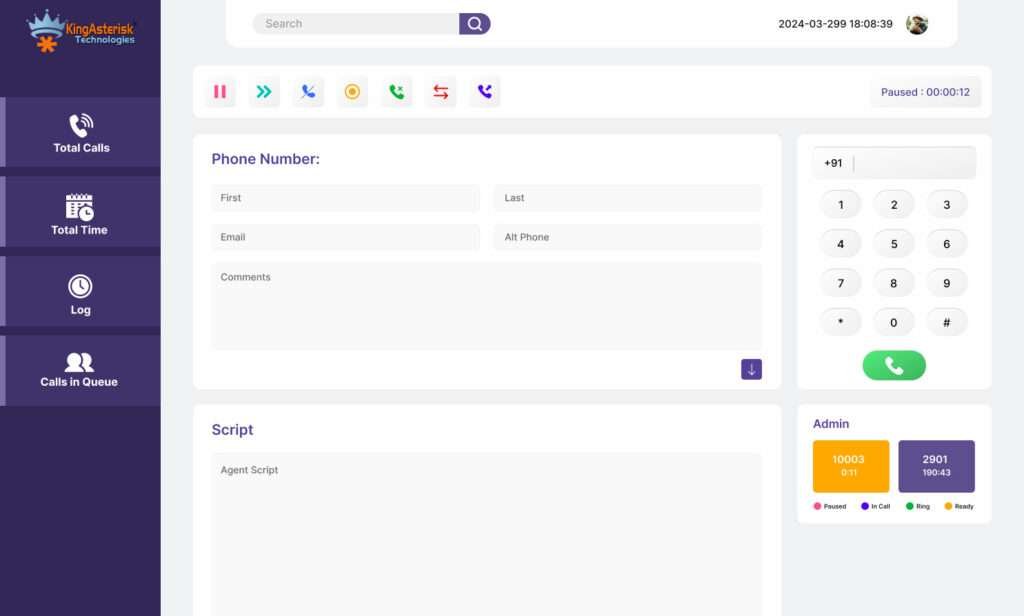
How to Build Your Own Branded UI Step by Step
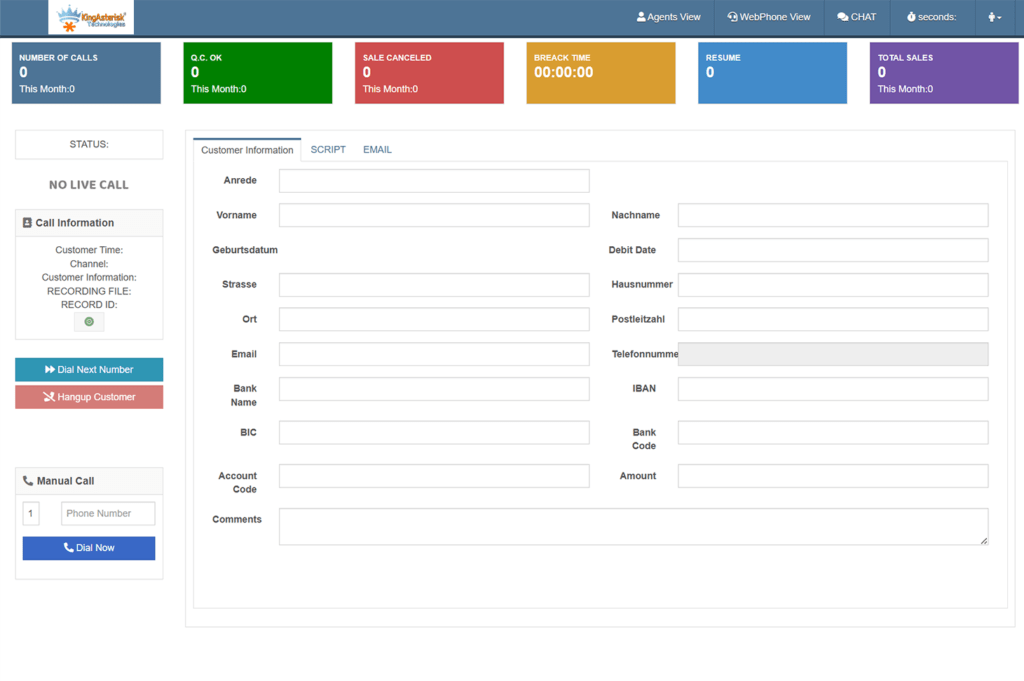
Let us walk through how to customize VICIdial UI step by step. This helps business owners and technical teams understand the journey.
Step 1: Define Goals
Start with questions. What slows your agents? Which screen causes confusion? What do you want to improve?
Common goals include:
- Reduce clicks
- Increase lead visibility
- Highlight call controls
- Improve supervisor monitoring
Clear goals guide design.
Step 2: Study Agent Behavior
Watch agents during live calls. Notice where they struggle. See how they move their mouse. Track which panels they ignore. Real data beats assumptions. This forms the base for contact center UI personalization.
Step 3: Wireframe the Layout
Now design structure. Use simple blocks.
Place:
- Call controls at the center
- Lead details on the left
- Notes and history on the right
- Status alerts at the top
This matches human eye movement. A good VICIdial CSS and HTML template follows a visual hierarchy. Important elements appear bigger and closer to the center.
Step 4: Apply Branding
Choose brand colors. Select readable fonts. Keep contrast high. Avoid bright distractions. VICIdial branding best practices suggest using one primary color and one accent color. Too many colors confuse users.
Step 5: Code the Theme
Now developers work on:
- HTML structure
- CSS styling
- UI component modification
- Panel customizations for VICIdial
This stage creates the real VICIdial theme with source code download package.
Step 6: Test with Agents
Never skip testing. Let agents use the theme for a week. Ask for feedback. Observe speed changes. Fix pain points. Interactive user interface features should feel natural, not forced.
Step 7: Roll Out
After testing, deploy across teams. Provide a short training video. Most agents learn quickly because design feels simple. That shows the power of VICIdial custom UI for call centers.
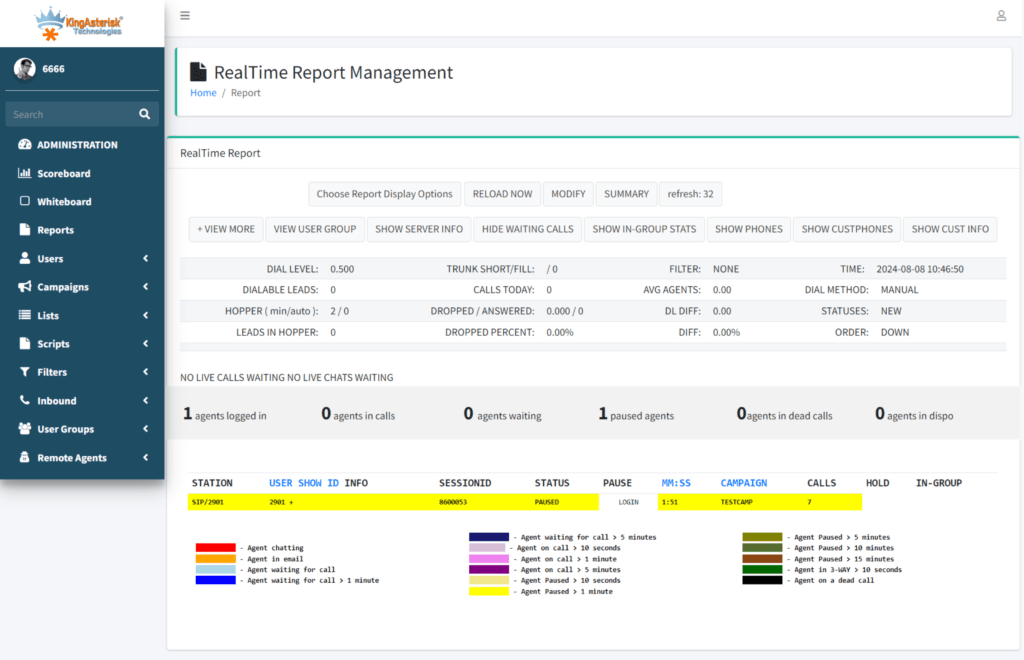
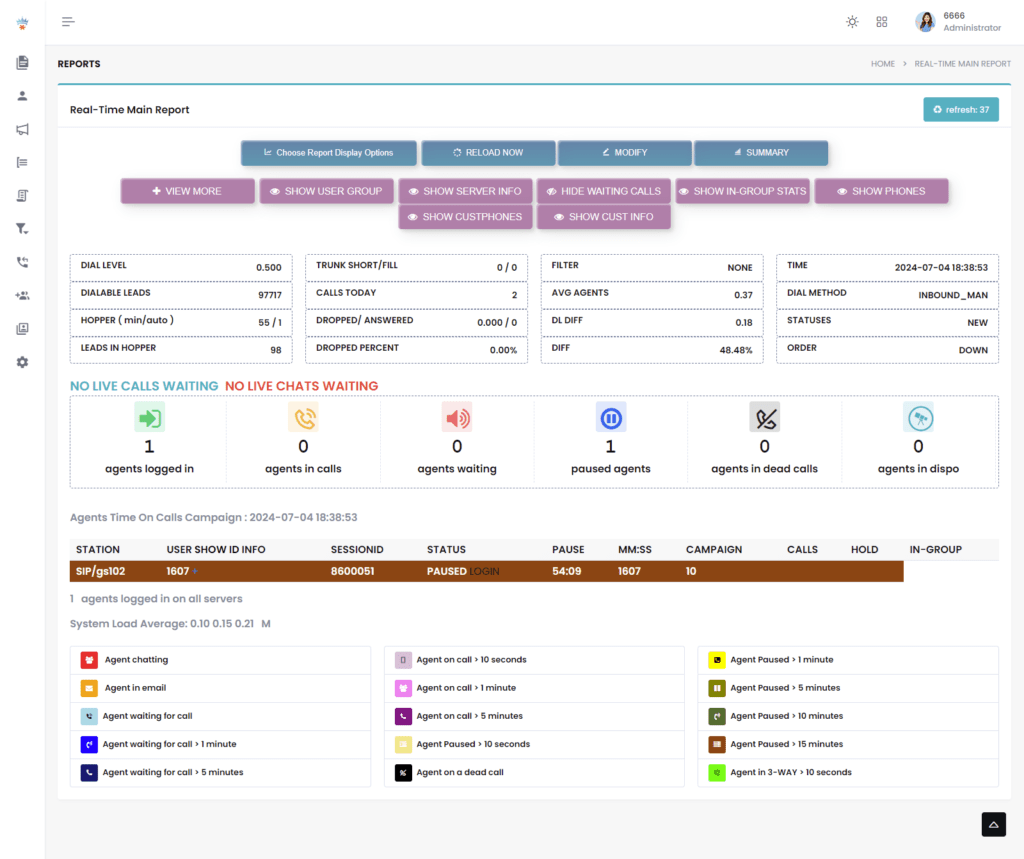
Real Benefits, Real Impact, Real Growth
You may wonder about the results. Let us talk numbers and examples.
A mid-size contact center with 120 agents redesigned screens using Custom VICIdial Theme with Source Code.
Before:
- Agents took 12 seconds to find call notes
- Average call handling time stayed high
- New staff training took 10 days
After redesign:
- Agents found notes in 4 seconds
- Handling time dropped
- Training reduced to 6 days
Small visual changes created big results. Another team improved supervisor dashboards. They added live status cards and clear alerts. Managers reacted faster to queue issues.
Here are strong benefits:
1. Faster Calls
Clean layouts reduce searching. Agents focus on conversation.
2. Lower Training Time
New staff understand simple screens faster.
3. Better Morale
Modern UI removes frustration.
4. Strong Branding
Your system looks professional.
5. Flexible Growth
You can extend the design later. Add new widgets. Adjust flows.
6. Competitive Advantage
Very few companies offer deep VICIdial theme customization services with full code access.
KingAsterisk Technology stands ahead here. Many businesses only provide surface design. We build an open source theme for call solution environments that grow with you.
People Also Ask
How do I change the look and feel of my call center dialer❓
You work on theme files, CSS, layout structure, and branding elements.
What UI frameworks work best for theme development❓
Lightweight HTML5 and structured CSS systems work best for speed and flexibility.
How much does a custom theme cost in 2026❓
Cost depends on complexity, number of screens, and advanced features.
What are the benefits of custom UI for agents❓
Agents work faster, feel less stress, and make fewer mistakes.
Why KingAsterisk Technology Leads This New Space
KingAsterisk Technology focuses on contact center solution services. We study operations, not just design. We build tools around real needs.
Our Custom VICIdial Theme with Source Code approach combines:
- Design thinking
- Workflow research
- Code-level customization
- Branding strategy
Very few businesses invest in deep UI work. Many ignore it. That creates opportunity for forward-thinking teams. We treat interface as a performance tool, not decoration.
Our experts guide:
- Vicidial theme options
- Vicidial UI component modification
- Plugin integrations and extensions
- Developer guides and walkthroughs
We support API-first UI customization for future expansion, We create cross-platform UI theme support, We design customizable agent dashboard themes that scale. Great design turns average systems into high-performance tools.
Final Thought
Technology evolves. Interfaces must evolve too. Screens shape behavior. Behavior shapes results. A powerful Custom VICIdial Theme with Source Code gives control, flexibility, and growth. It improves daily work, It strengthens branding, It boosts performance.
If your team spends hours on the system every day, should the screen not work perfectly for them? That question alone shows why custom Vicidial UI stands as the next big step in contact center growth.