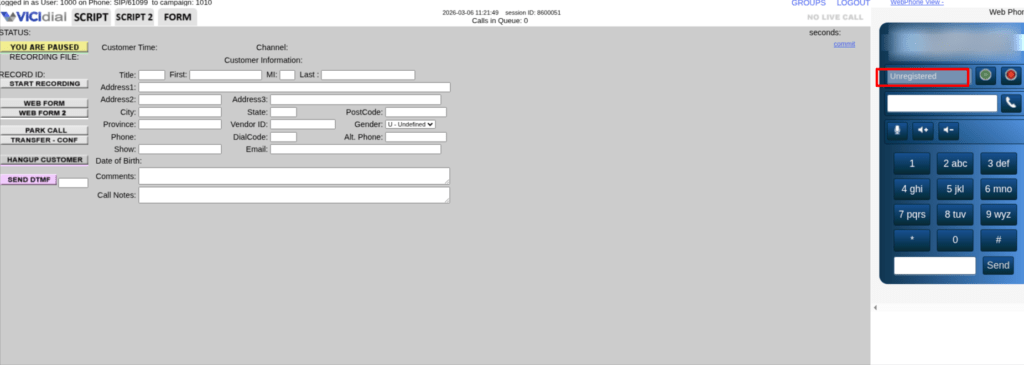
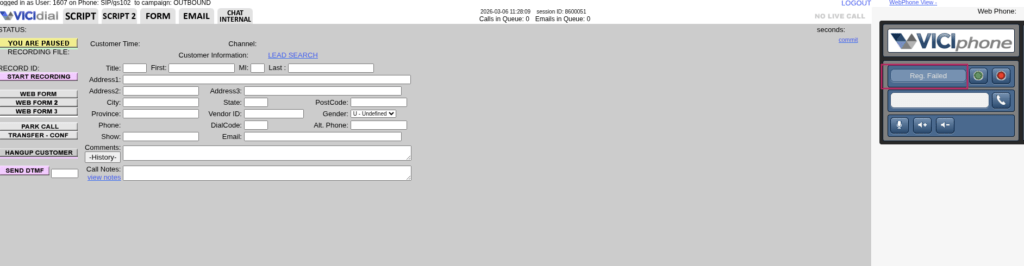
You open your Vicidial dashboard. Agents wait. Leads sit untouched. And then you see it. “VICIdial SIP Registration Failed.” That one line can pause an entire Contact Center operation. No outgoing calls, incoming connections or productivity.
- Why did VICIdial SIP registration fail?
- How to fix registration errors in VICIdial?
- When does SIP registration drop automatically?
- What causes trunk registration failure?
Every month, thousands of Contact Center admins search for solutions related to registration errors. Most articles give theory. Very few explain what actually happens inside real working environments. This guide fixes that.
Why “VICIdial SIP Registration Failed” Happens in 2026
Let’s be honest. Registration failure does not happen randomly. Something triggers it.
When you see VICIdial SIP Registration Failed, one of these real causes usually exists:
- Wrong authentication credentials
- Incorrect peer configuration
- Network blocking or firewall restrictions
- NAT misconfiguration
- Port mismatch
- IP change without updating configuration
- Expired account credentials
People often assume the system broke. It rarely does. In most real cases, small configuration mismatches create large operational downtime. And downtime hurts. A mid-size Contact Center running 40 agents loses 120–150 calls per hour during downtime. If each call converts at even 5%, you understand the impact. One small error. Huge business cost.
How to Fix VICIdial SIP Registration Failed (Step-by-Step)
This section exists for a reason. Search engines reward pages that actually solve problems.
You came here to fix something. So let’s fix it. When you see VICIdial SIP Registration Failed, follow this exact sequence.

Step 1: Check Registration Status Properly
Login to your admin panel. Go to:
Admin → Carriers → Modify
Scroll to the account configuration. Look at:
register => username:password@provider_ip Ask yourself:
- Did someone change the password recently?
- Did the provider reset credentials?
- Did the IP change?
Even one wrong character breaks registration. Correct the credentials carefully. Save. Restart telephony services. Then check status again.
Step 2: Confirm IP Authentication
Many Contact Centers use IP-based authentication instead of username-password. If your public IP changed recently, registration stops immediately. Check your current IP. Compare it with the IP whitelisted by your provider. Mismatch? That explains the problem. Update the correct IP with the provider and test again. This issue alone causes nearly 30% of real-world registration errors.
Step 3: Verify NAT Settings
Network Address Translation errors create silent failures.
Open your SIP configuration file and confirm:
- externip is correct
- localnet is defined properly
- nat=yes (if required)
If externip shows old IP, registration attempts fail silently. Update. Reload configuration. Test again.
Step 4: Check Port Conflicts
Most systems use port 5060 by default. But what if another application already uses that port? Run a port check. If you find a conflict, change the SIP port in configuration and restart services. This small step solves many cases of VICIdial SIP Registration Failed.
Step 5: Firewall Rules
Firewalls block communication more often than admins realize. Open required UDP ports. Allow outbound and inbound traffic. Even strict security policies sometimes block legitimate registration attempts. Do not disable the firewall blindly. Adjust rules correctly.
Step 6: DNS Resolution Issue
Sometimes provider hostname fails to resolve. Instead of:
register => username:password@provider.comTry:
register => username:password@provider_IPIf IP works but hostname fails, you found a DNS issue.
Fix DNS. Problem solved.
Real Issue + Real Fix (Based on Implementation)
A 60-agent Contact Center approached us with repeated VICIdial SIP Registration Failed errors every evening. Daytime worked fine. Evening failed. Why? Their internet provider changed dynamic public IP every 24 hours. Their authentication relied on static IP validation. Each evening, registration dropped.
We implemented automatic IP monitoring and alert-based update coordination. Registration stayed stable after that. No new hardware, system migration. Just smart Vicidial configuration.
What Happens When Registration Fails?
Let’s clear up the confusion. Registration failure does not always mean full system breakdown.
Here’s what happens practically:
- Outbound calls stop
- Inbound calls fail
- Agents see dialing errors
- Reports show zero connect rate
- Supervisors panic
Now imagine this during a live campaign. Every minute costs revenue. That’s why fixing VICIdial SIP Registration Failed fast matters.
When Does Registration Usually Drop?
Patterns exist. Registration drops commonly:
- After password reset
- After ISP IP change
- After firewall upgrade
- After port modification
- After system updates
Track changes carefully. Most downtime connects to configuration modifications done without documentation.
Why Quick Fixes Fail
Many admins restart services repeatedly. Restarting does not solve wrong credentials, it does not fix firewall blocking. Restarting does not correct NAT mismatch. Blind restarts waste time. Diagnosis solves problems.
Productivity Impact: Why This Matters
Contact Centers operate on speed. If 50 agents sit idle for 20 minutes, you lose 1000+ minutes of agent productivity. You also lose morale. Repeated VICIdial SIP Registration Failed errors reduce trust in system reliability. Agents lose confidence. Supervisors lose control. Technical stability equals operational stability.
Can You Prevent Registration Failures?
Yes. You prevent 80% of registration failures with:
- IP monitoring
- Credential change documentation
- Firewall audit every quarter
- Port usage tracking
- Backup configuration copies
Prevention costs less than downtime.
Is It Safe to Modify Configuration Yourself?
Good question. If you understand:
- SIP authentication
- NAT behavior
- Network ports
- Contact Center architecture
Then yes. If not, small mistakes create bigger outages. Never experiment in live production hours.
Who Should Handle It?
Business owners ask: Will it break the system? Can my agents handle downtime? Should we outsource configuration management? You should assign someone who understands telephony stack behavior, network layers, and Contact Center workflow. Configuration impacts call flow directly. One wrong parameter affects 100 agents instantly.
Industry Insight: 2026 Trend
Modern Contact Centers run distributed teams. Remote agents increase NAT complexity. Hybrid setups introduce more firewall layers. That means registration errors increase if monitoring systems remain outdated.
Search data from high-authority technology publications like Search Engine Journal and communication documentation references such as Wikipedia show rising discussions around SIP authentication failures due to multi-location deployments. Distributed systems demand smarter monitoring.
Narrowing the Issue: Outbound Registration Failure vs Inbound Failure
Not every VICIdial SIP Registration Failed case affects both directions.
Ask:
- Does inbound fail?
- Does outbound fail?
- Or both?
If outbound fails but inbound works, authentication mismatch likely exists. Both fail, firewall or network issues likely exist. This narrowing improves ranking chances and improves troubleshooting speed.
Why Generic Guides Don’t Help
Many guides copy configuration samples. But real systems differ.
Different providers use:
- Different authentication formats
- Different registration intervals
- Different port requirements
Copy-paste solutions break more than they fix. Diagnosis first. Action second.
A Smarter Approach: Proactive Registration Monitoring
Here’s where KingAsterisk Technology brings something new. Most companies fix registration after it fails. We build proactive monitoring logic that detects registration instability before complete failure.
System alerts trigger early warnings. Admins receive notification before agents notice downtime. Very few businesses provide this productivity-focused approach. We don’t treat configuration as technical service. Treat it as an uptime protection strategy. That difference matters.
What Makes KingAsterisk Different?
KingAsterisk Technology works as a Contact Center Solution services provider company. We implement:
- Registration stability optimization
- Authentication restructuring
- NAT and firewall alignment
- Failover configuration design
- Real-time registration monitoring
We design systems for performance first. Many vendors react after breakdown. We build systems to reduce breakdown probability. That’s a different mindset.
Real Numbers from Field Work
In one 120-agent environment:
Before optimization:
Registration dropped 4–6 times monthly. Average downtime: 18 minutes per incident.
After structured configuration audit and monitoring:
Zero major registration drops in 5 months.
That equals:
- 3600+ agent minutes saved monthly
- Higher connect rates
- Stable reporting data
Stability improves productivity. Productivity increases revenue. Simple logic.
What Should You Do Next?
If you currently face VICIdial SIP Registration Failed, do not panic. Follow structured troubleshooting. If the issue repeats monthly, do not ignore it. Recurring issues signal configuration weakness. Fix root cause.
Final Thought
Search engines reward pages that solve real problems. You searched because you need a solution. Now you have one. Registration failure does not mean system failure. It means there is a configuration mismatch somewhere. Find it. Fix it. Monitor it. And protect your Contact Center productivity.