If you’ve spent any time inside a stock VICIdial admin panel, you already know the feeling: dense tables, 2005-era form fields, and a navigation structure that hasn’t meaningfully changed in over a decade. That’s the exact gap KingAsterisk Technologies built its custom VICIdial admin themes to close.
VICIdial’s underlying engine is rock solid – but the interface supervisors and administrators stare at for eight hours a day hasn’t kept pace with how contact centers actually operate in 2026. Every theme in this roundup is a proprietary, in-house build – not a community skin, not a third-party plugin, and not a repackaged open-source template.
We design, code, and test each dashboard against live VICIdial and ViciBox deployments, then refine it based on direct feedback from supervisors managing real campaigns across industries like lead generation, appointment setting, collections, and customer support.
In this guide, we’re walking through the top 5 custom VICIdial admin themes currently available from KingAsterisk, what makes each one different, and how you can explore them yourself in our live demo environment before committing to a deployment.
Why a Custom VICIdial Admin Theme Actually Matters
It’s tempting to dismiss admin theming as cosmetic. It isn’t. A poorly organized dashboard adds seconds to every lookup a supervisor performs – and across hundreds of daily actions, that adds up to real lost floor time. A custom VICIdial admin theme changes three things that directly affect day-to-day operations:
Navigation speed – grouping campaign management, list management, and reporting into a logical, visual structure instead of VICIdial’s flat menu tree.
Onboarding time – new administrators and team leads learn a clean, modern layout faster than the stock interface’s dense forms.
Data legibility – real-time agent status, campaign statistics, and queue information are easier to scan at a glance, which matters most during peak call volume.
Brand consistency – for agencies and BPOs running the panel in front of clients, a themed dashboard looks like a purpose-built platform rather than an off-the-shelf install.
None of this changes VICIdial’s core dialing engine, campaign logic, or database structure. A custom admin theme is a presentation layer built on top of the existing VICIdial and Asterisk stack – the underlying system you already know still does the work.
The Top 5 Custom VICIdial Admin Themes from KingAsterisk
All five of these dashboards are custom VICIdial admin themes designed and maintained by KingAsterisk. Four are English-language administration interfaces built around different operational priorities. The fifth is a dedicated German-language dashboard, built for teams operating in DACH-region deployments who need the admin panel itself – not just campaign scripts – presented in German.
The Streamlined Operations Theme
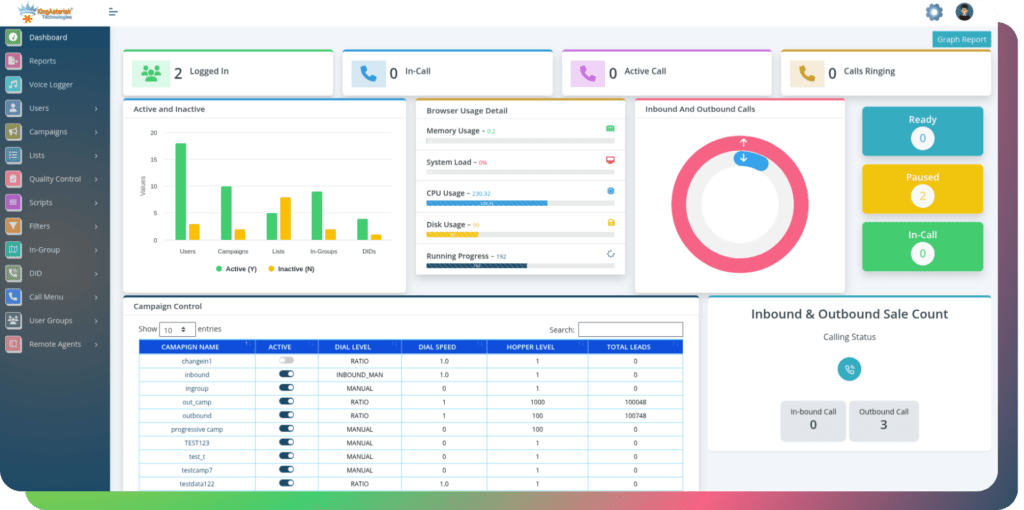
This one is the entry point for teams moving off the stock VICIdial interface for the first time. It restructures the default admin menu into a card-based navigation layout, with campaign management, list management, and user administration grouped into clearly labeled sections instead of a long left-hand tree.
This theme keeps every native VICIdial function in place – nothing is hidden or removed – but reorganizes the visual hierarchy so the most frequently used screens (live agent status, campaign configuration, and lead search) sit one click from the home dashboard instead of three or four.
Best suited for: smaller teams and agencies making their first move to a custom admin theme without wanting to relearn where anything lives.
The Real-Time Monitoring Theme
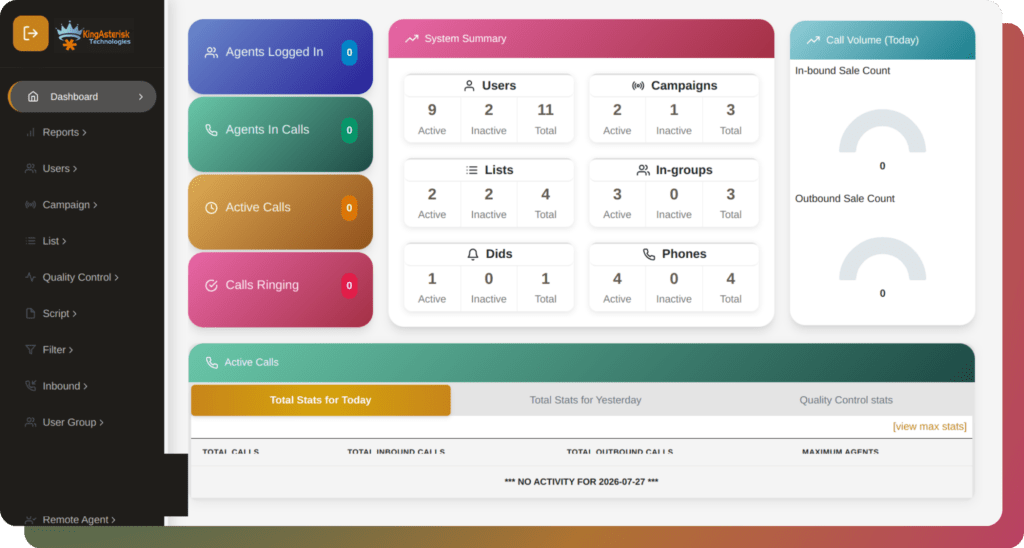
The real-time monitoring theme is built for supervisors who spend most of their day watching live queues rather than running reports. The dashboard opens directly into a real-time monitoring view showing agent status, live call counts, and queue depth across active campaigns, refreshed continuously rather than requiring a manual page reload.
It also incorporates an Auto-Attendant management panel, giving administrators a visual editor for call-routing logic instead of navigating raw menu configuration screens. Routing rules, time-based conditions, and department transfers can be reviewed and adjusted from a single screen, which meaningfully cuts down the time it takes to update inbound routing during shift changes or campaign launches.
Best suited for: floor supervisors and operations managers who need at-a-glance visibility into live activity, and teams that frequently adjust inbound routing.
The Conversation Intelligence Theme
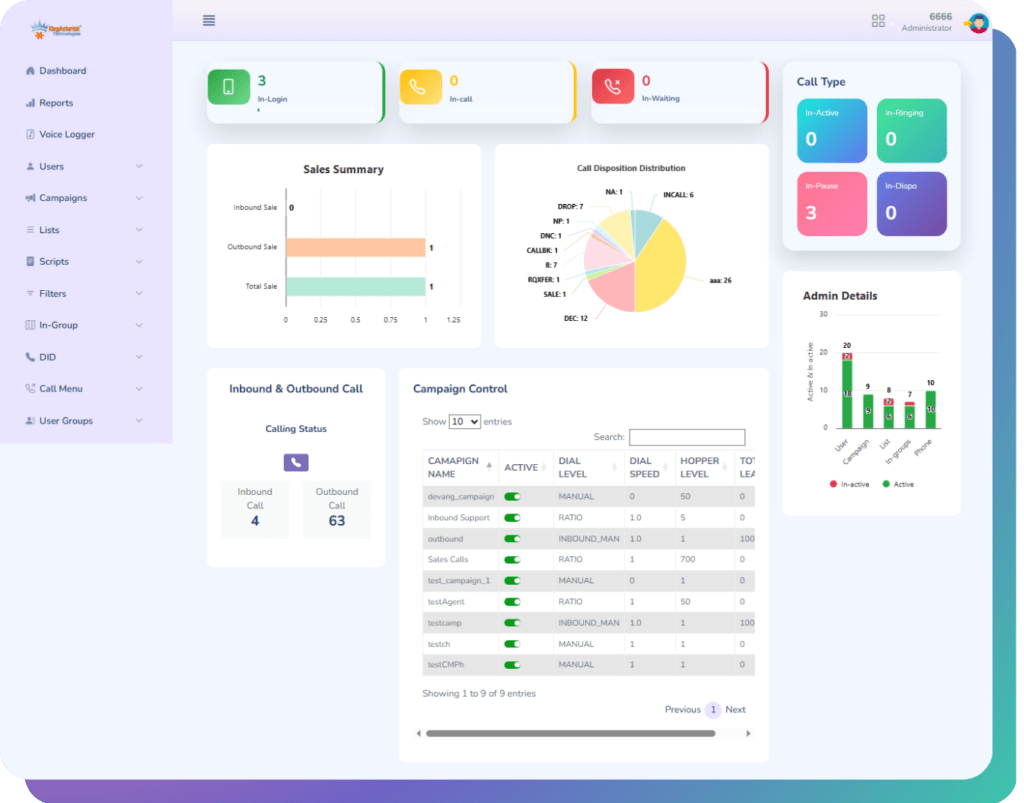
The conversation intelligence theme is built around post-call visibility. Alongside the standard VICIdial disposition and recording tools, this theme layers in a sentiment analysis module that flags calls likely to need supervisor review – tone shifts, extended silence, or abrupt call endings – without requiring a manager to listen to every recording end-to-end.
The sentiment view sits alongside disposition data and campaign statistics on the same dashboard, so quality assurance teams can move from a flagged call straight into the relevant lead record and agent history without switching screens.
Best suited for: quality assurance teams, coaching-focused supervisors, and campaigns where conversation quality directly affects conversion or compliance.
The Productivity Theme
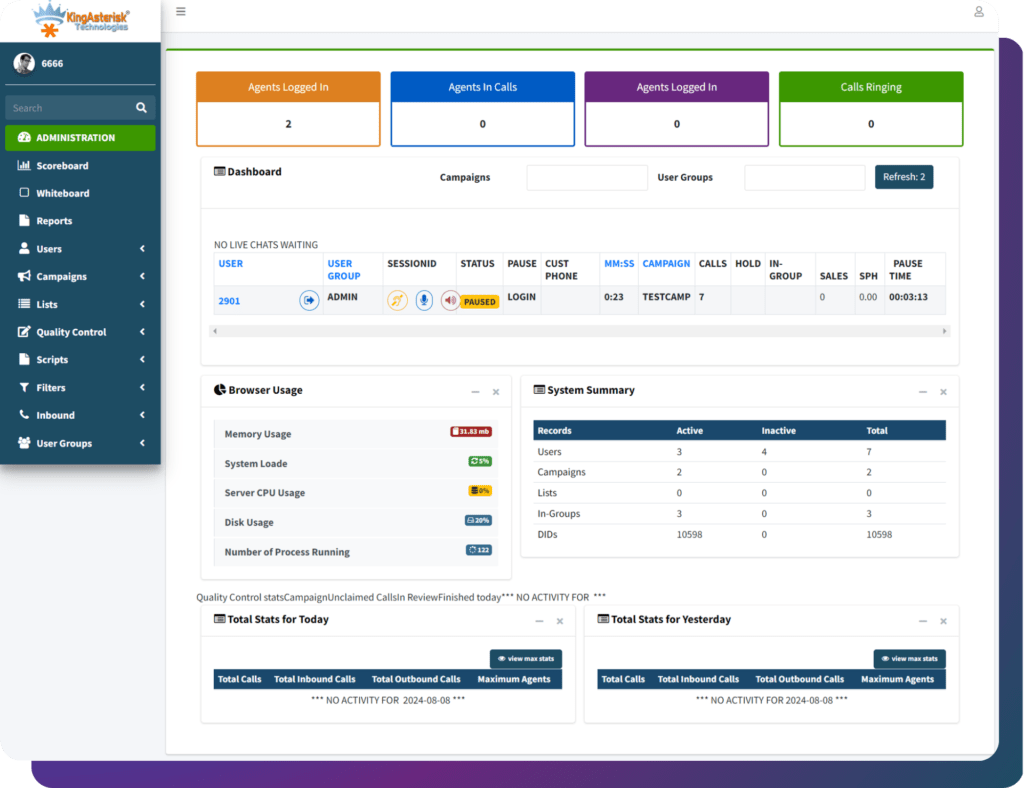
The productivity theme is designed around after-call workflow speed. Its standout addition is a call summarization panel that condenses each completed call into a short, structured summary – key discussion points, disposition reasoning, and any follow-up flagged by the agent – displayed directly in the lead history.
For campaigns with high call volume and tight after-call work targets, this cuts down the time supervisors spend reconstructing what happened on a call from raw recordings or agent notes alone, particularly useful when handing a lead off between shifts or agents.
Best suited for: high-volume outbound campaigns, appointment-setting teams, and any operation where fast lead handoffs matter.
The German-Language Dashboard
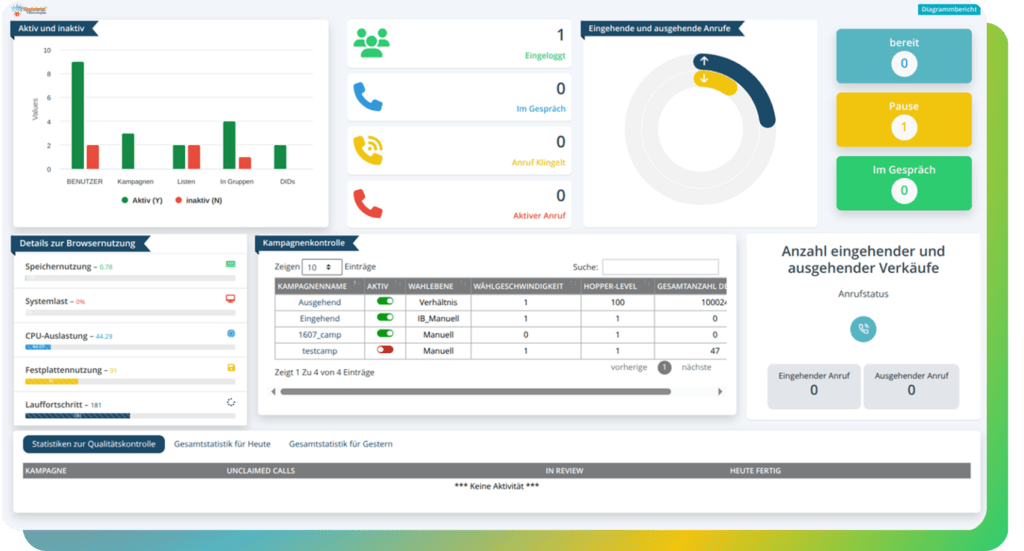
The German Theme is the only theme in this list built as a fully localized German-language administration panel – menu labels, form fields, report headers, and system messages are presented natively in German rather than relying on a browser-level translation layer. This is the theme we deploy for clients running DACH-region operations who need administrators to work in their own language, not just agents.
This theme also includes a predictive analytics module, surfacing forward-looking indicators such as projected list exhaustion, expected connect rates for the remainder of a shift, and campaign pacing trends – presented as simple visual indicators rather than raw statistical output, so administrators can act on them without needing a background in data analysis.
Best suited for: contact centers operating in German-speaking regions, and any deployment where administrator-level localization is a requirement rather than a nice-to-have.
How KingAsterisk Builds Every Custom Theme
A custom VICIdial admin theme isn’t a drop-in skin – VICIdial installations vary enough in the ViciBox version and SVN codebase revision that a theme built for one environment can break on another if it isn’t matched correctly. Our build process accounts for that from the start.
Step 1: Environment Assessment
Before development starts, we confirm two details from your existing setup: your ViciBox version and your SVN (VICIdial codebase) revision. These determine which theme structure and file paths we can safely build against.
Step 2: Custom Development
The theme is developed specifically for your environment – not adapted from a generic template. Depending on the project, this can include a modern interface layer, updated dashboard components, and campaign management tooling built on top of your existing VICIdial installation.
Step 3: Delivery
Once development is complete, you have two options: we provide the source code and installation steps for your own team to deploy, or you provide server access and we handle installation and configuration directly.
Step 4: Ongoing Support
Several support packages are available for post-installation needs, scoped to your environment and update frequency requirements – we can walk through the right fit once your ViciBox and SVN details are confirmed.
How to Explore These Themes on the Live Demo
Every theme above can be explored before deployment through the KingAsterisk demo portal. Here’s the process, using the Global Admin theme as an example:
- Visit kingasterisk.com and select Live Demo from the main navigation.
- This opens the demo portal at demo.kingasterisk.com, where each available theme is listed.
- Choose a theme – for example, Theme 5 for the German-language Global Admin dashboard.
- Click Admin to reach the themed login screen, located at a custom path such as
demo.kingasterisk.com/theme-5/dialer/admin.php- Enter the demo credentials provided on the login page and sign in to explore the full dashboard.
Once logged in, you can navigate the complete admin panel – campaign management, agent administration, lead and list management, real-time reporting, and system monitoring – all through the selected theme’s interface, with full underlying VICIdial functionality intact.
A Security Note on Custom Admin Panel Paths
One side benefit of a custom theme deployment worth mentioning: the admin login path itself changes. A standard VICIdial installation serves its admin panel at a predictable, publicly documented location. A KingAsterisk custom deployment instead serves the panel at a client-specific path – commonly something like /dialer/admin.php rather than the default /vicidial/admin.php – which can be adjusted further per project.
Frequently Asked Questions
No. The five themes covered in this guide are proprietary builds developed and maintained by KingAsterisk for specific client environments – they aren’t distributed as free downloads. Each one is matched to your ViciBox version and SVN codebase revision during development, which isn’t something a generic downloadable package can account for. You can explore all five through our live demo before deciding on a deployment.
KingAsterisk’s admin themes are not published on GitHub or any public repository. Source code is delivered directly to clients as part of a development engagement, either for in-house deployment or installed by our team on your server.
Yes – every theme listed here, including the German-language Global Admin dashboard, is accessible through our live demo portal at no cost, using provided demo credentials. This lets you evaluate the interface and workflow before any development or deployment begins.
Compatibility depends on your specific ViciBox version and SVN codebase revision, which is why we assess your environment before development starts rather than offering a one-size-fits-all package.
Global Admin specifically localizes the administration panel – menus, forms, and system messages. Agent-facing scripts and campaign content are configured separately within your campaign setup, independent of which admin theme is active.
Final Thoughts
The stock VICIdial admin panel gets the job done, but it wasn’t built with today’s contact center pace in mind. Whether your priority is faster navigation, real-time visibility, post-call intelligence, faster after-call summaries, or a fully localized German-language experience for your administrators, there’s a custom VICIdial admin theme built for that specific need – not a generic reskin applied after the fact.
If you’re ready to see how any of these five themes look against your own ViciBox and SVN environment, reach out to KingAsterisk Technologies to start with an environment assessment, or head straight to the live demo to explore them yourself.
KingAsterisk Technologies designs, develops, and deploys custom VICIdial, Asterisk, and dialer interface solutions for contact centers worldwide. For more on our development services, visit our contact page.