


A contact center depends on smooth inbound communication. Every second matters. But many teams run into a frustrating message inside the dialer system: “Call XXXX could not be grabbed.” Agents stay ready. Supervisors watch Vicidial dashboards. Yet inbound communication never reaches the right person.
Why does this happen? Most teams assume a complex technical problem. In reality, a VICIdial Inbound Routing Issue usually comes from small configuration mistakes. A missing inbound group assignment. A wrong number mapping. Or an inactive agent session.
Small configuration errors create big productivity losses. Many contact centers face this problem silently. Agents wait. Supervisors restart sessions. Customers hear ringing without a response.
The good news? You can identify and fix the VICIdial Inbound Routing Issue quickly once you understand the root cause and correct workflow.
This guide explains the real problem, shows step-by-step fixes, and reveals how modern contact centers prevent inbound routing failures entirely.
Why Inbound Call Routing Problems Hurt Contact Center Productivity
Inbound communication drives revenue. It drives support resolution. It drives customer satisfaction. If a caller cannot reach an agent, the contact center loses trust instantly. Think about this simple fact:
A customer rarely tries more than two times to connect. After that, they leave. Many organizations invest heavily in outbound dialing performance but forget inbound routing optimization. That mistake creates silent operational gaps.
A typical inbound workflow follows this path:
Customer dials support number → system directs interaction to inbound group → available agent receives it.
When a VICIdial Inbound Routing Issue appears, this chain breaks somewhere in the middle. The agent waits. The system receives the interaction. But the routing logic fails. That moment produces the familiar warning:
Now the system cannot assign the interaction to any agent. This small message hides a major productivity disruption.
Common Signs of a VICIdial Inbound Routing Issue
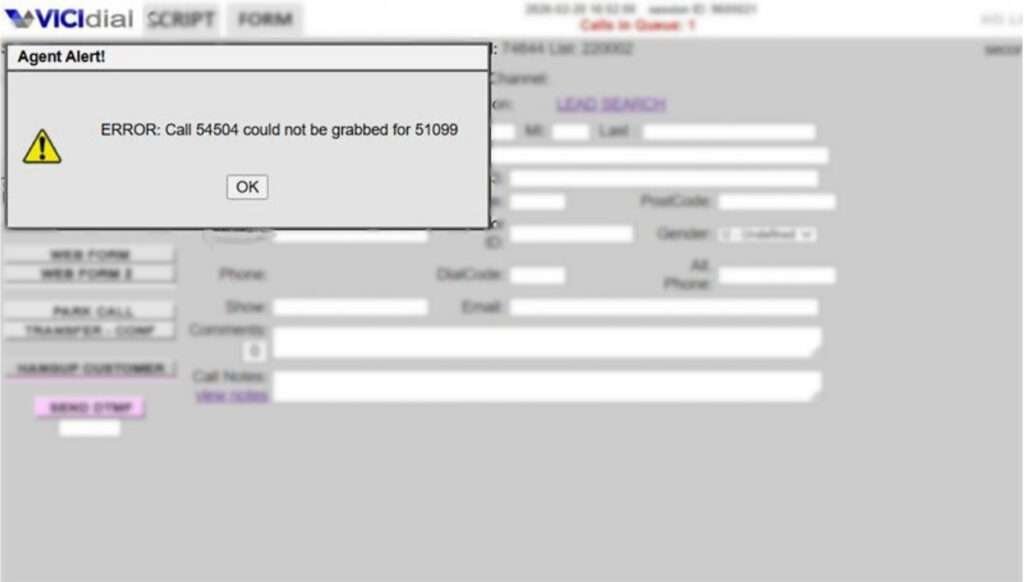
Many contact centers overlook the early symptoms. Supervisors usually detect the problem only after complaints increase. Watch for these common indicators: Agents remain idle even during peak hours. Customers report long ringing time. Dashboard shows inbound traffic but agent pickup stays low. The dialer displays “Call XXXX could not be grabbed.” These signs almost always point toward a VICIdial Inbound Routing Issue. But what actually triggers it? Let’s break down the real reasons.
Reason 1: Agent Not Assigned to the Correct Inbound Group
Every inbound interaction requires a matching inbound group. The system checks available agents inside that group before sending the call. If no agent exists inside the group, the system cannot deliver the interaction.
The dialer then throws the error: “Call XXXX could not be grabbed.” Many administrators create inbound groups but forget to add agents. Sometimes new team members join the contact center but administrators never assign them to the right inbound group.
The system sees the incoming interaction but finds no eligible agent. That immediately creates a VICIdial Inbound Routing Issue.
Quick Fix
- Open the admin panel.
- Locate the inbound group configuration.
- Add agents to the correct inbound group.
- Then reset the agent session so the system refreshes availability.
Once the agent logs back in, the routing engine detects the new assignment and starts delivering inbound interactions properly.
Reason 2: Incorrect Number Mapping
Inbound communication depends on correct number mapping inside the dialer. If the inbound number points toward the wrong configuration path, the system cannot deliver the interaction to agents.
The call enters the system. But the system cannot identify where to send it. This mismatch creates another common VICIdial Inbound Routing Issue. Many contact centers modify number configurations while expanding operations. During these changes, administrators sometimes leave outdated routing settings behind. Even one incorrect entry can block inbound delivery.
Fix Process
Check number configuration inside the Vicidial admin panel. Confirm that the inbound number points to the correct extension or menu. Ensure the inbound group assignment exists. Once the mapping matches the correct destination, inbound delivery resumes instantly.
Reason 3: Inactive or Stuck Agent Sessions
Agents often keep their interface open for long periods. Network interruptions or browser issues can freeze the session. The system still shows the agent online, but the dialer cannot push inbound communication to that interface.
This hidden issue creates another VICIdial Inbound Routing Issue. Supervisors often misinterpret the situation. They believe agents ignore calls. In reality, the session stopped responding.
Simple Solution
Log out the agent session completely. Then restart the login process. This action refreshes the connection and restores inbound communication delivery. Many contact centers schedule automatic session resets during shift changes to prevent this issue.
Reason 4: Active Channel Conflict in Asterisk
The communication engine tracks active channels for every interaction. If a channel remains stuck due to incomplete termination, the dialer cannot assign new inbound interactions. The system tries to deliver the communication but finds the channel busy.
This situation triggers the familiar message: “Call XXXX could not be grabbed.” Channel conflicts appear rarely but they cause serious routing failures. Supervisors must check active channel status whenever inbound traffic drops unexpectedly. Once administrators clear inactive channels, inbound distribution returns to normal.
Real Contact Center Scenario
Let’s examine a practical example. A growing support team handled around 900 inbound interactions per day. Agents reported long idle times even during peak hours. Supervisors noticed several instances of the “Call XXXX could not be grabbed” message. After investigation, administrators found the root cause.
A new inbound group existed for technical support. However, the team never assigned agents to that group. The system received incoming communication correctly but found no eligible agent. Administrators added agents to the group and restarted sessions.
Within minutes, inbound handling improved dramatically. One small configuration fix solved a massive productivity gap.
How KingAsterisk Technologies Solves VICIdial Inbound Routing Issues
Most businesses only react after problems appear. Leading contact centers prevent routing failures before they disrupt operations. KingAsterisk Technologies provides specialized solutions designed to eliminate recurring VICIdial Inbound Routing Issue scenarios.
Many providers only deliver dialer installation. They stop there. KingAsterisk Technologies goes much deeper. The company analyzes inbound communication flow, agent allocation, routing logic, and system behavior during real traffic conditions.
This approach helps identify configuration gaps that normal administrators miss. The team focuses on productivity optimization rather than basic system setup. This capability makes the service extremely rare in the industry. Very few providers analyze inbound routing performance at this level.
Organizations that implement these solutions experience measurable improvements:
Inbound pickup rates increase significantly.
- Agent idle time drops.
- Customer wait time decreases.
- Supervisors gain clearer operational visibility.
Modern contact centers need more than software installation. They need smart inbound workflow design. That exactly defines the KingAsterisk approach.
How to Fix a VICIdial Inbound Routing Issue Step by Step
Many administrators search online with a simple question: How do I fix the “Call XXXX could not be grabbed” error? The solution requires a structured verification process. Start by confirming inbound group assignments.
- Open the admin panel and review the inbound group configuration.
- Check whether agents appear inside the group list.
- If the list stays empty, add agents immediately.
- Next, confirm inbound number mapping.
- Ensure the incoming number connects to the correct extension or call menu.
- Incorrect mapping blocks inbound delivery.
- Then review agent login sessions.
Inactive sessions prevent communication delivery even when agents appear online. Finally inspect active channel status.
Remove stuck channels so the system can distribute interactions correctly. Once administrators follow these steps, most VICIdial Inbound Routing Issue cases disappear quickly.
Why Businesses Struggle With Inbound Routing Configuration
Many organizations focus heavily on outbound performance. They optimize dialing speed, lead distribution, and campaign settings. Inbound configuration often receives less attention. Yet inbound communication usually represents the highest-value customer interactions.
- Support requests.
- Service inquiries.
- Purchase decisions.
One missed inbound connection can mean a lost opportunity worth hundreds or thousands of dollars. That reality explains why modern contact centers now invest more effort into inbound routing optimization. Companies want consistent customer experiences across every communication channel.
Productivity Impact of Fixing Inbound Routing
Let’s look at the numbers. A mid-size contact center handles roughly 1,200 inbound interactions daily. If 5% fail due to routing issues, the business loses 60 interactions every day.
Over one month, that equals 1,800 missed customer opportunities. Fixing a single VICIdial Inbound Routing Issue can recover those lost connections instantly. This improvement directly increases customer satisfaction and operational efficiency.
Smart organizations treat routing optimization as a strategic priority rather than a technical detail.
Industry Insight: Why Most Businesses Never Detect This Problem
Here’s a surprising fact. Many contact centers operate with hidden routing errors for months. Why? Supervisors often assume low inbound pickup comes from agent performance. They rarely investigate routing configuration first.
But routing misconfigurations frequently create the real problem. Once teams analyze inbound traffic flow carefully, they discover the root cause much faster. Operational awareness makes a huge difference.
When Should You Investigate a VICIdial Inbound Routing Issue?
Certain situations demand immediate investigation.
- Agents report idle time during busy hours.
- Inbound dashboards show traffic but pickups remain low.
- Customers complain about long ringing.
- The system shows “Call XXXX could not be grabbed.”
These signs strongly indicate a VICIdial Inbound Routing Issue. Early diagnosis prevents productivity loss. The faster administrators identify the issue, the faster they restore smooth communication flow.
Real Implementation Example From KingAsterisk Technologies
One contact center struggled with inconsistent inbound delivery. Agents stayed available but only some received interactions. Supervisors restarted sessions repeatedly without success. KingAsterisk engineers analyzed the inbound configuration.
They discovered three hidden problems:
- Agents lacked correct inbound group assignments.
- Inactive sessions blocked communication distribution.
- Number mapping pointed toward outdated extensions.
Once the team corrected these elements, inbound delivery stabilized immediately. The contact center achieved 98% inbound pickup consistency within two days. This transformation demonstrated the value of deep inbound routing optimization.
How Smart Contact Centers Prevent Routing Failures
Modern operations follow several proactive strategies.
They audit inbound configuration regularly, verify group assignments weekly. They refresh agent sessions during shift changes, and monitor inbound traffic behavior carefully. These small habits prevent most VICIdial Inbound Routing Issue scenarios. Prevention always saves more time than troubleshooting.
A Simple Question for Contact Center Managers
Ask yourself one quick question: If inbound traffic spikes tomorrow, will every interaction reach the right agent instantly? If the answer feels uncertain, your system likely needs routing optimization. Small improvements today prevent large disruptions tomorrow.
The Future of Inbound Routing Optimization
Customer expectations continue to rise. People demand instant responses. They refuse to wait. Contact centers that manage inbound communication effectively gain a major competitive advantage. Routing precision, agent availability, and system responsiveness now define customer satisfaction.
Organizations that solve VICIdial Inbound Routing Issue challenges early position themselves far ahead of competitors. Inbound communication must feel seamless. Anything less damages customer trust.
Final Thoughts
Inbound communication remains the heartbeat of every contact center. When routing works perfectly, customers connect quickly and agents perform efficiently. But when a VICIdial Inbound Routing Issue appears, productivity drops instantly.
Messages like “Call XXXX could not be grabbed” signal deeper Vicidial configuration problems that demand immediate attention.
Fortunately, most routing issues come from simple causes:
- Missing group assignments
- Incorrect number mapping
- Inactive sessions
- Channel conflicts.
Once administrators correct these areas, inbound communication flows smoothly again.
Businesses that proactively monitor routing behavior avoid costly productivity losses. And organizations that implement advanced routing optimization unlock higher efficiency across their entire contact center operation.


