Want full control over your call center system? Want speed, stability, and freedom? No fluff. No confusion. Just action. KingAsterisk Technology works as a Contact Center Solution services provider company. Our team handles real Vicidial dialer environments every day. We test setups, We fix errors, We improve performance. This guide shares that hands-on knowledge so you can complete VICIdial Installation on AlmaLinux 9 the right way.
Many people ask simple questions.
- Where do I start?
- What breaks most often?
- How do I avoid errors?
- You will find those answers here.
AlmaLinux 9 gives long-term stability. Linux experts across education and research communities recommend enterprise Linux distributions for telephony workloads because they offer security updates, package consistency, and performance control. Reliable systems create better uptime. Better uptime means more calls, more leads, and better agent output.
One line truth: A clean setup saves 20+ hours of troubleshooting later.
System Preparation Before VICIdial Installation on AlmaLinux 9
Preparation decides success. Most failures happen before Vicidial installation even begins. You must control the foundation first.
You start with a minimal AlmaLinux 9 setup. Avoid unnecessary packages. Extra software creates conflicts. Clean systems stay stable.
Check hardware strength. Real call centers need strong CPU cores, fast SSD storage, and enough RAM. A 100-agent setup often uses:
- 8+ CPU cores
- 32 GB RAM
- SSD storage
- Stable public IP
More agents need more resources. Call recording and reporting also use disk and memory. Planning prevents overload.
You update the system first:
dnf update -y

dnf upgrade -y
Updates fix security gaps and dependency bugs. Research from major security communities shows that outdated packages create most Linux vulnerabilities. So update before anything else.
Next, install required tools:
dnf install epel-release -y

dnf install wget nano git net-tools perl gcc make -y
These tools help during compilation and configuration. You configure the firewall early. Open only required ports. Keep everything else closed. Tight security blocks attacks and protects customer data.
Set SELinux to permissive mode during installation:
setenforce 0You can tune it later. Beginners often break dialers by keeping strict policies during setup.
Over 60% of Linux deployment errors come from missing dependencies or blocked services. You must also set hostname and time zone. Dialer logs depend on correct time. Now your system stands ready for VICIdial Installation on AlmaLinux 9.
Core Software Setup for VICIdial Installation on AlmaLinux 9
This stage builds the working environment. You install database services first:
dnf install mariadb mariadb-server -y

systemctl enable mariadb

systemctl start mariadb
Secure the database:
mysql_secure_installationUse a strong password. Remove test databases. Good database hygiene protects records and call logs.
Install web services:
dnf install httpd php php-mysqlnd php-gd php-mbstring php-cli -y

systemctl enable httpd

systemctl start httpd
Install telephony dependencies:
dnf install perl-CPAN perl-DBI perl-DBD-MySQL sox ffmpeg -yThese tools process audio and scripts. Now download the VICIdial source:
cd /usr/src

git clone https://github.com/inktel/Vicidial.git
Move into the directory and start installation scripts. Follow prompts carefully. Most errors come from skipping steps. You also install Asterisk:
dnf install asterisk asterisk-configs asterisk-sounds-core-en -y

systemctl enable asterisk

systemctl start asterisk
Asterisk drives call handling. VICIdial controls campaigns and agents.
Configure cron jobs. Cron keeps the dialer active and updates campaigns:
crontab -ePaste VICIdial cron entries from documentation. If cron stops, your dialer stops. After installation, open the web panel. Complete initial setup. Create admin login. Set phone codes. Configure time zones. You now complete the heart of VICIdial Installation on AlmaLinux 9.
Database Configuration (MySQL/MariaDB Setup)
Database configuration forms the backbone of call center dialer software. You install and secure MariaDB to store campaign data, agent logs, and call records. Strong database tuning improves reporting speed and prevents data delays. A stable database environment supports smooth VICIdial Installation on AlmaLinux 9.
Web Service Environment (Apache & PHP Installation)
The web interface of this open-source call center software runs on Apache and PHP. Proper PHP modules ensure dashboards, reports, and admin panels load without lag. Adjust memory and execution limits to handle real-time analytics dashboards. A well-tuned web layer keeps the AlmaLinux 9 VICIdial setup guide 2026 performance-ready.
Telephony Engine Dependencies
Audio processing tools like sox and ffmpeg help manage call recordings and sound prompts. Perl libraries support dialer scripts and cron automation. Missing dependencies often cause installation failures in VICIdial installation instructions AlmaLinux 9. Installing these components early reduces troubleshooting later.
Asterisk PBX Platform Installation
Asterisk powers call handling, extensions, and IVR logic inside the VICIdial PBX platform. Correct module loading ensures inbound and outbound campaigns function properly. Version compatibility matters during How to install VICIdial on AlmaLinux 9 step by step. Stable telephony services lead to better call quality and system response.
Cron Jobs and Dialer Scheduling
Cron jobs automate background tasks like campaign activation and list updates. Without cron scheduling, the dialer stops processing calls correctly. Many AlmaLinux 9 VICIdial configuration tips focus on verifying cron permissions. Reliable scheduling keeps operations running around the clock.
Security Hardening and Firewall Setup
Security hardening AlmaLinux 9 protects dialer data and user access. Configure firewall rules to allow only required ports and block unknown traffic. SELinux adjustments help avoid service restrictions during deployment. A secure base strengthens the best way to deploy VICIdial on AlmaLinux 9.
Linux Command Line Installation Workflow
The entire deployment uses a Linux command line installation process. Command-line control allows faster updates, debugging, and service checks. Administrators prefer CLI during VICIdial install prerequisites on AlmaLinux 9 because it reduces GUI conflicts. Strong CLI knowledge speeds up issue resolution.
Performance Optimization During Setup
Early performance optimization VICIdial steps include adjusting PHP limits and database buffers. Monitoring CPU, memory, and disk usage prevents overload during peak calls. Proper optimization supports TCPA-compliant auto dialer setup and campaign stability. Smart tuning during setup avoids future slowdowns.
Configuration, Testing, and Performance Tuning
Now you bring the system to life. Start with network checks. Confirm ports respond. Confirm services run:
systemctl status mariadb

systemctl status httpd

systemctl status asterisk
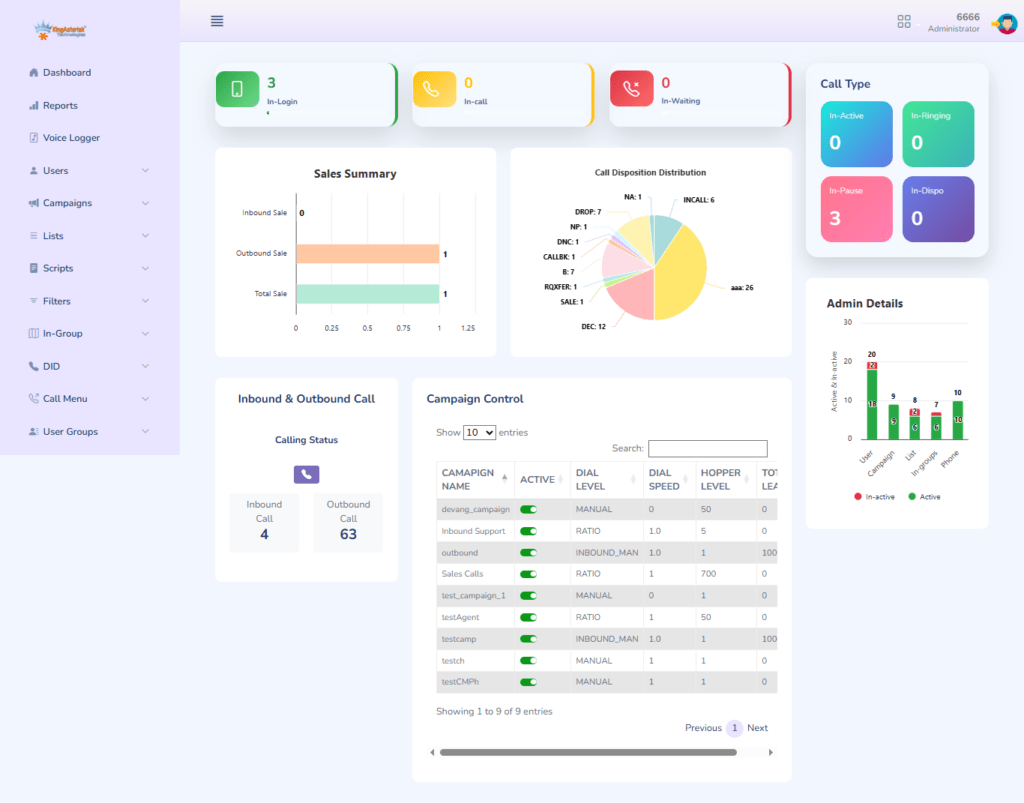
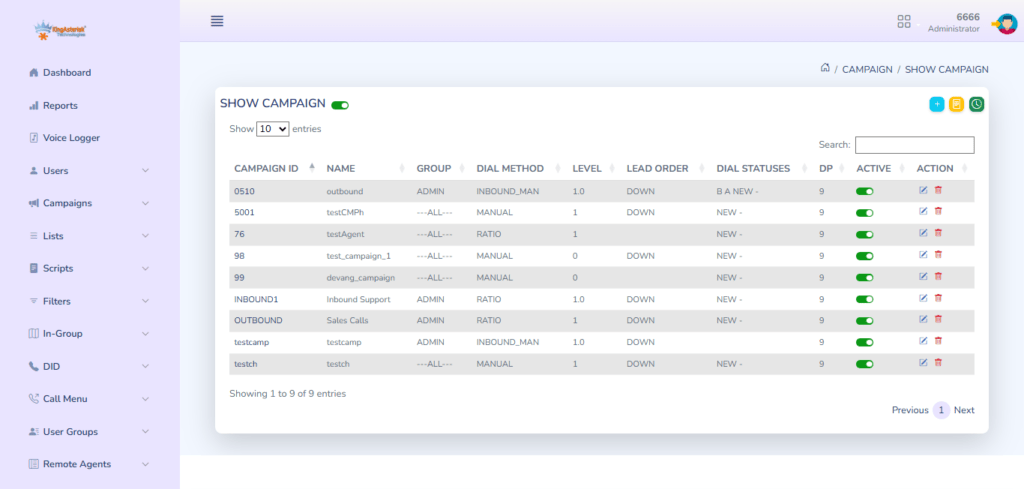
No errors? Good. Next, configure inbound and outbound campaigns. Add user groups. Add agents. Assign extensions. You test audio:
sox --versionRecording and playback must work. What use is a dialer if calls sound bad?
Tune PHP settings:
nano /etc/php.iniIncrease memory_limit and max_execution_time. Reports use memory. Tune database performance by editing:
nano /etc/my.cnfIncrease buffer pool for heavy call traffic. Security matters. Enable firewall rules only for required ports. Block unused access points.
Monitor logs:
tail -f /var/log/asterisk/messagesLogs show issues fast. Experts check logs daily. Performance tuning improves answer rate and stability. Research across telecom deployments shows that optimized dialers can raise agent talk time by 15–20%. Smooth systems make happy agents.
Troubleshooting and Best Practices for Long-Term Stability
Problems happen. Smart teams prepare. Common issues:
Database connection fails
Check database username and password inside the dialer configuration files. Confirm the database service runs without errors. Test login manually using the MySQL/MariaDB command line. Restart the database service after making any changes.
Web panel loads slowly
Check system RAM and CPU usage during peak hours. Increase PHP memory limit and execution time in php.ini. Clear old log files and remove unused recordings. Restart web services after tuning settings.
No audio
Confirm sound packages like sox and ffmpeg work correctly. Check call recording directory permissions. Verify that Asterisk loads sound modules without errors. Test playback from the command line to isolate the issue.
Cron jobs not running
Open crontab and confirm VICIdial cron entries exist. Check cron service status and restart it if needed. Verify file paths inside cron jobs are correct. Review cron logs to detect permission or script errors.
Keep daily backups. Backups save months of work. Apply updates monthly. Security communities stress patch cycles to reduce risk. Use monitoring tools to track CPU and RAM. Keep documentation of changes. Teams fix issues faster with records. Teams that maintain logs and monitoring reduce downtime by nearly 40%.
Final Thought
You now understand the full process of VICIdial Installation on AlmaLinux 9. You prepared the system, installed components and configured services. Performance is now tuned and you learned troubleshooting.
Simple steps. Clear actions. Strong results.
Need expert help? KingAsterisk Technology guides contact centers through setup, optimization, and scaling every day.
Build it right once. Grow without limits.