Call centers run in seconds. One extra minute of agent idle time can change daily targets. One unnoticed logout can affect service levels. Supervisors need live visibility. Managers need proof, not guesswork. That need gave birth to a powerful feature — VICIdial Agent Logout Option in Realtime Report. This ViciDial feature shows exactly when, why, and how often agents log out.
Very few solution providers offer this level of control and clarity. KingAsterisk Technology delivers this capability as part of its contact center solution services, and this feature stands out as a rare operational advantage.
Many systems show call data. Many dashboards show agent status. But logout tracking in real time? That changes workforce control completely.
Think about this simple question: If an agent logs out five times a day without reason, do you see it instantly? Most teams do not. Now you can.
This guide explains everything in plain language. You will learn how the system works, why logout visibility matters, how supervisors use it, and how it improves performance, compliance, and productivity.
Why Realtime Logout Visibility Changes Call Center Control
Every contact center tracks calls. Many track talk time. Some track pauses. But logout behavior often stays hidden. That gap causes lost productivity. It also creates confusion during audits, disputes, or performance reviews.
The VICIdial Agent Logout Option in Realtime Report fills that gap. It brings logout events into the live dashboard. Supervisors no longer depend on guesswork or end-of-day reports. They see logout activity the moment it happens.
Simple fact: Research on workforce monitoring shows that real-time visibility improves productivity by up to 15% because managers act faster. Faster action means fewer delays and fewer unresolved issues.
What logout tracking really tells you
Logout data shows more than a simple exit. It reveals behavior patterns.
- Frequent short logouts may signal system confusion
- Long logouts may indicate disengagement
- Logout spikes may show process issues
- Logout timing may reveal workload imbalance
A supervisor who sees this live can react within minutes. That action protects service levels. That action saves campaign performance.
Example from a real support floor
A team of 40 agents handled outbound campaigns. Supervisors noticed missed dialing time every afternoon. Reports showed normal call counts. Something still felt wrong.
They enabled VICIdial Agent Logout Option in Realtime Report. Within two days, they spotted a pattern. Five agents logged out during low-lead periods and returned later. Each logout lasted 10–12 minutes.
Daily loss = 5 agents × 10 minutes × 2 times = 100 minutes lost
Monthly loss ≈ 50 hours of paid time
After monitoring started, supervisors addressed the issue. Logout frequency dropped. Productivity rose.
Why this feature stays rare
Most systems focus on calls, not agent behavior. Logout tracking requires deeper event capture and live reporting logic. Many vendors avoid it because it needs customization expertise. KingAsterisk Technology implements it as part of advanced contact center reporting customization.
That makes it a differentiator, not a common feature.
How VICIdial Agent Logout Option in Realtime Report Works
Let us keep this simple and clear. The system records an event every time an agent logs out. It stores the timestamp, It captures the user ID, It records session duration. The realtime report then displays this data instantly in the supervisor dashboard. Supervisors do not wait for end-of-day exports. They see logout events alongside agent status.
What the realtime dashboard shows
The VICIdial Agent Logout Option in Realtime Report includes:
- Agent name and ID
- Logout timestamp
- Total session duration before logout
- Agent state before logout
- Current availability status
Supervisors can sort, filter, and analyze this data in seconds.
Short question: Do you want to know who left the system during peak hours? Now you can answer that immediately. Logout reasons matter
Managers often ask: Did the agent log out for a valid reason? When teams define logout categories, supervisors gain clarity. These categories may include:
- Break
- End of shift
- System issue
- Training
- Escalation
Tracking these reasons supports workforce management. It also reduces disputes.
Logout behavior vs idle time
Many confuse logout with idle. They differ.
Idle = Agent stays logged in but inactive
Logout = Agent exits session
Idle time affects dialing speed. Logout affects workforce availability. Both need tracking, but ViciDial logout monitoring gives stronger control because it directly impacts active workforce size.
Numbers that explain impact
In a 100-agent center:
If 10 agents log out for 15 extra minutes daily
Lost time = 150 minutes/day
Lost time monthly ≈ 75 hours
That equals nearly two full working weeks lost. The VICIdial Agent Logout Option in Realtime Report exposes that loss immediately.
What Makes This Logout Feature Different from Standard Reporting
Many contact centers rely on historical reports. Managers download files. They check logs after shifts end. That approach delays action. Delayed action means lost opportunities.
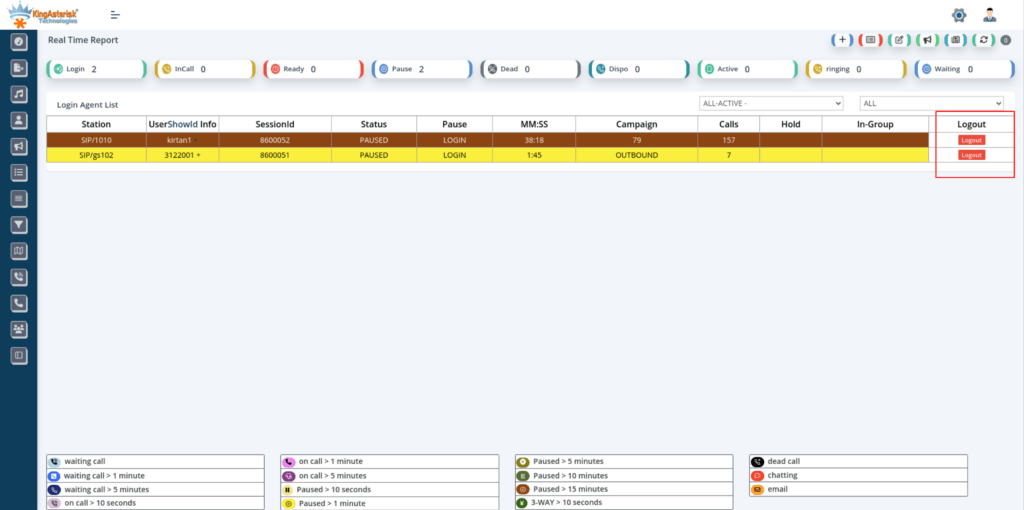
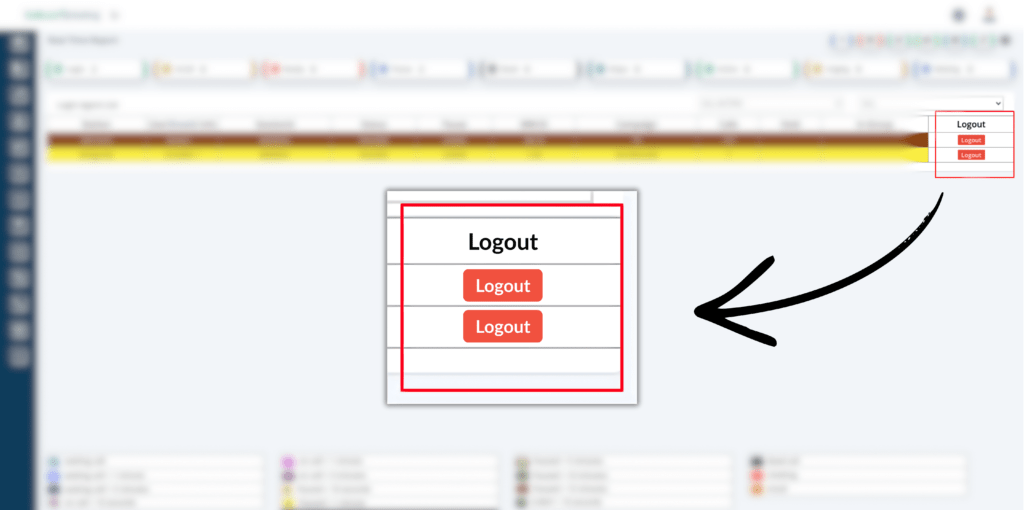
The screenshot shows a real-time report interface with clear agent rows and a visible Logout button column on the right side.
You do not just watch. You manage live.
What the realtime screen shows
From the interface:
- Agent Station ID
- User information
- Session ID
- Current Status (Ready, Paused, etc.)
- Pause type
- Session timer (MM:SS)
- Campaign name
- Call count
- Hold details
- Group info
- Logout action button
All this appears in one scrolling view. Supervisors do not jump between tools.
How Supervisors Use Logout Monitoring for Better Performance
Supervisors do not just watch screens. They manage outcomes. Logout monitoring helps them take action, not just observe data.
1. Live intervention
When an agent logs out during high call demand, supervisors notice instantly. They can check with the agent, They can adjust staffing, They can prevent service dips.
2. Fair performance evaluation
Performance reviews often raise disputes. An agent may say, “I stayed available.” Data may say otherwise. Logout logs provide clear proof. This clarity supports fair decisions.
3. Schedule adherence
Workforce planning depends on adherence. Logout data helps managers compare scheduled hours with actual active time.
Simple formula supervisors use: Active session time = Login time – Logout time – Approved breaks. This formula becomes reliable when logout data stays visible in realtime Vicidial reports.
4. Detecting behavior patterns
Some agents log out only near shift end, Some log out during low lead volume, Some log out after tough calls. Patterns reveal operational or emotional factors. Managers can then offer support or training.
Case study style scenario
A customer support center saw high abandonment in the last hour of shifts. Supervisors blamed call volume. Logout tracking showed 12% of agents logging out early.
After introducing VICIdial Agent Logout Option in Realtime Report, supervisors addressed early exits. Abandonment dropped. Customer satisfaction improved.
5. Coaching opportunities
If an agent logs out frequently after difficult interactions, that signals stress. Managers can offer coaching. They can balance workloads. That reduces burnout.
Industry insight
Contact center studies show that structured monitoring combined with supportive coaching improves agent retention. Logout analytics help start those conversations with facts.
What you measure, you manage. What you see live, you control faster.
Business Impact, Reporting Accuracy, and Competitive Advantage
This feature affects more than supervision. It impacts cost, compliance, and planning.
Productivity gain
Reducing unnecessary logout time by even 5% raises campaign output significantly. That small change improves revenue performance.
Accurate reporting
Historical reports often miss short logout bursts. Live capture ensures full accuracy. Leaders receive reliable numbers.
Workforce planning
Managers plan schedules better when they understand true active time. They avoid overstaffing and understaffing.
Cost example
- Without logout monitoring:
- Hidden lost time = 70 hours/month
- Average agent cost = $7/hour
- Monthly loss = $490
With VICIdial Agent Logout Option in Realtime Report, supervisors cut that by half. Savings appear fast.
Compliance readiness
Many industries require proof of agent activity records. Logout logs provide session history. That supports audit needs.
Operational transparency
Clear data builds trust between managers and agents. Everyone sees the same facts.
Competitive edge
Few providers implement logout control directly inside realtime reporting dashboards. KingAsterisk Technology delivers this rare capability as part of customized contact center solutions. Businesses gain deeper operational insight than standard setups provide.
Another quick question: Would you rather manage by assumption or by live facts?
Final Thoughts
Call centers run on timing. Visibility creates control. Control drives performance. The VICIdial Agent Logout Option in Realtime Report gives supervisors real-time awareness, accurate reporting, and better workforce decisions. It helps managers reduce hidden productivity loss, It supports fair evaluation, It improves compliance readiness.
Most platforms stop at call tracking. This feature goes deeper. It focuses on agent session behavior, a factor many overlook. KingAsterisk Technology delivers this advanced capability as part of its contact center solution services, giving businesses stronger operational insight than standard reporting systems provide.
If you want sharper supervision, cleaner reports, and better productivity, logout monitoring in realtime reports becomes essential — not optional.