


Building a custom VICIdial admin dashboard is one of the highest-leverage improvements a contact center can make, and yet most operations run on VICIdial’s default interface long after they’ve outgrown it. The default UI was designed for broad compatibility, not for the specific workflow of a 50-seat outbound BPO, a healthcare scheduling team, or a financial services inbound center.
This guide covers, in practical terms, how to design and deploy a tailored admin dashboard alongside a browser-based WebRTC agent interface that modern agents actually want to use.
Whether you’re an IT manager evaluating an overhaul or a contact center director looking to justify the investment to stakeholders, this article walks you through architecture choices, must-have features, and a field-tested build process, drawn from KingAsterisk’s deployment experience across hundreds of live contact centers.
Why a Default VICIdial UI Is Not Enough in 2026
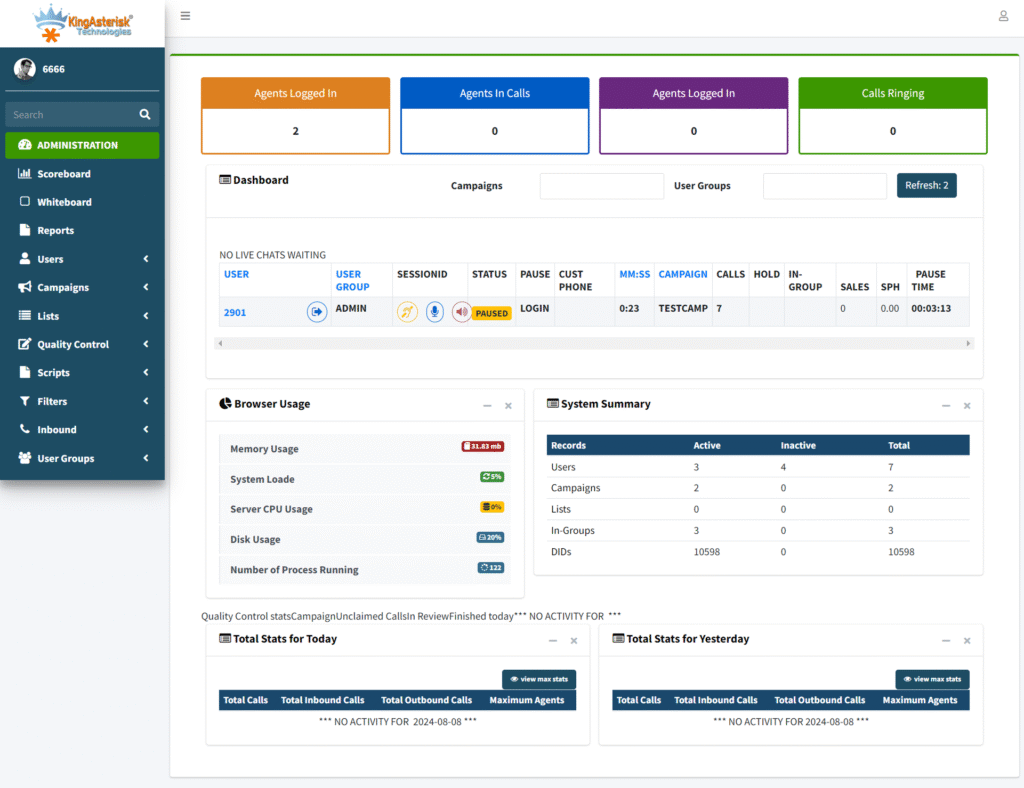
VICIdial is a powerful open-source platform: proven, scalable, and incredibly flexible at the Asterisk level. But its admin panel, built over many years of incremental updates, was never designed as a modern management interface. Supervisors often have to navigate five or six separate pages to get a coherent picture of a single campaign’s live performance.
Agents work inside a thin PHP interface that doesn’t adapt to browsers, breaks on mobile, and offers no integration hooks for CRM widgets or scripting.
VICIdial exposes agent activity through its native API endpoint:
GET /vicidial/non_agent_api.php?source=test&user=admin&pass=***&function=versionIn 2026, contact center leaders are competing on speed and personalization. A real-time call monitoring interface that refreshes every 30 seconds is no longer acceptable when WebSocket-based dashboards can push live data at sub-second latency. Custom dashboards solve this by sitting on top of VICIdial’s database and API layer, pulling exactly the data each role needs and surfacing it in a way that actually accelerates decisions.
Architecture Overview: Dashboard + WebRTC Stack
We develop a modern, clean, and fully customized admin dashboard tailored to your contact center’s exact needs. From live agent monitoring to campaign-level analytics, every panel is built for speed, clarity, and role-based access, so your supervisors always have the right data at a glance.
Before writing a single line of front-end code, it’s critical to get the architecture right. A custom VICIdial solution typically has three layers:
Data Layer
VICIdial MySQL/MariaDB tables, Asterisk AMI event stream, and campaign configuration tables.
AMI connects on port 5038. A basic login handshake looks like:
Action: Login / Username: admin / Secret: yourpassAPI Middleware
Node.js or Python FastAPI layer translating VICIdial DB queries into clean JSON endpoints with WebSocket push for real-time events.
Presentation Layer
React or Vue.js front end consuming API endpoints. Separate views for admin, supervisor, and agent roles, all served over HTTPS.
The middleware layer is the most critical architectural decision. Direct queries from the front end to the VICIdial database work in development but create security holes and break on every VICIdial upgrade. An API middleware insulates your custom UI from schema changes and lets you add authentication, rate limiting, and audit logging in a single place.
For the WebRTC agent interface, the stack adds a SIP-over-WebSocket gateway, typically FreeSWITCH or a Kamailio proxy, that bridges between the browser’s WebRTC stack and VICIdial’s Asterisk backend. This is the component that replaces physical desk phones and soft-phone executables.
What Your Custom VICIdial Admin Dashboard Should Include
Supervisor / Operations View
The operations view is where most of the dashboard value lives. It should surface, in real time, the metrics that answer the question supervisors ask dozens of times per shift: “What’s happening right now?”
Admin / IT View
The admin view handles VICIdial customization, campaign configuration, DID routing, carrier trunk management, and system health monitoring. Importantly, this view should be separate from the supervisor dashboard, restricted by role, and include an audit log of every configuration change so that issues can be traced quickly.
Reporting & Analytics View
Custom dashboards can pull VICIdial’s raw call log data and present it through interactive charts, hourly call volume heatmaps, agent scorecard trends, and campaign ROI summaries, far beyond what VICIdial’s built-in reports offer. Connecting this view to an export pipeline (CSV, Google Sheets webhook, or BI tool like Metabase) gives management self-service analytics without needing a developer every time they want a new cut of data.
Building the WebRTC Agent Interface
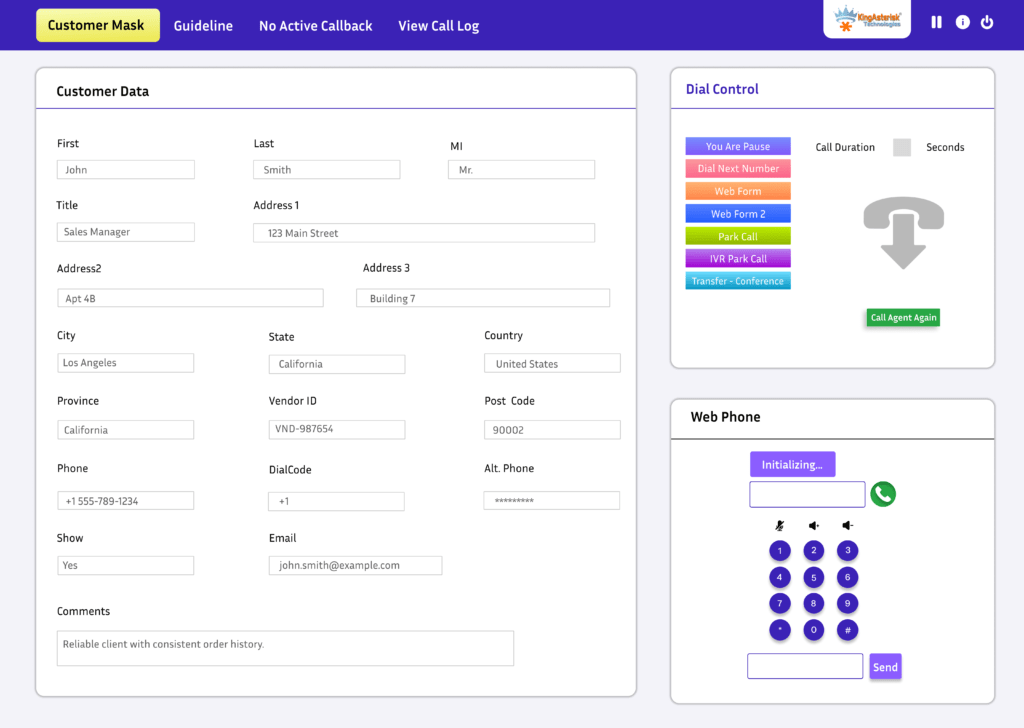
The agent-facing side of the project is where WebRTC integration changes the operational picture most dramatically. A browser-based softphone embedded inside the agent workspace eliminates hardware maintenance, enables remote and hybrid work, and centralizes login management, all from a single URL the agent opens in Chrome or Firefox.
Our WebRTC Agent Interface runs entirely in the browser, no desk phones, no extra software, no hardware costs. Agents get a clean, responsive screen with built-in softphone, call disposition controls, and CRM data side by side, so they can handle calls faster and with fewer errors.
Core Components of a WebRTC Agent UI
Embedded SIP Softphone
JsSIP or SIP.js library connected via WebSocket to a FreeSWITCH or Kamailio proxy that bridges to Asterisk.
Script & Disposition Panel
Campaign-specific call scripts, live customer data pulled from CRM, and post-call disposition codes in one view.
Status Controls
One-click pause, ready, break, and wrap-up state changes that sync instantly with VICIdial’s agent status table.
Integrated CRM Widget
Iframe or API-driven customer record display, no tab switching. Screen-pop on inbound call using ANI lookup.
Audio Quality Considerations
WebRTC audio quality depends heavily on the network path between the browser and your SIP proxy. For contact centers with agents on standard broadband or corporate LAN, G.711 codec delivers near-PSTN quality. For geographically distributed or remote agents, enabling Opus codec with jitter buffer tuning on the FreeSWITCH side significantly reduces packet-loss artifacts. Always deploy STUN/TURN servers for NAT traversal, this is the most common cause of one-way audio in initial WebRTC deployments.
Step-by-Step: How KingAsterisk Builds Custom VICIdial Dashboards
This is the process we follow for every contact center software customization engagement, whether the client is running 20 agents or 500.
Requirements Discovery & Role Mapping
We start with a structured workshop with stakeholders from operations, IT, and compliance. We map out exactly which data points each role: admin, supervisor, team lead, agent, needs to see, and which actions they need to trigger. This prevents scope creep and ensures the build is sized correctly from day one.
VICIdial Database & AMI Audit
We audit the client’s VICIdial version, database schema, and Asterisk Manager Interface (AMI) configuration, We identify which real-time events are available (agent status changes, call disposition events, queue events) and which data needs to be polled vs. pushed via WebSocket, We never modify core VICIdial tables, all custom data goes into separate schemas.
After “which data needs to be polled vs. pushed via WebSocket”, one line showing the key table supervisors care about most:
The two most queried tables during a live shift are vicidial_live_agents and vicidial_log — the latter alone can hold millions of rows on a busy system, making indexed queries non-negotiable.
SELECT user, status, campaign_id FROM vicidial_live_agents WHERE campaign_id = 'CAMP01';API Middleware Development
We build a Node.js/Express or FastAPI middleware service that exposes clean, versioned REST endpoints and WebSocket channels. Authentication uses JWT tokens with role claims, the same token determines what data the front end can request. Rate limiting and query caching (Redis) keep the VICIdial database from being hammered by dashboard refresh cycles.
A decoded JWT payload for a supervisor looks like:
{ "user": "sup_01", "role": "supervisor", "campaigns": ["CAMP01","CAMP02"] }
Front-End Dashboard Build
We use React with a component library aligned to the client’s brand. Each widget (agent grid, queue depth chart, campaign scorecard) is an independent component that subscribes to its own WebSocket channel or API endpoint. This makes it easy to add or remove dashboard elements without touching unrelated code.
WebRTC SIP Integration
We deploy a FreeSWITCH instance (or configure an existing one) as the WebSocket SIP proxy, configure Kamailio for load balancing if the seat count warrants it, and integrate JsSIP into the agent UI. STUN/TURN is configured using Coturn. We run a full codec negotiation test across all agent network environments before sign-off.
JsSIP registers the agent’s browser as a SIP endpoint in one call:
new JsSIP.UA({ sockets: [socket], uri: 'sip:agent01@pbx.yourserver.com', password: '***' })UAT, Load Testing & Go-Live
User acceptance testing runs with a pilot group of 10–15 agents on live traffic. We instrument the middleware with logging to catch edge cases, calls that drop mid-transfer, browsers that fail STUN negotiation, dispositions that don’t write back to VICIdial. Load testing simulates peak concurrent connections (typically 120–150% of expected maximum). Go-live is a rolling cutover, never a big-bang switch.
Post-Launch Monitoring & Iteration
We set up Grafana dashboards on the middleware server and a lightweight error tracking integration (Sentry or similar). The first 30 days post-launch typically surface a handful of workflow edge cases that weren’t visible in UAT, we address these in sprint cycles without impacting live operations.
Real-World Use Case: BPO Outbound Campaign Overhaul
A business process outsourcing firm running three simultaneous outbound campaigns for financial services clients approached KingAsterisk with a specific pain point: their supervisors couldn’t tell which campaign was experiencing a spike in abandoned calls until the end-of-hour report fired. By that point, 40–60 minutes of degraded performance had already impacted SLA scores.
We built a custom VICIdial admin dashboard with a campaign-level abandon-rate widget that triggers a color-coded alert within 90 seconds of the rate crossing a configurable threshold. Supervisors can drag agents between campaigns directly from the grid. In the first month post-deployment, average SLA breach incidents dropped by 68%.
The WebRTC agent interface, deployed simultaneously, eliminated 130 desk phones and reduced IT hardware tickets by over 80%.
Our interface includes built-in multi-language support, letting agents switch between English and Spanish instantly without logging out or reloading. Perfect for diverse BPO teams and contact centers managing multilingual campaigns across different regions.
Common Mistakes to Avoid
1. Building on VICIdial’s PHP UI Instead of Building Alongside It
Modifying VICIdial’s PHP files directly is the fastest path to a maintenance nightmare. Every VICIdial upgrade, and they happen regularly, overwrites your changes. Build your custom dashboard as a separate application that communicates with VICIdial via its API and database, not by editing its source files.
A reliable rule of thumb: if your change lives inside /var/www/html/vicidial/, it will be overwritten. Custom code belongs in its own app directory entirely
2. Skipping RBAC Design
Contact centers have complex permission hierarchies. A team lead should see their 15 agents, not all 300. A campaign manager should see financial metrics; agents should not. Designing RBAC as an afterthought means a complete rework of API endpoint security. Define roles and their data scopes before writing the first endpoint.
3. Underestimating WebRTC Network Requirements
WebRTC is unforgiving of network asymmetry. A contact center that runs happily on SIP desk phones at 80kbps per call may see WebRTC quality problems if the corporate firewall blocks UDP or if the TURN server is not geographically close to remote agents. Network assessment is not optional, it’s week-one work.
4. No Fallback for VICIdial Downtime
Custom dashboards that are tightly coupled to a single VICIdial server with no read replica create a single point of failure. For any deployment over 50 seats, configure a MySQL read replica for dashboard queries and ensure the middleware degrades gracefully (showing cached data with a stale-data indicator) rather than showing a blank screen when the primary DB is briefly unreachable.
Point your dashboard queries to the replica:
DB_HOST_DASHBOARD=replica.internal vs DB_HOST_VICIDIAL=primary.internalFrequently Asked Questions
Does a custom dashboard break when VICIdial is upgraded❓
Not if it’s built correctly. The API middleware layer is the key: it abstracts your custom UI from VICIdial’s internal database schema. When VICIdial is upgraded, only the middleware needs to be reviewed and updated, the front-end dashboard code remains untouched. We always version our API endpoints so that breaking schema changes are handled gracefully.
Can the WebRTC agent interface work for remote and work-from-home agents❓
Yes, this is one of the strongest use cases for WebRTC. Remote agents need only a browser, a headset, and a stable internet connection (minimum 1 Mbps symmetric). With a properly deployed TURN server and Opus codec, audio quality for remote agents is comparable to office-based desk phones. VPN is recommended for the API/dashboard traffic but is not required for the WebRTC media stream itself.
What is the difference between a VICIdial skin and a custom VICIdial admin dashboard❓
A skin changes the visual appearance of VICIdial’s existing PHP pages, it modifies CSS and layout but doesn’t change the underlying data architecture or add new functionality. A custom VICIdial admin dashboard is a completely separate application built on modern web technology (React, Vue.js) that surfaces VICIdial data in new ways, adds real-time features, and integrates with external systems like CRMs and reporting tools.
Does KingAsterisk provide ongoing support after the dashboard is deployed❓
Yes. KingAsterisk offers maintenance contracts that cover VICIdial version compatibility updates, dashboard feature additions, bug fixes, and 24/7 technical support. Given that we built the system, support response times are significantly faster than engaging a generic VoIP consultant who needs time to understand the codebase. Support plans are scoped based on seat count and SLA requirements.
Conclusion
A custom VICIdial admin dashboard is not a luxury upgrade, for contact centers operating at scale in 2026, it’s an operational necessity. The default VICIdial interface was built to work everywhere; a custom dashboard is built to work perfectly for your specific team structure, your specific campaigns, and your specific performance metrics.
Paired with a WebRTC agent interface, the combination eliminates hardware debt, enables remote work, and puts real-time decision-making data in front of the people who can act on it.
The key success factors are consistent across every deployment: a clean API middleware layer that insulates the UI from VICIdial internals, a role-based access design that is done upfront rather than retrofitted, proper STUN/TURN configuration for WebRTC, and a phased go-live that doesn’t gamble live operations on a big-bang cutover.
With over 15 years of Asterisk and VICIdial deployment experience, more than 900 contact centers served, and 2,000+ completed projects, KingAsterisk has the engineering depth to build, deploy, and support custom VICIdial solutions that go into production and stay there, reliably.
Ready to Build Your Custom VICIdial Dashboard?
Share your current setup and operational requirements with KingAsterisk’s engineering team. We’ll provide a no-obligation scoping assessment and a realistic timeline, usually within 48 hours.
No sales pressure. Just honest technical guidance from a team that has deployed this hundreds of times.


