


A modern contact center runs on speed, clarity, and agent comfort. But here is a simple question many teams ignore: What happens when agents struggle to understand the Vicidial Interface language?
Menus become confusing. Reports take longer to read. Training sessions stretch for days instead of hours. One small setting can change everything. Language.
Today, many international teams operate from different regions. A German-speaking team may handle customer interactions for European markets. But if the dialer interface stays in English, agents lose precious seconds on every screen.
Seconds turn into minutes. Minutes turn into lost productivity. This guide explains how to perform a VICIdial Language Change and switch the interface to German for both Admin and Agent panels.
More importantly, this guide shows why language configuration improves productivity inside a contact center environment. Many businesses never configure this feature properly. Even fewer companies offer structured implementation for it.
That is where KingAsterisk Technologies brings real value.
Why Language Settings Matter in a Contact Center
Imagine a German-speaking agent reading system labels in another language. Every action requires mental translation. That slows down:
- Campaign navigation
- Lead management
- Disposition updates
- Reporting analysis
Now imagine the same interface in German. Buttons make sense instantly. Reports become easy to interpret. Agents respond faster. A small configuration can produce big productivity gains. Here is a real observation from multiple deployments.
A German team reduced average handling time by 11% after switching the interface language. Why did this happen? Agents stopped translating menus in their heads. They focused only on the conversation. That single improvement made VICIdial Language Change a valuable productivity solution for multilingual contact centers. Our solution comes with Spanish, German, Greek, French, Italian, Japanese, Dutch, Polish etc and a total 16 different languages set up.
A Rare Productivity Feature Most Businesses Ignore
Many contact center systems claim multilingual support. But most of them only translate customer communication tools. They ignore the agent interface language. That creates a hidden productivity barrier. VICIdial Language Change solves this problem directly.
It allows administrators to:
- Change system interface language
- Assign different language profiles
- Configure agent interface display
However, many companies never activate it. Why? Because implementation requires proper configuration. Most providers never explore it deeply. KingAsterisk Technologies focuses on real productivity improvements. That includes interface localization for operational efficiency. This makes the solution rare in the industry. Very few companies highlight this capability as a productivity strategy instead of a visual customization.
Understanding the VICIdial Language System
Before performing a VICIdial Language Change, you should understand how the platform handles language files. The system stores translations in structured language files.
Each file contains translations for:
- Buttons
- Menu items
- Status messages
- Report labels
- Interface text
When you change the system language, the platform loads the corresponding translation file.
For example:
The English interface loads English translation data. German configuration loads German translation data. The interface changes instantly. No reboot required. Agents simply refresh the Vicidial dashboard and see the updated language.
How to Change Language in VICIdial (Admin Setup)
Many administrators search for this exact question. How do you change the interface language in VICIdial? The process remains simple when you follow the correct path.
Step 1: Enable Language Option in System Settings
Before any language features become available, you must activate them at the system level. This is a one-time configuration done by the VICIdial Administrator.
Login to your VICIdial Admin Portal using your admin credentials:
Navigate to: Login to Admin Portal
After making these changes, scroll to the bottom of the page and click Submit to save.
If Language Method is left as ‘disabled’, language options will NOT appear for users even if Enable Languages is set to 1.

Step 2: Modify Language Permission for Admin
After enabling languages globally, you need to grant the Admin user permission to change and manage languages.
Navigate to: ADMIN → USERS → SHOW USERS → Click Modify for the Admin User

Find the Admin user account in the user list and click Modify.
Press Submit to save the changes. The Admin account will now be able to switch and manage languages.
This step must be completed for the Admin before proceeding to add or import new languages.
Step 3: Adding New Languages in VICIdial
Now you will import a language pack into VICIdial. Language packs contain all the interface text translations for a specific language.
A. Download Language File
Download the latest language translation file from the official VICIdial translations repository:
Example — German language file:
LANGUAGE_ALL_es_German_20190718-094833.txt
Open the downloaded file in a text editor (Notepad, Notepad++, VS Code, etc.) and copy all the contents.
B. Create a New Language Entry
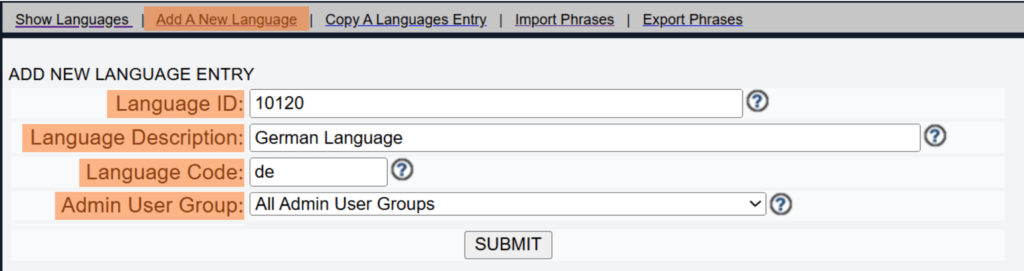
Navigate to: ADMIN → LANGUAGES → Add A New Language
Enter the following details
Language: German
Language Code: de (2-letter country code)
Admin User Group: All Admin User Groups
Click Submit to create the language entry.
C. Import Language Phrases
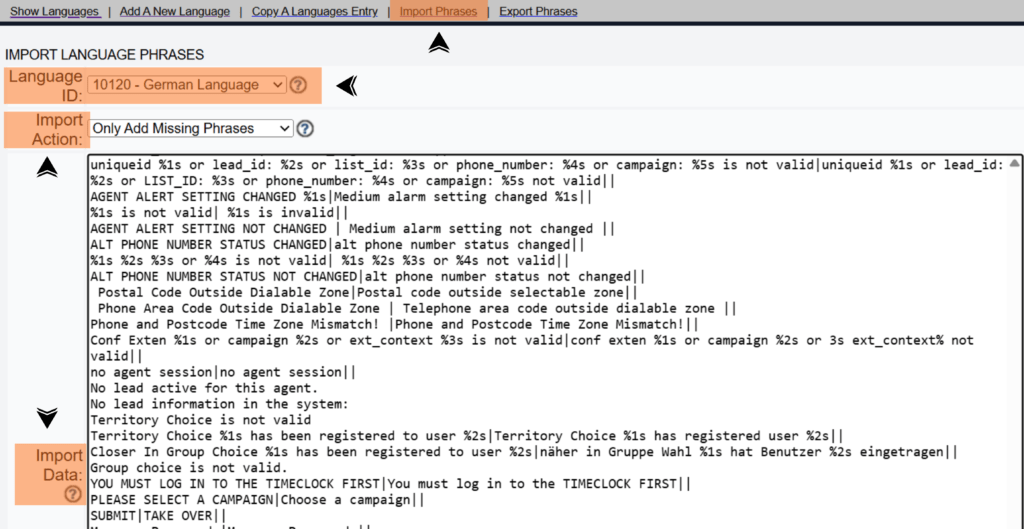
After creating the language entry, click Import Phrases at the top of the language page.
Press Submit to complete the import.
Once done, go back to Language ID 10120 and set Active to Y to activate the language.
Action Type → Only Add Missing Phrases
Import Data → Content copied from Step 3(A)
Set Active = Y after importing — the language will not be available to users until it is activated.
Step 4: Language Successfully Changed
Once you submit the language changes, VICIdial will confirm the update. You will see a success confirmation message on screen indicating the language has been applied.
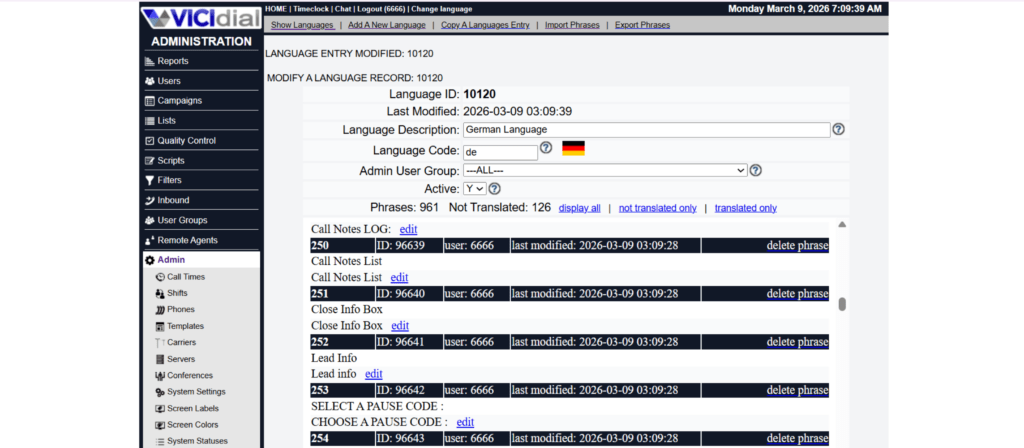
If no confirmation appears after submitting, verify that the Language Method is set to MYSQL (not disabled) in System Settings.
Step 5: Language Update Confirmation (IDNUM Reference)
After a successful language change, VICIdial displays a confirmation message similar to the following:
Language has been updated, you may now continue: 10120 (IDNUM)
The IDNUM (e.g., 10120) is the internal database record identifier confirming the change was saved successfully.
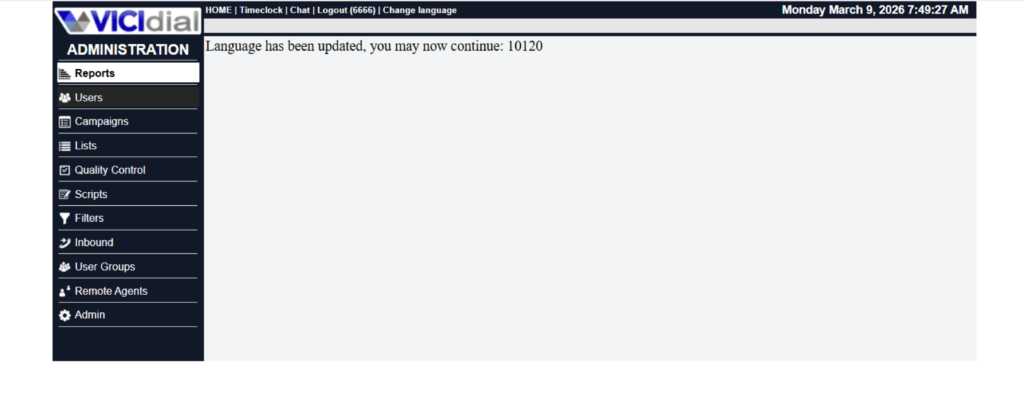
You can use this ID for reference or auditing purposes.
Step 6: Language Selection for Admin and Agent
Language can be set independently for the Admin interface and for each Agent.
Below are the configuration options for both.
For Admin Users
Admin users have two ways to switch the display language:
Option A: Use the Change Language Link
When logged in to the Admin Portal, click the Change Language link visible in the admin header or menu to switch language on the fly without changing system defaults.
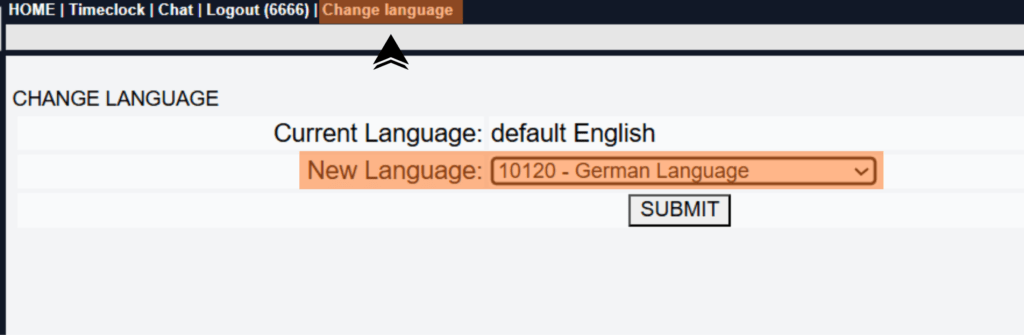
Option B: Set a New Default Language System-Wide

For Agent Users
Agents can be given the ability to select their own language when logging in, or an admin can pre-assign a default language per user.
When User Choose Language is set to 1, a language dropdown appears on the Agent Login screen, letting each agent pick their preferred interface language.
When set to 0, the language specified in Selected Language is automatically applied without giving the agent a choice.
Admin can assign different default languages to different agent groups by modifying each user account individually.
For more VICIdial guides and tutorials, visit your admin documentation portal.
Real Productivity Example
Let’s examine a practical scenario. A European contact center operated with 80 German-speaking agents. The system interface remained English. Training sessions took two full days. Agents constantly asked supervisors about button meanings.
Supervisors lost time explaining:
- “Disposition means call result.”
- “Pause means break.”
The organization switched the interface to German. The next training cycle lasted one day instead of two. Agents understood the system immediately. This example shows why VICIdial Language Change improves operational efficiency.
Common Problem After Language Change
Many administrators face one common issue. They change the language. But some screens still show English labels. Why does this happen? Because cached interface data remains active.
Here is the fix.
Real Issue
The agent dashboard displays mixed language. Some menus remain English. Other sections appear German.
Step-by-Step Fix
- Ask agents to logout
- Clear browser cache
- Login again
- Refresh the dashboard
Now the interface loads correct German translations. This simple fix resolves most VICIdial Language Change display problems.
When Should You Change Interface Language?
Many organizations ask this question. When should you implement a language configuration? Three scenarios make it essential.
Multinational Agent Teams
Global contact centers operate across multiple regions. German agents work more efficiently with German Vicidial interface labels.
Faster Agent Training
New employees learn faster when the system uses familiar language. Training time drops significantly.
Reporting Clarity
Supervisors analyze reports faster when labels match their working language. This leads to quicker decisions. These advantages explain why VICIdial Language Change becomes a productivity tool instead of a visual change.
Why German Interface Works So Well
German-speaking teams process information differently when the interface uses native terminology.
Common system terms become clear:
Pause → Pause
Campaign → Kampagne
Agents stop translating terms mentally. They respond faster. This reduces cognitive load. And cognitive load directly affects productivity. This explains why VICIdial Language Change with German configuration helps high-volume contact centers.
Security and Stability Considerations
Many administrators hesitate before changing system language.
They ask important questions:
- Will this break system operations?
- Will reports stop working?
- Will agents struggle with changes?
The answer remains simple. Language configuration does not affect core system functionality. The platform only updates interface text. Campaign operations remain unchanged. Lead distribution remains unchanged. Reporting logic remains unchanged. The configuration simply improves readability. That is why VICIdial Language Change remains safe for production environments.
Productivity Comparison
Let us compare two teams.
Team A – English Interface
German-speaking agents read English labels. Agents mentally translate menu options. Training takes longer. Errors occur frequently.
Team B – German Interface
Agents read native language labels. Agents navigate menus faster. Training completes quickly. Error rates drop. Which team performs better? The answer becomes obvious. This explains why VICIdial Language Change creates measurable productivity improvements.
Industry Insight
Global contact centers increasingly support multilingual teams. According to data from HubSpot and research summaries referenced on Search Engine Journal, businesses that localize internal systems reduce operational friction. Localization improves employee efficiency.
It also improves system adoption. General knowledge references available on Wikipedia also describe how software localization enhances usability across international teams. Even major platforms designed by companies such as Google emphasize interface localization for productivity. Contact centers follow the same principle.
Implementation Strategy Used by KingAsterisk Technologies
Many organizations attempt language configuration themselves. They often face unexpected issues:
- Incomplete translation display
- Agent profile mismatch
- Reporting labels mismatch
KingAsterisk Technologies implements structured configuration for VICIdial Language Change.
The process includes:
- System language audit
- Agent language mapping
- Interface testing
- Agent login validation
This structured process ensures smooth deployment without operational disruption. Most providers treat language configuration as a minor feature. KingAsterisk treats it as a productivity enhancement strategy.
A Simple Question for Contact Center Owners
How much time do your agents waste understanding the interface? One minute per hour? Five minutes per shift? Multiply that by 100 agents. Multiply that by 300 working days. That lost time becomes huge. Now imagine eliminating that friction. That simple improvement explains the value of VICIdial Language Change.
Final Thoughts
Small improvements often produce the biggest operational gains. Language configuration represents one of those improvements. Agents feel comfortable. Training becomes faster. Supervisors analyze reports quickly. All of this happens with one simple configuration.
Many organizations overlook this feature. But modern multilingual contact centers cannot ignore it. If your team speaks German, the interface should speak German too. That is the core idea behind VICIdial Language Change.
Based on real VICIdial reporting implementations by KingAsterisk Technologies. Configuration strategies tested across multilingual contact center environments.


