




Data grows fast inside every contact center. Calls increase. Agent activities expand. Reports become heavy. Logs multiply every single day. Now ask yourself something simple. When your Vicidial dialer database fills with old logs, test campaigns, duplicate entries, and unnecessary records, what happens?
Reports slow down. Search takes time. Admin pages feel heavy. Supervisors struggle to filter clean data. This is exactly where the Direct Delete Option in VICIdial changes the game.
KingAsterisk Technologies introduced this powerful productivity feature to help contact centers remove logs instantly from the admin panel without long technical processes. Not many businesses provide this level of direct control. That makes it rare. That makes it valuable.
And yes, this is not a design tweak. This is a productivity solution. If you are researching “how to remove logs in VICIdial instantly,” or “why old logs slow reporting,” you are in the right place.
Let’s go deep.
Why Log Deletion Becomes a Real Problem in 2026
Contact centers in 2026 handle more data than ever before. One campaign can generate thousands of call records in a day. A testing phase alone can create hundreds of useless entries. Multiply that by 30 days. Multiply that by multiple campaigns.
Within three months, your system may carry:
- Failed test entries
- Duplicate lead uploads
- Old campaign logs
- Inactive agent activity logs
- Abandoned test data
Do you really need all of that forever? No. But many teams avoid deletion because traditional methods feel complicated or risky. Admins fear breaking reporting. Managers worry about losing important data. Supervisors hesitate because they lack safe control. So they ignore the clutter. Clutter grows silently. Performance drops slowly. Nobody notices until reporting becomes painful. That is why the Direct Delete Option in VICIdial exists.
What Is Direct Delete Option in VICIdial?
The Direct Delete Option in VICIdial allows administrators to remove selected logs directly from the admin panel instantly, without long export-import cycles or backend-level operations. Simple. Fast. Controlled. You choose what to delete. You confirm. The system clears it immediately.
No waiting, manual database queries and complex scripting. This feature gives clean control to authorized admins inside the system itself. KingAsterisk Technologies developed this as a practical productivity upgrade based on real-world reporting bottlenecks.
How to Use Direct Delete Option in VICIdial
People search “how to delete logs in the VICIdial admin panel” every month. Google shows generic explanations. But real implementation needs clarity. Here is the exact step-by-step process.
First, log in to your VICIdial admin panel using admin credentials. Navigate to:
Admin → System Settings → Log Management Section
Inside the log management area, you will see available log categories such as:
- Call logs
- Lead logs
- Agent activity logs
- Campaign test records
Select the specific log category you want to remove.
Apply filters if needed. You can filter by:
- Date range
- Campaign ID
- Status
- Agent ID
Once you confirm the filtered data, click on the Direct Delete action button. The system prompts a confirmation message. Review the record count carefully. Click Confirm. The system removes selected logs instantly. That is how you activate the Direct Delete Option in VICIdial safely and efficiently.
Instant Admin-Level Deletion Control – Clean Users in One Click
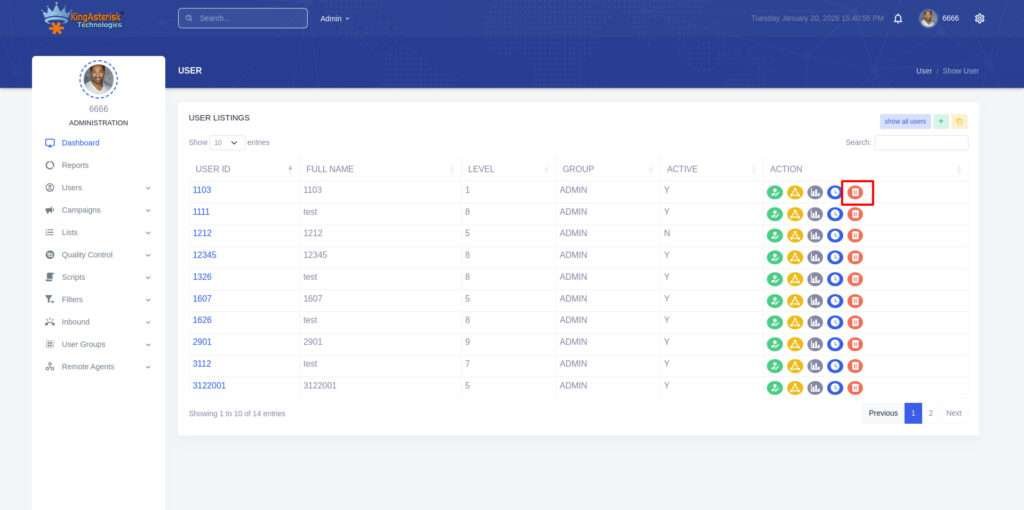
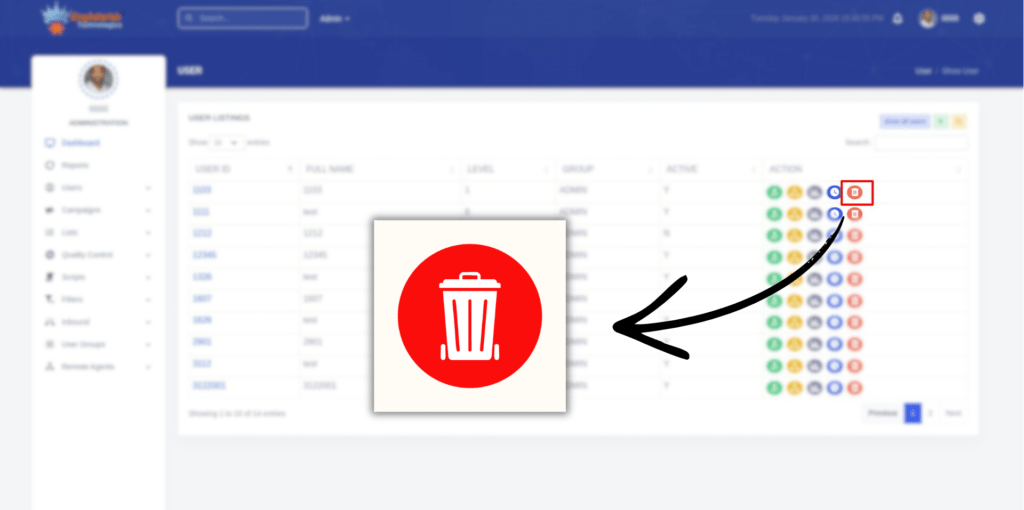
Look closely at the highlighted red delete icon in the action column. That small button represents powerful administrative control. With the Direct Delete Option in VICIdial, admins can instantly remove unwanted or inactive users directly from the admin panel without navigating multiple pages or running complicated backend tasks.
In busy contact centers, user management becomes messy very quickly. Test users remain active. Old agents stay listed. Duplicate profiles appear after bulk imports. Over time, this creates confusion in reporting, performance tracking, and group management.
KingAsterisk Technologies solved this operational gap by integrating a structured, secure direct deletion mechanism inside the admin user listing section itself.
Here is what makes this feature highly practical and productivity-driven:
- One-click delete icon inside the Action column
- Real-time confirmation before removal
- Controlled access based on admin level
- Instant removal from user listing
- Clean dashboard without reload delays
Admins no longer need to scroll through outdated user data. They can instantly remove unnecessary profiles and keep the system structured. Why does this matter?
When inactive or duplicate users remain inside the system:
- Reports show incorrect agent counts
- Group-level analytics get distorted
- Campaign assignment becomes confusing
- Supervisor monitoring becomes harder
Structured Direct Delete Control That Improves Operational Performance
A clean user database improves clarity. Clear systems improve decisions. Fast decisions improve performance. KingAsterisk Technologies designed the Direct Delete Option in VICIdial with operational discipline in mind. We do not treat it as a cosmetic addition. We treat it as a productivity tool.
Our implementation ensures:
- Deletion does not impact active campaign structures
- Reporting integrity remains protected
- Admin permissions stay strictly enforced
- System responsiveness improves after cleanup
Many businesses focus only on front-end adjustments. We focus on backend Vicidial workflow efficiency. That difference shows in daily operations. Think about a center with 300 agents. If 40 inactive users remain listed, supervisors waste time filtering them out during performance checks. Multiply that by daily usage. That becomes operational friction.
With structured direct delete access, admins remove clutter instantly and maintain an optimized working environment. This is the kind of small feature that delivers measurable impact over time.
Real Issue + Real Fix
Let’s talk about a real issue many contact centers face.
Issue:
Reports show inflated call counts. Managers see higher total attempts than actual live calls. Test entries from three months ago still appear in performance metrics. Supervisors complain that agent productivity numbers look incorrect. What causes this? Old test logs remain inside the system.
Fix:
Step 1: Identify the campaign ID used during testing.
Step 2: Open the log filter inside the admin.
Step 3: Filter by campaign ID and date range.
Step 4: Verify record count.
Step 5: Use the Direct Delete Option in VICIdial.
Step 6: Recheck reports.
Result? Clean metrics. Accurate reporting. Improved supervisor trust. This direct action removes confusion without harming active campaign data.
Why This Feature Matters More Than Ever
You might think, “Deleting logs is a small task.” It is not.
Log clutter directly affects:
- Reporting speed
- Data clarity
- Agent performance analysis
- Campaign evaluation
- Storage management
If your reporting page takes 8 seconds to load instead of 2 seconds, supervisors lose time every day. If 5 supervisors waste 15 minutes daily due to heavy logs, you lose more than 30 hours monthly. That equals almost four working days gone. Productivity leaks slowly. The Direct Delete Option in VICIdial plugs that leak instantly.
When Should You Use a Direct Delete Option?
Use it when:
- You complete a test campaign
- You upload wrong lead lists
- You duplicate campaign data accidentally
- You detect invalid call records
- You restructure reporting
Timing matters. Do not delete active campaign logs or remove compliance-related data without review. Use this feature after verification. That is how smart admins work.
What Makes KingAsterisk Technologies Different?
Many service providers customize themes. Many offer surface-level changes. KingAsterisk Technologies focuses on performance-first enhancements. We built this deletion capability after analyzing reporting delays across multiple contact centers.
We noticed:
- Heavy logs slow admin dashboards.
- Managers avoid system cleanup.
- Supervisors depend on inaccurate metrics.
So we introduced a controlled internal delete mechanism that saves time and protects structure. This is not common in the industry. Few businesses provide direct productivity-level modifications inside VICIdial admin. We deliver practical improvements based on operational needs.
Industry Insight: Data Hygiene Equals Performance
Search Engine Journal often emphasizes data accuracy as a ranking factor in analytics reporting systems. Clean data drives better decisions. Contact centers operate the same way. Dirty data creates wrong decisions. Wrong decisions create revenue loss. A simple delete action can protect thousands of dollars in campaign misjudgment.
Think about this: If you evaluate a campaign using 20% test data by mistake, you may shut down a profitable campaign. That small deletion matters.
Safety Considerations Before Using Direct Delete Option in VICIdial
Every powerful feature needs discipline.
Before using the Direct Delete Option in VICIdial, ask:
- Do I have a backup copy of critical logs?
- Did I filter correctly?
- Did I confirm my campaign ID?
- Did I verify the date range?
Take two extra minutes. Those two minutes prevent permanent mistakes. Admins who rush deletion regret it. Admins who verify win confidence.
Comparison: Manual Log Cleanup vs Direct Delete
Earlier methods required:
- Exporting logs.
- Running manual cleanup scripts.
- Waiting for technical teams.
- Rechecking integrity.
- Reloading reports.
Time required: 1–3 hours.
Direct Delete method: Filter. Confirm. Delete.
Time required: 2–5 minutes. That difference changes daily operations. Speed creates focus. Focus improves performance.
Does This Break Reporting?
No. When used properly, the Direct Delete Option in VICIdial improves reporting clarity. It removes unwanted entries without touching system configuration. Your reports become sharper, metrics become reliable and supervisors gain confidence.
Buyer Concerns Answered
Who will manage it? The authorised admin handles it. Is it safe? Yes, when used with correct filters and confirmation. Will it break the system? No, structured deletion removes selected logs only. Can agents handle it? Agents do not need access. Admin controls it. This protects operational flow.
Mobile Optimization and Real-World Usage
Admins often review dashboards on mobile devices. Heavy log tables load slower on smaller screens. After deletion, admin pages open faster even on mobile browsers. Faster loading improves usability and reduces frustration. Small improvements create better working environments.
Case Insight: Real Productivity Gain
One contact center handled 120,000 monthly call attempts. Old logs from 6 months remained untouched. Report loading time averaged 9 seconds. After structured cleanup using the Direct Delete Option in VICIdial, loading time dropped to 3 seconds. Supervisor evaluation time reduced by 20%. Decision speed improved significantly. Small action. Big impact.
Common Mistakes to Avoid
Do not delete without checking filters and remove compliance logs blindly. Never rush after seeing large record counts. Always double-check before confirmation. Smart deletion protects performance.
Long-Term Advantage of Clean Log Structure
Regular cleanup creates:
- Faster dashboards
- Accurate metrics
- Better campaign analysis
- Higher admin confidence
- Reduced confusion
Data discipline drives operational discipline. When your system stays clean, your team works better.
Final Thoughts
The Direct Delete Option in VICIdial gives direct control to admins who value speed, clarity, and clean reporting. It removes clutter instantly, improves performance and protects data accuracy. KingAsterisk Technologies introduced this feature as a productivity-driven solution, not a cosmetic change.
We build solutions that solve real operational problems inside contact centers. Based on real VICIdial reporting implementations by KingAsterisk Technologies. Built from practical system optimization experience across multiple live environments.
If your reporting feels heavy, if your logs look cluttered, if your supervisors question metrics, this feature may solve it faster than you expect.


